
Session Tracker
OpenCode TUI plugin & Telegram Integration - Track active sessions/subagents in the sidebar and interact remotely from your phone
7
279
17 in 7 days
42.2
Multi-signal model
10 days ago
2026-10-10
Install and configure
opencode.jsonWrites to this project's opencode.json — applies to this repository only.
opencode.json
{
  "$schema": "https://opencode.ai/config.json",
  "plugin": ["opencode-session-tracker@2.4.0"]
}
Writes to ~/.config/opencode/opencode.json — applies to every project.
~/.config/opencode/opencode.json
{
  "$schema": "https://opencode.ai/config.json",
  "plugin": ["opencode-session-tracker@2.4.0"]
}
If you want to modify the plugin locally, install it into the project and reference the local path.
shell
pnpm add -D opencode-session-trackerOpenCode loads npm dependencies through its embedded runtime on startup and caches them locally — no manual global install needed.
OpenCode Session Tracker




One session tracker for OpenCode, two surfaces: a TUI sidebar in your terminal and a Telegram remote control on your phone. Both stay in sync automatically — pick up a session in one place, and it's right where you left it in the other.
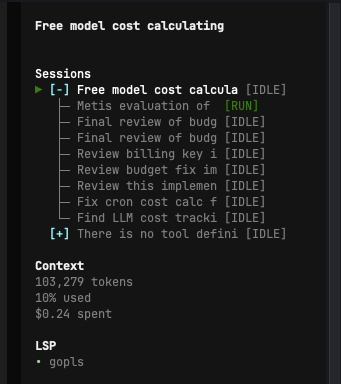
What you get
- One session list, everywhere. Sessions and subagents are tracked in real time and shown identically in the sidebar and in Telegram's
/sessionsand/history. Active and archived sessions are always bucketed the same way on both sides. - Session hierarchies. Subagents nest under their parent session like folders. Toggle
[+]/[-]to expand or collapse; active subagents pop out automatically even while their parent is collapsed. - Live status everywhere. The same status — running, waiting, idle, asking a question, waiting on a permission — is reflected as a colored tag in the sidebar and as a live-updating message in Telegram.
- Remote control from your phone. Send prompts, follow your agent's thinking and tool calls as they happen, and approve or deny permission requests and interactive questions — all via Telegram buttons, without touching your keyboard.
- Cross-window / cross-project routing. Multiple OpenCode windows are tracked together. Telegram routes prompts to the correct project's terminal window and follows you as you switch sessions.
- Instance management from Telegram. List running projects, launch OpenCode in a project that isn't running, or close/restart the current instance — all from
/projects. - History, your way. Sessions idle for 24h automatically move to History. Don't want to wait? Cmd+click (Alt+click on Windows/Linux) a session in the sidebar to archive it to History immediately.
🖥️ TUI Sidebar
- Session Hierarchies: Subagents nest under their parent session like folder trees. Toggle expand/collapse with
[+]or[-]. - Smart Active Pop-out: Collapsing a parent won't hide running work — active subagents pop out automatically.
- Cmd/Alt+click to archive: Cmd+click (Alt+click on Windows/Linux) any session to move it into History right away, without waiting for the 24h auto-expiry. (Plain right-click gets intercepted by your terminal's own context menu, and ctrl+click gets remapped to right-click by macOS itself — neither reaches the app reliably.)
- Visual Status Tags:
[RUN](Green): Agent is actively running a tool or generating code.[IDLE](Gray): Agent completed its task and is idle.[WAIT](Yellow): Agent is waiting or retrying an internal process.[ASK](Magenta): Agent is waiting for you to answer a question.[PERM](Magenta): Agent is waiting for permission to execute a command.
📱 Telegram Remote Control
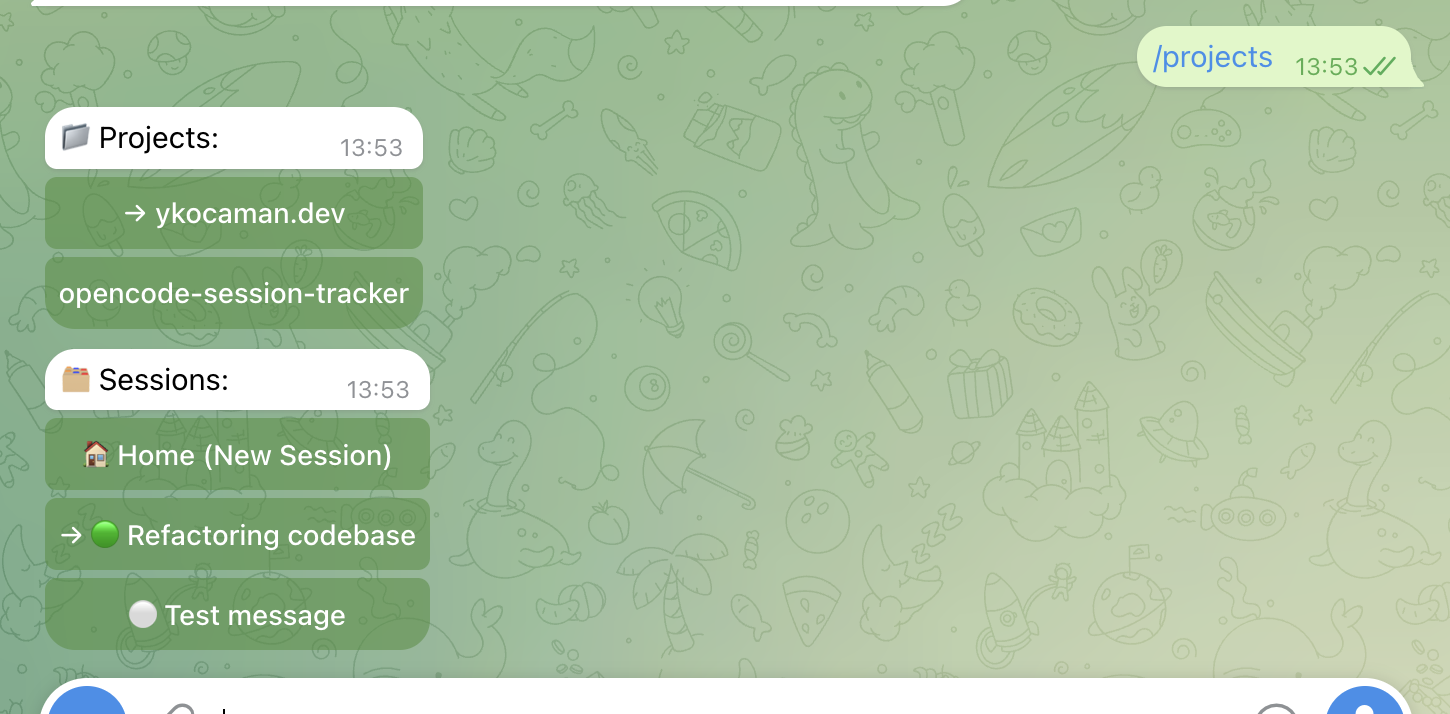 Projects & sessions — select an active session to monitor or interact with.
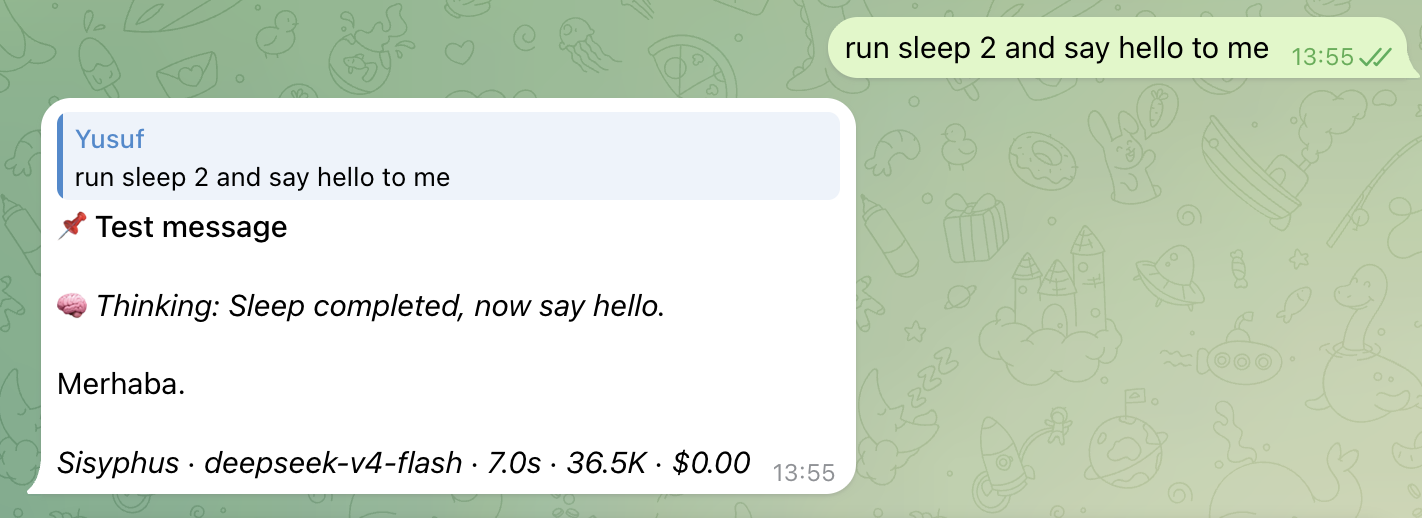 Live prompt tracking — follow your agent's thinking and tool calls in real-time, with buttons to approve or deny commands.
- Live Status Streaming: Follow your agent's thinking process and tool executions, formatted cleanly, in real-time.
- Interactive Approvals: Answer questions and authorize terminal commands (
allowordenypermissions) directly via Telegram buttons. - Session & History Browsing:
/sessionslists everything currently active;/historylists everything archived — exactly matching what the sidebar shows. - Project Control:
/projectslists every known OpenCode project, shows which are online, and lets you launch, close, or restart an instance remotely. - Cross-Process Routing: Multi-window support automatically syncs session views and routes prompts to the correct terminal window.
- Zero Overhead: Idle-state polling is fully cached and throttled to respect Telegram rate limits.
[!TIP] To get started with the mobile control bot, check out the Telegram Setup Guide.
📥 Installation
OpenCode v2 supported. Version 2.4.0 and newer require OpenCode
>=2.0.0(tested on 2.0.25). If you are still on OpenCode v1, use version 2.3.x of this plugin instead.
Install using the official OpenCode plugin command:
opencode plugin add opencode-session-tracker
Restart OpenCode, and the sidebar will load automatically. Telegram control activates on top of it as soon as you add a telegram.json config — see the setup guide.
🔧 Developer Setup
If you want to customize or develop the plugin locally:
- Clone the repository and install dependencies:
git clone https://github.com/ykocaman/opencode-session-tracker.git cd opencode-session-tracker npm install - Build the plugin:
npm run build - Load the plugin locally in OpenCode by adding the absolute path of this folder to the
pluginsarray in your~/.config/opencode/cli.jsonfile:{ "plugins": ["/absolute/path/to/opencode-session-tracker"] }
Similar plugins

Cache Hit
opencode-cache-hit
OpenCode TUI sidebar: prompt cache hit rate, tokens & cost with sub-agent rollup. Works with opencode-visual-cache; optional per-call JSONL timeline.

Agents Monitor
opencode-agents-monitor
OpenCode TUI plugin — live sub-agent status in the sidebar

Background Tasks
opencode-background-tasks
A sidebar list of the background shells and subagents still running in an OpenCode v2 session