
Cache Hit
OpenCode TUI sidebar: prompt cache hit rate, tokens & cost with sub-agent rollup. Works with opencode-visual-cache; optional per-call JSONL timeline.
28
+5 in 30 days
1,541
232 in 7 days
56.0
Multi-signal model
10 days ago
2026-09-25
Install and configure
opencode.jsonWrites to this project's opencode.json — applies to this repository only.
opencode.json
{
  "$schema": "https://opencode.ai/config.json",
  "plugin": ["opencode-cache-hit@0.7.6"]
}
Writes to ~/.config/opencode/opencode.json — applies to every project.
~/.config/opencode/opencode.json
{
  "$schema": "https://opencode.ai/config.json",
  "plugin": ["opencode-cache-hit@0.7.6"]
}
If you want to modify the plugin locally, install it into the project and reference the local path.
shell
pnpm add -D opencode-cache-hitOpenCode loads npm dependencies through its embedded runtime on startup and caches them locally — no manual global install needed.

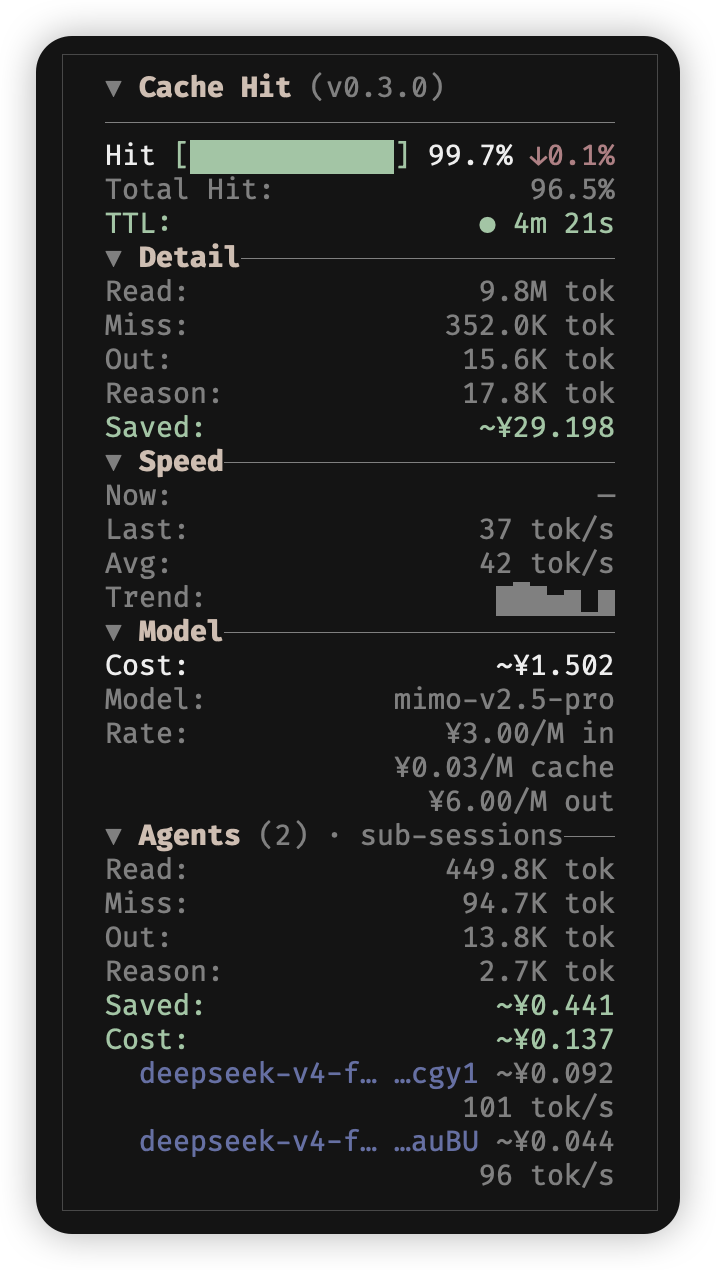
OpenCode TUI sidebar plugin for prompt cache hit rate, token usage, and cost—with first-class sub-agent (child session) rollup. Standalone by default (main + sub-agents in one panel). Optional coexistence with opencode-visual-cache.
Languages: English (this file) · 简体中文 · Documentation
Why this plugin
opencode-visual-cache already covers main-session cache visualization (token distribution, savings, slash-driven settings). This project exists because that scope does not fit several real workflows:
- Sub-agent visibility — OpenCode spawns child sessions for Task / explore agents; you need rolled-up cache, tokens, and cost per sub-session, not only the main thread.
- One panel for the whole session — Main session Hit/tokens/cost and a collapsible Agents section for sub-agent rollup.
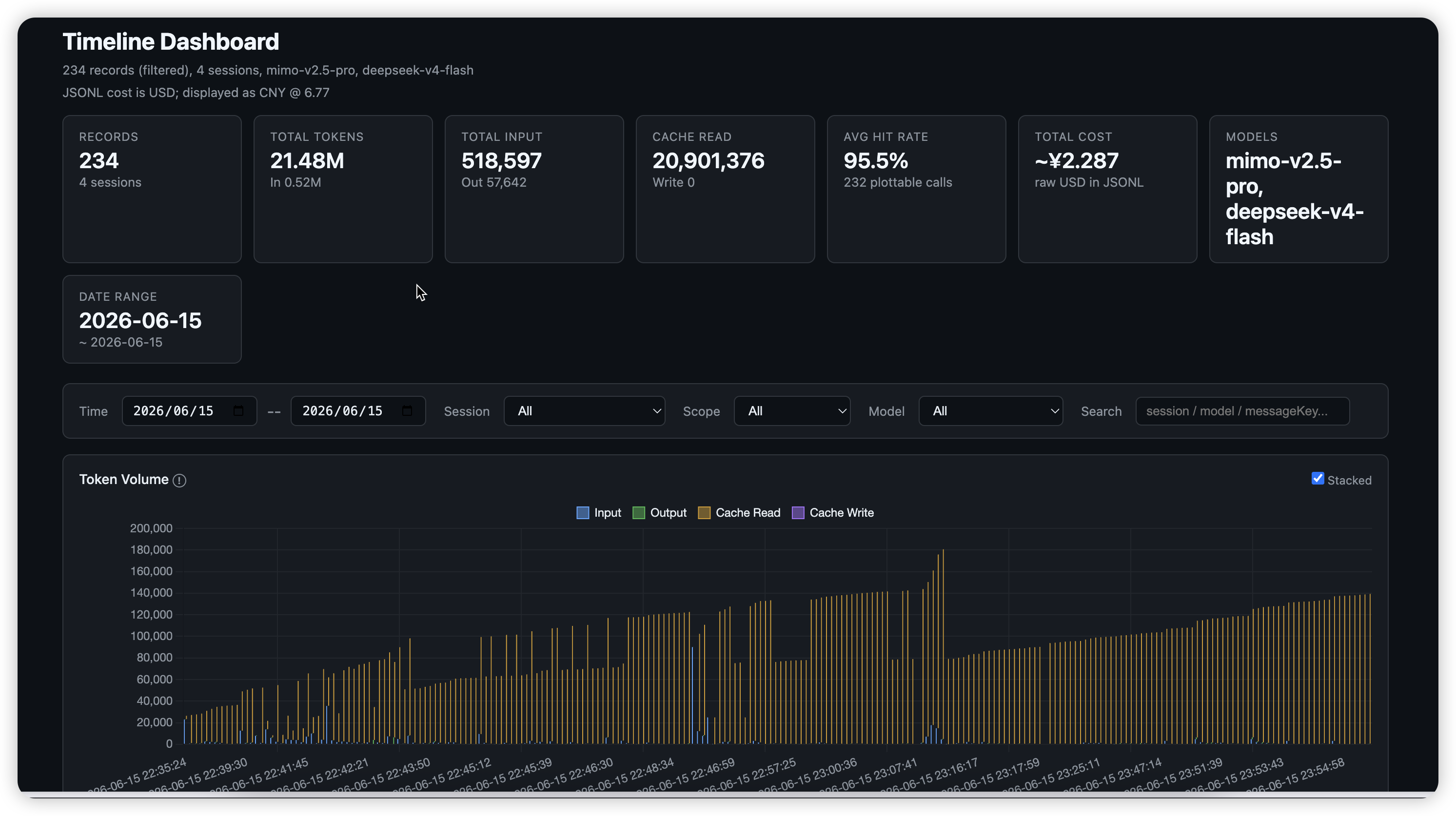
- Analysis off the TUI — Optional timeline JSONL (per assistant turn) for charts, jq, and billing post-mortems without scraping platform logs.
- Shared TUI building blocks —
src/tui-panel/extracted so other sidebar plugins can reuse the same layout language as visual-cache.
Roadmap items (sidebar Timeline section, metric windows, nested sub-agents) are described in docs/en/timeline.md and docs/en/design.md.
Acknowledgments
This plugin is not part of opencode-visual-cache. Its sidebar layout, panel components (src/tui-panel/), and coexistence patterns are heavily inspired by opencode-visual-cache. visual-cache focuses on main-session context / token distribution; cache-hit focuses on per-turn metrics and sub-agent totals.
The cache TTL feature (elapsed time display with color-coded status) is inspired by opencode-cache-timer by nero-sensei. The original plugin provides a standalone sidebar countdown for prompt cache expiration; this plugin integrates the concept directly into the cache-hit panel.
The tool-part TTFT fallback (capturing tool.pending as first-response time when no text/reasoning streaming part exists) is inspired by oc-tps by Tarquinen, which is the first OpenCode plugin to properly handle finish=tool-calls for TTFT measurement.
Features
- Cache hit rate: session-level total (DB aggregate when available) + per-turn rate with trend (↑ / ↓ /
-) on the main block - Token breakdown: cache read / write / miss / output (aligned rows with visual-cache)
- Cost: per-message model rates with multi-currency config (
USD,CNY,EUR,GBP,JPY); read savings, write premium, and net cache value; dynamic pricing for time-of-day tiers (DeepSeek peak/off-peak) and context tiers (context_over_200k, e.g. GPT-5.6) - Sub-agents: Agents section rolls up child sessions only (scope labeled in UI); each row shows model name + session ID suffix with vendor-tinted label (cost in muted gray)
- Main + Agents: main block always shown; Agents section when sub-agents exist (foldable)
- Model lineages: separate provider/model buckets; model switches show
switchorwarminginstead of a cross-model trend - Cache TTL: active and recent model lineages have independent timers
- Compaction filtering:
summary: trueandagent: "compaction"messages do not change interactive metrics - Collapsible sections: Detail / Model / Models (and Agents); theme-adaptive hit bar colors
- i18n:
display.lang—en/zh/autovia config (no slash commands yet) - Timeline (optional): daily JSONL per assistant turn for
jq/ scripts
Comparison with opencode-visual-cache
Standalone use is the default (main + sub-agents in one panel). Layout patterns were inspired by visual-cache; that package is not required.
| visual-cache | opencode-cache-hit | |
|---|---|---|
| Main session context / token distribution estimate | Yes | No — use visual-cache |
| Per-role token breakdown (system / tools / …) | Yes | No |
| Cache savings estimate | Yes | Yes (from provider pricing) |
| Model per-million pricing from provider | Yes | Yes (from SDK provider config) |
Slash commands (/cache-lang, /cache-currency, …) |
Yes | Config file only |
Fold state in api.kv |
Yes | In-session (not persisted) |
| Loaded skills panel | Yes | No |
| Sub-agent session rollup | No | Yes |
| Combined hit (main + subs) | No | Yes when sub-agents exist |
| Per-call JSONL export | No | Optional timeline |
Quick start
Option A: OpenCode command palette (recommended)
Ctrl+P → type install plugin → press Tab to switch scope to global (default is local) → type opencode-cache-hit@latest → press Enter.
Global plugins install to ~/.cache/opencode/packages/opencode-cache-hit@latest/. Create config at ~/.config/opencode/cache-hit.json:
Option B: Manual
Create or edit ~/.config/opencode/tui.json / tui.jsonc:
{
  "$schema": "https://opencode.ai/tui.json",
  "plugin": ["opencode-cache-hit@latest"]
}
Local development: use an absolute path to the checkout, such as "/path/to/opencode-cache-hit", instead of the npm name. OpenCode loads the package root and its index.tsx entry.
Copy cache-hit.config.example.json → ~/.config/opencode/cache-hit.json (recommended) or next to the plugin root. Restart OpenCode after changing plugin code or config.
| Install | After update |
|---|---|
Local ./plugins/... |
Full restart |
npm @latest |
Restart; if UI is stale, remove ~/.cache/opencode/packages/opencode-cache-hit@latest |
Load errors: ~/.local/share/opencode/log/ (search cache-hit or failed to load tui plugin).
Configuration
Configuration files accept JSONC (line/block comments and trailing commas). cache-hit.config.example.json ships as strict JSON so it stays tool-friendly (jq, editors).
Cost display (USD → CNY example)
{
  "currency": "CNY",
  "costUnit": "USD",
  "rate": 6.77
}
| Field | Meaning |
|---|---|
costUnit |
Currency of msg.cost (usually USD) |
currency |
Sidebar display currency |
rate |
Multiply costUnit → currency |
rate is a manual snapshot — the 6.77 in the example is the USD→CNY rate at the time it was written and does not auto-update. Omitting rate falls back to the same built-in default, so it only needs to be set when you display a non-USD currency and want a current rate (e.g. from Xe, Wise, or OANDA). Use "currency": "USD", "costUnit": "USD" when no conversion is needed.
Supported display currencies in config: USD, CNY, EUR, GBP, JPY (see cache-hit.config.example.json). Runtime slash switching like visual-cache’s /cache-currency is not implemented yet.
Display (display)
"display": {
  "lang": "en",
  "panelBorder": true,
  "showSpeed": true,
  "speedUnit": "tpot"
}
| Field | Default | Meaning |
|---|---|---|
lang |
"en" |
en / zh / auto |
panelBorder |
true |
Border/padding |
mainHitLabel |
(i18n) | Optional override for the Hit row label |
showSpeed |
true |
Show/hide speed section |
speedUnit |
"tpot" |
"tpot" (ms/tok) or "tps" (tok/s) |
Agents totals sum child sessions only, not the main session (see agentsScopeHint). Main session metrics stay in the block above; collapse Agents to save space. Per-child rows use the same model slug as the main Model line (truncated when the sidebar is narrow); see docs/en/design.md § Sub-agent row display.
Model lineages and metric history
The main Hit, Total Hit, and cost values use the DB-level session aggregate when available (session.get, complete regardless of message-source caps), keeping the active lineage as the model identifier; the cache TTL follows the active lineage. Read savings, write premium, and net cache value sum eligible messages with each message's provider/model rates. The foldable Models section shows per-lineage buckets separately.
The plugin excludes assistant messages with summary: true or agent: "compaction" from interactive metrics. Timeline JSONL keeps these rows when timeline.logSummaryMessages is enabled and marks them with skippedForMetrics: true.
The plugin requests main-session history directly with a limit of 10,000 messages. When that request fails and the mirror has filled its 100-message cap, or the returned history reaches the 10,000 limit, the panel shows a * history truncated hint. Streaming speed and TTFT use this live mirror so they can update during a call. If a message has no matching rate, the cost row keeps OpenCode's reported blended cost instead of showing a partial recomputation.
Timeline logs (timeline, default off)
Per assistant turn → JSONL (tokens, cache, cost, TTFT, per-tool toolDurations, and skippedForMetrics). docs/en/timeline.md · 中文.
[!NOTE] A mounted sidebar is a prerequisite. The collector runs inside the sidebar host, so when OpenCode does not render the sidebar (terminal ≤ 120 columns without
session.sidebar.toggle, or any child-session view) nothing is written at all — no rows, no error,timeline.enabled: truenotwithstanding. See § Compatibility.
"timeline": {
  "enabled": true,
  "dir": "",
  "rotateMaxBytes": 16777216,
  "retainRotated": 5,
  "maxAgeDays": 30,
  "maxLogFiles": 20,
  "toolSummary": { "allTools": true, "bash": false }
}
| Field | Default | Meaning |
|---|---|---|
enabled |
false |
Master switch |
toolSummary |
{ allTools: true, bash: false } |
Controls the privacy-sensitive toolDurations[].summary field (secure-by-default: bash off). true/false for all tools, or { allTools, bash?, … } per-tool. Durations (tool, durationMs) are always recorded. See docs/en/timeline.md |
dir |
"" |
logs/timeline-YYYY-MM-DD.jsonl under plugin root |
rotateMaxBytes |
0 |
Same-day size roll to .jsonl.1 |
retainRotated |
5 |
Backups kept per day |
maxLogFiles |
0 |
Cap file count; deletes earliest logs first |
LOG=~/.config/opencode/plugins/opencode-cache-hit/logs/timeline-$(date +%Y-%m-%d).jsonl
tail -f "$LOG"
# time fields are ISO 8601 strings with local timezone (e.g. "2024-05-30T08:00:00.000+08:00")
jq -r 'select(.rootSessionId=="YOUR_ROOT") | [.created,.scope,.hitPercent,.cost]|@tsv' "$LOG"
Retention details: Rotation and retention. Charts: scripts/README.md.
Cache TTL (cacheTTL, default on)
Shows how long the active provider/model prompt cache has been alive. Each model lineage has an independent timer. Color changes when exceeding TTL:
- Green: elapsed < TTL
- Yellow: TTL ≤ elapsed < 2×TTL
- Red: elapsed ≥ 2×TTL
"cacheTTL": {
  "enabled": true,
  "providers": {
    "anthropic": "5m",
    "openai": "5m",
    "deepseek": "2h",
    "google": "1h"
  }
}
| Field | Default | Meaning |
|---|---|---|
enabled |
true |
Master switch |
providers |
{} |
TTL per provider (or provider:model). Human-readable: 30s, 5m, 1.5h |
Built-in defaults (used when provider not in config):
| Provider | Default TTL | Source |
|---|---|---|
| anthropic | 5 min | Anthropic docs |
| openai | 5 min | OpenAI docs |
| deepseek | 2 hours | DeepSeek docs |
| 1 hour | Google docs | |
| xai | 5 min | xAI docs |
| minimax | 5 min | MiniMax docs |
| xiaomi | 5 min | Implicit caching |
| qwen | 5 min | Implicit caching |
| moonshot | 5 min | Implicit caching |
Default TTL: 5 minutes for all providers not listed above. Color changes based on elapsed time vs TTL: green (< TTL), yellow (TTL-2x TTL), red (≥ 2x TTL).
Dynamic pricing (dynamicPricing, default on)
Model rates are normally static per-million USD from OpenCode's provider registry. Some models price by time of day (DeepSeek V4: peak Mon–Fri 09:00-12:00 / 14:00-18:00 Beijing time, off-peak half price — weekends are off-peak) or by context size (context_over_200k, e.g. GPT-5.6: rates roughly double above 200k tokens).
Without config, the plugin already:
- Reads the model's context tier from
state.provider(runtimetiers/experimentalOver200K, normalized internally) and shows the right tier based on total context (input + cache read) vs the threshold. - Applies a built-in DeepSeek off-peak 0.5× multiplier when the schedule below matches (weekdays only for peak, weekends fall to the off-peak fallback).
"dynamicPricing": {
  "enabled": true,
  "timezone": "Asia/Shanghai",
  "schedule": [
    { "level": "peak", "windows": [
      { "start": "09:00", "end": "12:00", "days": [1, 2, 3, 4, 5] },
      { "start": "14:00", "end": "18:00", "days": [1, 2, 3, 4, 5] }
    ] },
    { "level": "offpeak", "windows": [] }
  ],
  "contextThreshold": 200000,
  "providers": {
    "deepseek": {
      "models": {
        "deepseek/deepseek-v4-flash": {
          "multipliers": { "peak": 1, "offpeak": 0.5 }
        }
      }
    }
  }
}
| Field | Default | Meaning |
|---|---|---|
enabled |
true |
Master switch. Disable to restore fully static pricing |
timezone |
Asia/Shanghai |
IANA zone used for schedule matching (DeepSeek prices are Beijing-time based) |
schedule |
DeepSeek peak/off-peak | {level, windows:[{start,end,days?}]} list; HH:MM, cross-midnight windows allowed. days is an optional ISO weekday list (1=Monday … 7=Sunday); omitted or [] = every day. A level with empty windows is the catch-all fallback: it applies whenever no windowed level matches (e.g. weekends with the default DeepSeek schedule) |
contextThreshold |
200000 |
Token threshold for the context tier; per-model contextThreshold wins over the runtime tier size from state.provider |
providers |
{} |
Per providerID → modelID rules |
Per-model rules support two forms (explicit config wins over the built-in DeepSeek default):
multipliers: factor applied to the static rates per schedule level (e.g.{"offpeak": 0.5})levels: absolute rates per level, e.g.{"peak": {"input": 0.44, "output": 0.88, "cacheRead": 0.01}, "offpeak": {"input": 0.22, ...}}. Cache rates may be written as flatcacheRead/cacheWrite(orcache_read/cache_write) or nestedcache: {"read": …, "write": …}(both are accepted; flat wins if both present). Default unit is USD per 1M (same asstate.provider). To write prices in another currency, set"currency": "CNY"and either make it match the displaycost.currency(converted viacost.rate) or provide the per-rule"rate"(USD → that currency, e.g."rate": 1.08for EUR). If the currency cannot be converted (norate, currency ≠ display currency), a warning is logged to stderr and the values are treated as USD.multipliersare ratios and have no currency.contextThreshold: per-model override of the global threshold (wins over the runtime tier size fromstate.provider).
Rates shown in the sidebar switch automatically at schedule boundaries (no polling). The peak/off-peak badge on the rate row appears only when the model actually prices that level (the level exists in its explicit levels/multipliers, or the built-in DeepSeek default applies); plain static models and unpriced levels (e.g. a peak-only rule at an off-peak moment) show no badge. Session cost shown is recomputed per message from its provider/model, request time, and context tier when dynamic rules apply; otherwise OpenCode's own msg.cost is used. If a message has no matching rate, the cost row keeps OpenCode's reported blended cost instead of showing a partial recomputation. Read savings, write premium, and net cache value use the same per-message rates. Sub-agent rows use their session creation time (session.list) for time-of-day pricing.
[!NOTE] Migration (weekday-aware schedules). Schedules now support an optional
daysfield (ISO weekday, 1=Monday … 7=Sunday; omitted = every day) and a catch-all fallback level (a level with emptywindows). DeepSeek's official peak is Monday–Friday 09:00-12:00 / 14:00-18:00 Beijing time; weekends are off-peak. The built-in default schedule is weekday-aware, and new configs written from the examples above are too. Legacy configs withoutdayskeep the old behavior — weekends are still billed as peak. To pick up the fix, add"days": [1,2,3,4,5]to yourpeakwindows (or use the new default schedule with anoffpeakfallback). If you resolve a DeepSeek model while your configured schedule has windowed levels but nodays, the plugin logs a one-time hint to stderr.
Timeline dashboard (docs/en/timeline.md) also recomputes costs offline: it reads ~/.config/opencode/opencode.json (JSONC-aware) for provider rates and injects dynCost per record (shown with ≈ and in charts/totals when it differs from the original).
Refresh official DeepSeek rates: bun scripts/fetch-deepseek-pricing.ts prints a ready-to-paste dynamicPricing snippet — a weekday-aware schedule (peak Mon–Fri, off-peak catch-all fallback) plus providers rates (CNY by default with "currency": "CNY", --usd --rate 6.77 for USD).
Updating
[!IMPORTANT] OpenCode pins
@latestto the first-resolved version and never re-fetches it (opencode#6774, #25293, #30631). Arestartalone will not pick up a newer npm release. If you are running an old cached build, you may hit crashes already fixed upstream (e.g. #3 — the sidebar vanishing withundefined is not an object (evaluating 'config.providers')). OpenCode wraps each plugin slot in a per-slot<ErrorBoundary>(via@opentui/solid, present since v1.17.0). A SolidJS component render error is caught and logged to stderr — the broken slot unmounts silently (no crash screen, easy to miss) while the rest of the TUI survives. Note: lower-level opentui/yoga renderer errors (e.g. layout-phase faults) can still bypass this boundary and crash the whole TUI.
To force an update, delete the cached package, then reinstall and restart:
rm -rf ~/.cache/opencode/packages/opencode-cache-hit@latest
Then reinstall via Ctrl+P → install plugin, and restart OpenCode.
To avoid the pinning issue entirely, install a pinned version instead of @latest:
{ "plugin": ["opencode-cache-hit@0.7.3"] }
Compatibility
Model-agnostic: any OpenCode provider that exposes assistant tokens / cost on messages (DeepSeek, Claude, GPT, etc.). Data comes from the OpenCode session API, same as visual-cache.
Requires OpenCode with TUI plugin slots (@opencode-ai/plugin ≥ 1.14). Works alongside visual-cache; no extra dependencies at runtime beyond peers in package.json.
Sidebar not showing? sidebar_content plugins — this one included — then render nothing at all: no panel, no placeholder, no error, while the plugin still loads normally. OpenCode's own sidebar is hidden by any of:
- Narrow terminal — auto-shown only when the TUI is wider than 120 columns (121+, measured on 1.18.x). Below that
<Sidebar>never mounts, so the slot is never called. Open it withsession.sidebar.toggle(default<leader>b); it then appears as a full-screen overlay. - Toggled off earlier — that toggle persists (
sidebar: "hide"in TUI state), so a sidebar hidden once stays hidden at any width until toggled back on. - Sub-agent (child) session — the sidebar is never rendered for a session with a
parentID, and the toggle does not override it. Open the parent session to see the panel.
tui.json cannot force the sidebar on — its state is only auto or hide. To give it a dedicated key, bind keybinds.sidebar_toggle.
Documentation
| Audience | English | 中文 |
|---|---|---|
| Users | This README | README.zh-CN.md |
| Maintainers | docs/en/design.md | docs/zh-CN/design.md |
| Timeline / JSONL | docs/en/timeline.md | docs/zh-CN/timeline.md |
| TUI panel reuse | src/tui-panel/README.md | src/tui-panel/README.zh-CN.md |
| Contributing / npm | CONTRIBUTING.md | — |
| Coding agents | AGENTS.md | — |
| Index | docs/README.md |
Project layout
index.tsx
cache-hit.config.example.json
src/
  plugin.tsx              # sidebar_content slot
  sidebar-host.tsx        # messages, child sync, timeline
  widget.tsx
  stats.ts / timeline/ / tui-panel/
tests/
Development
bun test
See CONTRIBUTING.md for setup, PR notes, and npm publishing. Architecture: docs/en/design.md.
License
MIT
Similar plugins
Tui Usage
opencode-tui-usage
OpenCode TUI sidebar: precise prompt-cache, token, cost, context, tools, skills, speed & sub-agent usage. English/USD only.

Visual Cache
opencode-visual-cache
OpenCode TUI plugin displaying real-time token cache hit rate in the sidebar

Context Usage
opencode-context-usage
OpenCode TUI plugin: a /context command with the exact token breakdown behind the built-in Context panel (last request) plus session-wide usage, subagent totals, cache hit rate and cost.