
Idle Since
opencode TUI plugin — shows when the current session went idle, right in the sidebar
0
466
15 in 7 days
36.0
Multi-signal model
13 days ago
2026-09-22
Install and configure
opencode.jsonWrites to this project's opencode.json — applies to this repository only.
opencode.json
{
  "$schema": "https://opencode.ai/config.json",
  "plugin": ["opencode-idle-since@0.1.2"]
}
Writes to ~/.config/opencode/opencode.json — applies to every project.
~/.config/opencode/opencode.json
{
  "$schema": "https://opencode.ai/config.json",
  "plugin": ["opencode-idle-since@0.1.2"]
}
If you want to modify the plugin locally, install it into the project and reference the local path.
shell
pnpm add -D opencode-idle-sinceOpenCode loads npm dependencies through its embedded runtime on startup and caches them locally — no manual global install needed.
Know exactly how long your opencode session has been sitting idle — a quiet line in the sidebar.
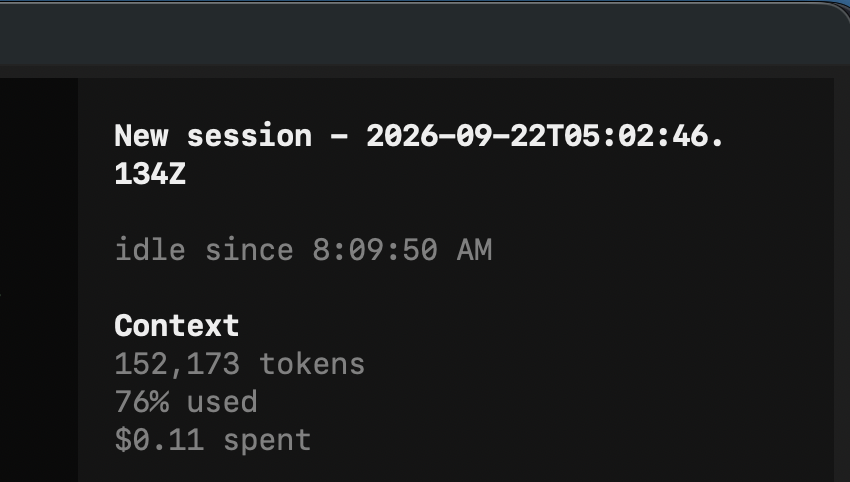

When the agent finishes and the session goes quiet, the sidebar shows idle since 14:32:07. As soon as the session is busy again the line disappears, and it comes back with a fresh timestamp the next time the session goes idle.
Install
opencode plugin opencode-idle-since -g
Restart opencode. That's it — the plugin registers itself in your tui.json.
Manual install
Add the package to the plugin array of ~/.config/opencode/tui.json:
{
  "plugin": ["opencode-idle-since"]
}
Restart opencode afterwards.
Disable
Plugins are enabled by default. Turn this one off by its id:
{
  "plugin_enabled": {
    "idle-since": false
  }
}
Notes
- Shows the current session only.
- The time is rendered with
toLocaleTimeString(), so it follows your system locale. - npm plugin packages are cached under
~/.cache/opencode/packages/.
License
MIT
Similar plugins

Skills Tui
opencode-skills-tui
OpenCode TUI plugin that shows skills and loaded state in the sidebar

Cache Hit
opencode-cache-hit
OpenCode TUI sidebar: prompt cache hit rate, tokens & cost with sub-agent rollup. Works with opencode-visual-cache; optional per-call JSONL timeline.

Sidebar Token Metrics
opencode-sidebar-token-metrics
OpenCode sidebar plugin showing generation speed (tok/s), cache hit rate, and average time-to-first-token (TTFT).