
Skills Tui
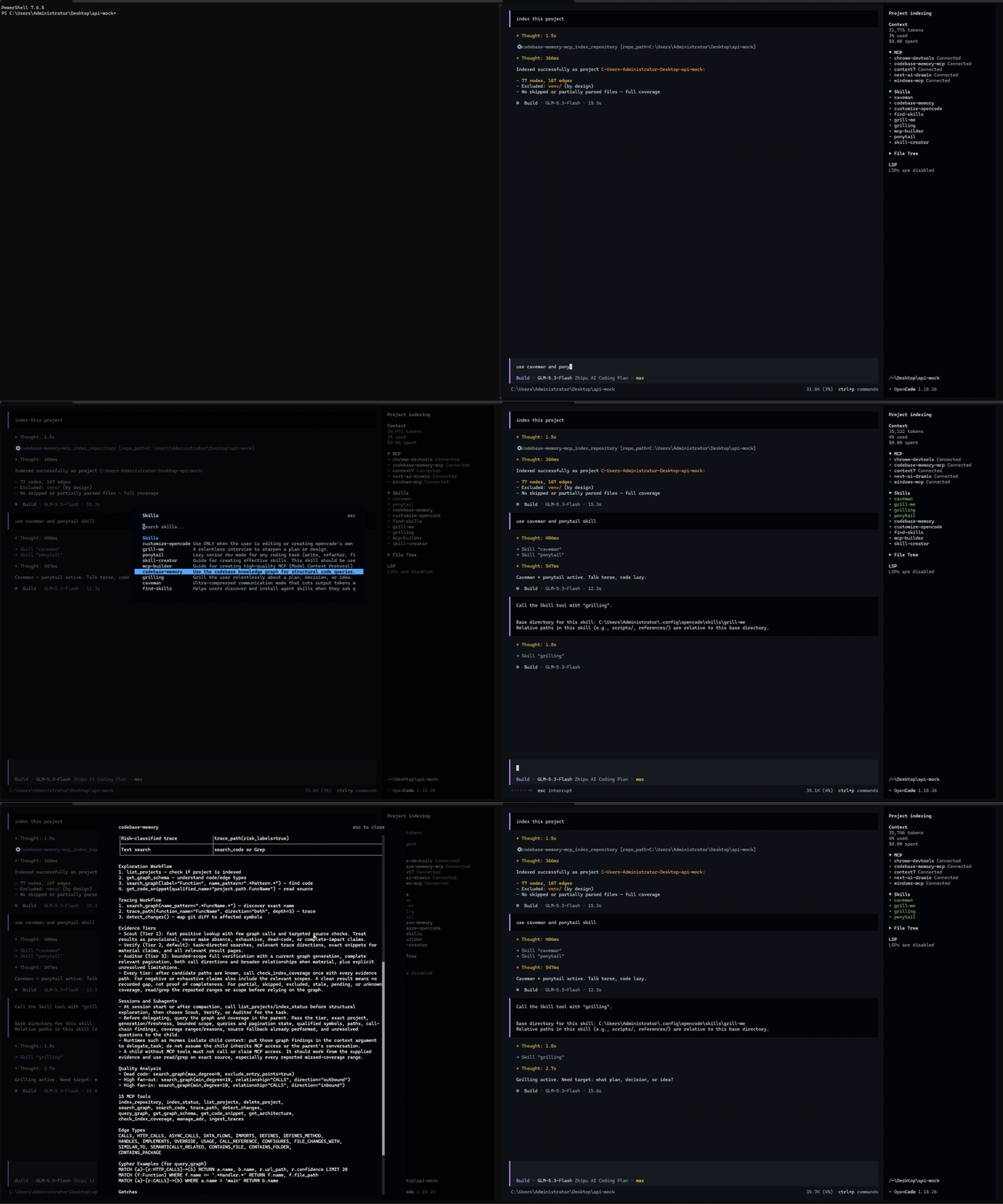
OpenCode TUI plugin that shows skills and loaded state in the sidebar
23
+22 in 30 days
1,487
311 in 7 days
59.1
Multi-signal model
1 day ago
2026-10-04
Install and configure
opencode.jsonWrites to this project's opencode.json — applies to this repository only.
opencode.json
{
  "$schema": "https://opencode.ai/config.json",
  "plugin": ["opencode-skills-tui@1.1.0"]
}
Writes to ~/.config/opencode/opencode.json — applies to every project.
~/.config/opencode/opencode.json
{
  "$schema": "https://opencode.ai/config.json",
  "plugin": ["opencode-skills-tui@1.1.0"]
}
If you want to modify the plugin locally, install it into the project and reference the local path.
shell
pnpm add -D opencode-skills-tuiOpenCode loads npm dependencies through its embedded runtime on startup and caches them locally — no manual global install needed.



A skill list for your OpenCode sidebar. See what's available, check what the current session has loaded, and read SKILL.md without leaving the terminal.
✨ What you get
- Browse the skills available to your project, with loaded skills pinned in green and tracked per session.
- Click a skill to read its SKILL.md in a scrollable preview.
📦 Install
Requires OpenCode ≥ 2.0:
# install
opencode plugin add opencode-skills-tui
# uninstall
opencode plugin remove opencode-skills-tui
# update
opencode plugin update opencode-skills-tui
On V1, see the V1 guide.
🔧 A few tips
- Where the green marks come from: derived from session messages (skill tool calls and @-mentions). Reopening an old session restores them after a moment; opening a preview never loads a skill.
- Updating: run
opencode plugin update opencode-skills-tui, then restart. npm copies are cached under~/.cache/opencode/npm/opencode-skills-tui@latest/; delete that directory if an update refuses to land.
🛠️ Development
Working on the plugin? Clone the repo and install Bun for the development tools:
git clone https://github.com/aihaipeng/opencode-skills-tui.git
cd opencode-skills-tui
bun install
bun run typecheck
bun run test
bun run test:package
Run bun run build before loading this repository as a local plugin, then add its file:// path to the plugins array in cli.json and restart. Published npm packages ship precompiled Solid code and need no build step.
Similar plugins

Sidebar Token Metrics
opencode-sidebar-token-metrics
OpenCode sidebar plugin showing generation speed (tok/s), cache hit rate, and average time-to-first-token (TTFT).

Timeline
@memef1f1y/opencode-timeline-plugin
Conversation history node viewer for the OpenCode TUI (sidebar timeline)

Shell
@opencode-cockpit/shell
Background shells for OpenCode: the agent starts, waits on and drives PTYs; you watch them in a docked TUI panel