
Git
OpenCode v2 TUI sidebar plugin listing git working-copy changes with diff preview
0
256
256 in 7 days
34.8
Multi-signal model
3 days ago
2026-10-01
Install and configure
opencode.jsonWrites to this project's opencode.json — applies to this repository only.
opencode.json
{
  "$schema": "https://opencode.ai/config.json",
  "plugin": ["opencode-git-plugin@0.2.1"]
}
Writes to ~/.config/opencode/opencode.json — applies to every project.
~/.config/opencode/opencode.json
{
  "$schema": "https://opencode.ai/config.json",
  "plugin": ["opencode-git-plugin@0.2.1"]
}
If you want to modify the plugin locally, install it into the project and reference the local path.
shell
pnpm add -D opencode-git-pluginOpenCode loads npm dependencies through its embedded runtime on startup and caches them locally — no manual global install needed.
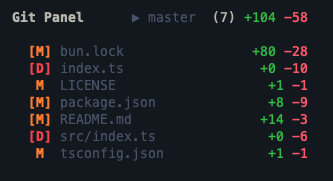
An OpenCode v2 TUI plugin that shows Git working-tree changes in the sidebar and opens file diffs in the native session panel.
Features
- Sidebar list with
A,M, andDbadges plus per-file addition/deletion counts - Staged files marked as
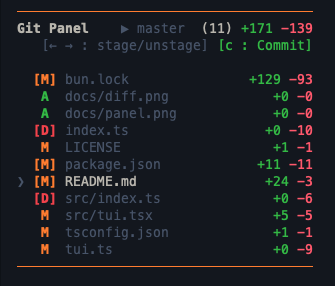
[A],[M], or[D] - Stage and unstage with the keyboard, command palette, or mouse
- Commit staged files without leaving the TUI
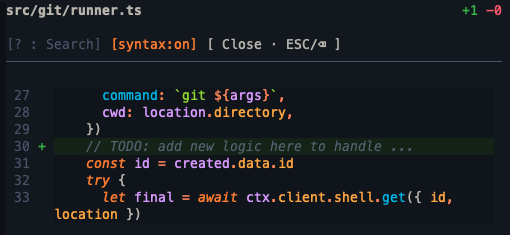
- Scrollable diff panel with line numbers and responsive controls
- Search with highlighted matches and next/previous navigation
- Optional persisted tree-sitter syntax highlighting
- Automatic refresh from OpenCode events and a configurable polling interval
- Safe handling of Git paths containing spaces, quotes, arrows, or newlines
The plugin runs Git through OpenCode's local shell API. It does not contact an external service.
Screenshots
| File list | List navigation | Diff panel |
|---|---|---|
 |
 |
 |
Requirements
- OpenCode
>=2.0.0 <3 - A Git repository as the active session directory
Install
Install the published package with OpenCode:
opencode plugin add opencode-git-plugin
Git Panel is a TUI-only plugin, so opencode plugin add registers it in ~/.config/opencode/cli.json. It stays active when the TUI connects to a remote server.
Restart the OpenCode TUI after installation. Verify installation with:
opencode plugin list
Update
opencode plugin check
opencode plugin update
check reports whether a newer version is available; update installs it. Restart the TUI afterwards.
Uninstall
opencode plugin remove opencode-git-plugin
Local development
For local development, add the package directory to ~/.config/opencode/cli.json:
{
  "plugins": [
    {
      "package": "/absolute/path/to/git-changes",
      "options": { "intervalMs": 4000 }
    }
  ]
}
Fully quit and reopen the TUI after changing local plugin code.
Do not add the plugin to opencode.json(c); that file is for server plugins and Git Panel has no server entrypoint.
Options
| Option | Type | Default | Description |
|---|---|---|---|
intervalMs |
number |
4000 |
Refresh interval in milliseconds; values below 1000 are clamped. |
Usage
File list
<leader>G(or palette:Git Panel: Focus List) enters list mode (yellow top/bottom border)↑/↓move,Enteropens the diff,→stages,←unstages,ccommits staged files,ESCexits- Click a row to open its diff; click the branch name to enter stage mode (every clicked file toggles staged/unstaged; branch click or
ESCexits) - Clicking the prompt input exits list mode so typing is never hijacked
- Staging also via palette (
Git Panel: Stage/Unstage File)
Diff panel
?searches (yellow match highlight + match counter,↑/↓jump between matches),ESCclears the search, secondESC(orBackspace) closes the panels, the[syntax:on/off]header button, or palette (Git Panel: Toggle Diff Syntax Highlighting) toggles language syntax colors; default off, persisted across restarts- While searching, the view temporarily falls back to plain text so highlight + jump keep working
j/kscroll in syntax mode; mouse wheel works in both modes- Closing the panel returns to list mode
- Plain diffs are truncated after 4,000 parsed lines to keep the TUI responsive
Commit
- Green
[c : Commit]button (orc, or palette:Git Panel: Commit Staged), visible only while files are staged and list mode is active; prompts for a message, then commits
States
Loading…while fetchingWorking tree cleanwhen there is nothing to show (header stats hidden)Empty repo — no commits yetbefore the first commitNot a git repositoryoutside a repo, plus raw fetch errors
Development
bun install
bun run check
bun run build
npm pack --dry-run
The published package exposes ./tui as dist/tui.js, compiled by bun run build with the OpenTUI Solid transform. OpenCode does not compile JSX inside node_modules, so shipping raw .tsx makes the panel fail to render once installed from npm. npm pack and npm publish run the build automatically.
A local directory plugin is resolved as <dir>/tui, so local development loads tui.ts at the repository root, which re-exports src/tui.tsx and is compiled by OpenCode on the fly.
Any module that imports runtime values from solid-js (createSignal, createMemo, onCleanup, …) must be a .tsx file. For local plugins OpenCode only applies its Solid transform to .jsx/.tsx files; in a .ts file the import loads a second Solid instance and the UI stops updating. A test enforces this.
Before publishing, test the packed tarball rather than the working directory:
bun pm pack
mkdir -p /tmp/git-panel-smoke && cd /tmp/git-panel-smoke
bun init -y && bun add /path/to/opencode-git-plugin-<version>.tgz
Publish
npm login
npm publish
The prepublishOnly script runs type checking and tests before npm publishes the package.
License
MIT
Similar plugins

Dir Tree Tui
opencode-dir-tree-tui
OpenCode V2 TUI plugin: VS Code-style file tree in the sidebar with git status coloring and click-to-open
Skills Tui
opencode-skills-tui
OpenCode TUI plugin that shows skills and loaded state in the sidebar

Cache Hit
opencode-cache-hit
OpenCode TUI sidebar: prompt cache hit rate, tokens & cost with sub-agent rollup. Works with opencode-visual-cache; optional per-call JSONL timeline.