
2 Tasks
A Tasks panel for OpenCode V2: a `tasks` tool plus a live, nestable task list in the TUI sidebar.
0
627
近 7 天 627
37.2
生态多维模型
5 天前
2026-09-29
快速安装与配置
opencode.json写入当前项目的 opencode.json,只对这个仓库生效。
opencode.json
{
  "$schema": "https://opencode.ai/config.json",
  "plugin": ["opencode2-tasks@0.1.3"]
}
写入 ~/.config/opencode/opencode.json,对所有项目生效。
~/.config/opencode/opencode.json
{
  "$schema": "https://opencode.ai/config.json",
  "plugin": ["opencode2-tasks@0.1.3"]
}
若你要在本地改造这个插件,先装到项目里再从本地路径引用。
shell
pnpm add -D opencode2-tasksOpenCode 启动时会通过内嵌运行时自动加载 npm 依赖并缓存至本地目录,无需手动在全局环境执行安装。
A Tasks panel for OpenCode V2 — a tasks tool the agent can call, plus a live, nestable task list in the TUI sidebar.



English · 简体中文
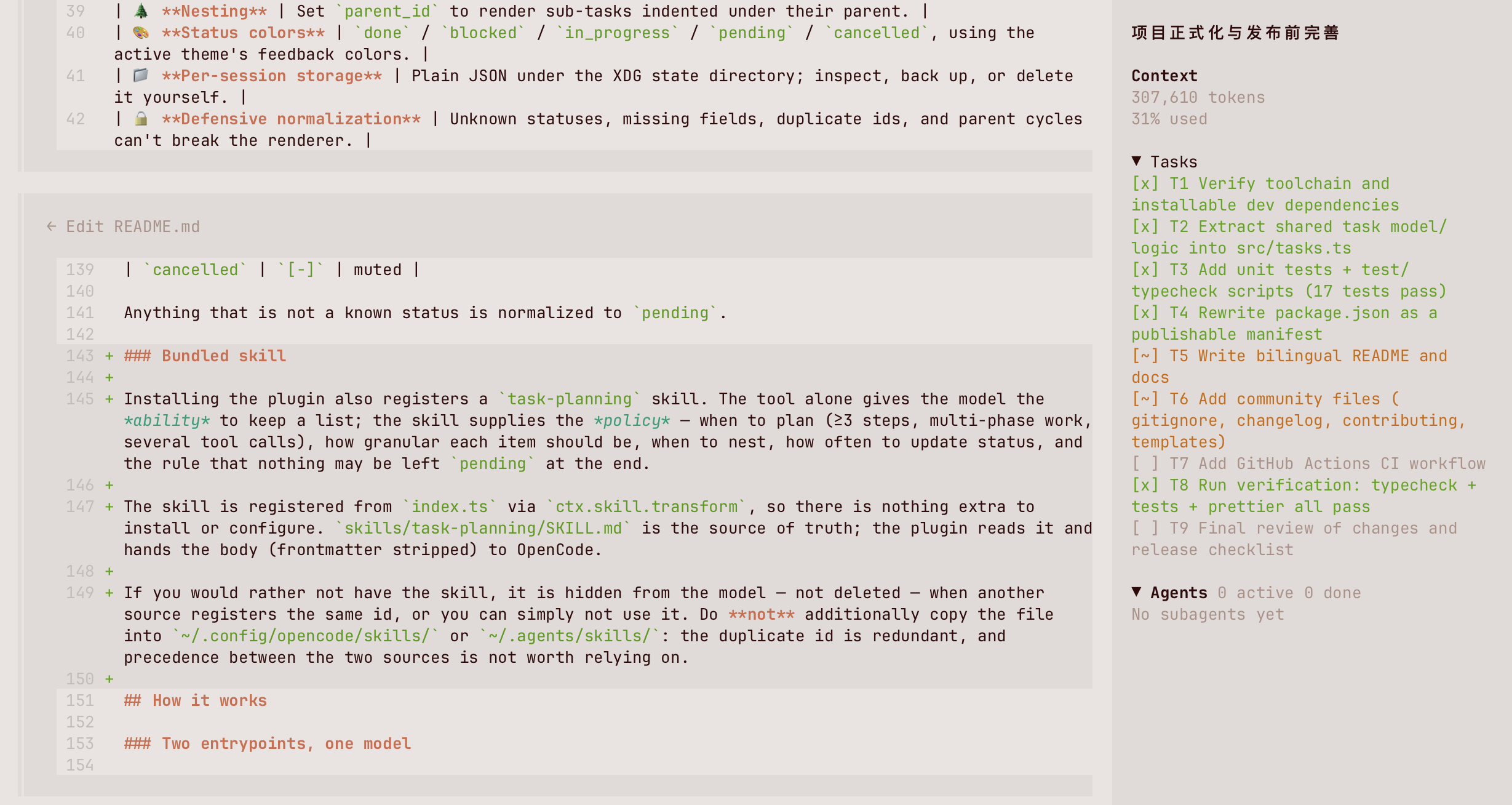
Overview
Long agent runs are easier to follow when the plan is visible. OpenCode ships a session task tool, but the state only lives in the transcript. This plugin makes the plan durable and glanceable:
- Server entrypoint (
index.ts) registers ataskstool. The agent sends the complete list on every call; the plugin validates it and writes it to disk per session. - TUI entrypoint (
tui.tsx) reads those files and renders them in the OpenCode sidebar (sidebar.content), with indentation for sub-tasks, per-status markers, and theme colors.
Both entrypoints load in different runtimes, so they share a single dependency-free model module (src/tasks.ts) and cannot disagree about the on-disk format.
┌──────────────────────────────┐        ┌──────────────────────────────┐
│  OpenCode server (agent)     │        │  OpenCode TUI (sidebar)      │
│                              │        │                              │
│  tasks tool ──► normalize ───┼──┐  ┌──┼──► flatten ──► <Tasks />     │
└──────────────────────────────┘  │  │  └──────────────────────────────┘
                                  ▼  │
                    $XDG_STATE_HOME/opencode-tasks/<session>.json
Features
| Feature | Description |
|---|---|
🧩 tasks tool |
One call replaces the whole list, so the model never has to diff or delete. |
| 🧭 Bundled skill | Ships a task-planning skill so the model plans on its own instead of waiting to be asked. |
| 🌲 Nesting | Set parent_id to render sub-tasks indented under their parent. |
| 🎨 Status colors | done / blocked / in_progress / pending / cancelled, using the active theme's feedback colors. |
| 📁 Per-session storage | Plain JSON under the XDG state directory; inspect, back up, or delete it yourself. |
| 🔒 Defensive normalization | Unknown statuses, missing fields, duplicate ids, and parent cycles can't break the renderer. |
| 🗂️ Collapsible panel | Click the Tasks header to fold the section, matching the built-in MCP block. |
| ⚡ No build step | Ships as TypeScript sources; OpenCode loads them directly. |
Requirements
- OpenCode V2 (developed against
v2.0.18). - Node.js ≥ 22.18 for development (type stripping + the built-in test runner).
XDG_STATE_HOMEis honored; on macOS/Linux without it, state goes to~/.local/state.
Installation
With the OpenCode CLI
opencode plugin add opencode2-tasks   # install and write the global configuration
opencode reload                       # apply it without restarting the service
opencode plugin add targets the global configuration, so the plugin becomes available in every project. To enable it for one project only, add it to that project's opencode.json(c) by hand instead (see below).
The rest of the subcommands:
opencode plugin list                        # what is loaded, and from where
npm view opencode2-tasks version            # find the latest version
opencode plugin add opencode2-tasks@x.y.z   # pin an exact version
opencode plugin check                       # is a newer version available?
opencode plugin update                      # upgrade to the latest
opencode plugin remove opencode2-tasks      # uninstall
The ./tui export is discovered automatically, so the sidebar panel loads with the same entry.
By editing the configuration
// ~/.config/opencode/opencode.jsonc  (global)  or  ./opencode.jsonc  (project)
{
  "$schema": "https://opencode.ai/config.json",
  "plugins": ["opencode2-tasks"] // append "@x.y.z" to pin a version
}
If you use OpenCode against a remote server, also register the package in the CLI-only configuration so the panel keeps working locally:
// ~/.config/opencode/cli.json
{
  "$schema": "https://opencode.ai/v2/cli.json",
  "plugins": ["opencode2-tasks"]
}
From a local checkout
{
  "plugins": ["/absolute/path/to/opencode2-tasks"]
}
Register either the published package or a local checkout, never both: the plugin would load twice, registering the tasks tool and the task-planning skill twice each.
Then apply the change with opencode reload, or restart the service (opencode service restart) if you edited the configuration while it was running.
Usage
Once installed, the agent gets a tasks tool. A single call replaces the entire list:
{
  "tasks": [
    { "id": "T1", "status": "in_progress", "summary": "Model the task store" },
    { "id": "T1.1", "parent_id": "T1", "status": "done", "summary": "Normalize tool input" },
    { "id": "T1.2", "parent_id": "T1", "status": "pending", "summary": "Add cycle protection" },
    { "id": "T2", "status": "blocked", "summary": "Wait for review" }
  ]
}
The sidebar then shows:
▼ Tasks
[~] T1 Model the task store
[x]   T1.1 Normalize tool input
[ ]   T1.2 Add cycle protection
[!] T2 Wait for review
Tool schema
| Field | Type | Required | Description |
|---|---|---|---|
tasks |
array |
✅ | The complete list. It replaces the previous one. |
tasks[].id |
string |
✅ | Short unique id, e.g. T1 or T1.1. |
tasks[].status |
string |
✅ | One of pending, in_progress, blocked, done, cancelled. |
tasks[].summary |
string |
✅ | One-line description. |
tasks[].parent_id |
string |
Parent task id for nesting; empty or omitted for a top-level task. |
Status reference
| Status | Marker | Color |
|---|---|---|
pending |
[ ] |
muted |
in_progress |
[~] |
warning |
blocked |
[!] |
error |
done |
[x] |
success |
cancelled |
[-] |
muted |
Anything that is not a known status is normalized to pending.
Bundled skill
Installing the plugin also registers a task-planning skill. The tool alone gives the model the ability to keep a list; the skill supplies the policy — when to plan (≥3 steps, multi-phase work, several tool calls), how granular each item should be, when to nest, how often to update status, and the rule that nothing may be left pending at the end.
The skill is registered from index.ts via ctx.skill.transform, so there is nothing extra to install or configure. skills/task-planning/SKILL.md is the source of truth: the plugin reads it at startup and hands its body (frontmatter stripped) to OpenCode.
Do not also copy the file into ~/.config/opencode/skills/ or ~/.agents/skills/. Both sources would define the same skill id, and which one wins depends on registration order — pointless ambiguity for identical content.
How it works
Two entrypoints, one model
index.ts ─┐                      ┌─ OpenCode server runtime  (tool + skill)
          ├── src/tasks.ts ─────┤
tui.tsx  ─┘                      └─ OpenCode TUI runtime      (sidebar panel)
src/tasks.tsandsrc/skill.tshold the types, storage paths, and pure helpers (normalizeTasks,flattenTasks,parseSkillDocument). Neither has any OpenCode import, so both are trivially unit-testable.index.tsimports them and registers thetaskstool plus the bundled skill. It imports@opencode/pluginwithimport typeonly, because the server runtime resolves that specifier itself; the import is erased at load time and the exported object already matches the{ id, setup }contract.tui.tsximports the model and renders the panel. It polls the state directory every 1.5 s (the sidebar renders synchronously while the tool writes from another process) and returns a cleanup function that stops the timer. Clicking the section header re-reads immediately, so expanding never shows a stale snapshot.
See docs/architecture.md for the full design notes.
Storage
$XDG_STATE_HOME/opencode-tasks/<url-encoded-session-id>.json
# or, when XDG_STATE_HOME is unset:
~/.local/state/opencode-tasks/<url-encoded-session-id>.json
Each file is a JSON array of tasks:
[
  { "id": "T1", "parent_id": null, "status": "in_progress", "summary": "Model the task store" }
]
Files are written atomically enough that a half-written file is skipped by the reader. Task ids are encodeURIComponent-escaped so they are safe as filenames.
Session scope
The task list is per session, and the panel shows only the current session's list:
- Each session has its own file, named after its session id. Opening a new session starts from an empty list — nothing carries over from the session you were in before.
- The
Taskssection stays hidden while the current session has no tasks, and appears as soon as the agent writes some. It disappears again if the list is cleared. - The panel mirrors every session's list into memory, so switching sessions re-renders instantly without waiting for a re-read. The background poll and the click-to-refresh keep those mirrored lists current.
- Deleting one session's file affects only that session.
Development
npm install          # install dev dependencies
npm test             # run the unit tests (node:test)
npm run typecheck    # tsc --noEmit
npm run format       # prettier --write .
npm run check        # typecheck + format check + tests (what CI runs)
Project layout
.
├── index.ts                 # server entrypoint: registers the `tasks` tool + skill
├── tui.tsx                  # TUI entrypoint: renders the sidebar panel
├── src/
│   ├── tasks.ts             # shared model, storage paths, pure helpers
│   └── skill.ts             # SKILL.md frontmatter/body parser
├── skills/
│   └── task-planning/
│       └── SKILL.md         # the planning skill registered at startup
├── test/
│   ├── tasks.test.ts        # unit tests for the pure helpers and storage
│   └── skill.test.ts        # unit tests for the skill parser
├── docs/
│   ├── architecture.md      # deeper notes on the two-runtime design
│   └── screenshot.png       # the panel in a real session
├── .github/                 # CI workflow, issue and PR templates
├── package.json
├── tsconfig.json
├── CHANGELOG.md
├── CONTRIBUTING.md
└── LICENSE
Verifying the plugin locally
After adding the checkout to plugins, restart OpenCode and ask the agent to update its task list. The sidebar should show the Tasks section. You can also inspect the raw state:
cat "${XDG_STATE_HOME:-$HOME/.local/state}/opencode-tasks/"*.json
Troubleshooting
The panel doesn't appear.
The Tasks section only renders when the current session has at least one task. Ask the agent to call the tasks tool, then wait one refresh interval (1.5 s). Restart the service after changing plugins: opencode service restart.
The panel shows stale data.
The TUI re-reads the state directory every 1.5 s, and clicking the Tasks header re-reads immediately — so if you edited a task file by hand, expand the section (or wait one interval) to pick it up.
The Tasks section shows fewer rows than expected.
A task file that is unreadable or half-written is skipped rather than blanking the panel, and rows only appear for the session you are looking at. Run cat "${XDG_STATE_HOME:-$HOME/.local/state}/opencode-tasks/"*.json to check what is actually stored.
Cannot find module '@opencode/plugin'.
That import is type-only inside index.ts, so it is erased at runtime. If you see this from tui.tsx, your OpenCode build does not resolve @opencode/plugin/tui; upgrade to a build that does, or pin a compatible version.
The task-planning skill is listed twice, or not at all.
It should come from the plugin only. Check for a hand-made copy or symlink under ~/.config/opencode/skills/, ~/.agents/skills/, or .opencode/skills/ and remove it. If it is missing entirely, the packaged skills/ directory was not installed — reinstall without a files filter, or copy skills/task-planning/SKILL.md into one of those discovery directories as a fallback.
Contributing
Issues and pull requests are welcome — see CONTRIBUTING.md and the Code of Conduct. Run npm run check before opening a PR.
Changelog
See CHANGELOG.md.
License
MIT © 2026 smallnest
同类生态推荐

2 Todo
opencode2-todo
Restore the V2-removed todowrite tool and a TUI sidebar list for OpenCode sessions

Quotes Tui
opencode-quotes-tui
OpenCode TUI plugin that replaces the home screen tips with a random quote

Session Elapsed
opencode-session-elapsed
OpenCode TUI plugin that shows session elapsed, cumulative work, and response timers in the prompt line.