
7
近 30 天 +6
28
近 7 天 28
42.0
生态多维模型
3 天前
2026-10-02
快速安装与配置
opencode.json写入当前项目的 opencode.json,只对这个仓库生效。
opencode.json
{
  "$schema": "https://opencode.ai/config.json",
  "plugin": ["opencode-quotes-tui@1.0.0"]
}
写入 ~/.config/opencode/opencode.json,对所有项目生效。
~/.config/opencode/opencode.json
{
  "$schema": "https://opencode.ai/config.json",
  "plugin": ["opencode-quotes-tui@1.0.0"]
}
若你要在本地改造这个插件,先装到项目里再从本地路径引用。
shell
pnpm add -D opencode-quotes-tuiOpenCode 启动时会通过内嵌运行时自动加载 npm 依赖并缓存至本地目录,无需手动在全局环境执行安装。


Open your terminal to a piece of timeless wisdom. opencode-quotes-tui replaces OpenCode's built-in tips with a hand-picked quote. You get a new one every time you start OpenCode.
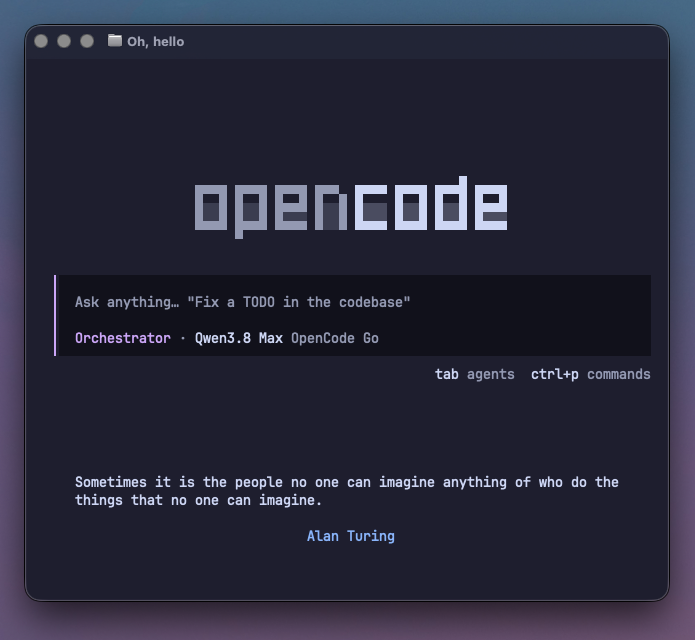
Why you'll like it
- A fresh quote every session: philosophy, literature, science, art. A hand-curated list instead of a wall of tips.
- Matches your theme: renders in your current OpenCode theme's colors, with nothing to configure.
- One command to install: works out of the box, globally, in every project.
Install
opencode plugin opencode-quotes-tui -g
Restart OpenCode. That's it. Every session from now on opens with a quote.
Alternative install routes
In-app Plugin Manager: command palette → Plugins → install → type opencode-quotes-tui → press Tab to select global scope.
Manual config: add the package to the plugin list in ~/.config/opencode/tui.json and OpenCode downloads it automatically:
{
  "$schema": "https://opencode.ai/tui.json",
  "plugin": ["opencode-quotes-tui"]
}
Use "opencode-quotes-tui@1.0.0" to pin a version.
Single project only: copy src/tui.tsx, src/quotes.ts and tui.json from this repo into your project root and OpenCode picks them up automatically.
Uninstall
Remove opencode-quotes-tui from the plugin list in ~/.config/opencode/tui.json and restart OpenCode.
One honest note: while active, the plugin hides OpenCode's built-in tips, which is the point. That preference outlives the plugin, so if you want the tips back afterwards, run the built-in tips.toggle command once.
Make it yours
The quote list is a plain file: src/quotes.ts, an array of { quote, author }. Fork it, edit it, rebuild with npm run build. An empty list is fine too. The plugin simply steps aside.
Contributing a quote
Pull requests with new quotes are welcome:
- Verifiable attribution: cite the source or work in the PR; misattributed quotes are declined.
- Terminal-friendly: around 200 characters max.
- Any language: English and Portuguese today, more welcome.
- Fit the shelf: keep the section organization of
src/quotes.ts.
Compatibility
OpenCode 1.18 or newer.
Development
npm install
npm run typecheck
npm run build
Plain Node 22 + npm, no extra runtime needed.
License
MIT
同类生态推荐

Smart Questions
opencode-smart-questions
Language-neutral auto-selection of recommended OpenCode question options with user-interaction cancellation and separate V1/V2 adapters

Session Elapsed
opencode-session-elapsed
OpenCode TUI plugin that shows session elapsed, cumulative work, and response timers in the prompt line.

Dir Tree Tui
opencode-dir-tree-tui
OpenCode V2 TUI plugin: VS Code-style file tree in the sidebar with git status coloring and click-to-open