
Usage Insights
OpenCode V2 plugin: a live turn telemetry line plus a persistent SQLite usage record, read back by an interactive /usage panel — models, providers, prompt cache, periods and latency.
0
501
近 7 天 501
36.6
生态多维模型
2 天前
2026-10-18
快速安装与配置
opencode.json写入当前项目的 opencode.json,只对这个仓库生效。
opencode.json
{
  "$schema": "https://opencode.ai/config.json",
  "plugin": ["opencode-usage-insights@0.1.1"]
}
写入 ~/.config/opencode/opencode.json,对所有项目生效。
~/.config/opencode/opencode.json
{
  "$schema": "https://opencode.ai/config.json",
  "plugin": ["opencode-usage-insights@0.1.1"]
}
若你要在本地改造这个插件,先装到项目里再从本地路径引用。
shell
pnpm add -D opencode-usage-insightsOpenCode 启动时会通过内嵌运行时自动加载 npm 依赖并缓存至本地目录,无需手动在全局环境执行安装。



OpenCode plugin for one question the host cannot answer: which provider is
actually serving each model — and what that costs. It shows a telemetry line
above the composer after every finished turn and records every assistant step
in a local SQLite file, read back through an interactive /usage panel.

Everything stays local: one SQLite file under the OpenCode state directory, written by the server-side recorder and read by the TUI.
What it does
- The line (
session.composer.top): end time, the gap since the previous prompt, the provider and model that ran the turn, turn and session token totals, and warnings when the prompt cache or the provider identity changed. It belongs to finished work, so it stays hidden while a turn is running. - The
/usagepanel: nine keyboard-driven views —overview,models,providers,cache,periods,latency,sessions,turns,db— over five ranges (session,today,7d,30d,all), with drill-downs, sorting, filters and state remembered between openings./usage models 7d,/usage providers 30d,/usage turns 7d. - The session sidebar: the session's own totals and its last turns, in the
same buckets as the line. Three lines per turn — when and through which
provider, the prompt volumes, then
hit · tok/s · cost— plus the model at both ends of the block and on any turn that changed it, so the history reads whether it is the whole session or a window of a long one:16:54 opencode-go/deepseek-v4.1-flash max/in 1.7k (427.3k) · out 1.06k/hit 99.7% · 1.2k/s · $0.0006. - The record (server entry): every assistant step with tokens, cost, timings, finish reason, the provider and model it ran as, and its session and parent ids; prompts, session lifecycle and compaction events too.
- Portable data (from a checkout):
bun run report --ndjsonexports the whole database, and--importmerges it back on another machine. - Observational by design: the plugin never rewrites prompts, requests or responses, and a failure inside the recorder is swallowed — telemetry can never interrupt a session.
Requirements
- OpenCode V2 (
>=2.0.0). The V2 release changed the plugin API (slots, panels, event stream). - Bun to install dependencies (development only).
| OS | Linux, macOS and Windows. The database lives in the per-user state directory of each (table below); test/paths.test.ts asserts the path rules of all three from any machine, and bun run check:platform exercises the data layer — paths, database, recorder, queries, panel assembly, dump round-trip, file permissions — on the OS it runs on. CI runs the whole suite (including the TUI render tests) on Linux. |
| Runtime | Bun, the runtime OpenCode ships with. SQLite comes from bun:sqlite: there is no native module to build and nothing to compile on install. |
Install
[!IMPORTANT] Not on the npm registry yet. Until the first release is published,
opencode plugin addand the package-name form below cannot resolve it — use the local checkout, the last form of this section.
opencode plugin add opencode-usage-insights
Or add the package to ~/.config/opencode/opencode.jsonc (server entry) and
~/.config/opencode/cli.json (TUI entry):
// ~/.config/opencode/opencode.jsonc
{
  "$schema": "https://opencode.ai/config.json",
  "plugins": ["opencode-usage-insights"]
}
// ~/.config/opencode/cli.json
{
  "$schema": "https://opencode.ai/v2/cli.json",
  "plugins": ["opencode-usage-insights"]
}
To pass options, use the object form:
{
  "plugins": [
    { "package": "opencode-usage-insights", "options": { "sidebarTurns": 5 } }
  ]
}
Or register a local checkout. V2 resolves a local directory plugin through its
entry files, so pointing at src/ loads the server recorder (src/index.ts)
and the TUI contributions (src/tui.tsx) from source:
// ~/.config/opencode/opencode.jsonc
{ "plugins": [{ "package": "/home/you/code/projects/opencode-usage-insights/src" }] }
// ~/.config/opencode/cli.json
{ "plugins": [{ "package": "/home/you/code/projects/opencode-usage-insights/src" }] }
Configuration changes reload on their own; after changing the plugin's source,
restart the background service with opencode service restart.
Send a prompt to verify: the telemetry line appears above the composer when the
turn finishes, and /usage (alias /insights) opens the panel.
The line
14:32:07 · Δ 3m12s · opencode-go/deepseek-v4.1-flash max · in 85.4k (1.62M), cached 1.53M, out 3.7k, cost $0.21 · sess in 2.1M (14.5M), cached 12.4M, out 88k, cost $1.90 · ⚠ cache expired (−11.7k)
| Segment | Meaning |
|---|---|
14:32:07 |
When the response ended (completed, else streamed, else created). |
Δ 3m12s |
Time since the previous prompt of the same session. |
opencode-go/deepseek-v4.1-flash max |
The identity of the turn: the provider the model ran through, as OpenCode is configured, and the model (the variant as a trailing word; fields.model/fields.variant hide either). Yellow with changed when the provider differs from the previous prompt, model changed when only the model does. |
in 85.4k (1.62M), cached 1.53M, out 3.7k, cost $0.21 |
in is the uncached part of the prompt (fresh input + cache writes), the parenthesised value the whole prompt — shown only when the two differ — cached its cached part, out everything generated (visible output + reasoning), and cost what the turn was billed. With several steps the segment reads 3 steps · … and reports the step the turn ended with (latest) for the tokens, while the cost is always the turn's own — every step is paid for; turnTotals: "sum" adds every step's tokens instead. |
cost $0.21 |
Money, not tokens: a turn sums every step's cost whatever the token view shows. A cost of zero is left out, so a free model reads as free. fields.cost: false hides it. |
sess in 2.1M (14.5M), cached 12.4M, out 88k, cost $1.90 |
The session totals reported by the host, in the same buckets, with the cost of the whole session. |
⚠ cache expired (−11.7k) |
Yellow. The prompt cache read fell by that many tokens against a comparable previous step; ×N when several steps in the turn lost cache. |
The turn segment carries no label by default — the numbers are the turn's, and
sess marks the session's; labels.turn (e.g. "turn") brings a prefix back.
A turn is every consecutive assistant step after a prompt. Compaction, shell,
idle and info messages do not split a turn; user, synthetic and system
messages do. From a checkout, bun run demo prints one example per case,
including the streaming one and both turn-total views.
The panel
/usage [view] [range] opens the panel (/usage alone opens the last view, or
overview over all the first time). While the panel is open it owns input, so
the prompt cannot take the command again: escape closes it, f toggles full
screen, and the palette entry (ctrl+p → "Usage insights") toggles it closed.
With the composer focused, /usage with no arguments also toggles it closed,
and any argument — including an unknown token, which is ignored — keeps it open.
There is no default key binding — the command is palette-only, so it never
shadows a key you use.
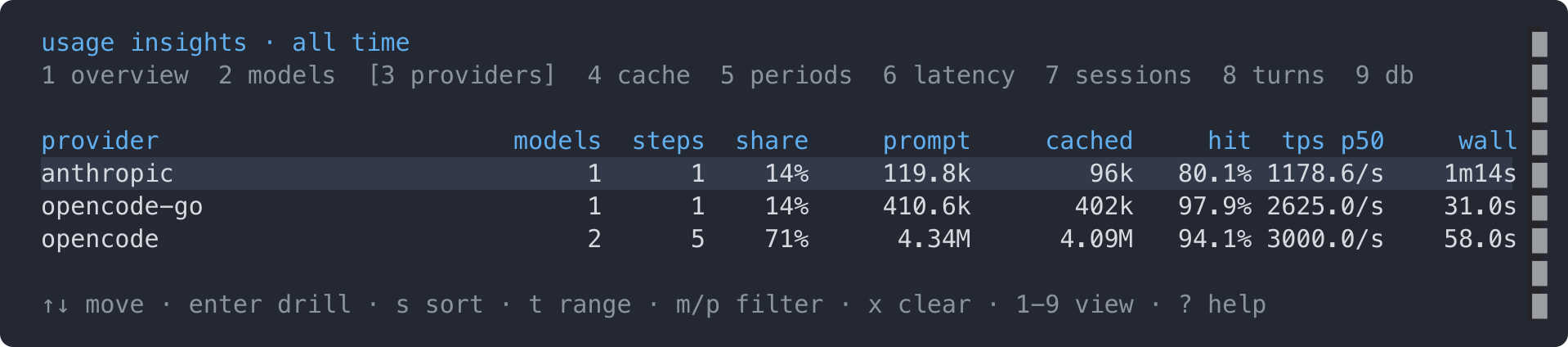
The view bar at the top names every view and brackets the active one; ? opens
a help overlay that repeats the keys and defines every number.
Keys
| Key | Does |
|---|---|
↑ ↓ / j k |
Move the cursor; the row under it is highlighted. |
pageup pagedown / home end |
Move by ten rows / to the first or last row. |
enter |
Drill into the row: a model → the providers it ran through and their latency; a provider → the models it served and its latency; a session → its turns; a period → the providers of the period. In db, prune the steps recorded before the selected retention's cutoff date (asks first). |
backspace |
Go back from a drill-down. |
1–9 / [ ] |
Pick a view (9 is db) / cycle views. |
t / shift+t |
Next / previous range. |
s / shift+s |
Cycle the sort column / reverse it. |
b |
periods bucket: day → week → month. |
a |
turns scope: this session ↔ every session. |
m p |
Filter by model or by provider (a picker of the values actually observed). |
x |
Clear the filters. |
r |
Re-read the database. |
v |
db: compact the file, giving the space of deleted rows back. |
? |
Help overlay. |
f / escape |
Full screen / close. |
The view, range, sort, bucket, scope and filters are stored through the host's durable storage, so the panel reopens where it was left.
Views
| View | Answers |
|---|---|
overview |
Steps, sessions, prompts, in/cached/write/out, hit, cost, an activity sparkline, a this session block and a data coverage block (how many models and providers were observed, and how many steps lack a model or a completion — a zero elsewhere is only trustworthy when this is complete). |
models |
Every model with its cache (hit and the per-step hit p50), tokens, cost, the providers it ran through and how often it switched model or provider — with the cache a provider switch cost. enter opens the per-provider detail. |
providers |
Who ran the work: one row per provider, with the models it served, steps, share, prompt, cached, hit, p50 throughput, wall time and cost. enter lists every model it served. Steps recorded without a provider (a model that was never observed) are dimmed and cannot be drilled into. |
cache |
Reuse by model, losses grouped by reason (expired, compaction, unknown), cache survival against idle time, reuse kept per provider, the observed TTL bounds (hits up to / drops from) and the most recent losses. |
periods |
Day, week or month totals — steps, sessions, in, cached, write, hit, out, cost — with a sparkline per metric and a totals row. enter lists the providers of a period. |
latency |
Wall time, streaming window and throughput as p50/p90/p99 overall and per model (per provider when a model is filtered). n < 5 is dimmed. |
sessions |
Each session with steps, prompts, tokens, hit, cost, its directory and how many models it used; subagent sessions are indented under their parent and rolled up. |
turns |
The per-prompt history: one line per finished turn, rendered exactly like the live line. a widens it to every session, titled. |
db |
Where the file lives, what it holds and how much of it is old. The retention table lists, per preset (30/90/365 days), how many steps a prune would remove and the cutoff date it prunes from — pick one with ↑/↓ and enter prunes it (a confirmation first); v gives the space back. |
The panel sums the stored per-step buckets over the selected range, so a number
read in one place means the same in the other: prompt is everything the
provider saw (cached + fresh + writes), in the uncached part, hit is
cached / prompt, and out everything generated (visible output + reasoning).
The identity of a step is the provider the model ran through — opencode,
opencode-go, deepseek, whatever the provider is called in the OpenCode
configuration — and the model itself. That is what every view groups by, and it
is also the whole answer available: a gateway such as OpenCode Console may
re-route a request to another operator, but that upstream is not observable from
the plugin, and the identity a request would have been routed to is not
evidence of who ran it. The provider is: the same model through deepseek and
through opencode-go are two rows, two caches and two latency profiles, and a
switch between them forfeits the cache the previous one held (the switch counts
and the cache losses in the models view count exactly that).
tps/wall/stream are produced tokens per streaming second / request to
completed step / request to the last chunk. The sidebar's rate (per turn, and
the session average on its totals) is the weighted one — produced tokens
divided by the summed streaming windows — so it answers "how fast did this
produce"; the latency view reports the p50 of the per-step rates instead, which
answers "how fast is a typical step". A switch from one step to the next is not
by itself a fault — moving to another model or provider is a deliberate choice —
so the models view pairs the count with the cache the switch actually cost,
which only a provider switch can: two models never share a cache to lose. The
panel's ? overlay defines every number in place.
Configuration
Options apply to both entries (each side reads the ones it needs):
| Option | Default | Meaning |
|---|---|---|
enabled |
true |
false disables that side completely — no line, no panel, no recording. |
db |
per-OS state path | SQLite path override. Must match between the server and TUI entries. |
turnTotals |
"latest" |
How the turn segment counts prompt usage: latest shows the prompt size the turn ended with; sum adds every step of the turn. |
sidebar |
true |
Show the session summary and the per-prompt history — cache hit and cost per turn — in the session sidebar (the slot is invisible while the sidebar is hidden). |
sidebarTurns |
5 |
How many turns the sidebar history shows. |
panel |
true |
Show the /usage statistics panel and its command. false keeps the line and the sidebar. |
fields |
see below | Toggle line segments. |
labels |
see below | Override line labels (the plugin is English-only by default). |
Fields and labels
{
  "options": {
    "fields": { "clock": true, "delta": true, "model": true, "variant": true, "turn": true, "session": true, "reasoning": false, "cost": true, "cacheExpiry": true },
    "turnTotals": "latest",
    "labels": { "delta": "Δ", "turn": "", "session": "sess", "step": "step", "steps": "steps", "input": "in", "cached": "cached", "output": "out", "reasoning": "reason", "cost": "cost", "cacheExpired": "cache expired", "providerChanged": "changed", "modelChanged": "model changed" }
  }
}
fields: { "clock": false, "delta": false, "session": false } turns the line
into a pure provider/model · turn … reading.
Database and privacy
The recorder writes to the per-user state directory:
| OS | Path |
|---|---|
| Linux / other | $XDG_STATE_HOME/opencode/opencode-usage-insights/usage.db (default ~/.local/state/opencode/opencode-usage-insights/usage.db) |
| macOS | ~/Library/Application Support/opencode/opencode-usage-insights/usage.db |
| Windows | %LOCALAPPDATA%\opencode\opencode-usage-insights\usage.db |
OPENCODE_USAGE_INSIGHTS_DB=/path/to/usage.db overrides the path, and the db
option overrides both. The file is private to the user: its directory is created
0700 and the file 0600 (POSIX), re-applied on every open. The TUI reads
through a read-only connection, so it can never write, migrate or take the
recorder's lock.
Per step the database holds tokens, cost, timings, finish reason, the provider and the model it ran as, and the session title and working directory. Prompts and responses are not stored, and nothing leaves the machine. The schema, the indexes, the identity rules and the security notes live in docs/internals.md.
CLI report
From a checkout, the database can be read without opening the TUI:
bun run report                          # overview over all time
bun run report models 7d                # one view, one range
bun run report all                      # every view
bun run report providers --model deepseek-v4.1-flash
bun run report periods --granularity month
bun run report models --provider opencode-go
bun run report --json                   # raw rows and every analysis, for scripting
bun run report --ndjson > backup.jsonl  # export the whole database
bun run report --import backup.jsonl    # merge an export (idempotent)
bun run report --help
The views come from the same buildPanel the TUI renders, so the terminal and
the panel never drift apart. --width, --granularity, --model,
--provider, --sort and --asc mirror what the panel's keys do.
Development
bun install
bun run typecheck    # tsc --noEmit, strict
bun test             # pure logic + database + TUI harness + render tests
bun run build        # dist/index.js, dist/tui.js and declarations
bun run demo         # print the line and every view from a seeded database
bun run docs:images  # re-render docs/images/*.png (needs ImageMagick)
src/core.ts,src/line.ts,src/panel-data.tsandsrc/stats/are pure: turn accounting, the host-shape adapter, the view models, and the database, queries and analysis layer. No host imports, so they are unit-testable without a TUI runtime.src/text.ts— text hygiene and the token shape a provider id is validated against.src/recorder.ts— the event-stream state machine that fills the database.src/panel-build.ts,src/panel.tsx,src/sidebar.tsx— panel assembly, the panel component, and the sidebar contribution.src/index.ts,src/tui.tsx— the server and TUI entries.scripts/— the demo, report, bench, platform-check and documentation-image CLIs, plus the two-entryBun.build.
See CONTRIBUTING.md for the ground rules and review expectations, and docs/internals.md for the database design, performance rules and how the TUI side is tested.
License
MIT — see LICENSE. Author: Hugo Batista (https://github.com/hugobatista).
同类生态推荐

Usage Panel
opencode-usage-panel
Sidebar token-usage and cost panel for the opencode TUI. Breaks a session down by model with per-model cost, context usage, and configurable peak/off-peak pricing.

Total Session Cost
opencode-total-session-cost
Real-time cumulative cost tracker for Opencode sessions, aggregating costs from parent sessions, archived messages, and all child sub-agent tasks.

Docker Panel
opencode-docker-panel
Docker container panel for the OpenCode 2 TUI sidebar