
Turn Stats
Current-turn processed-token count for the OpenCode sidebar
0
175
近 7 天 6
33.0
生态多维模型
21 天前
2026-09-13
快速安装与配置
opencode.json写入当前项目的 opencode.json,只对这个仓库生效。
opencode.json
{
  "$schema": "https://opencode.ai/config.json",
  "plugin": ["opencode-turn-stats@1.0.0"]
}
写入 ~/.config/opencode/opencode.json,对所有项目生效。
~/.config/opencode/opencode.json
{
  "$schema": "https://opencode.ai/config.json",
  "plugin": ["opencode-turn-stats@1.0.0"]
}
若你要在本地改造这个插件,先装到项目里再从本地路径引用。
shell
pnpm add -D opencode-turn-statsOpenCode 启动时会通过内嵌运行时自动加载 npm 依赖并缓存至本地目录,无需手动在全局环境执行安装。
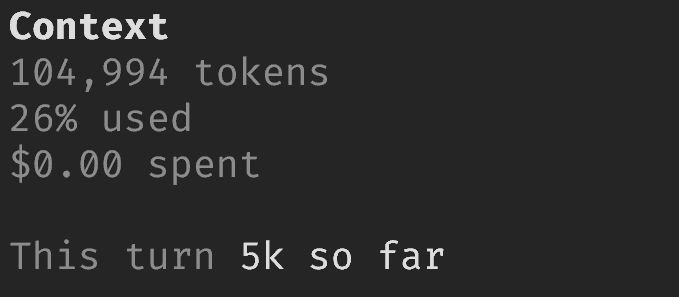
OpenCode Turn Stats adds one line to the OpenCode sidebar:
This turn 13k processed
It counts uncached work reported for the current user turn. The count includes input, cache writes, visible output, and reasoning across tool-call continuations. It excludes cache reads.
The plugin uses only synchronised OpenCode host state. It makes no provider requests, reads no transcript files, starts no subprocesses, and stores no usage history. If the host records cannot support the number, the row is omitted instead of estimated.
OpenCode exposes synchronised, bounded snapshots without a completeness marker. The plugin omits the row when a missing or inconsistent record is detectable. A pathological snapshot that loses an earlier step while retaining a matching latest step is indistinguishable from complete host state.
OpenCode 1.18.30 or later is required.
Install
Install the published package:
opencode plugin opencode-turn-stats --global
Restart OpenCode. Show the sidebar. The row appears below built-in Context and above MCP. OpenCode does not currently expose an insertion point inside the built-in Context component.
For an unpublished checkout:
bun install --frozen-lockfile
bun run build
Add the built entry to the plugin array in ~/.config/opencode/tui.json:
{
  "$schema": "https://opencode.ai/tui.json",
  "plugin": ["file:///absolute/path/to/opencode-turn-stats/dist/tui.js"]
}
On Windows, use a URL such as
file:///C:/projects/opencode-turn-stats/dist/tui.js.
Development
Run all checks:
bun run verify
Create and check the release archive without publishing it:
bun pm pack
bun run package:check --packed
Licence
MIT - see LICENSE.
同类生态推荐

Usage Stats
opencode-usage-stats-plugin
An OpenCode plugin that tracks LLM token usage and displays interactive statistics in the terminal UI.

Tokenmeter Tui
opencode-tokenmeter-tui
OpenCode TUI plugin: TokenMeter sidebar — live token usage, cost, and delegation tree for sessions

Headsup
@banburist/opencode-headsup
Live inference telemetry pinned to the OpenCode 2 sidebar.