
Usage Stats
An OpenCode plugin that tracks LLM token usage and displays interactive statistics in the terminal UI.
0
351
近 7 天 12
34.8
生态多维模型
22 天前
2026-09-12
快速安装与配置
opencode.json写入当前项目的 opencode.json,只对这个仓库生效。
opencode.json
{
  "$schema": "https://opencode.ai/config.json",
  "plugin": ["opencode-usage-stats-plugin@0.2.0"]
}
写入 ~/.config/opencode/opencode.json,对所有项目生效。
~/.config/opencode/opencode.json
{
  "$schema": "https://opencode.ai/config.json",
  "plugin": ["opencode-usage-stats-plugin@0.2.0"]
}
若你要在本地改造这个插件,先装到项目里再从本地路径引用。
shell
pnpm add -D opencode-usage-stats-pluginOpenCode 启动时会通过内嵌运行时自动加载 npm 依赖并缓存至本地目录,无需手动在全局环境执行安装。
简体中文 | English
An OpenCode plugin that tracks LLM token usage and displays interactive statistics in the terminal UI.
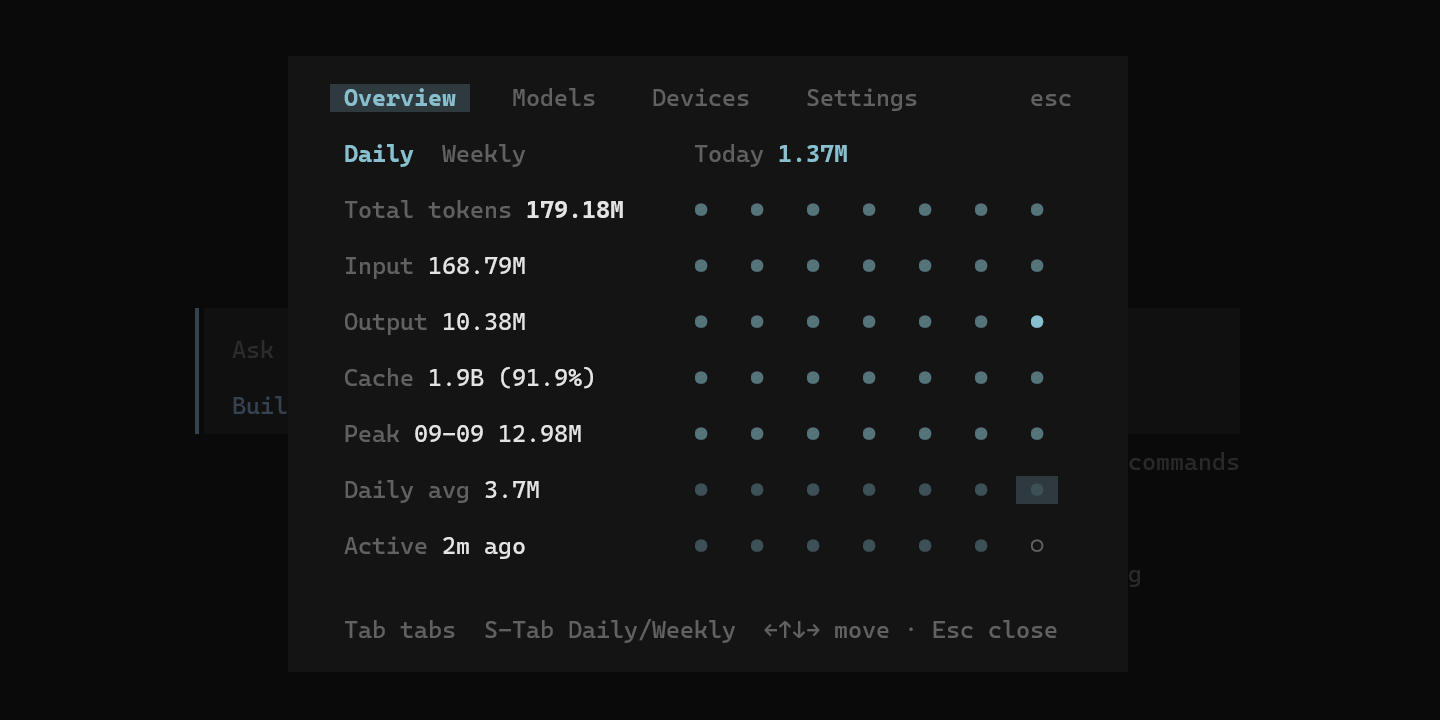
Features
- Token tracking -- automatically records input, output, cache, and reasoning tokens for every LLM call
- Multi-device -- aggregates usage across multiple machines via hostname identification
- Heat-map overview -- daily and weekly activity heat maps with trend levels
- Model breakdown -- per-provider / per-model token consumption with bar charts
- Device breakdown -- per-device usage with last-active timestamps
- Timezone-aware -- configurable timezone with 10 presets; all aggregation respects DST / leap-year boundaries
- Crash-safe -- SQLite WAL mode with busy-timeout retry; committed data survives process kills
- Keyboard & mouse -- full keyboard navigation (arrow keys, Tab, Shift+Tab) and mouse click support
- Responsive layout -- adapts to narrow terminals with a stacked layout
Requirements
Installation
From npm (recommended)
Add the plugin to
~/.config/opencode/opencode.json:{ "plugin": ["opencode-usage-stats-plugin"] }Add the plugin to
~/.config/opencode/tui.json:{ "plugin": ["opencode-usage-stats-plugin"] }The same package name goes in both files: OpenCode loads the server entry from the first and the TUI entry from the second.
Restart OpenCode. The plugin is installed automatically and will begin tracking usage.
Database location for npm installs: the database defaults to
~/.config/opencode/usage-stats-data, outside the package directory, so updating the plugin never wipes your history. SetdataDirto an absolute path in your config file if you want it elsewhere (see Configuration).
From source (for local development)
Clone the repository:
git clone https://github.com/qiming-zhao/opencode-usage-stats-plugin.git
cd opencode-usage-stats-plugin
Install dependencies:
bun installBuild the plugin:
bun run buildRegister the plugin in your OpenCode configuration files:
Add the server plugin to
~/.config/opencode/opencode.json:{ "plugin": [ "/absolute/path/to/opencode-usage-stats-plugin/dist/server.mjs" ] }Add the TUI plugin to
~/.config/opencode/tui.json:{ "plugin": [ "/absolute/path/to/opencode-usage-stats-plugin/dist/tui.mjs" ] }Restart OpenCode. The plugin will begin tracking usage automatically.
Usage
Open the usage panel in OpenCode via:
- Slash command: type
/usage - Command palette: search for Usage stats
Keyboard shortcuts
| Key | Action |
|---|---|
Tab |
Switch between tabs (Overview / Models / Devices / Settings) |
Shift+Tab |
Toggle Daily / Weekly mode (on Overview tab) |
Arrow keys |
Navigate heat-map cells |
Esc |
Close the panel |
Configuration
The plugin looks for configuration in this order (first match wins):
~/.config/opencode/usage-stats-plugin.json(user-level, recommended -- survives plugin updates)stats.config.jsonin the plugin root (legacy, for local installs)- Built-in defaults
{
  "dataDir": "./data",
  "timeZone": "Asia/Shanghai"
}
| Field | Description | Default |
|---|---|---|
dataDir |
Directory for the SQLite database. Absolute paths are used as-is; relative paths resolve against the directory of the loaded config file | ~/.config/opencode/usage-stats-data (or ./data under the plugin root for legacy local installs) |
timeZone |
IANA timezone for day boundaries | Asia/Shanghai |
The timezone can also be changed from the Settings tab in the TUI panel; the change is saved to the user-level config file.
Development
# Install dependencies
bun install

# Build
bun run build

# Run tests
bun test

# Type check
bun run typecheck
See CONTRIBUTING.md for more details.
Architecture
src/
├── server.ts      # Server-side plugin entry (event listener + retry queue)
├── tui.tsx        # Terminal UI panel (SolidJS + @opentui)
├── collector.ts   # Event capture / token extraction
├── store.ts       # SQLite data layer (schema, upsert, aggregation)
├── overview.ts    # Heat-map and compact number formatting
└── config.ts      # Configuration file reader
License
同类生态推荐

Commandcode
@brainervirus/opencode-commandcode
Command Code API provider for opencode — use Claude, GPT, Gemini, DeepSeek, Qwen, Kimi, GLM, MiniMax, and Step models via Command Code

Commandcode
@herouucn/opencode-commandcode
Inject Command Code API provider into opencode — access Claude, GPT, Gemini, DeepSeek, Qwen, Kimi, GLM, MiniMax & Step via unified Command Code API. / 将 Command Code API provider 注入 opencode —— 通过统一的 Command Code API 使用 Claude、GPT、Gemini、DeepSeek、Qwen、Kim

Permission Reviewer
opencode-permission-reviewer
Policy-aware permission reviewer for OpenCode V1 and V2