
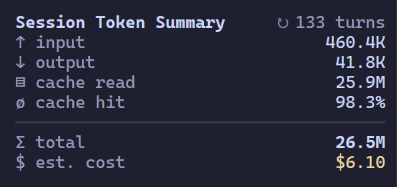
Session Token Summary
OpenCode TUI sidebar showing token usage across a session and its subagents.
5
近 30 天 +1
145
近 7 天 104
41.7
生态多维模型
5 天前
2026-10-15
快速安装与配置
opencode.json写入当前项目的 opencode.json,只对这个仓库生效。
opencode.json
{
  "$schema": "https://opencode.ai/config.json",
  "plugin": ["opencode-plugin-session-token-summary@2.1.2"]
}
写入 ~/.config/opencode/opencode.json,对所有项目生效。
~/.config/opencode/opencode.json
{
  "$schema": "https://opencode.ai/config.json",
  "plugin": ["opencode-plugin-session-token-summary@2.1.2"]
}
若你要在本地改造这个插件,先装到项目里再从本地路径引用。
shell
pnpm add -D opencode-plugin-session-token-summaryOpenCode 启动时会通过内嵌运行时自动加载 npm 依赖并缓存至本地目录,无需手动在全局环境执行安装。

An OpenCode TUI plugin that adds a compact session-usage panel to the sidebar. It aggregates the root session and all nested subagent sessions.
Features
- Compact OpenCode sidebar panel with live session updates
- Click the panel title to customize visible metrics and see the plugin version
- Input, output, reasoning, cache read, cache write, and total token counts
- Cache hit (ratio or percentage) and assistant turn count
- Usage aggregated across the root session and every nested subagent
- Reported API costs for metered providers
- API-equivalent cost estimates for quota and subscription-backed providers
- One combined cost total for sessions that mix metered and quota-backed models
- Clear labels distinguishing reported, estimated, and partially estimated costs
- V2 model-catalog pricing with context-tier support
Compatibility
| OpenCode version | Plugin version | Installation |
|---|---|---|
OpenCode V2 (opencode, >=2.0.28 <3) |
2.x |
Use the V2 instructions below. |
| OpenCode V1 | 0.4.1 |
Install the pinned legacy package with the V1 instructions below. |
OpenCode 2 Install
Add the npm package to ~/.config/opencode/cli.json, or replace its existing
entry. Preserve other plugins and settings:
{
  "$schema": "https://opencode.ai/v2/cli.json",
  "plugins": [
    "opencode-plugin-session-token-summary@^2"
  ]
}
OpenCode installs the package from npm automatically. Restart the TUI if it does not reload.
The 0.4.x package targets the legacy TUI plugin API and cannot be used with
OpenCode 2.
OpenCode V1 Install
OpenCode V1 users must install the final legacy release, 0.4.1:
- Press
Ctrl+Pin OpenCode and choose Install plugin. - Press
Tabto install globally. - Enter
opencode-plugin-session-token-summary@0.4.1.
This creates an entry in ~/.config/opencode/tui.json. Do not install an
unversioned package in V1, because later releases target OpenCode 2.
Notes
Click Session Token Summary in the sidebar, or press Ctrl+P and choose
Customize Session Token Summary, to open the settings popup. Toggle metrics
with the mouse or use arrow keys and Space. Preferences apply immediately and
are saved across restarts. Choose Close or press Esc to dismiss the popup.
In short terminals, use arrow keys or the mouse wheel to scroll through settings.
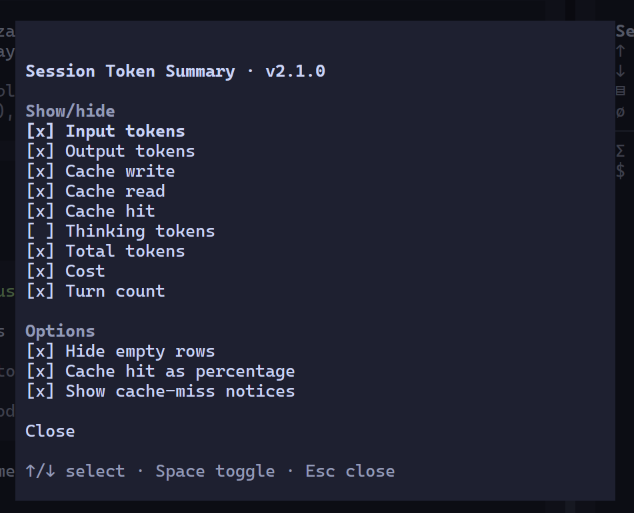
Show/hide controls individual metrics; thinking tokens are off by default for new settings. Options lets you hide zero-valued rows or display cache hit as a percentage. Both options are off by default. The percentage is cache reads divided by input tokens plus cache writes and cache reads; the ratio is cache reads divided by input tokens plus cache writes. Existing saved metric choices are preserved.
Show cache-miss notices is off by default. It warns about new suspected misses of at least 20K tokens, comparing consecutive completed requests within each session, including subagents. It skips the first request, resets after compaction, and requires evidence of cache activity. Opening a session or enabling the option does not replay historical warnings. Inspired by Pi’s cache-miss heuristic, this estimates prompt overlap, not confirmed provider failures. Model switches and idle gaps are context hints, not proof of the cause. No cost-loss estimate is shown; providers that do not report caching cannot be assessed.
The panel reads V2 session totals and paginated assistant messages for the selected session and its nested descendants. It limits descendant requests to four concurrent operations and keeps the last complete snapshot if a background refresh fails. It works with the connected server, including remote servers, and needs no separate API key.
With cache-miss notices enabled, message fetching also includes compaction records.
Nonzero cost reported by OpenCode is shown as $ cost. For messages with an
explicit zero cost, the plugin uses OpenCode's model
catalog to calculate what the same tokens would cost at published API rates.
Fully estimated totals are shown as $ est. cost; totals that combine reported
and estimated amounts are shown as $ cost incl. est. Quota or subscription
users are not necessarily charged the estimated amount. If catalog pricing
cannot be matched, only the reported cost is shown.
Development
npm install
npm run check
npm run pack:check
To load a local checkout in OpenCode 2, run npm ci && npm run build, then
replace the npm entry in ~/.config/opencode/cli.json with the checkout's
absolute directory path. Use the directory, not tui.tsx: OpenCode V2 resolves
the directory's tui entrypoint and skips direct-file TUI entries. Restart the
TUI if it does not reload.
License
同类生态推荐

Background Tasks
opencode-background-tasks
A sidebar list of the background shells and subagents still running in an OpenCode v2 session

Subagent Usage
opencode-subagent-usage
opencode TUI sidebar widget showing the rolled-up cost and token usage of subagent (child) sessions.

Usage Panel
opencode-usage-panel
Sidebar token-usage and cost panel for the opencode TUI. Breaks a session down by model with per-model cost, context usage, and configurable peak/off-peak pricing.