
Peak Badge
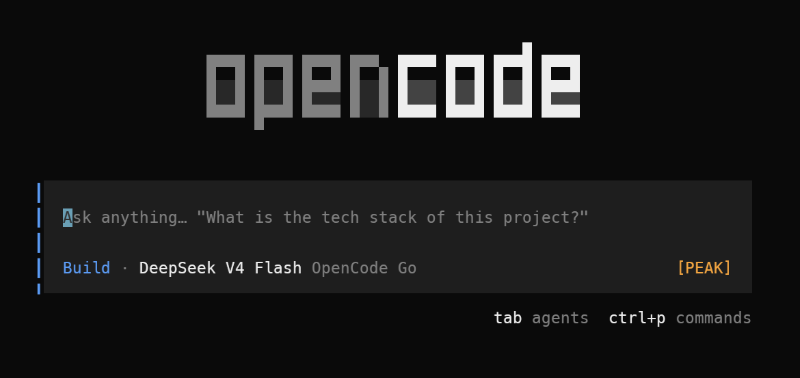
OpenCode TUI plugin: live [PEAK]/[OFF-PEAK] badge for any model with configured peak hours. Provider-agnostic; ships with DeepSeek defaults.
3
近 30 天 +2
944
近 7 天 41
46.1
生态多维模型
14 天前
2026-09-20
快速安装与配置
opencode.json写入当前项目的 opencode.json,只对这个仓库生效。
opencode.json
{
  "$schema": "https://opencode.ai/config.json",
  "plugin": ["opencode-peak-badge@0.4.0"]
}
写入 ~/.config/opencode/opencode.json,对所有项目生效。
~/.config/opencode/opencode.json
{
  "$schema": "https://opencode.ai/config.json",
  "plugin": ["opencode-peak-badge@0.4.0"]
}
若你要在本地改造这个插件,先装到项目里再从本地路径引用。
shell
pnpm add -D opencode-peak-badgeOpenCode 启动时会通过内嵌运行时自动加载 npm 依赖并缓存至本地目录,无需手动在全局环境执行安装。



OpenCode TUI plugin. Shows a [PEAK] / [OFF-PEAK] badge in the footer status
line, so you always know whether the active model is billed at peak rates. When
a subagent session is running, its model is tracked too: peak wins across the
main model and all running subagents. Updates live — no restart needed when a
session crosses a peak window boundary.
Using OpenCode V1 (CLI v1)? OpenCode V2 changed the plugin API, so this plugin was rewritten.
0.3.0is the last release compatible with V1. Since0.4.0the npmlatesttag points at the V2 build, so pin the version: useopencode-peak-badge@opencode-v1(or@0.3.0). See OpenCode V1 (legacy).
What it does
- Renders a badge in the footer status line via
prompt.footer.status(session) andhome.footer.status(home) whenever a model with configured peak hours is active — or always, withalwaysShow: true. [PEAK]renders in the theme's warning color.[OFF-PEAK]renders in the muted color. The badge shows in both states for tracked models.- Recomputes every
pollSeconds(default 10) and reacts live tosession.model.selected,session.agent.selected,session.statusandmodel.updatedthrough the TUI's cached session data — no restart when a session crosses a peak boundary. - Tracks all descendant subagent sessions through
data.session.family(). While a subagent session isrunning, its model is checked against the peak windows. Peak wins: if any running subagent is in peak hours, the badge shows[PEAK]. Disable withsubagents: false. - Resolves the active model from the session's committed model
(
data.session.get(id)?.modelplussession.created/session.model.selectedevents) and, while the picker selection has not been committed yet, from the TUI's last picked model in<XDG_STATE_HOME>/opencode/model.json. The home screen uses the picked model too, falling back toclient.model.default()when there is no pick. - Follows model changes live: picking a model updates the badge immediately (both on the home screen and inside a running session), and a committed session model always wins over a stale pick.
- Shows nothing for models without configured peak hours, unless
alwaysShow: trueforces the badge for the main model from the top-levelwindows/weekdaysOnly. - Provider-agnostic: track any model that has peak pricing by adding a rule
under
models. Built-in defaults cover DeepSeek models, which is where peak hours are known today.
Requirements
- OpenCode V2. The V2 release changed the plugin API; V1 plugin
implementations do not run in V2. If you are on the V1 CLI, use
0.3.0— see OpenCode V1 (legacy). - Bun to install dependencies (dev only).
Install
opencode plugin add opencode-peak-badge
Or add the package to opencode.jsonc (project or
~/.config/opencode/opencode.jsonc):
{
  "$schema": "https://opencode.ai/config.json",
  "plugins": ["opencode-peak-badge"]
}
To pass options, use the object form:
{
  "$schema": "https://opencode.ai/config.json",
  "plugins": [
    { "package": "opencode-peak-badge", "options": { "pollSeconds": 30 } }
  ]
}
CLI-only installs can use ~/.config/opencode/cli.json instead:
{
  "plugins": ["opencode-peak-badge"]
}
Restart OpenCode if a watched config file changed. Published package plugins load at startup.
Verify. Start a session with a tracked model (for example
opencode-go/deepseek-v4-flash) and confirm the badge appears in the footer
status line. To force a known state, see Evaluation.
OpenCode V1 (legacy)
0.3.0 is the last release compatible with the OpenCode V1 CLI. It uses the old
@opencode-ai/plugin/tui API and the tui.json config. Pin the version
explicitly:
opencode plugin opencode-peak-badge@opencode-v1 --global
# or, exact pin (guaranteed):
opencode plugin opencode-peak-badge@0.3.0 --global
Or, CLI-version-proof, in ~/.config/opencode/tui.json:
{
  "$schema": "https://opencode.ai/tui.json",
  "plugin": ["opencode-peak-badge@opencode-v1"]
}
Do not use opencode-peak-badge without a version on V1: from 0.4.0 the
latest tag points at the V2 build. The opencode-v1 dist-tag always resolves
to 0.3.0.
Install from source (local dev)
Clone the repository and install dependencies:
git clone https://go.hugobatista.com/gh/opencode-peak-badge.git ~/code/projects/opencode-peak-badge
cd ~/code/projects/opencode-peak-badge
bun install
Register the plugin in your
opencode.jsoncwith an absolute path tosrc/index.tsx:{ "$schema": "https://opencode.ai/config.json", "plugins": [ "/home/your-user/code/projects/opencode-peak-badge/src/index.tsx" ] }The defaults below apply when no options are given. To override, use the object form (see Configuration).
Restart OpenCode.
Configuration
Add options with the object form:
{
  "$schema": "https://opencode.ai/config.json",
  "plugins": [
    {
      "package": "opencode-peak-badge",
      "options": {
        "models": [
          "re:^opencode-go/deepseek",
          "re:^opencode/deepseek",
          "re:^deepseek/deepseek"
        ],
        "windows": [["01:00", "04:00"], ["06:00", "10:00"]],
        "weekdaysOnly": true,
        "pollSeconds": 10,
        "subagents": true,
        "alwaysShow": false,
        "labelPeak": "[PEAK]",
        "labelOffPeak": "[OFF-PEAK]",
        "debug": false
      }
    }
  ]
}
Options
| Option | Default | Description |
|---|---|---|
models |
built-in patterns for any DeepSeek model (OpenCode Go, OpenCode Zen, DeepSeek direct) | Models with peak hours. Override to track any provider/model. Each entry is a "provider/model" exact string, a "re:<pattern>" regex string, or an object with per-model windows/weekdaysOnly overrides. Matching is against the full provider/model key (case-insensitive). Exact id entries win over regex patterns; otherwise the first matching entry in list order wins. |
windows |
[["01:00","04:00"],["06:00","10:00"]] |
Peak windows in UTC. Each is ["HH:MM","HH:MM"], half-open [start, end). A window whose end is ≤ its start wraps past midnight. |
weekdaysOnly |
true |
When true, weekends are always off-peak. |
pollSeconds |
10 |
How often the badge recomputes (minimum 1). The badge also reacts live to session and model events. |
subagents |
true |
Track subagent sessions while they are running. Peak wins over the main model's state. |
alwaysShow |
false |
When true, always show a badge for the main model, using the top-level windows/weekdaysOnly when no model rule matches. |
labelPeak |
"[PEAK]" |
Text shown during peak hours. |
labelOffPeak |
"[OFF-PEAK]" |
Text shown during off-peak hours. |
debug |
false |
When true, append the detected provider/model key to the badge. |
models entries are additive to the defaults? No. Supplying models
replaces the default list. Provide the full list you want tracked.
Subagents
When an OpenCode task spawns a subagent session, that child session carries a
parentID pointing at the session that spawned it. The plugin reads the
descendant tree from data.session.family(sessionID) and, for each descendant
that is running, checks the child's model against the peak windows:
- If any running subagent has a matching rule and is in peak hours, the badge
shows
[PEAK], whatever the main model says (peakwins). - Otherwise the badge follows the main model's state.
- Idle or deleted subagent sessions are ignored.
- Subagent sessions whose model has no configured peak hours add nothing.
- The badge reacts live to
session.statuschanges when a subagent goes running or idle; no need to wait for the next poll tick.
alwaysShow only affects the main model; a subagent never renders a badge from
the fallback windows. Set subagents: false to ignore subagents entirely.
Model picker and the home screen
OpenCode keeps the picker selection in TUI-local state and only commits it to
the session server-side when you submit a prompt. To avoid a stale badge, the
plugin also reads the TUI's model.json (at
$XDG_STATE_HOME/opencode/model.json, by default
~/.local/state/opencode/model.json), which the picker updates immediately.
The badge therefore:
- on the home screen (where
session.newlands), shows the last picked model instead of the server'smodel.default(); - inside a running session, shows the newly picked model right away, then the committed session model once the prompt is submitted.
Precedence: a committed session model (session.created /
session.model.selected) wins over the model.json pick; a pick is applied
only to the session currently on screen and is dropped when you switch
sessions. If model.json is missing, the plugin falls back to
client.model.default() as before.
This is a bridge over an internal TUI file — OpenCode V2 does not expose the in-progress picker selection to plugins. If a future release publishes an event or API for it, this can be simplified.
Agent switches (plan / build) with different models
When agents in a session use different models, the badge follows the session's
model from the TUI store, updated by session.agent.selected and
session.model.selected. One limitation remains: the TUI Tab agent cycle may not
publish an event or persist the chosen model until the next prompt, because the
cycle and per-agent model pick are stored in the TUI's local state. Between
pressing Tab and submitting the next prompt, the badge keeps the last known
session model. On prompt submission OpenCode publishes the selected
agent/model, and the badge updates in the same tick.
If you need an immediate update, pick the model explicitly from the model list.
This behavior should be re-verified on your OpenCode V2 build; if the agent cycle starts emitting an event, the badge reacts automatically.
alwaysShow
By default the plugin shows nothing for models without a matching rule. Set
alwaysShow: true to always render a badge in the footer: unmatched main models
use the top-level windows / weekdaysOnly (defaults or your overrides).
Combined with subagents, a running subagent in peak hours still wins over an
off-peak main model.
Background: peak pricing is property of channel + model
Peak hours are a property of the channel + model pair, not of the model
alone. The plugin is provider-agnostic: it renders a badge whenever the active
provider/model key matches a configured rule, and prices are billable at peak
in the channels you configure. Add any model you care about — the plugin does
not know or care which provider it belongs to.
The built-in defaults target DeepSeek models, because that is where peak pricing is known today. Current facts (per OpenCode docs):
- OpenCode Go — DeepSeek V4 Pro, V4 Flash and V4 Flash Vision Exp: peak =
Mon–Fri 01:00–04:00 and 06:00–10:00 UTC; everything else, including weekends,
is off-peak (2× price in peak). No other Go model has peak hours. The same
windows apply to newer ids such as
deepseek-v4.1-*. OpenCode also exposes Flash as the aliasopencode-go/deepseek-flash; the default patterns match everyopencode-go/deepseek*id. - OpenCode Zen — bills the same DeepSeek models (
opencode/deepseek-*) at DeepSeek's list price, so the same peak windows apply. - DeepSeek direct API (BYOK) — the same peak windows apply to
deepseek/deepseek-*.
In Lisbon time (WEST, UTC+1) the DeepSeek windows are 02:00–05:00 and 07:00–11:00; in winter (WET, UTC+0) the UTC windows apply as-is. The plugin computes in UTC, so DST is a non-issue.
Exact matching
Match one provider/model id exactly (case-insensitive). This is the simplest
form and avoids regex entirely:
{
  "models": [
    "opencode-go/deepseek-v4-flash",
    "opencode/deepseek-v4-pro"
  ]
}
Give a single model its own windows or weekday behavior with the object form:
{
  "models": [
    { "id": "opencode-go/deepseek-v4-flash", "windows": [["09:00", "17:00"]], "weekdaysOnly": false }
  ]
}
Regex matching
Exact ids match one model. To track every current and future model id that
fits a pattern, use the re: prefix on a string, or the pattern object form
(which also allows per-model overrides):
{
  "models": [
    "re:^opencode-go/deepseek",
    { "pattern": "^my-provider/.*$", "windows": [["09:00", "17:00"]] }
  ]
}
Matching rules:
- Patterns are compiled case-insensitively and tested against the full
provider/modelkey. - An exact
identry always beats a regex pattern, regardless of list order. - Otherwise the first matching entry wins (list order).
- An invalid or empty pattern is ignored.
Escaping: models is JSON, so backslashes must be doubled. For example, to
match a literal dot use "re:^opencode-go/deepseek\\.v4". To avoid escaping,
prefer plain - and ? characters as in the defaults above.
Evaluation
Set the environment variable before launching OpenCode to force a specific
instant. The variable is read on every tick, so changing it mid-session takes
effect within pollSeconds:
OPENCODE_PEAK_HOURS_FAKE_TIME=2026-09-07T08:30:00Z opencode   # peak (Mon 08:30 UTC)
OPENCODE_PEAK_HOURS_FAKE_TIME=2026-09-07T12:00:00Z opencode   # off-peak (Mon 12:00 UTC)
Unset the variable to use real time.
Uninstall
opencode plugin remove opencode-peak-badge
Or remove the entry from plugins in your opencode.jsonc / cli.json and
restart OpenCode.
Development
bun install
bun run typecheck   # tsc --noEmit, strict
bun test            # unit (core logic) + functional (mocked TUI context)
bun run build       # dist/tui.js + dist/tui.d.ts (npm entrypoint)
src/core.ts— pure logic: window parsing, UTC peak check, per-model config resolution. No TUI imports. Fully unit-tested.src/index.tsx— the TUI plugin (id: "peak-badge"), aPlugin.define({ id, setup })from@opencode/plugin/tui. The plugin loader reads the default export only; the__testnamed export is a test hook.scripts/build.ts— bundlessrc/index.tsxtodist/tui.jswith@opencode/plugin,@opencode/theme,@opentui/*andsolid-jsexternal. The npmexports["./tui"]entry points atdist, never atsrc(the Solid transform does not run insidenode_modules).
Pre-release checklist
bun install
bun run typecheck
bun test
bun run build
npm pack --dry-run
Inspect the pack list (dist/, README.md, LICENSE only). Scan for
secrets before npm publish.
License
MIT — see LICENSE. Author: Hugo Batista (https://github.com/hugobatista).
同类生态推荐

Usage Monitor
opencode-usage-monitor
OpenCode TUI sidebar plugin that displays API usage quotas for OpenAI and Z.AI (GLM) providers

Tell Sessions
opencode-tell-sessions
Inter-session direct messaging (DM) for OpenCode V1 & V2: agents in different sessions can message each other

Usage Panel
opencode-usage-panel
Sidebar token-usage and cost panel for the opencode TUI. Breaks a session down by model with per-model cost, context usage, and configurable peak/off-peak pricing.