
Git Guard
OpenCode plugin that blocks destructive git commands before they run.
0
703
近 7 天 23
37.5
生态多维模型
13 小时前
2026-10-04
快速安装与配置
opencode.json写入当前项目的 opencode.json,只对这个仓库生效。
opencode.json
{
  "$schema": "https://opencode.ai/config.json",
  "plugin": ["opencode-git-guard@1.0.1"]
}
写入 ~/.config/opencode/opencode.json,对所有项目生效。
~/.config/opencode/opencode.json
{
  "$schema": "https://opencode.ai/config.json",
  "plugin": ["opencode-git-guard@1.0.1"]
}
若你要在本地改造这个插件,先装到项目里再从本地路径引用。
shell
pnpm add -D opencode-git-guardOpenCode 启动时会通过内嵌运行时自动加载 npm 依赖并缓存至本地目录,无需手动在全局环境执行安装。




An OpenCode plugin that blocks destructive git commands before they run. It hooks OpenCode's tool.execute.before event and throws on any bash command containing a destructive git variant - the tool call aborts and the agent sees the block message.
How it works: two layers
| Layer | Lives in | What it does |
|---|---|---|
| 1. Plugin guard (this repo) | OpenCode's tool.execute.before hook |
Hard-blocks destructive git ops - the tool call aborts, no prompt. Needs no config. |
| 2. Permission rules (optional) | permission.bash ask/allow globs in your opencode.json |
Prompts for mutating-but-recoverable ops (commit, push, rebase, …) so non-destructive git work still gets a human in the loop. |
The plugin works standalone - layer 2 is optional. Without the pairing block, non-destructive git commands simply run silently. See the Escape hatch for how OPENCODE_GIT_GUARD_DISABLE=1 interacts with both layers.
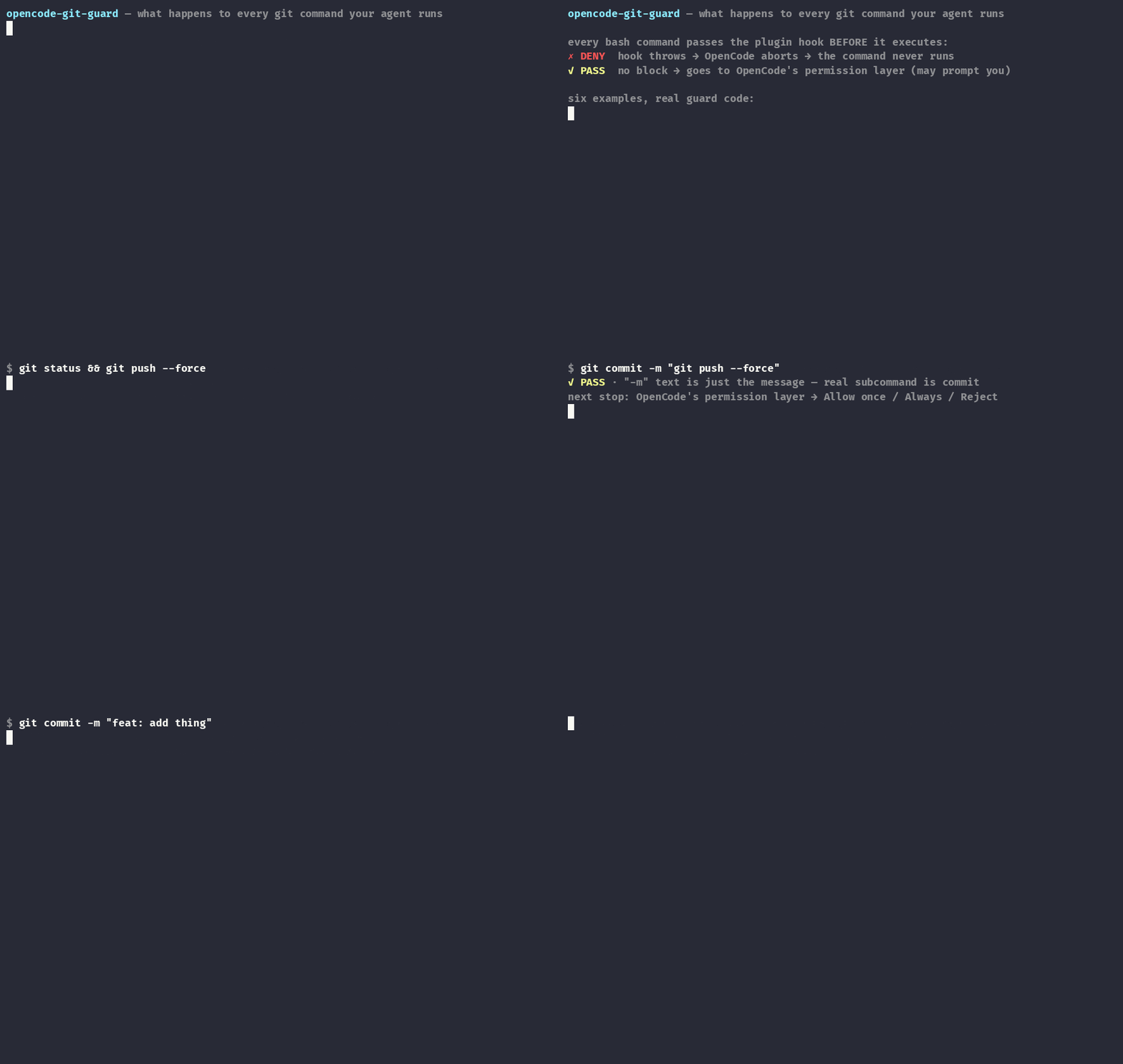
The guard in action
Install
Requires Node >= 22.6.
Pick one:
1. From npm
Add the package name to plugin in your opencode.json (global ~/.config/opencode/opencode.json or local project ./opencode.json). Restart OpenCode - it installs via Bun at startup (needs network on first run).
{
  "plugin": ["opencode-git-guard"]
}
2. From local file
Save index.ts as git-guard.ts in your plugins directory don't keep the name index.ts - it can collide:
~/.config/opencode/plugins/git-guard.ts- global.opencode/plugins/git-guard.ts- per project
Restart OpenCode to load. No extra package.json needed - the only import is type-only and erased at runtime.
3. Via agent
Paste this README into an opencode session and ask it to install both layers (plugin + permission pairing). Review the diff - check the allow rows stayed after the ask rows and it landed in the intended (global vs project) config.
What it blocks
| Command | Why |
|---|---|
git push --force / -f / --force-with-lease |
Remote history rewrite (conservative: blocks --force*) |
git push origin :branch / --delete |
Remote branch deletion |
git push --mirror |
Force-overwrites all remote refs, deletes remote-only branches/tags |
git reset --hard |
Discards working tree + index |
git checkout . / git restore . |
Discards all local changes |
git checkout -f / git switch -f / switch --discard-changes |
Discards uncommitted changes on switch |
git checkout --orphan / -B |
History/branch clobbering |
git branch -D / -M / -f / --force |
Force branch delete/rename/create |
git stash drop / clear |
Unrecoverable stash loss |
git tag -d / -f / --force |
Tag deletion / move |
git reflog expire |
Removes recovery path |
git gc --prune / git prune |
Unreachable object loss |
git update-ref |
Direct ref surgery |
git filter-branch / filter-repo |
History rewriting |
git worktree remove --force / prune |
Worktree state loss |
git clean -fd / -fdx / --force |
Untracked file deletion (clean -n / --dry-run always allowed) |
What it deliberately does NOT do
- No allowlisting. Branch-guard plugins exist for that; this one only denies known-destructive variants. Everything else flows to your permission config.
- Not a shell parser. Commands are split on
|,;,&, newlines - same residual risk as any bash hook:eval, heredocs, or unusual substitutions can hide a command. Segments not led by git (sudo git reset --hard,echo $(git push --force)) fail conservative: any destructive match blocks. - Plain-text mentions can false-positive. Writing those commands as text (e.g.
echo, heredoc file writes) is also blocked - use the escape hatch for the rare legitimate case. - Aliases and flag clusters are not traced.
git config alias.x 'push --force'thengit x(or-c alias.…=…) evades the guard; combined flags like-fBcan slip past single-flag patterns. Deliberate evasion is out of scope - this guard targets accidents. - Quoted messages are handled:
git commit -m "git push --force"is recognized ascommitand passed through - a denied push pattern only fires when the segment's first git subcommand actually owns it.
Escape hatch
When starting opencode via terminal use the following command to disable the Git Guard:
OPENCODE_GIT_GUARD_DISABLE=1 opencode
Scope: the plugin only. The env var stops the Git Guard from throwing; it does not touch your permission config. With the recommended pairing installed, destructive ops then fall through to the ask rows and prompt for approval instead of being hard-blocked - exactly what you want for a one-off legitimate git filter-repo. If you add your own deny globs, note they survive the hatch: remove the matching row for the one-off.
Read once at startup. Use it when you legitimately need git filter-repo or similar - not as a default.
Recommended permission pairing
The guard denies outright; layer permission rules so non-destructive git work still gets a human in the loop. Merge this into your existing opencode.json (global ~/.config/opencode/opencode.json or project ./opencode.json) - don't replace the whole file or you'll lose the plugin line from Install:
{
  "permission": {
    "bash": {
      "git status*": "allow",
      "git diff*": "allow",
      "git log*": "allow",
      "git show*": "allow",
      "git commit*": "ask",
      "git push*": "ask",
      "git checkout*": "ask",
      "git switch*": "ask",
      "git restore*": "ask",
      "git reset*": "ask",
      "git rebase*": "ask",
      "git revert*": "ask",
      "git cherry-pick*": "ask",
      "git branch*": "ask",
      "git tag*": "ask",
      "git stash*": "ask",
      "git rm*": "ask",
      "git mv*": "ask",
      "git am*": "ask",
      "git apply*": "ask",
      "git remote*": "ask",
      "git worktree*": "ask",
      "git submodule*": "ask",
      "git notes*": "ask",
      "git reflog*": "ask",
      "git gc*": "ask",
      "git prune*": "ask",
      "git filter-branch*": "ask",
      "git filter-repo*": "ask",
      "git update-ref*": "ask",
      "git clean*": "ask",
      "git clean*--dry-run*": "allow",
      "git clean* -n*": "allow",
      "git stash list*": "allow",
      "git branch --list*": "allow",
      "git tag --list*": "allow"
    }
  }
}
Order matters: OpenCode resolves overlapping rules by last-match-wins, so exemption allow rows must come after the broad ask rows they carve out. This block is pre-ordered correctly.
No deny rows on purpose. The plugin hard-blocks destructive ops with better chain attribution, and unanchored deny globs would keep those commands blocked even with the escape hatch set - defeating its purpose. With this pairing, OPENCODE_GIT_GUARD_DISABLE=1 turns hard blocks into approval prompts: the ask rows above catch every destructive op, so nothing runs silently while the hatch is active. If you want belt-and-suspenders deny globs of your own, add them - but see the Escape hatch caveat.
Testing
npm test # node >= 22.6 (uses --experimental-strip-types)
70 table-driven cases cover the tricky parsing paths (chain segments, -C dir globals, quoted commit messages, clean -n exemption, subcommand attribution).
License
MIT - see LICENSE.
同类生态推荐

Branch Guard
opencode-branch-guard
OpenCode plugin: allows, asks, or blocks git mutations (commit, push, merge, rebase, ...) based on the current branch or repository, so protected branches stay clean.

Dir Tree Tui
opencode-dir-tree-tui
OpenCode V2 TUI plugin: VS Code-style file tree in the sidebar with git status coloring and click-to-open

Review
@opencode-cockpit/review
A pull request in the terminal: read the diff, hold your notes, send one review