
Branch Guard
OpenCode plugin: allows, asks, or blocks git mutations (commit, push, merge, rebase, ...) based on the current branch or repository, so protected branches stay clean.
1
353
近 7 天 13
37.7
生态多维模型
14 天前
2026-09-20
快速安装与配置
opencode.json写入当前项目的 opencode.json,只对这个仓库生效。
opencode.json
{
  "$schema": "https://opencode.ai/config.json",
  "plugin": ["opencode-branch-guard@0.2.0"]
}
写入 ~/.config/opencode/opencode.json,对所有项目生效。
~/.config/opencode/opencode.json
{
  "$schema": "https://opencode.ai/config.json",
  "plugin": ["opencode-branch-guard@0.2.0"]
}
若你要在本地改造这个插件,先装到项目里再从本地路径引用。
shell
pnpm add -D opencode-branch-guardOpenCode 启动时会通过内嵌运行时自动加载 npm 依赖并缓存至本地目录,无需手动在全局环境执行安装。



OpenCode plugin. Controls git mutations (commit, push, merge, rebase,
reset, …) based on the current branch or repository, so protected branches
stay clean. Allow an operation, ask the user for approval, or deny it. Deny a
whole branch, allow a different policy per repository, and keep read-only
commands untouched.
Requires OpenCode V2. OpenCode V2 changed the plugin API; V1 plugin implementations do not run in V2. This plugin is built against
@opencode/pluginV2 only.
Motivation
OpenCode V2 already ships permissions with allow, ask, and deny. You can
write { "action": "shell", "resource": "git push *", "effect": "deny" }. Those
rules are static: they match the command text. They cannot see the current
branch or the repository.
The problem: git commit has the same text on main and on feat/x. A static
rule cannot allow it on feat/x and ask on main. To protect main, you must
ask or deny git commit everywhere, including feature branches.
This plugin adds the missing input: the VCS state at command time. It resolves the branch and the checkout directory, then decides per git operation.
Differences from the built-in ask
| Aspect | Built-in permissions (V2) | branch-guard |
|---|---|---|
| Decision input | Command text pattern | Branch + directory + git operation |
| When decided | Config load (static) | Command time (dynamic) |
| Git awareness | None; raw shell patterns | Recognizes git mutations |
| Branch scope | None | Per exact branch name |
| Repository scope | None | Per checkout directory |
| Default | Permissive (allow); ask only where configured |
Deny (fail-closed); unlisted mutation is blocked |
| Read-only commands | Need an explicit allow pattern |
Pass automatically |
| Compound commands | Scanner splits into command resources | Parses the git op; aggregates deny > ask > allow |
| Persistence | "Allow always" saves project allow rules |
Config only |
When to use which
They compose. The built-in rules run first, and the plugin hooks into the resolution:
- Use built-in
denyfor absolute blocks. A configureddenyis final and the plugin never sees it. Example: blockgit pushin every repository. - Use built-in
allow/askfor tool-level rules that do not depend on the branch, such as allowinggit status. - Use the plugin for branch- and repository-aware policy — the case the built-in rules cannot express.
The plugin escalates but never downgrades. If the core resolved ask, the
plugin keeps ask. See About ask for the interaction details.
Demo
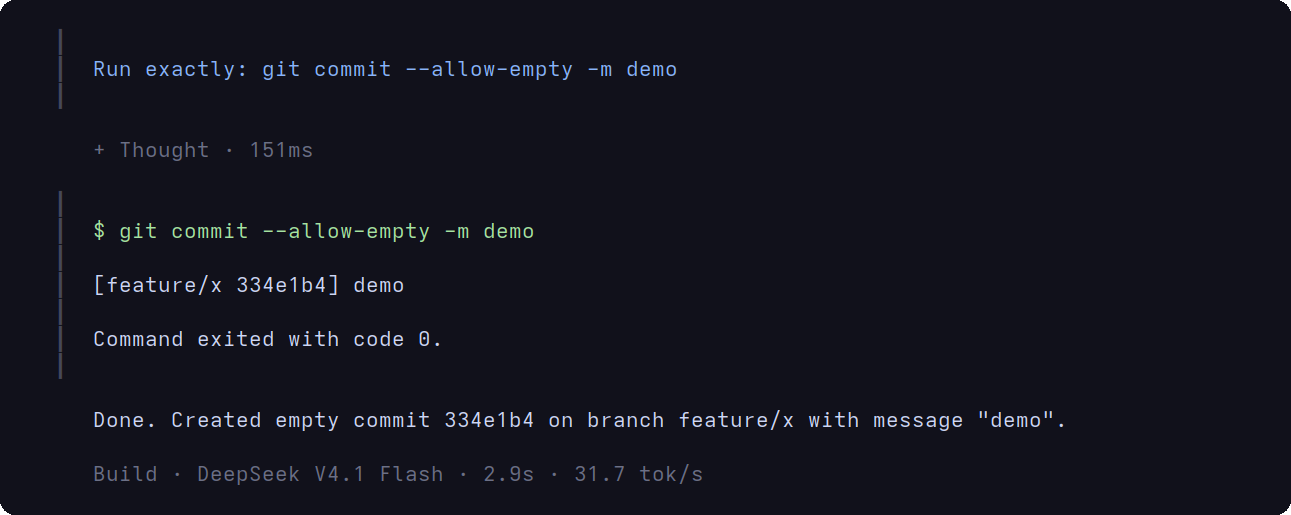
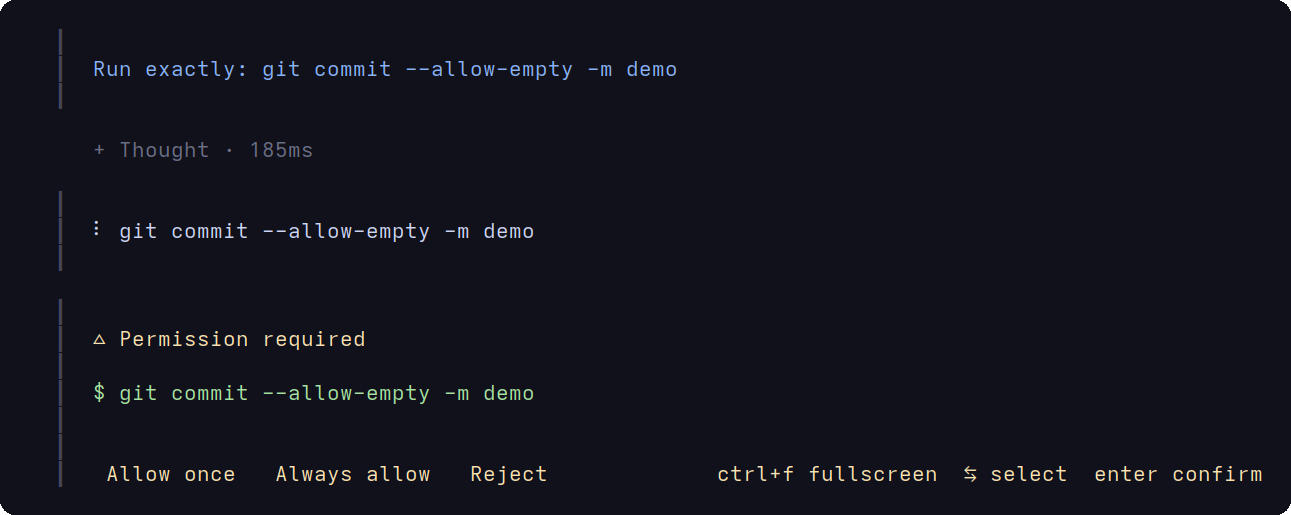
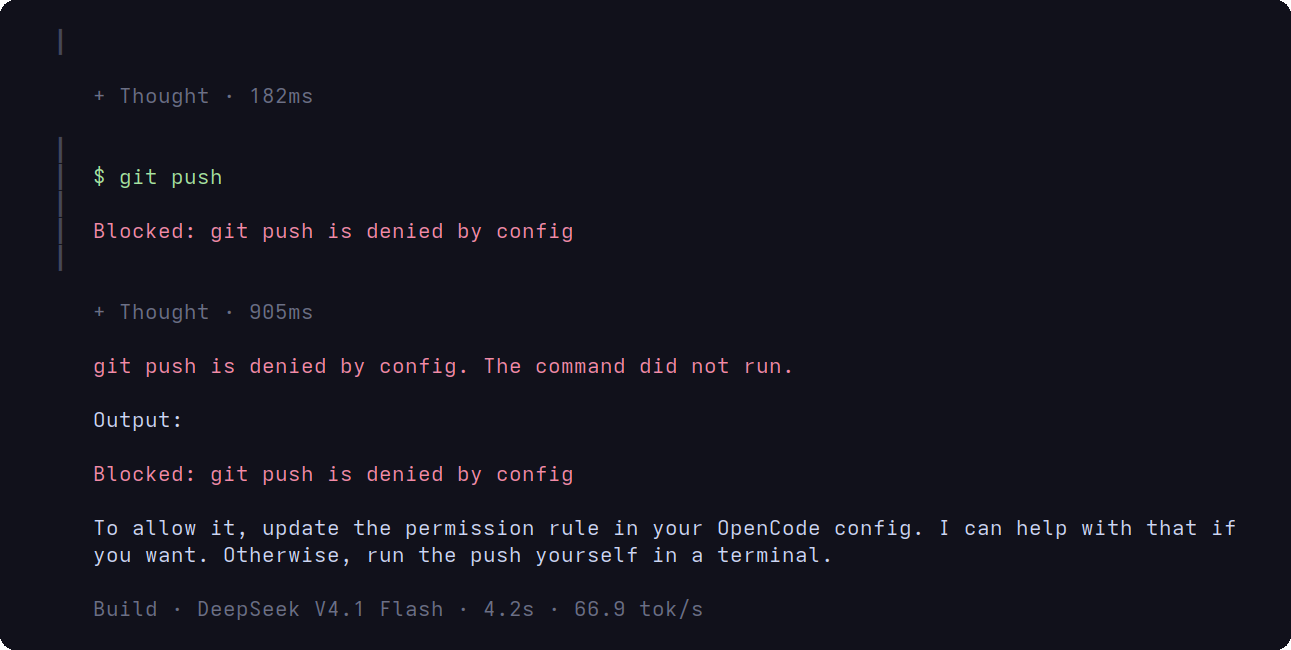
The screenshots come from a demo repository. The config allows commit on a
feature branch, asks for commit on main, and denies push on main.
Allowed on a feature branch. The agent runs git commit with no prompt.
Asked on main. The same command opens the permission prompt.
Denied on main. git push is blocked and the message explains why.
What it does
- Intercepts the
shellpermission viactx.permission.hook("evaluate")and returnseffect: "allow" | "ask" | "deny"when a git mutation matches the resolved policy. - Resolves the branch with
git -C <directory> branch --show-current; the directory comes from the session (ctx.session.get().location.directory), not the plugin instance. - Resolves the policy hierarchically:
repos[<directory>]overridesbranches[<branch>], which overridesdefault. - Applies the same decision to every resource of a compound command, so
cd /tmp && git commitis caught. Precedence across resources isdeny > ask > allow. - Passes read-only commands (
status,log,diff,fetch, …) and anything that is not a known git mutation. - Fails closed: with no options, every git mutation is denied.
Requirements
- OpenCode V2. The V2 release changed the plugin API; V1 plugin implementations do not run in V2.
- Bun to install dependencies (dev only).
Install
opencode plugin add opencode-branch-guard
Or add the package to opencode.jsonc (project or
~/.config/opencode/opencode.jsonc):
{
  "$schema": "https://opencode.ai/config.json",
  "plugins": ["opencode-branch-guard"]
}
With no options the plugin is fail-closed: it denies every git mutation. Pass options to allow or ask for the operations you want.
This is a server plugin. Configure it in
opencode.json(c). Thecli.jsonfile is for terminal (TUI) plugins only.
Install from source (local dev)
Clone the repository and install dependencies:
git clone https://github.com/hugobatista/opencode-branch-guard.git ~/code/projects/opencode-branch-guard
cd ~/code/projects/opencode-branch-guard
bun install
Register the plugin in your
opencode.jsoncwith an absolute path to thesrcdirectory (a local plugin directory must containindex.tsat its root):{ "$schema": "https://opencode.ai/config.json", "plugins": ["/home/your-user/code/projects/opencode-branch-guard/src"] }To pass options with a local path, use the object form and set
packageto the path:{ "$schema": "https://opencode.ai/config.json", "plugins": [ { "package": "/home/your-user/code/projects/opencode-branch-guard/src", "options": { "default": { "allow": ["commit", "push"] }, "branches": { "main": { "allow": [], "ask": ["commit"] } } } } ] }Restart OpenCode.
Configuration
Pass options with the object form. The plugin is configured under options:
{
  "$schema": "https://opencode.ai/config.json",
  "plugins": [
    {
      "package": "opencode-branch-guard",
      "options": {
        "default": {
          "allow": ["add", "branch", "checkout", "commit", "push", "fetch", "merge", "pull", "rebase", "reset", "restore", "stash", "switch", "tag"],
          "ask": [],
          "deny": []
        },
        "branches": {
          "main": { "allow": [] },
          "master": { "allow": [] }
        }
      }
    }
  ]
}
Policy shape
A policy is { "allow": string[], "ask": string[], "deny": string[] }. Every
field is optional and holds a list of git operations.
| Effect | Result |
|---|---|
allow |
The operation runs without prompting. |
ask |
The client asks the user to approve the operation. |
deny |
The operation is blocked. The message explains why. |
An operation missing from every list is denied. This keeps the plugin fail-closed.
Options
| Option | Default | Description |
|---|---|---|
default |
none (fail-closed) | Baseline policy applied when no more specific rule matches. Any mutation missing from the resolved allow and ask is denied. |
branches |
none | Policy keyed by exact branch name, resolved at command time from the VCS. |
repos |
none | Policy keyed by absolute location directory. Takes precedence over branches and default. |
Effects and precedence
Precedence is deny > ask > allow:
- If the operation is in
deny, it is denied. This wins over every other list. - Otherwise, if it is in
ask, the client asks the user. - Otherwise, if it is in
allow, it runs. - Otherwise, it is denied (fail-closed).
An operation listed in both ask and allow is asked. deny always wins.
When OpenCode checks a compound command, the plugin aggregates every resource
with the same precedence: one deny blocks the command, otherwise one ask
escalates it, otherwise it is allowed.
How a policy is resolved
For a command on branch B in directory D:
baseisdefault.ruleisrepos[D]if present, otherwisebranches[B], otherwise nothing.allowisrule.allow, orbase.allow, or[].askisrule.ask, orbase.ask, or[].denyisbase.denyfollowed byrule.deny.
allow and ask replace the baseline. deny unions with the baseline.
This means a specific rule that omits ask inherits the baseline ask, and a
rule that sets ask replaces it.
Because deny only unions with the baseline, a repos rule does not inherit
the deny of the matching branches rule. Repeat the operation in the repos
rule if you need it there.
Recognized git operations
add, branch, checkout, cherry-pick, clean, commit, merge, mv,
push, rebase, reset, restore, revert, rm, stash, switch, tag.
Anything not in this list is treated as read-only and passes. The branch is
matched exactly with git branch --show-current. There are no globs.
Examples
Each example shows the options object. Wrap it in the plugins object form
shown in Configuration.
Common recipes
| Goal | Use |
|---|---|
| Allow work on normal branches, ask on protected branches | default.allow plus branches.<name>.ask |
| Block every mutation on protected branches | branches.<name>: { "allow": [] } |
| Ask for every mutation | default: { "ask": [...] } |
| Block one operation everywhere | default: { "deny": ["push"] } |
| Different policy for one checkout | repos: { "/path": { ... } } |
1. Allow on normal branches, ask on protected branches
{
  "default": {
    "allow": ["add", "checkout", "switch", "commit", "merge", "push", "rebase", "stash"]
  },
  "branches": {
    "main": {
      "allow": [],
      "ask": ["add", "checkout", "switch", "commit", "merge", "push", "rebase", "stash"]
    },
    "master": {
      "allow": [],
      "ask": ["add", "checkout", "switch", "commit", "merge", "push", "rebase", "stash"]
    }
  }
}
| Command | Feature branch | main / master |
|---|---|---|
git commit |
allow |
ask |
git push |
allow |
ask |
git switch |
allow |
ask |
git reset |
deny |
deny |
git tag |
deny |
deny |
git status |
allow |
allow |
allow and ask replace the baseline. On main, allow is empty and ask
lists the operations, so the listed ones ask. Anything else is denied.
2. Block every mutation on protected branches
{
  "default": { "allow": ["commit", "push"] },
  "branches": {
    "main": { "allow": [] },
    "master": { "allow": [] }
  }
}
| Command | Feature branch | main / master |
|---|---|---|
git commit |
allow |
deny |
git push |
allow |
deny |
git status |
allow |
allow |
An empty allow with no ask denies every mutation.
3. Ask for every mutation
{
  "default": {
    "ask": ["add", "branch", "checkout", "cherry-pick", "clean", "commit", "merge", "mv", "push", "rebase", "reset", "restore", "revert", "rm", "stash", "switch", "tag"]
  }
}
Every mutation asks on every branch. Read-only commands pass. Nothing is blocked, so the user decides.
4. Ask on main, hard-deny push
{
  "default": { "allow": ["commit", "push"] },
  "branches": {
    "main": {
      "allow": [],
      "ask": ["commit"],
      "deny": ["push"]
    }
  }
}
| Command | Feature branch | main |
|---|---|---|
git commit |
allow |
ask |
git push |
allow |
deny |
git merge |
deny |
deny |
On main, commit asks, push is denied, and merge is denied because it is
missing from every list.
5. Block push everywhere
{
  "default": {
    "allow": ["add", "checkout", "switch", "commit", "merge", "rebase", "stash"],
    "deny": ["push"]
  }
}
deny wins over allow. push is blocked on every branch, even though the
other mutations are allowed.
6. Allow only a small set of operations
{
  "default": { "allow": ["commit", "push"] }
}
Only commit and push are permitted. Every other mutation is denied on every
branch. This is the strictest permissive form.
7. Protect a release branch
{
  "default": { "allow": ["commit", "push", "merge"] },
  "branches": {
    "release": {
      "allow": [],
      "ask": ["merge", "tag"],
      "deny": ["push", "reset", "clean"]
    }
  }
}
On the branch named exactly release: merge and tag ask, push, reset,
and clean are denied, and everything else is denied. Branch names match
exactly. There are no globs.
8. Per-repository override
Allow work in a single checkout even on a protected branch by keying it on the location directory:
{
  "default": { "allow": ["commit", "push"] },
  "branches": {
    "main": { "allow": [], "ask": ["commit"], "deny": ["push"] }
  },
  "repos": {
    "/home/you/code/projects/scratch": {
      "allow": ["add", "commit", "push", "reset", "stash", "switch"]
    }
  }
}
In /home/you/code/projects/scratch the repo rule replaces the branch allow
and ask, so commit runs without prompting. The repo rule omits deny, so it
inherits only default.deny (empty here), not the branch deny.
9. Compound commands
{
  "default": { "allow": ["add", "commit"], "deny": ["push"] }
}
| Command | Result |
|---|---|
git add . && git commit -m x |
allow (both allowed) |
git add . && git push |
deny (one resource denied) |
git add . && git reset |
deny (one resource not allowed) |
The plugin applies the policy to every resource of the command. Precedence is
deny > ask > allow.
10. Effect precedence
{
  "default": { "allow": ["commit"], "ask": ["commit"], "deny": [] }
}
commit is in both allow and ask, so it asks. ask wins over allow.
{
  "default": { "allow": ["commit"], "ask": ["commit"], "deny": ["commit"] }
}
Adding commit to deny blocks it. deny wins over everything.
Limitations
The plugin inspects the shell command string, so it can be bypassed by:
- Git hidden behind a wrapper the scanner does not unwrap (
sudo git commit, shell aliases, scripts that call git). - Git invoked through a tool other than the shell tool (for example a subprocess started by a program the agent runs).
- Compound commands the scanner cannot split.
Also note that branch is treated as a mutation, so git branch and
git branch --show-current are blocked or asked on a protected branch. Use
git rev-parse --abbrev-ref HEAD if you need a read-only branch check there.
About ask
The ask effect sends the operation to the OpenCode permission prompt. It has
these limits:
- An explicit
denyin your ownpermissionsconfig is final. The plugin hook runs only forallowandaskdecisions, so adenyrule inopencode.json(c)blocks the command before the plugin sees it. - Non-interactive clients decide how to handle
ask. A run without a user (for example CI) may reject or stall. Keepdenyfor those environments. - "Allow always" may not stick. Approving always saves a durable
allowrule, but the plugin hook still runs and can escalate the command toaskagain. Useallowin the plugin options for a permanent decision. - The plugin never downgrades. If the core resolved an
askfrom your config, the plugin does not turn it intoallow.
It is a guardrail against accidental mutations, not a security boundary.
Verify
After configuring, restart OpenCode and try:
- On
mainwith{ "allow": [] }: ask the agent to rungit commit— the command is denied withBlocked: git commit is not allowed by config. - On
mainwith{ "allow": [], "ask": ["commit"] }: the same command opens a permission prompt. - On a feature branch: the same command is allowed.
git statusandgit logare always allowed.- On a directory listed in
repos, the repository policy applies. - With
{ "allow": [], "ask": ["commit"], "deny": ["push"] }onmain:git pushis denied, andgit commitasks.
Uninstall
opencode plugin remove opencode-branch-guard
Or remove the entry from plugins in your opencode.jsonc and restart
OpenCode.
Development
bun install
bun run typecheck   # tsc --noEmit, strict
bun test            # unit (core logic) + functional (mocked plugin context)
bun run build       # dist/index.js + dist/index.d.ts (npm entrypoint)
src/core.ts— pure logic: git operation parsing, policy resolution, and theallow/ask/denydecision. No OpenCode imports. Fully unit-tested.src/index.ts— the plugin (id: "branch-guard"), aPlugin.define({ id, setup })from@opencode/plugin. It registers actx.permission.hook("evaluate"), resolves the session directory, and reads the branch withgit branch --show-current.scripts/build.ts— bundlessrc/index.tstodist/index.jswith@opencode/pluginexternal, then emits declarations withtsc.
Pre-release checklist
bun install
bun run typecheck
bun test
bun run build
npm pack --dry-run
Inspect the pack list (dist/, README.md, LICENSE only). Scan for secrets
before npm publish.
License
MIT — see LICENSE. Author: Hugo Batista (https://github.com/hugobatista).
同类生态推荐

Git Commit
@levent-kurt/opencode-git-commit
Zero-config background git auto-commit plugin for OpenCode CLI

Oc Solomemory
oc-solomemory
Persistent memory plugin for OpenCode — your AI agent remembers across sessions and projects
Oc Solomemory Dev
oc-solomemory-dev
Persistent memory plugin for OpenCode — your AI agent remembers across sessions and projects