
Status Line
A live status line for OpenCode v2's terminal UI — context window, cache, streaming speed, cost, elapsed time and uncommitted changes in one configurable row.
24
+23 in 30 days
0
39.8
Multi-signal model
14 hours ago
2026-10-04
Install and configure
opencode.jsonWrites to this project's opencode.json — applies to this repository only.
opencode.json
{
  "$schema": "https://opencode.ai/config.json",
  "plugin": ["@rashidrazak/opencode-status-line@1.2.0"]
}
Writes to ~/.config/opencode/opencode.json — applies to every project.
~/.config/opencode/opencode.json
{
  "$schema": "https://opencode.ai/config.json",
  "plugin": ["@rashidrazak/opencode-status-line@1.2.0"]
}
If you want to modify the plugin locally, install it into the project and reference the local path.
shell
pnpm add -D @rashidrazak/opencode-status-lineOpenCode loads npm dependencies through its embedded runtime on startup and caches them locally — no manual global install needed.


A status line for OpenCode v2's terminal UI. It shows context window usage, cache usage, streaming speed, cost, elapsed time and uncommitted changes in one configurable row.
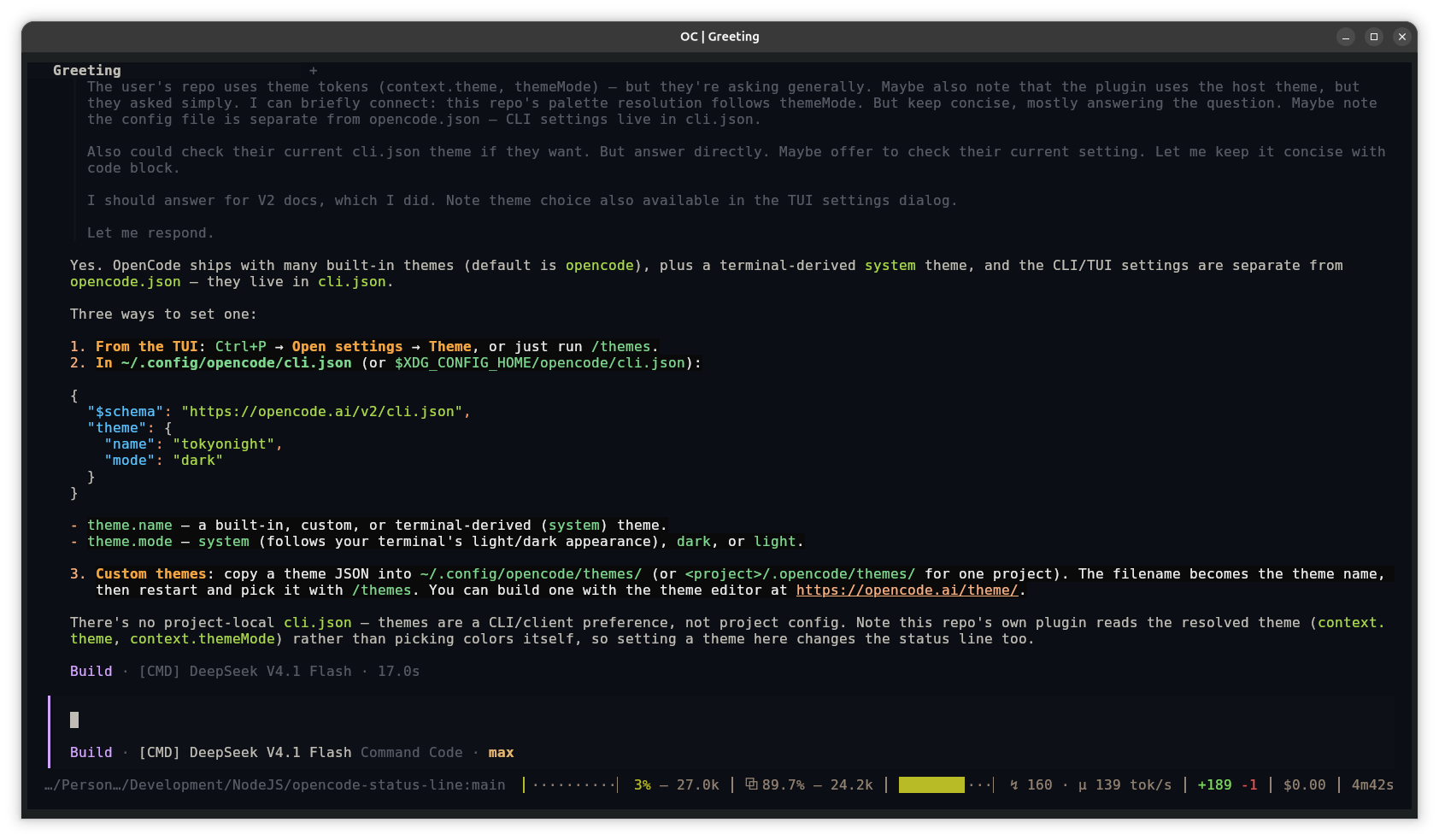
The line itself:
███········▏ 26% — 262.0k │ ⧉ 99.6% — 260.9k │ ██████·····▏ ↯ 158 · μ 88 tok/s │ +6 -1 │ $0.18 │ 57m11s
From left to right, the line shows context window usage, cache usage, current
speed (↯) and turn average (μ) speed, uncommitted changes, session cost,
and elapsed time. Segments with nothing to show are hidden.
What you get
- Context window: a bar showing how full the context window is, the percentage used, and the token count. The bar colour changes as the window fills.
- Cache (
⧉): how much of the model's input came from cache, and the cached token count. - Speed: the current streaming speed (
↯) and the average for the turn (μ). When a stream stops, the speed segment rests at↯ 0.0in a dimmed colour with an empty gauge — the same shape a resumed session shows.window.hold: "last"keeps the last reading on screen instead, andfalsehides the segment whenever there is no live reading. - Cost and time: the session's cost so far and how long it has been running.
- Uncommitted changes: added and removed line counts for staged, unstaged
and untracked files, taken from OpenCode's VCS status. No
gitcommand is run. - Running shells: the number of commands running right now. Click the count to open the composer's Shell tab.
/opencode-status-line(alias/tps): opens a dialog with the detailed numbers behind the meter.
The line can be placed in one slot or in several at once, and each placement
can show its own segments. When the window is narrow, whole segments move to
the next row; in a sidebar they stack one per row. Built-in colour palettes:
Catppuccin, Dracula, Gruvbox, Nord, Rosé Pine, Tokyo Night, and the flat
grey and white.
Install
Requires OpenCode v2. The plugin is CLI-only, so it is loaded from
~/.config/opencode/cli.json, not opencode.json.
Add the package to the
pluginslist. Create the file if it does not exist, or add the package to the existing list:{ "plugins": ["@rashidrazak/opencode-status-line"] }Restart OpenCode and open a session. The line appears at the bottom of the window, below OpenCode's own footer. Run
/opencode-status-line(alias/tps, also in the command palette) to open the stats dialog.
OpenCode downloads the package and runs its prebuilt entry, so there is nothing to compile on your side.
The line only appears while a session is open. If it does not appear during a
session, check that the entry is in cli.json (not opencode.json) and
restart OpenCode. For other problems, see the manual's common questions and
fixes; if none of them apply, open an issue.
To install from a checkout, point cli.json at the directory instead. An
absolute path, a path relative to the config directory, or a package name all
work:
{
  "plugins": ["/path/to/opencode-status-line"]
}
Changes to a checkout hot-reload, so nothing needs rebuilding.
Quick start
Configuration is optional and written in JSON. Place it in
~/.config/opencode/opencode-status-line.json for every project, or in
.opencode-status-line.json in a project folder. The project file wins where
both set the same key. For example:
{
  "usage": { "labels": "words" },
  "colors": { "palette": "catppuccin" },
  "cap": { "gaugeWidth": 14 }
}
This changes the labels from glyphs to words, applies the Catppuccin palette, and widens the speed gauge. Settings are read when the plugin loads, so restart OpenCode to apply a change. Invalid files and values produce a warning and are ignored.
Full manual
The customization manual is the complete reference:
- every setting, with its default and allowed values
- choosing and ordering the segments, per placement if you like
- placing the line in one slot or several at once, and padding it
- understanding and tuning the speed meter
- the bundled palettes, custom colours and per-segment opt-outs
- ready-made setups to copy
- common questions and fixes
Development
bun test                    # the whole suite, no OpenCode needed
bun test test/rate.test.ts  # one module
bun install                 # once, for the typechecker
bun run typecheck           # src/, the tests and the entry
bun run build:entry         # dist/tui.js — the entry npm consumers run
npm run check:pack          # every module the entry imports is in the tarball
src/tui.tsx is the plugin entry. src/rate.ts holds the speed maths,
src/render.ts the gauge and context-bar geometry, src/format.ts the
usage-line formatting, src/diff.ts the uncommitted-change counter,
src/palette.ts the bundled colour palettes, and src/config.ts the JSON
loader. The root tui.tsx re-exports the entry so OpenCode can load the
plugin from a checkout directory; npm consumers resolve the entry through the
exports map, which points at the built dist/tui.js.
CI runs the suite on Linux, macOS and Windows for every pull request, together
with a typecheck of the source (the entry included), a build of the npm entry
and the tarball check. Contributions are welcome; see
CONTRIBUTING.md for the workflow, and AGENTS.md for the
host-API traps behind the entry.
Publishing
The package ships source plus one built file. A checkout install runs
src/tui.tsx as TSX, which OpenCode transpiles itself; npm consumers run
dist/tui.js, which bun run build:entry compiles with OpenTUI's own Solid
plugin so the entry imports @opentui/solid by name instead of resolving a JSX
runtime at load — see AGENTS.md for why the entry is built.
package.json maps ./tui to dist/tui.js, and the files allowlist
carries both src/ and dist/. @opencode/plugin is a dependency; the
rendering peers (@opentui/core, @opentui/solid, solid-js) are provided by
OpenCode. npm run check:pack verifies that every module the entry imports is
in the tarball and that the packed entry is the precompiled one.
Releases are published by CI. Pushing a v* version tag (created by
npm version) triggers .github/workflows/publish.yml, which publishes with
npm trusted publishing (OIDC) and creates the GitHub Release from that
version's changelog section in the same run. Creating the Release by hand also
works. No repository secret is needed, and provenance is attached
automatically. The tagged commit must be on main, and the tag must match the
package.json version. Versions and Releases that already exist are skipped
rather than treated as errors, so re-runs and the hand-published bootstrap
release are safe. Maintainers: see RELEASING.md.
Similar plugins

Status
@opencode-cockpit/status
A statusline for OpenCode you can actually configure: declarative segments, a typed module, or your existing Claude Code statusline command

Telescope
@bojackduy/opencode-telescope
OpenCode TUI plugin for fuzzy and semantic search across local conversation history, session transcripts, and AI coding chats

Tui Context
opencode-tui-context
OpenCode TUI plugin that renders session context-window usage as a segmented bar in the sidebar