
Tui Context
OpenCode TUI plugin that renders session context-window usage as a segmented bar in the sidebar
0
170
10 in 7 days
33.4
Multi-signal model
12 days ago
2026-09-22
Install and configure
opencode.jsonWrites to this project's opencode.json — applies to this repository only.
opencode.json
{
  "$schema": "https://opencode.ai/config.json",
  "plugin": ["opencode-tui-context@1.0.1"]
}
Writes to ~/.config/opencode/opencode.json — applies to every project.
~/.config/opencode/opencode.json
{
  "$schema": "https://opencode.ai/config.json",
  "plugin": ["opencode-tui-context@1.0.1"]
}
If you want to modify the plugin locally, install it into the project and reference the local path.
shell
pnpm add -D opencode-tui-contextOpenCode loads npm dependencies through its embedded runtime on startup and caches them locally — no manual global install needed.
See context usage and token composition at a glance in the OpenCode sidebar.


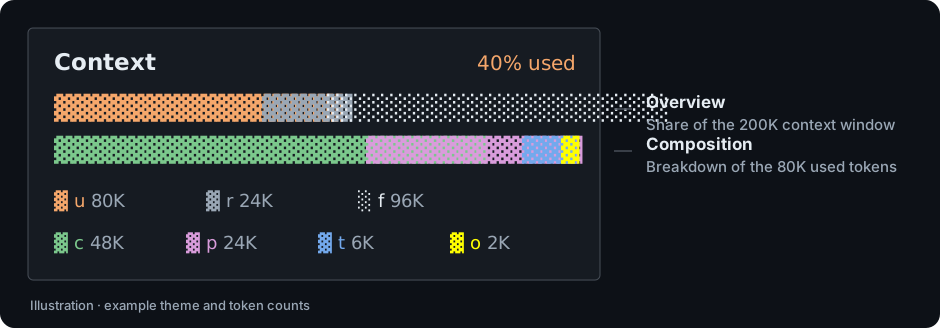
Illustration with sample data; actual colors follow your OpenCode theme, except for the yellow output segment.
- Two views: context-window capacity and a breakdown of reported tokens.
- Fits your sidebar: bars and legends adapt to the available width.
- No extra model calls: reads existing usage data without a tokenizer or credentials.
Quick start
Requires OpenCode >=1.18.0. Installation and activation have been verified on Windows with OpenCode 1.18.31.
opencode plugin -g opencode-tui-context
OpenCode downloads the prebuilt plugin and adds it to the global tui.json; no local build is needed.
Restart OpenCode, open a session, and show the sidebar. The Context panel displays usage after an assistant response reports positive output tokens. Until then, it shows no assistant turns yet.
- For a project-only installation, omit
-g. - For ZIP/source installation or migration from a local copy, see the user guide.
- Seeing two Context panels? Follow the built-in panel instructions.
Reading the panel
- Top bar: used, reserved, and free context-window space. Reserved space is a display estimate based on the model's output limit; it does not reserve tokens in OpenCode.
- Bottom bar: the used tokens split into cache, prompt, reasoning, and output. It shows composition, so it can be full while the top bar still has free space.
| Bar | Legend | Segment | Meaning |
|---|---|---|---|
| Overview | u |
used |
Total used tokens |
| Overview | r |
reserved |
Remaining output reservation (estimated) |
| Overview | f |
free |
Space remaining after usage and reservation |
| Composition | c |
cached |
Cache-read tokens |
| Composition | p |
prompt |
Input + cache-write tokens |
| Composition | t |
think |
Reasoning tokens |
| Composition | o |
out |
Output tokens |
The panel reflects the latest assistant message reporting positive output tokens. It is not cumulative session usage or an exact count of the next prompt.
See the user guide for segment meanings and calculation details.
Optional configuration
The defaults work without additional configuration. To hide the legends, edit the existing plugin entry in tui.json (not opencode.json):
{
  "plugin": [
    ["opencode-tui-context", { "showLegend": false }]
  ]
}
Keep your other settings and plugins. Preserve an existing @version suffix if you want to stay on that version; edit the entry rather than adding a second copy.
| Option | Default | Purpose |
|---|---|---|
showLegend |
true |
Show token legends when space permits. |
exclude |
[] |
Hide selected segments and their legends. |
barWidth |
24 |
Initial outer panel width; measured sidebar width takes over. Not a fixed bar width. |
Restart OpenCode after changes. The full configuration reference lists supported segments and option behavior.
Documentation and support
- User guide: other installation methods, configuration, calculations, troubleshooting, updates, and removal.
- Contributing: development setup, checks, and source layout.
- Release guide: packaging and publishing for maintainers.
- Report an issue: include your OpenCode version, OS, and steps to reproduce.
License
MIT © opencode-tui-context contributors.
Similar plugins

Thinking Meter
opencode-thinking-meter
OpenCode TUI plugin: counts the turns cut off mid-thought, says whether the output cap or the context window did it, and shows what thinking costs per turn and after which tool.
Compaction Meter
opencode-compaction-meter
OpenCode TUI plugin: how many times the session has compacted, tool calls per cycle, room after each restart, and whether the last summary was cut off. Spots compaction thrash while you work.

Sidebar Token Metrics
opencode-sidebar-token-metrics
OpenCode sidebar plugin showing generation speed (tok/s), cache hit rate, and average time-to-first-token (TTFT).