
Yul
Forces models to use the latest versions of dependencies instead of outdated versions from model training data.
3
2,154
1.1k in 7 days
45.4
Multi-signal model
1 day ago
2026-10-03
Install and configure
opencode.jsonWrites to this project's opencode.json — applies to this repository only.
opencode.json
{
  "$schema": "https://opencode.ai/config.json",
  "plugin": ["opencode-yul@0.0.21"]
}
Writes to ~/.config/opencode/opencode.json — applies to every project.
~/.config/opencode/opencode.json
{
  "$schema": "https://opencode.ai/config.json",
  "plugin": ["opencode-yul@0.0.21"]
}
If you want to modify the plugin locally, install it into the project and reference the local path.
shell
pnpm add -D opencode-yulOpenCode loads npm dependencies through its embedded runtime on startup and caches them locally — no manual global install needed.
Force your AI agents (Claude and OpenCode) to use the latest release of dependencies instead of them writing the outdated version from training data.
Supported manifests:
pom.xml— Maven Centralrequirements.txt— PyPI,==pins onlypyproject.toml— PyPI,[project.dependencies]/[project.optional-dependencies],==pins onlypackage.json— npm registry,dependencies/devDependencies/optionalDependencies/peerDependencies, exact version pins only.github/workflows/*.yml/*.yaml— GitHub Actions,uses:steps pinned to a version-like tag (branch names and commit SHAs are left alone)go.mod— Go modules,requireentries (single-line and block form, direct and indirect)Cargo.toml— crates.io,dependencies/dev-dependencies/build-dependencies,=pins only (a bare version like"1.2.3"is Cargo's implicit caret range, not an exact pin)
Install as a Claude Code plugin
Inside Claude Code, run:
/plugin marketplace add chains-project/chains-hooks
/plugin install yul@chains-project
Enabling it for a whole team
To enable it for everyone working in a repo, check this into the repo's .claude/settings.json:
{
  "extraKnownMarketplaces": {
    "chains-project": {
      "source": { "source": "github", "repo": "chains-project/chains-hooks" }
    }
  },
  "enabledPlugins": { "yul@chains-project": true }
}
The extraKnownMarketplaces entry matters: it tells collaborators' Claude Code where yul@chains-project lives, so they don't need to have added the marketplace themselves.
Collaborators then don't run any install commands. The first time they start Claude Code in the repo, it reads the checked-in settings, asks them to confirm they trust the chains-project marketplace and the yul plugin, and — once accepted — installs the plugin and downloads the release binary on session start. Declining just leaves the plugin disabled for them; nothing else breaks. Updates are picked up automatically as new plugin versions are released.
Use with OpenCode
Also ships as opencode-yul, an OpenCode plugin driving the same release binary through OpenCode's tool.execute.before hook instead of Claude Code's PreToolUse. Add it to opencode.json/opencode.jsonc:
{
  "plugin": ["opencode-yul"]
}
See opencode-yul/README.md for details.
Manual install
[!NOTE] Prefer this method if you want control over which version you run. The
/plugininstalls above updates automatically as new releases ship. OpenCode install also ensures that the updates are automatically pulled in whenever the NPM package is updated.
If you have Go installed, this is the preferred way to install the yul binary yourself:
go install github.com/chains-project/yul@latest
This places the binary at $(go env GOPATH)/bin. Unlike a curl | sh script, go install builds from the module proxy over a verified, checksummed (GONOSUMCHECK/go.sum-backed) supply chain, so you're not piping an arbitrary internet script into your shell.
If you don't have Go installed:
curl -fsSL https://raw.githubusercontent.com/chains-project/yul/main/install.sh | sh
This downloads the right yul binary for your OS/arch from the latest release, verifies its checksum, and installs it to ~/.local/bin (override with YUL_INSTALL_DIR; pin a version with YUL_VERSION).
Manual usage
If you installed the binary manually instead of using the plugin, add to .claude/settings.json:
{
  "hooks": {
    "PreToolUse": [
      {
        "matcher": "Write|Edit",
        "hooks": [
          {
            "type": "command",
            "command": "/home/<user>/go/bin/yul",
            "timeout": 30
          }
        ]
      }
    ]
  }
}
Point command at the installed binary's absolute path (~/.local/bin/yul if you used the installer above, or $(go env GOPATH)/bin/yul if you used go install) — never at go run. go run always exits 1 on program failure regardless of the program's actual exit code (golang/go#17813), so a blocking exit 2 from this hook is flattened to exit 1. Claude Code treats exit 1 as a non-blocking error, so the write goes through instead of being blocked.
Example
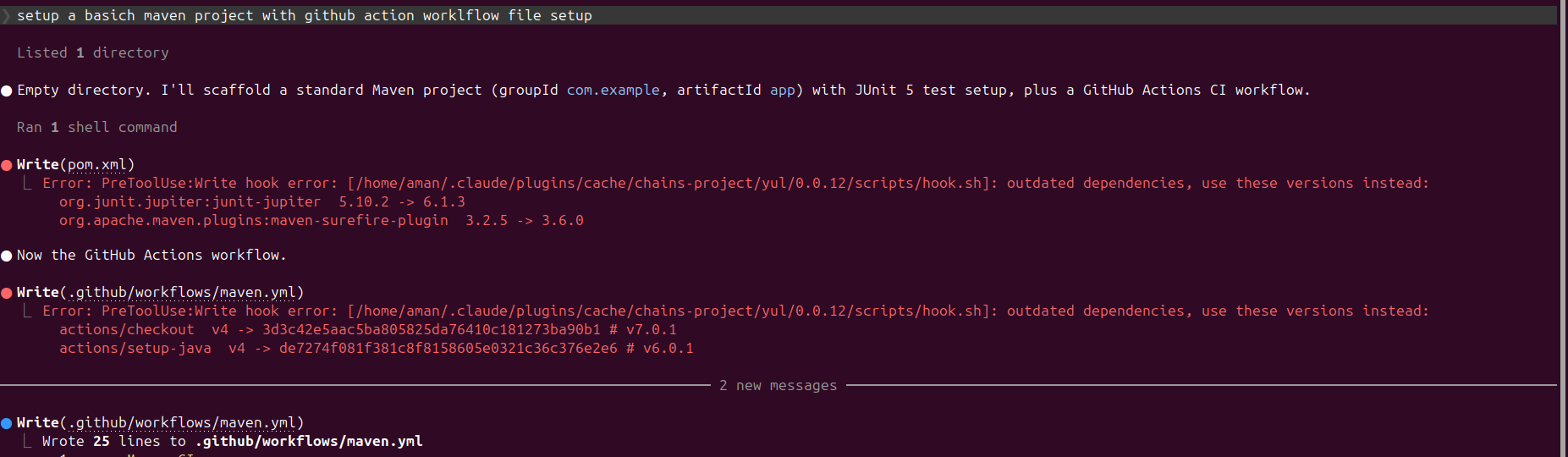
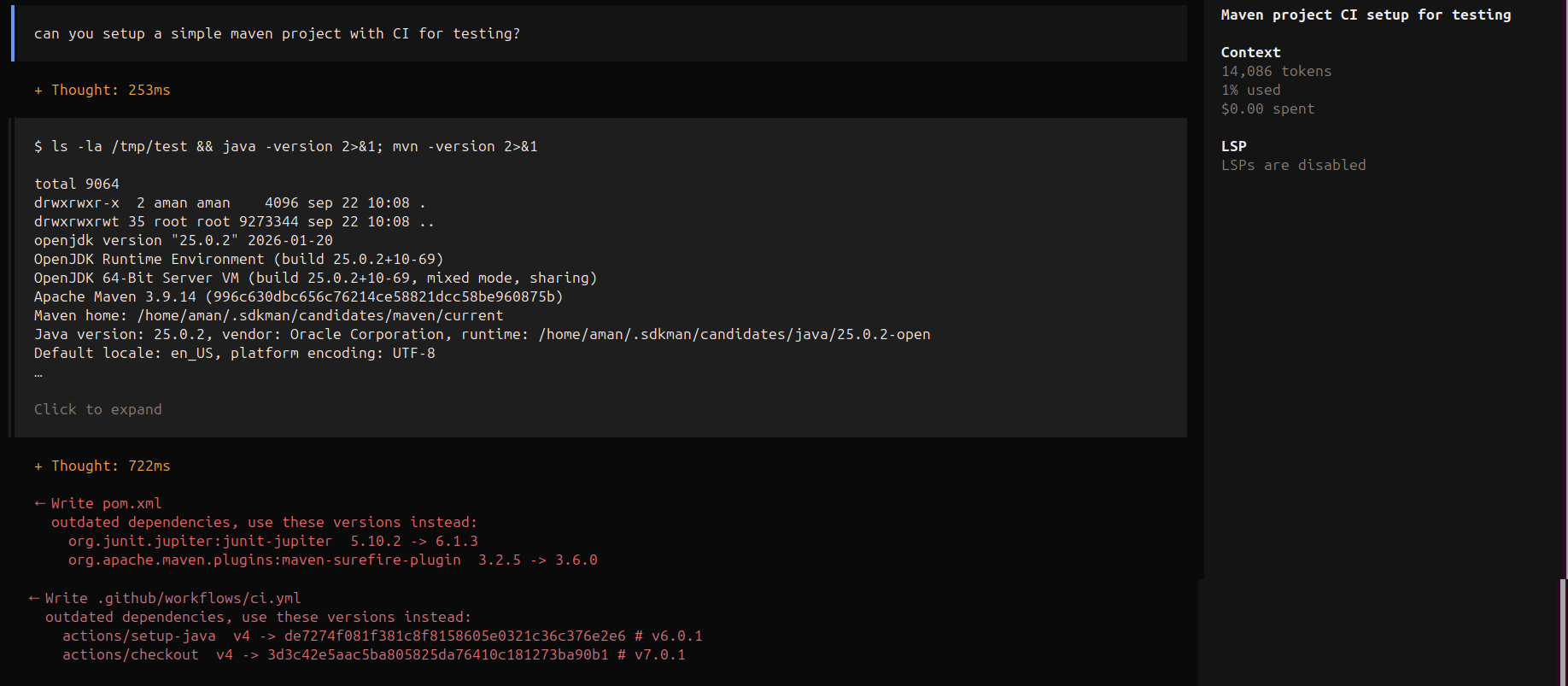
Claude scaffolds a Maven project with a GitHub Actions workflow; the hook blocks both stale pins and Claude retries with the versions it's given:
Claude Code
OpenCode
Initial scan
If you're already working on a project when you install the hook, yul does an init-scan and asks whether you want to update any stale pins it finds. Say yes and it updates on the fly; say no and it remembers your decision and won't prompt again.

Why some ecosystems need this more than others
yul only ever fires on a manifest write that hand-pins an exact, already-stale version. Some ecosystems have a CLI command that resolves and writes the latest version for you, so Claude reaches for that instead of typing a version number — which means there's nothing stale for the hook to catch. Others have no such command, so Claude has to type a version from memory (often stale, since that's frozen at training time), which is exactly the case yul is built to guard.
This was observed empirically across the benchmark/ scaffolding runs (see benchmark/runs, and the write-up): in the nohook condition, Claude's own tool choice split cleanly along these lines.
| Ecosystem | Direct "give me latest" command? | What Claude actually did (nohook) |
|---|---|---|
Go (go.mod) |
Yes — go get <module> / go mod tidy |
Ran go get, which hits the module proxy and writes the resolved latest version itself. Nothing to catch. |
npm (package.json) |
Yes — npm install <pkg> |
Ran npm install, which resolves the latest release and writes it (as a ^ range) at install time, before any Write/Edit reaches the hook. |
pip (requirements.txt) |
No | pip install <pkg> installs into the venv but doesn't add the package to requirements.txt — Claude typed the line by hand (often unpinned, or an exact == pin recalled from memory). |
PyPI (pyproject.toml) |
No | Same gap as pip — no command resolves a version straight into [project.dependencies], so Claude hand-typed the pin (or a >= range). |
Maven (pom.xml) |
No | There's no Maven equivalent of npm install/go get that adds a resolved <dependency> block; Claude always hand-typed the <version>. |
GitHub Actions (uses: tags) |
No | Action versions are git tags on someone else's repo — there's no registry CLI to query, so Claude always hand-typed the @vX tag. |
Cargo (Cargo.toml) |
Yes — cargo add <crate> |
Ran cargo add in 9 of 10 cases, which resolves the latest version and writes it as Cargo's implicit caret range (no =) — nothing for the hook to catch. The exception, cargo-top-10-winapi-i686-pc-windows-gnu, hand-edits Cargo.toml directly with Write/Edit in both the hook and nohook runs; the hook still finds nothing to mitigate there because the exact pin Claude writes from memory already matches the latest release. |
go.mod, package.json, and Cargo.toml are the manifests where the
ecosystem's own tooling already avoids the stale-pin problem.
However, yul still acts as a safety net for those ecosystems.
Similar plugins

With Claude
opencode-with-claude
OpenCode plugin to use your Claude Max subscription via Meridian proxy

Goal
opencode-goal-plugin
Durable, guarded goal workflows for OpenCode.

Openai Compact
opencode-openai-compact
OpenCode plugin that stores OpenAI Responses API compaction checkpoints in SQLite.