
0
206
近 7 天 21
33.7
生态多维模型
16 天前
2026-08-04
快速安装与配置
opencode.json写入当前项目的 opencode.json,只对这个仓库生效。
opencode.json
{
  "$schema": "https://opencode.ai/config.json",
  "plugin": ["@ternetin/opencode-codex-multiplexer@0.1.4"]
}
写入 ~/.config/opencode/opencode.json,对所有项目生效。
~/.config/opencode/opencode.json
{
  "$schema": "https://opencode.ai/config.json",
  "plugin": ["@ternetin/opencode-codex-multiplexer@0.1.4"]
}
若你要在本地改造这个插件,先装到项目里再从本地路径引用。
shell
pnpm add -D @ternetin/opencode-codex-multiplexeropencode 启动时会通过内嵌运行时自动加载 npm 依赖并缓存至本地目录,无需手动在全局环境执行安装。
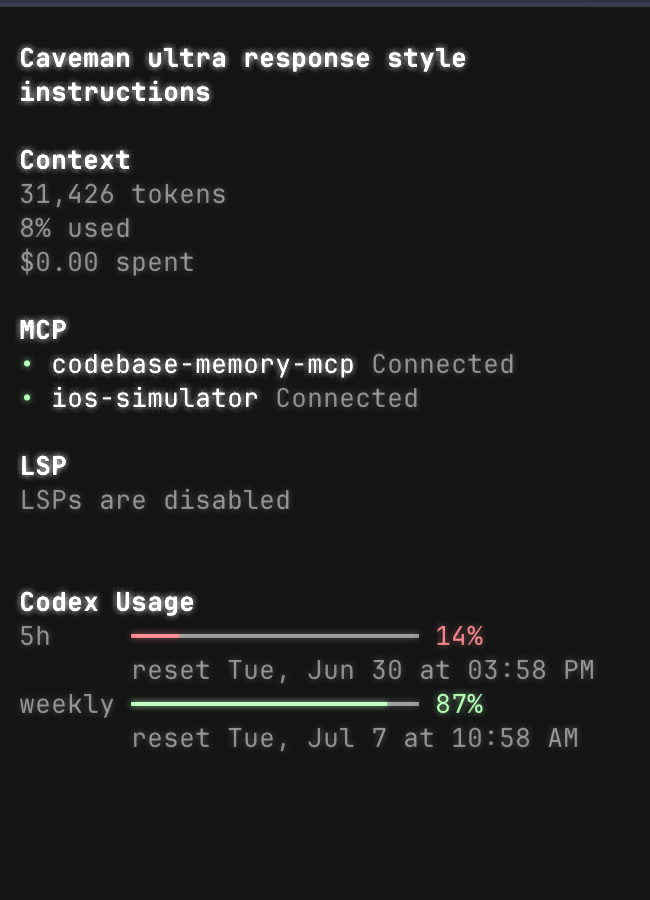
OpenCode TUI plugin for switching saved Codex/OpenAI auth profiles and showing Codex usage windows.
Install
Add the TUI plugin to ~/.config/opencode/tui.json:
{
  "plugin": ["@ternetin/opencode-codex-multiplexer"]
}
Optional hot-switch hook in ~/.config/opencode/opencode.json:
{
  "plugin": ["@ternetin/opencode-codex-multiplexer/server"]
}
Restart OpenCode after changing plugin config.
OpenCode installs npm plugins from config automatically. You do not need to run bun add unless you want to test or use the package from another JavaScript project.
For a local unpublished checkout, replace /absolute/path/to/codexmx with the checkout's absolute path:
{
  "plugin": ["/absolute/path/to/codexmx/src/tui.tsx"]
}
{
  "plugin": ["/absolute/path/to/codexmx/dist/server.js"]
}
Commands
codexmx:savesaves currentauth.jsonand, when present,account.jsoninto a named Codex profile.codexmx:switchswitches current live Codex auth to a saved profile.codexmx:showshows redacted debug info about live and selected auth.
Slash commands:
/codexmx-save/codexmx-switchor/codexmx/codexmx-show
Storage
Profiles are stored under:
$OPENCODE_DATA_DIR/codexmx/profiles/
Default OPENCODE_DATA_DIR is ~/.local/share/opencode.
Profile files:
<name>.auth.json<name>.account.json
The selected profile name is stored at:
$OPENCODE_DATA_DIR/codexmx/.current
Files are written with 0600 permissions.
Hot Switch
The TUI switch copies the selected profile into the live auth.json and, when available, account.json, then updates .current. Usage API data refreshes without restart.
Model request hot-switch is best effort through the server plugin. It injects the selected profile bearer token in chat.headers for OpenAI/Codex-like providers. This affects new requests only. If OpenCode/provider code overwrites headers after plugin hooks, restart remains required.