
opencode-plugin-codex-usageOpenCode TUI plugin that shows live Codex usage limits in the session sidebar.
7
236
14 in 7 days
40.9
Multi-signal model
26 days ago
2026-07-25
Install and configure
opencode.jsonWrites to this project's opencode.json — applies to this repository only.
opencode.json
{
  "$schema": "https://opencode.ai/config.json",
  "plugin": ["opencode-plugin-codex-usage@0.1.3"]
}
Writes to ~/.config/opencode/opencode.json — applies to every project.
~/.config/opencode/opencode.json
{
  "$schema": "https://opencode.ai/config.json",
  "plugin": ["opencode-plugin-codex-usage@0.1.3"]
}
If you want to modify the plugin locally, install it into the project and reference the local path.
shell
pnpm add -D opencode-plugin-codex-usageopencode loads npm dependencies through its embedded runtime on startup and caches them locally — no manual global install needed.
OpenCode TUI plugin that shows live Codex usage limits in the right sidebar.
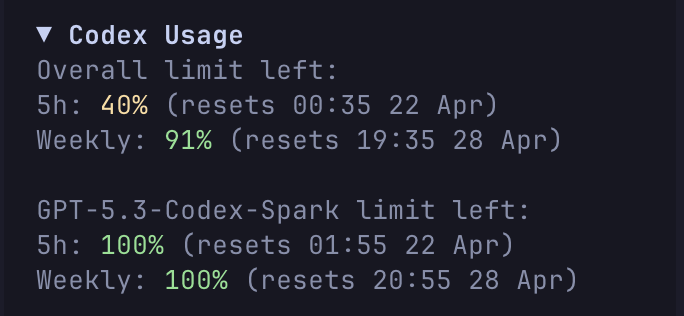
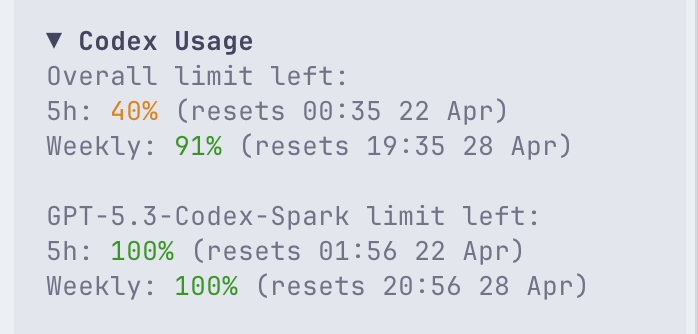
It reads Codex quota data from codex app-server using the same account/rateLimits/read RPC that Codex uses for rich clients, then renders the returned buckets inside OpenCode's sidebar_content slot.
What it shows
- The main Codex usage bucket.
- Extra model-specific buckets when Codex exposes them, for example
GPT-5.3-Codex-Spark. - The current remaining percentage and reset time for each available window.
Requirements
- OpenCode TUI.
- The
codexCLI installed and available on yourPATH, unless you setcodexBinaryto a custom path. - A working Codex login so
codex app-servercan read your rate limits.
When it appears
- The plugin adds a
Codex Usagesection to the right sidebar. - It is most useful during Codex or OpenAI-backed sessions, where it starts expanded automatically.
- In other sessions it stays available in the sidebar, but starts collapsed.
Installation
Install it like any other OpenCode plugin:
opencode plugin opencode-plugin-codex-usage
If you want to configure it in your workspace-local TUI config, add this to .opencode/tui.json:
{
  "$schema": "https://opencode.ai/tui.json",
  "plugin": [["opencode-plugin-codex-usage", { "refreshMs": 30000 }]]
}
Restart OpenCode after updating the config.
Open a Codex-backed session and look for Codex Usage in the right sidebar.
Manual Installation
Use this only if you want to run a local checkout of the plugin, for example while testing unreleased changes.
Clone the repository and install dependencies:
git clone https://github.com/anaskhan96/opencode-plugin-codex-usage.git
cd opencode-plugin-codex-usage
bun install
Then point .opencode/tui.json at the local source:
{
  "$schema": "https://opencode.ai/tui.json",
  "plugin": [["file:///absolute/path/to/opencode-plugin-codex-usage", { "refreshMs": 30000 }]]
}
Restart OpenCode after updating the config.
Configuration
The plugin accepts these options in tui.json.
If you installed the published plugin, configure it like this:
{
  "plugin": [["opencode-plugin-codex-usage", {
    "refreshMs": 30000,
    "codexBinary": "codex",
    "codexHome": "/path/to/codex-home"
  }]]
}
If you are using a local checkout, use the same options with your file:///absolute/path/... plugin entry:
{
  "plugin": [["file:///absolute/path/to/opencode-plugin-codex-usage", {
    "refreshMs": 30000,
    "codexBinary": "codex",
    "codexHome": "/path/to/codex-home"
  }]]
}
Options:
refreshMsPoll interval in milliseconds. Default:30000Minimum enforced value:15000codexBinaryCommand or absolute path used to launch Codex. Default:codexcodexHomeDirectory used asCODEX_HOMEwhen launching Codex. Default: unset
If codex is not on your PATH, set codexBinary to the full path of the executable.
If codexHome is set to a non-empty value, it overrides any CODEX_HOME inherited from the
OpenCode process. If it is omitted or empty, the inherited environment is left unchanged, allowing
Codex to use an existing CODEX_HOME or its normal ~/.codex fallback.
Troubleshooting
codex CLI not foundInstall the Codex CLI, or setcodexBinaryto its absolute path.No Codex usage data availableMake sure Codex is logged in and able to return rate-limit data fromcodex app-server.Codex login expiredRuncodex login, then restart OpenCode. This means the Codex CLI's cached ChatGPT authentication token was invalidated or expired.The plugin appears, but stays collapsed That is expected in non-Codex sessions. Open a Codex or OpenAI-backed session to see it expand automatically.
The sidebar does not update immediately The default refresh interval is
30000ms. The plugin also refreshes when the session becomes idle.
Local Verification
For a local checkout, run the import smoke test:
cd opencode-plugin-codex-usage
bun run check
That verifies the plugin module can be imported with OpenTUI runtime support.
Performance Notes
- CPU: low. The plugin is idle most of the time and does a short refresh on an interval and when a session becomes idle.
- Memory: low. It keeps only a small in-memory snapshot of the latest limit data.
- Token/context usage: none. It does not call the model or inject extra prompt/context into OpenCode sessions.
The only real overhead is that each refresh launches a short-lived codex app-server process to read the current rate limits. At the default 30000ms this should be light, but if you want even less churn you can increase refreshMs to 60000 or 120000.