
Shoulder Daemon
Context advisor for coding agents. Watches the session over HTTP hooks, keeps a store of facts, and injects the relevant ones back in when they matter. Starts the daemon itself; nothing else to install.
3
346
近 7 天 175
40.5
生态多维模型
1 天前
2026-10-03
快速安装与配置
opencode.json写入当前项目的 opencode.json,只对这个仓库生效。
opencode.json
{
  "$schema": "https://opencode.ai/config.json",
  "plugin": ["shoulder-daemon@0.5.0"]
}
写入 ~/.config/opencode/opencode.json,对所有项目生效。
~/.config/opencode/opencode.json
{
  "$schema": "https://opencode.ai/config.json",
  "plugin": ["shoulder-daemon@0.5.0"]
}
若你要在本地改造这个插件,先装到项目里再从本地路径引用。
shell
pnpm add -D shoulder-daemonOpenCode 启动时会通过内嵌运行时自动加载 npm 依赖并缓存至本地目录,无需手动在全局环境执行安装。

shoulder-daemon





Context advisor for coding agents. Injects relevant information when needed. Records facts and keeps them up to date as they change.
How it works
A local Go daemon watches your session, maintains a bucket of facts and injects information into the agent's session when that context is relevant. Your agent doesn't need to do anything - so it can't forget to store a fact or consult a knowledgebase. Storage and reasoning are both modular, and local-only is supported: facts live in a JSON file under your home directory, or as markdown bullets committed with the repository they describe.
- The working agent never manages memory. It doesn't need to know how the memory is structured, doesn't check whether a fact is already stored, and can't skip the docs or ingest all of them at session start. Only relevant context is injected and only when needed.
- Facts remain up-to-date. When facts change, they supersede each-other. The agent doesn't need to manage this - it just receives up to date information.
- Retrieval and updates are smart. A small, low-latency model determines when facts need to be updated, injected into the session or created from scratch. Local inference is fully supported.
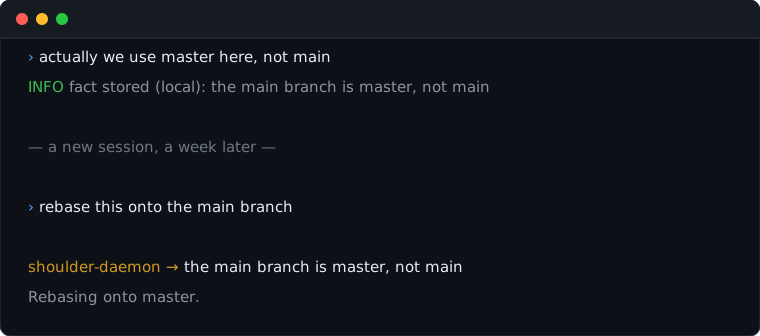
Something you mention once in passing comes back in a later session, without the agent having to ask for it.
Install
Claude Code - the plugin is the whole install. On first start it fetches the
daemon for your platform from the latest release, verifies the checksum, links
it into ~/.local/bin so shoulderd works in a terminal, and starts it; after
that it starts the daemon whenever a session needs one and sessions share it.
/plugin marketplace add QuittyMR/shoulder-daemon
/plugin install shoulder-daemon
/plugin marketplace add https://gitlab.com/quittymr/shoulder-daemon does the
same from GitLab. A shoulderd already on your PATH is used in preference to
the fetched one, so go install or a package manager is never second-guessed.
The plugin brings a setup-shoulder-daemon skill with it. Ask Claude Code to
set shoulder-daemon up and it reads what is already configured, asks only what
is still open - which model decides, where facts are kept, how recall ranks -
and does the rest itself, including starting a memory service and proving the
result with shoulderd doctor. It never asks for an API key in the chat: it
copies one it can find by name, and otherwise hands you the line to run.
OpenCode - the plugin is one file, and the daemon has to be on your PATH
from any of the sources below. Copy into ~/.config/opencode/plugins/, or into
.opencode/plugins/ for a single project; OpenCode loads both.
mkdir -p ~/.config/opencode/plugins
curl -o ~/.config/opencode/plugins/shoulder-daemon.js https://gitlab.com/quittymr/shoulder-daemon/-/raw/main/adapters/opencode/shoulder-daemon.js
That is the whole install. There is no store to run, no embedding model to pull and no token to generate: the daemon remembers in a file of its own, ranks with a model compiled into the binary, and generates the shared secret the hooks need where the editor reads it.
One more file gives it a decision model, and it is the only thing anybody has to write by hand:
mkdir -p ~/.config/shoulder-daemon
cat > ~/.config/shoulder-daemon/env <<'EOF'
SHOULDER_LLM=gemini
GEMINI_API_KEY=...
EOF
chmod 600 ~/.config/shoulder-daemon/env
The daemon reads that file itself, so nothing needs exporting and no editor has
to be told about it. Restart yours and shoulderd doctor will say what is
still missing. Everything else - the daemon by hand, a memory service instead of
the built-in store, running from a checkout, and every setting there is - lives
in docs/INSTALL.md.
OpenCode is the better informed of the two: Claude Code no longer exposes thinking tokens, so the decision pass sees less of what the agent is actually doing.
Choosing a model
SHOULDER_LLM names a connector, and takes a comma-separated list to fall back
through. SHOULDER_LLM_MODEL and SHOULDER_LLM_BASE_URL override the default
model and endpoint.
| Connector | Endpoint | Default model | Key |
|---|---|---|---|
gemini |
Google AI | gemini-flash-lite-latest |
GEMINI_API_KEY |
openrouter |
OpenRouter | google/gemini-2.5-flash-lite |
OPENROUTER_API_KEY |
glm |
z.ai | glm-4.7-flash |
GLM_API_KEY |
glm-coding |
z.ai coding plan | glm-5.3-flash |
GLM_API_KEY |
opencode-go |
OpenCode Go | glm-5.3-flash |
OPENCODE_API_KEY |
openai |
OpenAI | gpt-5.2-mini |
OPENAI_API_KEY |
local |
Ollama on 127.0.0.1:11434 |
qwen2.5-coder:7b |
none |
Pick for speed. The decision pass runs while your prompt is being answered, and advice that
arrives after the assistant has chosen what to do is worth nothing, so a
flash-tier model beats a better one that thinks for twenty seconds; deciding
whether an event contradicts a stored fact is classification, not authorship. On
one machine gemini-3.5-flash-lite answered in 0.9s and one coding-plan
endpoint took 29s, so time your own choice - the shoulder_hook_latency_seconds
metric with event="advisor" reports what the model call is costing you, and
with a triage configured, event="triage" reports the call made before it;
an event the triage hands on costs the two together.
SHOULDER_TRIAGE=jev with TYPESAFE_API_KEY adds TypeSafe's Jev as a triage
in front of the model: events it is sure need nothing, or need a stored fact
repeated before the next tool call, are settled by that one call without the
model, and everything else goes to the model as before. docs/ADVISOR.md has the details and the
other SHOULDER_JEV_* settings.
Put the choice and its key in ~/.config/shoulder-daemon/env as above. The
daemon reads that file wherever it was started from - a container, a service
manager or an editor - which is what stops a key that is set in your login shell
from being invisible to the process that needs it.
Use shoulderd doctor to verify the validity of your installation and setup.
It fails when the daemon has no decision model (a triage on its own passes),
when its store failed to open, and when it runs another model or store than this file asks for because it
started before the file was edited or from another file.
Running from a checkout, a container or a service manager is covered in docs/INSTALL.md, along with every setting.
Updating
git pull
make update
Then restart your editor and run shoulderd doctor.
Use it
$ shoulderd message "this is my git repository"
main branch is master

$ shoulderd fact add --global "I prefer terse answers with no preamble"
$ shoulderd fact add --local --category=fact "integration tests need a live Postgres"
$ shoulderd fact add --local --private "postgres listens on 5433 on this machine"
$ shoulderd fact list --local
$ shoulderd digest                      # narrative summary; --local or --global to narrow
$ shoulderd learn --local               # read the docs this repository already has
message records what it learns by default. --update forces it,
--no-update answers without writing. learn fills the store from the
documentation a repository already carries instead of waiting to overhear it,
and with --replace deletes each document once everything it said is stored.
--private marks a fact about your machine, accounts, paths or habits rather
than about the project, so a backend that files facts beside the checkout keeps
it out of what the team commits. Writes demand --local or --global; reads
default to this project, except digest, which covers both. shoulderd help
spells out each one.
Every fact carries one of four categories. A finding is something a session
established by looking - a bug located, the state of a file, a measurement -
and a fact is a durable truth about the project or the machine; anyone may
record either, the assistant and its subagents included. A rule governs how
work is done here and a preference is how you want work or communication
done; only you may state those, so the daemon stores them from what you typed
and never from what an agent concluded. shoulderd fact add counts as your
typing whoever runs it. A preference is private by default.
Configuration and tweaking
Every setting is a line in ~/.config/shoulder-daemon/env, and the four that
matter day to day can also be changed on a running daemon:
shoulderd config                        # log level, pickiness, provider and model in use
shoulderd config set --pickiness=careful
shoulderd config set --provider=gemini --model=gemini-2.5-flash-lite
config set takes effect on the next event and writes nothing down; a restart
returns to what the env file says.
Pickiness
Pickiness is how reluctant the decision model is to write a new fact. There is
no right answer: a memory that stores everything fills with noise, and one that
stores nothing is an expensive way to forget. SHOULDER_PICKINESS in the env
file sets the starting level, config set --pickiness moves it live, and
either takes a name or the number behind it.
| Level | Stores |
|---|---|
eager (0) |
anything the session established, stated or not; when in doubt, store it |
open (1) |
rules you state, and ones you clearly imply |
balanced (2) |
the default: rules stated or made plain, keeping only the part it is sure of |
careful (3) |
only rules you state; when in doubt, nothing |
strict (4) |
only a rule it could quote from what was said, in your words |
Lower levels lean on the tidying pass, which the daemon runs every few events
and when a session ends, and which shoulderd consolidate runs by hand. Higher
levels keep the store clean and miss rules you only implied. If the monitor
shows facts that are really history - what you just did rather than how
things are done - go up one; if a correction you gave never appears, go down one.
Monitoring
shoulderd monitor
This follows the daemon's log and shows only the facts moving: stored,
superseded, merged, dropped, refused, and advice queued and injected, one line
each with the text. It opens on the last twenty and waits for more; --all
shows the whole file, --no-follow prints and exits, --json passes the raw
records through.
14:02:11  stored      local shoulder-daemon     (fact) "main branch is master"  id=mem_12
14:09:40  queued      session 3f9a1c07 event 6  "the branch is master, not main"  id=adv_4
14:09:41  injected    session 3f9a1c07 UserPromptSubmit  "the branch is master, not main"  id=adv_4
14:31:05  superseded  global                   [cli]  (preference) "terse answers, no preamble"  supersedes=mem_2
14:40:00  merged      local shoulder-daemon     "integration tests need a live Postgres"  kept=mem_5  replaced=mem_7,mem_9
The log itself is ~/.local/share/shoulder-daemon/shoulderd.log, JSON, one
record per line, and the daemon writes it wherever it was started from. At the
default info level it holds every movement above and nothing per hook;
config set --log-level=debug adds each hook arrival. SHOULDER_LOG moves the
file, and SHOULDER_LOG=stderr switches it off for a daemon whose output something
else collects, which is also the one case monitor cannot watch. Counters for
the same events are at /metrics on the daemon's address.
Storage backend
Facts are kept by the daemon itself, in
~/.local/share/shoulder-daemon/facts.json, with nothing to install or
configure; SHOULDER_MEMORY_PATH moves the file. Recall ranks by meaning with
an embedding table compiled into the binary, so a question worded differently
from the fact that answers it still finds it. SHOULDER_MEMORY=docs keeps the
same facts as markdown under docs/ in each checkout instead, where they are
committed and read by the whole team; section 6 of
docs/INSTALL.md has the layout. shoulderd memory migrate
carries what a daemon already learned across to whichever backend it is pointed
at next.
mcp-memory-service recalls better and can be shared between machines. It is one container to start and one setting to point at it:
make memory                             # from a checkout; first start pulls an embedding model
echo SHOULDER_MEMORY_URL=http://127.0.0.1:8100 >> ~/.config/shoulder-daemon/env
make up starts the service alongside the relay from then on, so the command
your editor runs at session start brings both back.
Restart the daemon and it uses the service; remove the line and restart to go
back. Facts do not migrate between the two. SHOULDER_MEMORY_KEY carries the
service's API key if it demands one; how the two stores compare is measured in
docs/INSTALL.md. Other stores can be added; ask for the one
you use on
GitLab or
GitHub.
Alternatives
| What triggers it | Where it stores | Why we built this instead | |
|---|---|---|---|
| shoulder-daemon | A small model reads each prompt and each answer | a file it manages, embeddings included, or mcp-memory-service | - |
| Natural Memory Triggers | regex and keyword matches on your prompt | SQLite-vec, Cloudflare or Milvus | Triggers on preset keywords only |
| PowerContext | Every prompt | SQLite / OceanBase | Team-focused, no consolidation or supersession, and more invasive, but possibly the best alternative here |
| claude-code-semantic-memory | Embedding similarity on your prompt | SQLite/Ollama | Read-only - no learning, no supersession |
| Letta Claude Subconscious | A background agent reads each finished answer | Letta cloud | Paid option is the clear focus (currently broken for ClaudeCode/SQLite) and very heavy |
| ContextStream | Tools the agent chooses to call, plus hooks | hosted | No injection, no self-hosting |
Docs
- How it works - the hot path, the injection budget, why a hook can't block
- Install and configure - the whole install, every setting, and how the built-in store measures up against a memory service
- Performance - what each ranker recalls, what it costs in latency and memory, and how to measure it
- Advisor protocol - bring your own decision model
- Contributing - house rules, what a new connector or adapter takes, and the four test suites and what each one is for
- Security policy - what is in scope, and how to report privately
- Changelog
Status
Working and tested against Claude Code 2.1.251 and OpenCode 1.18.25. Neither Go
module depends on anything outside the standard library; the one piece of
third-party material is the embedding table, which is public-domain GloVe data
(see relay/internal/memory/vectors/NOTICE). More model and memory connectors
are coming - ask for the one you want; no version has been tagged yet.
Development happens on GitLab and on GitHub. Both are live - open an issue or a change on whichever you already use, but not on both. The house rules are in CONTRIBUTING.md. For a vulnerability, do not open a public issue; see SECURITY.md.
The Go module path is gitlab.com/quittymr/shoulder-daemon/relay on either remote.
Licence
MIT. See LICENSE.
同类生态推荐

Claude Memory
opencode-claude-memory
OpenCode plugin for Claude Code memory: persistent, local-first shared memory with Claude Code-compatible Markdown files, LLM recall, in-process auto extraction, and auto-dream consolidation

@knowl/opencode
@knowl/opencode
Project memory for opencode, injected rather than requested. Retrieved knowledge reaches the system prompt, files carry their own recorded rules, and memory survives compaction.

Thatch
@jeffober/thatch
Persistent memory for AI coding agents — local embeddings, SQLite stores, zero config. Works with OpenCode (as a plugin), Claude Code (as an MCP server), and Cursor (as an MCP server).