
0
349
近 7 天 11
34.8
生态多维模型
21 天前
2026-09-14
快速安装与配置
opencode.json写入当前项目的 opencode.json,只对这个仓库生效。
opencode.json
{
  "$schema": "https://opencode.ai/config.json",
  "plugin": ["opencode-tps-plugin@0.1.1"]
}
写入 ~/.config/opencode/opencode.json,对所有项目生效。
~/.config/opencode/opencode.json
{
  "$schema": "https://opencode.ai/config.json",
  "plugin": ["opencode-tps-plugin@0.1.1"]
}
若你要在本地改造这个插件,先装到项目里再从本地路径引用。
shell
pnpm add -D opencode-tps-pluginOpenCode 启动时会通过内嵌运行时自动加载 npm 依赖并缓存至本地目录,无需手动在全局环境执行安装。
Real-time AI generation speed and token throughput monitor for OpenCode. Displays live tokens-per-second (TPS) metrics directly in the OpenCode TUI status bar while the model generates output.
Screenshot
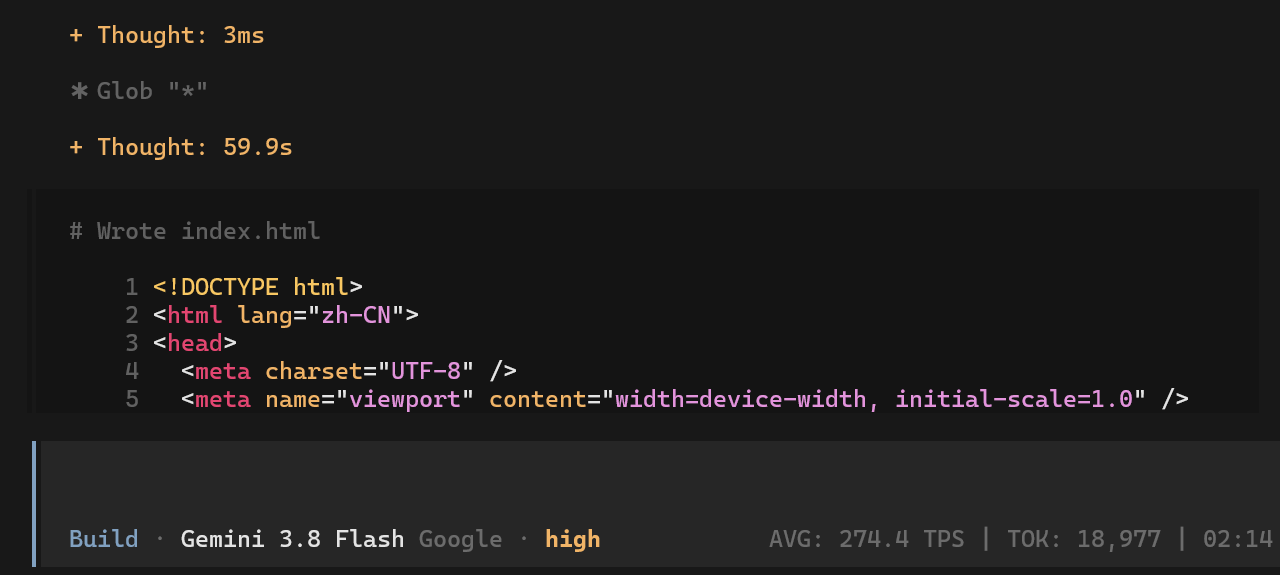
Illustrative output from an OpenCode session; values vary by model and session.
Features
- Real-time TPS display — instant speed, rolling average, token count, and elapsed time in the prompt status bar
- Color-coded speed indicators — green (fast), yellow (medium), red (slow) based on configurable thresholds
- Tool execution awareness — shows "TOOL" indicator during tool calls, automatically deducts tool wait time from generation speed calculation
- Sub-agent tracking — traces parent-child session relationships and rolls up metrics to root session
- EMA smoothing — exponential moving average with adaptive half-life to suppress noisy spikes
- CJK-aware token estimation — treats each CJK character as 1 token for more accurate counting
- Multiple estimation algorithms —
general(chars/4),program(chars/3),prose(words/0.75) - Flexible configuration — JSON config files, environment variables, or code overrides
Installation
npm install opencode-tps-plugin
Add the plugin to your tui.json:
{
  "plugin": [
    // ... your existing plugins
    "opencode-tps-plugin"
  ]
}
How It Works
The plugin renders a ThroughputGauge component in the session_prompt_right slot using SolidJS. It listens to message.part.delta, message.part.updated, message.updated, and session.idle events to track token generation in real time, showing live TPS, average speed, total tokens, and elapsed time with color theming.
Configuration
Configuration is resolved in the following priority order (highest wins):
- Code overrides (passed programmatically)
- Environment variables (
TPS_PLUGIN_*) - User config:
~/.config/opencode/tps-plugin.json - Project config:
.opencode/tps-plugin.json - Built-in defaults
Note: display toggles (
showAvg,showRate,showTokens,showTimer) are JSON/defaults only and have no environment variable override.
Config File Example
{
  "enabled": true,
  "refreshIntervalMs": 50,
  "samplingWindowMs": 1000,
  "showAvg": true,
  "showRate": true,
  "showTokens": true,
  "showTimer": true,
  "tokenMode": "general",
  "useColors": true,
  "slowRate": 10,
  "fastRate": 50
}
Environment Variables
| Variable | Description | Default |
|---|---|---|
TPS_PLUGIN_ENABLED |
Enable/disable the plugin | true |
TPS_PLUGIN_REFRESH_INTERVAL_MS |
Minimum ms between UI updates | 50 |
TPS_PLUGIN_SAMPLING_WINDOW_MS |
Sliding window for speed calculation | 1000 |
TPS_PLUGIN_TOKEN_MODE |
Token estimation mode (general, program, prose) |
general |
TPS_PLUGIN_USE_COLORS |
Enable speed-based color coding | true |
TPS_PLUGIN_SLOW_RATE |
TPS below this is red | 10 |
TPS_PLUGIN_FAST_RATE |
TPS above this is green | 50 |
Requirements
- OpenCode
>=1.15.13 - Node.js 18+
Development
# Install dependencies
bun install

# Type check
bun run typecheck

# Build
bun run build
License
同类生态推荐

Token Metrics
opencode-token-metrics
Live tokens-per-second meter for the OpenCode TUI prompt.

Sidebar Token Metrics
opencode-sidebar-token-metrics
OpenCode sidebar plugin showing generation speed (tok/s), cache hit rate, and average time-to-first-token (TTFT).

Oc Usage
@taraksh011/oc-usage
OpenCode plugin — live token usage, cost, and TPS display