
Todolist
OpenCode V2 plugin restoring session todo list tools (todowrite/todoread) with a sidebar todo strip
0
531
近 7 天 64
36.7
生态多维模型
13 小时前
2026-10-04
快速安装与配置
opencode.json写入当前项目的 opencode.json,只对这个仓库生效。
opencode.json
{
  "$schema": "https://opencode.ai/config.json",
  "plugin": ["opencode-todolist@0.4.1"]
}
写入 ~/.config/opencode/opencode.json,对所有项目生效。
~/.config/opencode/opencode.json
{
  "$schema": "https://opencode.ai/config.json",
  "plugin": ["opencode-todolist@0.4.1"]
}
若你要在本地改造这个插件,先装到项目里再从本地路径引用。
shell
pnpm add -D opencode-todolistOpenCode 启动时会通过内嵌运行时自动加载 npm 依赖并缓存至本地目录,无需手动在全局环境执行安装。
OpenCode V2 plugin that restores the session todo list tools (todowrite / todoread) that shipped with OpenCode V1.
OpenCode V2 removed the built-in todo tools. This plugin brings them back as a server plugin:
todowrite— create or replace the todo list for the current session.todoread— read the current list back.
Lists are stored per session and a compact summary is injected into the session context on every model request while tasks are still open, so the model keeps track of them across long conversations and context compaction.
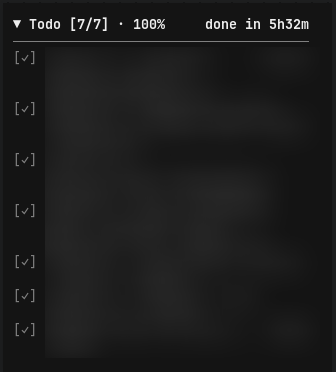
Screenshot
Install
opencode plugin add opencode-todolist
Or add it manually to ~/.config/opencode/opencode.json:
{
  "plugins": ["opencode-todolist"]
}
Restart OpenCode if the plugin is not picked up automatically.
Usage
Ask the agent to "make a todo list for this task", or let it use the tools on its own while working. You can also ask it to "read the todo list" at any point.
Each todo has:
| Field | Values |
|---|---|
content |
Short, imperative task description |
status |
pending, in_progress, completed, cancelled |
priority |
Optional: high, medium, low |
Example output:
1. [ ] Fix flaky checkout spec
2. [•] Refactor payment webhook handler — high priority
3. [x] Add regression test
4. [-] Update changelog
todowrite always receives the complete list and replaces the previous one. Passing {"todos": []} clears it.
Sidebar
The terminal client shows a live todo strip at the end of the session sidebar, styled like the V1 sidebar todo list:
▼ Todo [1/3] · 33%
────────────────────────
[ ] Fix flaky checkout spec
[•] Refactor payment webhook handler
[✓] Add regression test
In-progress tasks use the warning color and everything else is muted, matching OpenCode V1. The heading shows completed/total and the percentage; either part can be turned off. Long items wrap and lists longer than two items collapse with a click. Once everything is completed the strip hides, unless the timer is on — then it stays to show the total.
Run /todo-sections (or pick "Todolist: Settings" from the command palette) to configure:
| Setting | Default | Values |
|---|---|---|
| Show count | on | on/off |
| Show percentage | on | on/off |
| Show timer | on | on/off |
| Header separator | line | none / line / line + blank |
| Collapse threshold | 2 | 2/3/5 |
| Border | off | on/off |
Timer
With the timer on, the strip tracks how long the current todo run is taking:
Todo [1/3] · 33%                  4m12s
[ ] Fix flaky checkout spec
[•] Refactor payment webhook handler · 2m12s
[✓] Add regression test · 3m05s
The header timer is right-aligned, with no separator before it. A run starts at the first write that opens tasks and ends at the write where nothing is open anymore. Per-task times appear when the model marks both in_progress and completed; tasks that jump straight to completed only count toward the total. Once the run finishes, the strip stays visible with done in 12m34s on the right instead of hiding.
Times are wall-clock: they include model thinking and user pauses. A list replaced by an unrelated one (or cleared) is treated as abandoned, and the timer restarts on the new list.
The todoread tool reports the same timing to the model, e.g. Current todo list (running for 4m12s):.
To enable the strip, add the package to the terminal client plugin list:
// ~/.config/opencode/cli.json
{
  "plugins": ["opencode-todolist"]
}
Development
npm install
npm run typecheck
npm test
npm run build
To load your working copy before publishing, point the global plugins config at this directory:
{
  "plugins": ["/absolute/path/to/opencode-todolist"]
}
Plugin changes under watched config directories reload automatically; otherwise restart the OpenCode service.
License
MIT
同类生态推荐

Aside
opencode-aside
Claude Code's /btw side chat for opencode - ask a one-shot question in an overlay, with no tools and nothing added to the transcript

Session Elapsed
opencode-session-elapsed
OpenCode TUI plugin that shows session elapsed, cumulative work, and response timers in the prompt line.

2 Todo
opencode2-todo
Restore the V2-removed todowrite tool and a TUI sidebar list for OpenCode sessions