
Todo
A personal task backlog for OpenCode, for you, not the agent.
10
近 30 天 +2
59
近 7 天 23
40.9
生态多维模型
1 个月前
2026-08-30
快速安装与配置
opencode.json写入当前项目的 opencode.json,只对这个仓库生效。
opencode.json
{
  "$schema": "https://opencode.ai/config.json",
  "plugin": ["opencode-todo@0.0.3"]
}
写入 ~/.config/opencode/opencode.json,对所有项目生效。
~/.config/opencode/opencode.json
{
  "$schema": "https://opencode.ai/config.json",
  "plugin": ["opencode-todo@0.0.3"]
}
若你要在本地改造这个插件,先装到项目里再从本地路径引用。
shell
pnpm add -D opencode-todoOpenCode 启动时会通过内嵌运行时自动加载 npm 依赖并缓存至本地目录,无需手动在全局环境执行安装。
A personal task backlog for OpenCode, for you, not the agent.
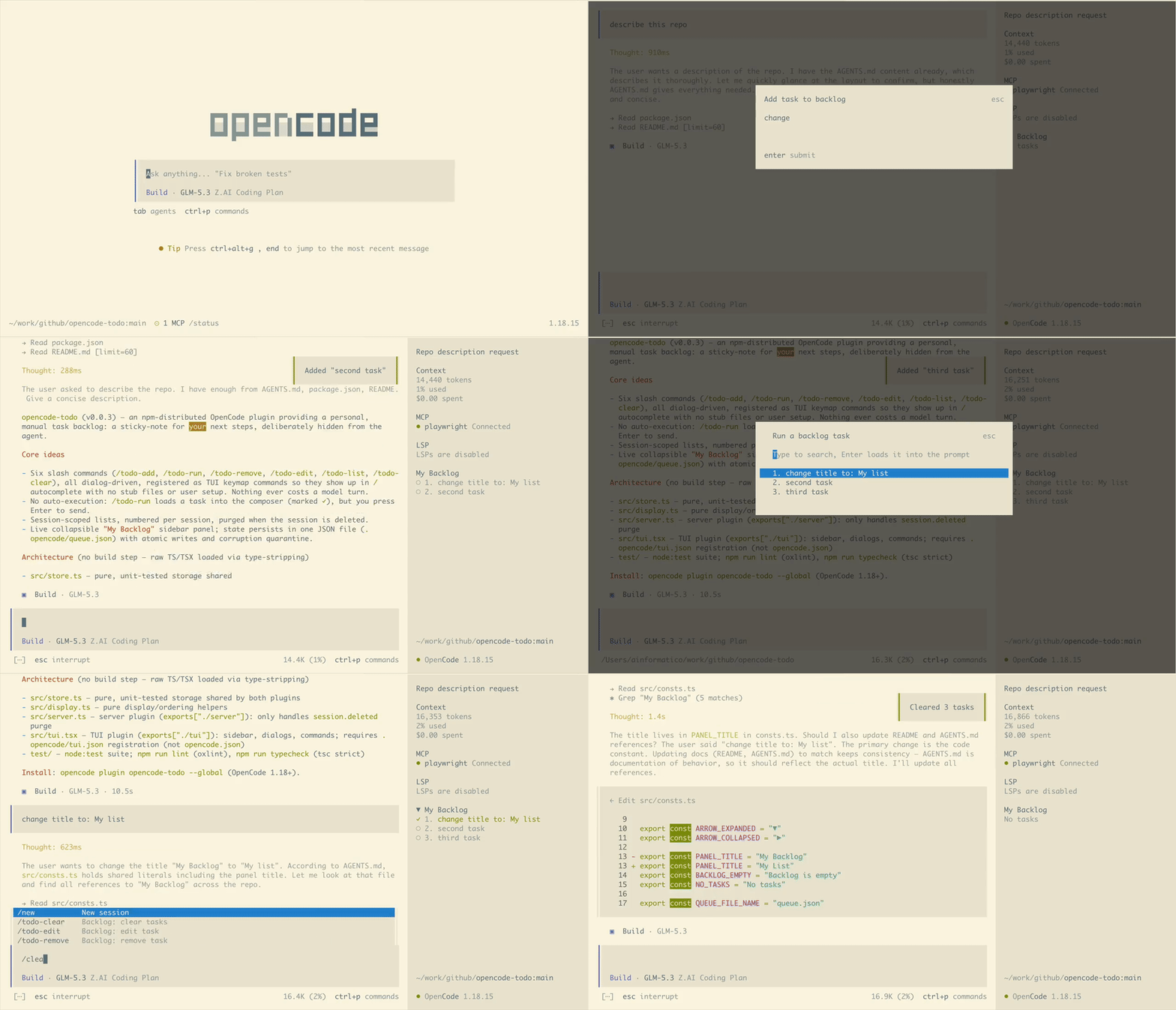
The problem
You're watching an agent refactor the auth middleware when it hits you: "after this, I should also fix the retry logic, update the docs, and finally rename that terrible function."
You can't send that message. Send it mid-run and the agent cheerfully derails into all three tasks at once, and now nothing works, including the thing that was working two minutes ago.
So you hold it in your head. Then you open a second session in another git worktree, which spawns its own follow-ups, and your head runs out of RAM.
opencode-todo is the sticky note that fixes that: custom commands, a live
"My Backlog" panel in the sidebar, one JSON file on disk. That's the whole
plugin. It is deliberately the simplest thing that works.
Install
opencode plugin opencode-todo --global
Restart opencode. Done. Requires OpenCode 1.18+; drop --global for a
project-local install.
Commands
| Command | What it does |
|---|---|
/todo-add |
Type a task into a dialog. It's on the list. |
/todo-run |
Pick a task → it loads into your composer, marked done. You press Enter. |
/todo-remove |
Pick a task → delete it. |
/todo-edit |
Pick a task → fix that typo. Editing a completed task puts it back to pending. |
/todo-list |
Print this session's tasks (first 10). |
/todo-clear |
Empty this session's list, after a confirmation dialog. |
All dialog-driven, no arguments, no model turns, pure bookkeeping. Commands
appear in / autocomplete once installed; nothing else to set up.
For you, not the agent
- The agent never sees your tasks. Nothing is auto-executed, auto-drained,
or auto-anything.
/todo-runloads a task into the composer and stops there; sending it is your Enter press. Running a task marks it done (✓); items leave the list only when you remove or clear them. - Session-scoped. Each session sees only its own list, numbered per session, so each worktree keeps its own next-steps. Delete the session and its list goes with it.
- Collapsible sidebar. With more than 2 items, click the "My Backlog" header to collapse/expand (count shown while collapsed); the state sticks across restarts.
- One JSON file. State lives in
.opencode/queue.json: human-readable, atomic writes, survives restarts. Corrupt files are quarantined (queue.json.corrupt-<ts>-<rand>), never silently overwritten. You probably want it in your project's.gitignore, task text can be sensitive. Zero infrastructure, by design.
Development
npm test && npm run lint && npm run typecheck
For local hacking: opencode.json → { "plugin": ["./src/server.ts"] },
.opencode/tui.json → { "plugin": ["../src/tui.tsx"] }. MIT licensed.
同类生态推荐

Auto Review Completed Todos
opencode-auto-review-completed-todos
Auto-detect when all session todos are completed and trigger a review. Yin to opencode-todo-reminder's yang.

2 Todo
opencode2-todo
Restore the V2-removed todowrite tool and a TUI sidebar list for OpenCode sessions

Subagent Magazine
opencode-subagent-magazine
OpenCode TUI plugin monitoring sub-agent invocation status in real time