
24
近 30 天 +3
259
近 7 天 185
49.9
生态多维模型
4 天前
2026-09-30
快速安装与配置
opencode.json写入当前项目的 opencode.json,只对这个仓库生效。
opencode.json
{
  "$schema": "https://opencode.ai/config.json",
  "plugin": ["opencode-sidebar@0.4.0"]
}
写入 ~/.config/opencode/opencode.json,对所有项目生效。
~/.config/opencode/opencode.json
{
  "$schema": "https://opencode.ai/config.json",
  "plugin": ["opencode-sidebar@0.4.0"]
}
若你要在本地改造这个插件,先装到项目里再从本地路径引用。
shell
pnpm add -D opencode-sidebarOpenCode 启动时会通过内嵌运行时自动加载 npm 依赖并缓存至本地目录,无需手动在全局环境执行安装。

Tmux sidebar launcher for opencode.
Why Does This Exist?
OpenCode is easier to use when the session list, preview pane, and TUI stay together. This launcher keeps them in one tmux session so you can move between the sidebar and OpenCode without losing context.
Features
- Left pane for projects and sessions
- Right pane for the stock OpenCode TUI
- Enter-based session recall into preview
- Background active sessions
- Session deletion from the sidebar
- Sound notifications when OpenCode needs input or finishes work
- Automatic cleanup of parked
opencode attachpanes
Quick Start
Prerequisites
- Node.js 20+
tmuxopencode
Make sure they are installed and available in your PATH.
Package
- npm package: https://www.npmjs.com/package/opencode-sidebar
Install from npm
npm install -g opencode-sidebar
opencode-sidebar
The CLI checks for tmux and opencode at runtime. If either command is missing, it prints a clear error instead of failing silently.
Build & run from source
git clone https://github.com/arnavpisces/opencode-sidebar.git
cd opencode-sidebar
bun install
npm run start
npm run start builds the local dist/ output and launches the same tmux-backed CLI used by the published package.
Usage
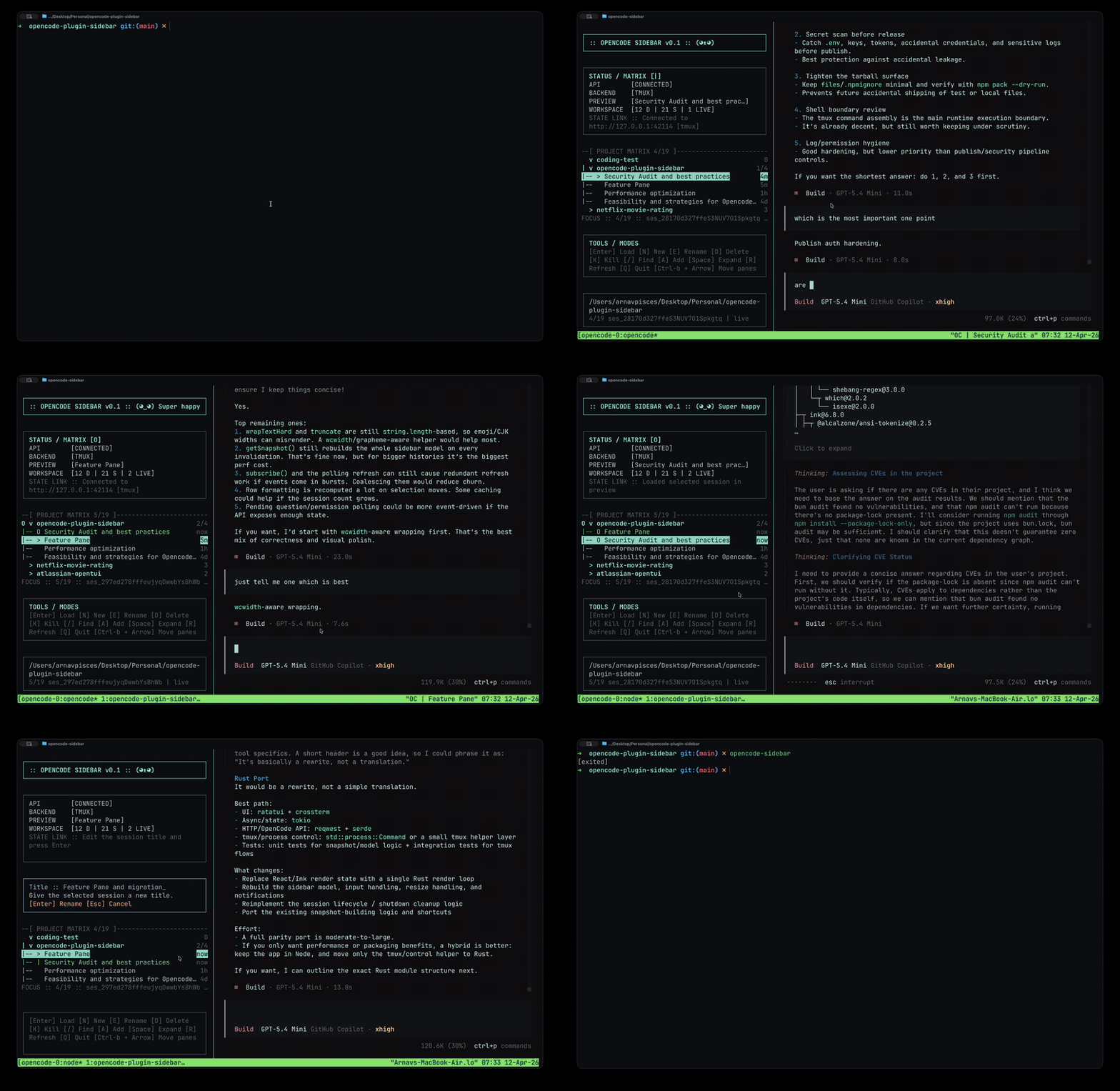
opencode-sidebar
Shortcuts
↑/↓: moveEnter: load or recall the selected session into previewn: new sessione: rename sessiond: delete session with confirmationk: kill a running session window without deleting historyh: hide the selected project folder from the listCtrl-bthenTab: collapse or expand the sidebar from either pane after opening a session. If you use a different tmux prefix, use that prefix instead ofCtrl-b.Tabwhile browsing the sidebar: collapse it. In the collapsed sidebar,Tab,Enter, or clicking anywhere on the icon rail expands it again./: searcha: add a project folderSpace: expand or collapse a projectCtrl-bthen arrow keys: switch between the sidebar and the OpenCode paneq: quit
Status Symbols
The sidebar collapses to a five-column icon rail (plus the tmux divider): › expands it, ≡ indicates sessions, and the status dot is ● while running or ○ while idle. A connection error shows !. Click anywhere on the rail, including its empty space, to expand. Labels, counts, and shortcut hints stay in the expanded view. Collapsing gives focus and extra space to OpenCode; expanding restores your previous sidebar width and focus. Both panes and their sessions keep running. The width adapts to small terminals, and the collapsed state survives session switching. Search text, selection, and open dialogs are preserved when toggling with the tmux shortcut. Option/Alt configuration is not needed.
▶means currently previewed◆means active in background[*]means a session recently completed work and still has unread completion state
Configuration
OPENCODE_SIDEBAR_DIR: override the local state and log directoryOPENCODE_SIDEBAR_NOTIFY=0: disable soundsOPENCODE_SIDEBAR_NOTIFY_ATTENTION_SOUND: custom sound for questions and approval requestsOPENCODE_SIDEBAR_NOTIFY_COMPLETE_SOUND: custom sound for completion- Sound values can be a system sound name like
GlassorPing, or a full path such as~/Music/done.aiff
Release Checks
npm run verify: typecheck, unit tests, and buildnpm run verify:tmux: manual tmux integration checks in isolated temp workspacesnpm run verify:release: full maintainer-only release check
Contribution
Pull requests and opening issues are welcome. For details, see:
License
Apache-2.0 © 2026 Arnav Kumar
If this repo helped you, consider giving it a ⭐. Happy Vibing :)
同类生态推荐

Tui Quota Usage
opencode-tui-quota-usage
OpenCode quota usage sidebar tracker for OpenCode V2 CLI/TUI

Skills Tui
opencode-skills-tui
OpenCode TUI plugin that shows skills and loaded state in the sidebar

Sidebar Token Metrics
opencode-sidebar-token-metrics
OpenCode sidebar plugin showing generation speed (tok/s), cache hit rate, and average time-to-first-token (TTFT).