
Idea Inbox
Never lose a stray thought in opencode: park ideas in a sidebar backlog mid-conversation, then dispatch them to agents when you're ready (opencode v2 plugin; v1 users -> opencode-idea-inbox@legacy-v1)
0
2,630
近 7 天 1.9k
41.0
生态多维模型
3 天前
2026-10-01
快速安装与配置
opencode.json写入当前项目的 opencode.json,只对这个仓库生效。
opencode.json
{
  "$schema": "https://opencode.ai/config.json",
  "plugin": ["opencode-idea-inbox@0.5.10"]
}
写入 ~/.config/opencode/opencode.json,对所有项目生效。
~/.config/opencode/opencode.json
{
  "$schema": "https://opencode.ai/config.json",
  "plugin": ["opencode-idea-inbox@0.5.10"]
}
若你要在本地改造这个插件,先装到项目里再从本地路径引用。
shell
pnpm add -D opencode-idea-inboxOpenCode 启动时会通过内嵌运行时自动加载 npm 依赖并缓存至本地目录,无需手动在全局环境执行安装。



English | Русский
You're twenty minutes deep in a refactor when a completely unrelated thought shows up: "...I should really try caching provider responses."
Traditionally there are three outcomes: you type it into the chat and derail the agent, you switch to a notes app and lose your terminal focus, or you're sure you'll remember it later (you won't).
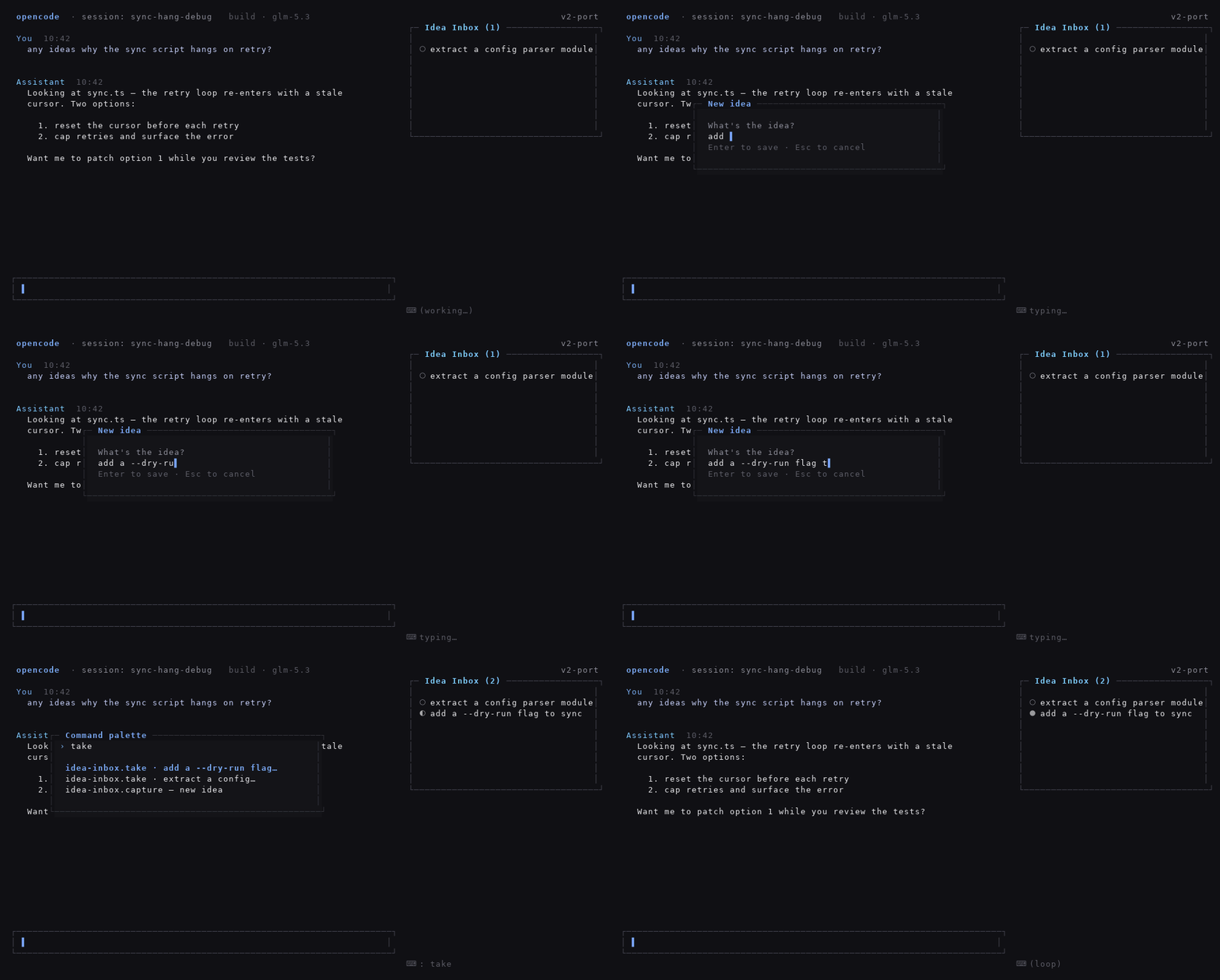
This plugin is a fourth option. Press <leader>z, type the thought, hit
Enter — it's parked in a backlog that lives in your opencode sidebar, and you
never left the task you were on. When you have a free moment, press
<leader>i, pick an idea, and it gets dispatched to an agent while you watch
its status tick over:
○ parked → ◐ running → ● done → ✓ documented
The sidebar mid-session looks like this:
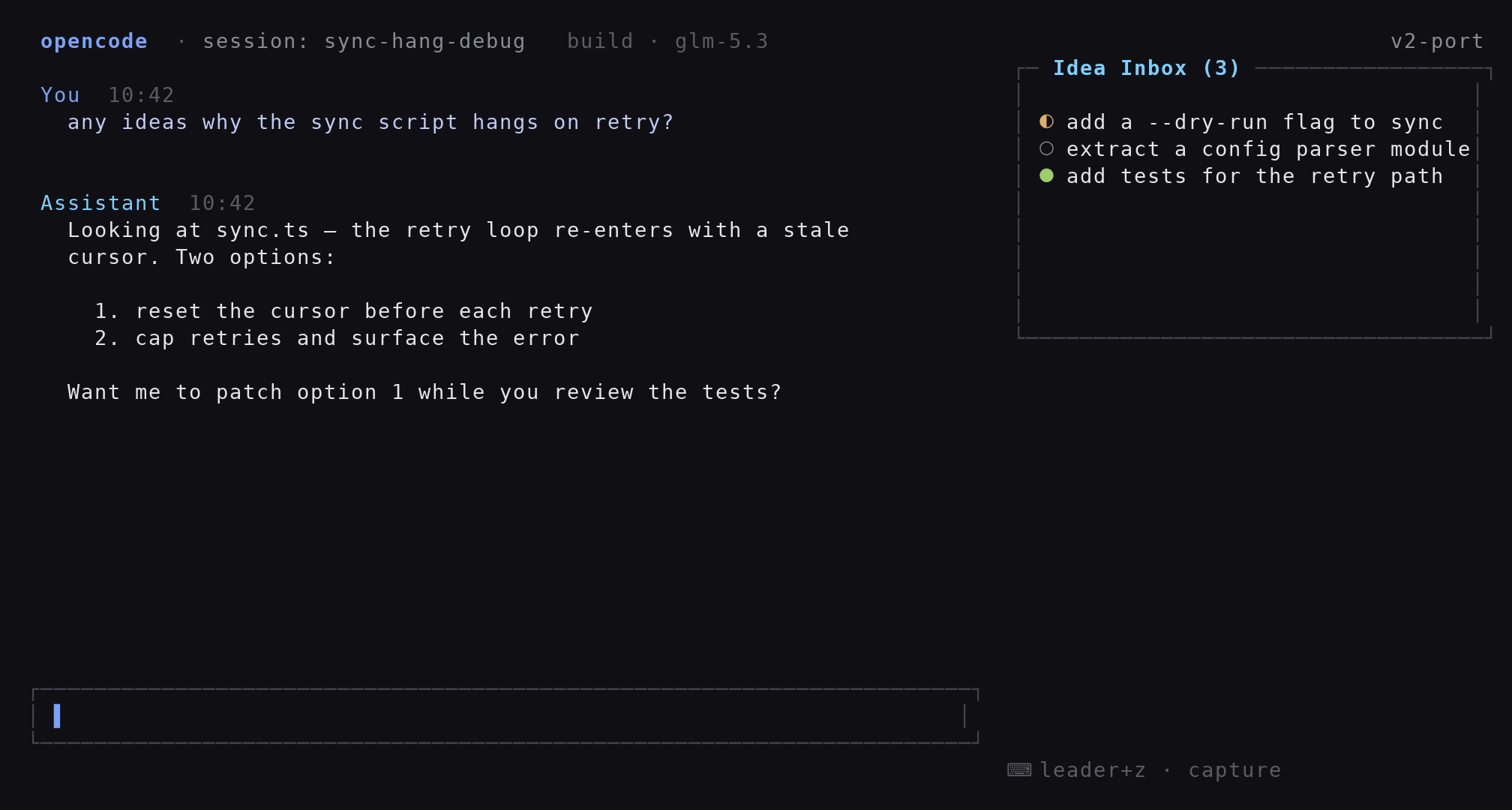
▶ Watch the full loop — capture an idea, dispatch it, watch it finish (GIF, ~10 s)
Which version do I need?
There are two lines of this package, one per major version of opencode:
| Your opencode | Install | Where it lives |
|---|---|---|
| v2 (≥ 2.0.20) | opencode-idea-inbox (latest) |
branch master (default) |
| v1 | opencode-idea-inbox@legacy-v1 (currently 0.3.5) |
branch legacy-v1 |
Not sure what you're running? Check opencode --version.
The #1 "it doesn't load" cause: opencode v2 reads the
pluginskey (plural) and silently ignores the v1pluginkey. If nothing shows up after install, look at that key first.
Installation
Add one line to your opencode.json / opencode.jsonc — global
(~/.config/opencode/opencode.json) or per-project:
{
  "$schema": "https://opencode.ai/config.json",
  "plugins": ["opencode-idea-inbox"]
}
That's the whole setup. The package exports both halves — the server part
(tools, slash commands, session events) and the TUI part (palette commands,
sidebar) — and opencode v2 loads them together. There is no tui.json to
create; that file only existed in v1, and the /idea, /ideas commands are
registered by the plugin itself, so there's nothing to copy around either.
For opencode v1, the same key in the v1 format:
{ "plugin": ["opencode-idea-inbox@legacy-v1"] }
Restart opencode afterwards — the config is not hot-reloaded — and verify with
opencode plugin list. If the sidebar panel isn't visible yet, toggle it once
with your sidebar keybind; the plugin never force-opens it.
Installing from a local clone (development)
git clone https://github.com/apilot/opencode-idea-inbox.git ~/opencode-idea-inbox
Point plugins at the directory:
{ "plugins": ["file:///home/YOU/opencode-idea-inbox"] }
Relative paths work too ("./plugins/idea-inbox"); the root-level server.ts
/ tui.ts re-exports make local-directory loading work on v2.
Your first five minutes
- Type
/idea try caching provider responses— the thought is parked instantly (a direct write, no model round-trip) and appears in the sidebar - Press
<leader>i— a picker opens with your pending ideas on top - Hit
Enteron one — a delegation mission lands in the current session and execution starts immediately; the idea turns◐ - Watch the sidebar:
○ → ◐ → ●as the work progresses - When the agent finishes it marks the idea
● done; run/ideas documented <id>once you've written the results down, and the row leaves the panel for the archive
Everyday use
Keyboard
| Action | Binding |
|---|---|
| Open the backlog picker | <leader>i (command idea-inbox.open) |
| Quick capture dialog (no model involved) | <leader>z (command idea-inbox.capture) |
| Remove one idea | idea-inbox.remove (palette only, picker dialog) |
| Clear the visible list | idea-inbox.clear (palette only, asks for confirmation; the documented archive stays) |
| Show/hide the sidebar | your opencode sidebar toggle |
All commands have stable ids (idea-inbox.open, idea-inbox.capture,
idea-inbox.remove, idea-inbox.clear, idea-inbox.take.<id>) — rebind them
via keybinds in your cli.json if the defaults clash.
Slash commands
| Command | Effect |
|---|---|
/idea <text> |
Park an idea (direct write; with no text, the agent asks you what to write down) |
/ideas |
Show the active backlog table |
/ideas run <id> |
Execute an idea in the current session |
/ideas start <id> |
Run an idea in a background session (agent build) |
/ideas done <id> · /ideas documented <id> |
Change status; documented archives the row |
What the agent sees
The plugin registers four tools your agents can call:
| Tool | Purpose |
|---|---|
idea_add |
Add an idea from conversation context |
idea_list |
List active (or filtered) ideas |
idea_update |
Change status or text; documented hides from the panel |
idea_start |
Spawn a background session with a mission prompt |
Status lifecycle
| Status | Glyph | Meaning | Who sets it |
|---|---|---|---|
pending |
○ |
Parked, waiting for dispatch | You (capture) or the server (rollback) |
in_progress |
◐ |
Running in the current or a background session | The orchestrator (mission idea_update) or idea_start |
done |
● |
The agent reported completion | The orchestrator, or the session.idle safety net |
documented |
✓ |
Results written down → hidden from the panel, kept in the DB | You or the working agent |
FAQ
Where is my data stored?
In <worktree>/.opencode/idea-inbox/ — a plain SQLite database ideas.db
(WAL mode) plus diag.log, the plugin's diagnostic log. Both live one per
git worktree and survive restarts. Add .opencode/idea-inbox/ to your
project's .gitignore.
I ran /idea <text> and the chat stayed silent. Did it work?
Yes — with text present the command writes straight to the backlog without a
model round-trip, so there's no reply in the chat. Check the sidebar or run
/ideas.
The sidebar is empty even though I have ideas. The panel refreshes every ~2 seconds and never force-opens itself — toggle it once with your sidebar keybind.
Something is off — where can I look for clues?
The TUI part appends what it does to
<worktree>/.opencode/idea-inbox/diag.log (registrations, refresh ticks,
errors; rotated at ~128 KB). The file is safe to delete at any time.
Can I rebind <leader>i / <leader>z?
Yes — see the command ids above and the keybinds section of your cli.json.
Why does the picker only show pending ideas?
By design: done and documented rows are history. /ideas done /
/ideas documented <id> manage them.
Is it safe to hand idea text to agents?
Idea text is always wrapped in <<< >>> data guards in mission prompts, so a
note that happens to contain instructions can't hijack the delegation.
How it works
flowchart LR
    U[User] -- "/idea text" --> CMD[Plugin command]
    CMD -- "direct write" --> DB[(ideas.db SQLite)]
    AG[Agent] -- "idea_add / idea_update" --> DB
    U -- "<leader>i" --> PICK[Plugin picker dialog]
    PICK -- "session.prompt mission" --> AG
    AG -- "idea_update in_progress / done" --> DB
    DB --> SB[Sidebar Idea Inbox]
The server half (Plugin.define({ id: "idea-inbox" }), exported from the
package root) registers the tools, the /idea + /ideas commands, and settles
statuses on session.idle / session.deleted. The TUI half (exported at
./tui) renders the sidebar slot and the reactive palette layer; both state
stores come from the host-owned solid runtime, so the panel updates live.
Development
bun install
bun run typecheck   # tsc --noEmit (src + tests)
bun test            # full suite: store, tools, server, commands, TUI, live render
Source layout: src/store.ts (SQLite core), src/server/ (tools, slash
commands, session events), src/tui/ (palette commands, sidebar slot,
worktree resolver), commands/ (legacy v1 markdown commands, kept for
reference).
Issues and PRs are welcome at https://github.com/apilot/opencode-idea-inbox.
License
同类生态推荐

Skills Tui
opencode-skills-tui
OpenCode TUI plugin that shows skills and loaded state in the sidebar

Cache Hit
opencode-cache-hit
OpenCode TUI sidebar: prompt cache hit rate, tokens & cost with sub-agent rollup. Works with opencode-visual-cache; optional per-call JSONL timeline.

Sidebar Token Metrics
opencode-sidebar-token-metrics
OpenCode sidebar plugin showing generation speed (tok/s), cache hit rate, and average time-to-first-token (TTFT).