
Hush
Sidebar telemetry panel for the OpenCode TUI: context pressure, Git branch and family session metrics the host does not draw
0
0
20.0
生态多维模型
15 分钟前
2026-10-21
快速安装与配置
opencode.json写入当前项目的 opencode.json,只对这个仓库生效。
opencode.json
{
  "$schema": "https://opencode.ai/config.json",
  "plugin": ["opencode-hush@0.1.3"]
}
写入 ~/.config/opencode/opencode.json,对所有项目生效。
~/.config/opencode/opencode.json
{
  "$schema": "https://opencode.ai/config.json",
  "plugin": ["opencode-hush@0.1.3"]
}
若你要在本地改造这个插件,先装到项目里再从本地路径引用。
shell
pnpm add -D opencode-hushOpenCode 启动时会通过内嵌运行时自动加载 npm 依赖并缓存至本地目录,无需手动在全局环境执行安装。
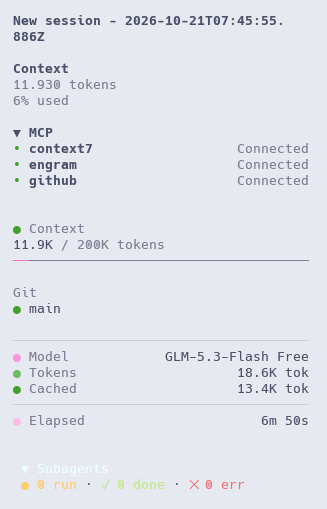
Minimal telemetry for the OpenCode TUI: the context window's pressure, the Git branch and the secondary session metrics the host does not draw. Quiet while everything is healthy, specific when something needs attention.
 |
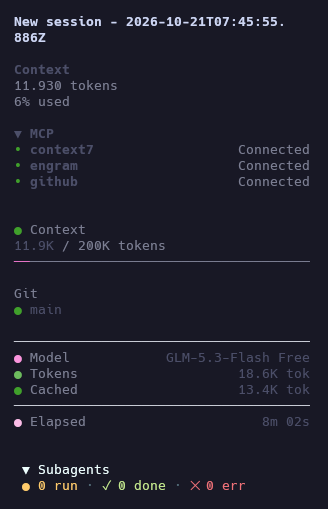 |
Every figure comes from the plugin context; nothing is estimated, scraped, or fetched from outside the local runtime.
Install
opencode plugin add opencode-hush
Restart OpenCode afterwards. The command prints no progress, and the first load can take close to a minute while the host fetches and precompiles the plugin.
What it shows
| Section | Content | Where it comes from |
|---|---|---|
| Context | tokens in the window, model limit, thin pressure bar | last assistant message carrying usage, after the last completed compaction and before the revert boundary; limit from ModelInfo.limit.context |
| Git | current branch | data.location.vcs.info() |
| Meta | model, family cost, family tokens, family cached tokens, elapsed time, active reasoning | session store plus session.reasoning.* events |
Sections with no data render nothing. A missing limit still shows tokens, just without a pressure bar.
- Context ≠ session total. Context is what the current window holds, computed with the host's own usage algorithm. The cumulative figures are labelled
TokensandCached, so the two are never mixed. - Cost, Tokens and Cached describe the same scope: the root session's family, so subagent work is counted once, and cached reads get their own dim row instead of inflating
Tokens. - Pressure is the only adaptive reading:
calmbelow 70%,warnat 70%,criticalat 90%. It colors the Context dot; the bar itself sits on the theme accent — one cell of fill at any usage above zero, the full row at 100%. - Reasoning reads
activeonly while reasoning content streams. It is never inferred from a model name.
The panel paints exclusively with the host theme tokens (text, hue and categorical ramps, with one documented fallback when a theme has no semantic accent), so it reads correctly on OpenCode's light and dark themes.
Requirements
- Node.js 22.12+
- Tested with OpenCode 2.1.x
Development
Requires Node.js 22.12+ and pnpm.
pnpm install
pnpm test
pnpm build
pnpm verify:pack
verify:pack packs the tarball, runs the host's real Host.resolve against the installed layout, imports both entrypoints and fails when either one loses its default export — or when the README ships an image that is not absolute.
Structure
src/
  index.ts       Server entrypoint: inert, so the package resolves as a plugin
  tui.tsx        TUI entrypoint: claims slots and releases them on deactivate
  telemetry.ts   Reactive session state: store reads, clock, event subscriptions
  panel.tsx      Presentation: sidebar panel
  core/
    bar.ts       Width contract for the context bar's fill
    format.ts    Token, percent, duration and cost formatting
    usage.ts     Token totals, context window, pressure
test/            Vitest unit tests
scripts/         Build helpers
docs/design/     Design references
License
MIT, copyright © 2026 Federico Bordón.
同类生态推荐

Copilot Statusline
opencode-copilot-statusline
OpenCode TUI plugin: display GitHub Copilot quota (premium requests, with a chat fallback for Copilot Free) in the footer statusline. V2-native, zero-config, no cookies.

Status Line
@rashidrazak/opencode-status-line
A live status line for OpenCode v2's terminal UI — context window, cache, streaming speed, cost, elapsed time and uncommitted changes in one configurable row.

Sidebar Token Metrics
opencode-sidebar-token-metrics
OpenCode sidebar plugin showing generation speed (tok/s), cache hit rate, and average time-to-first-token (TTFT).