
Headroom
OpenCode v2 plugin that transparently compresses large tool results via Headroom at the message level — works with any provider, including AWS Bedrock.
0
72
近 7 天 72
31.4
生态多维模型
16 小时前
2026-10-04
快速安装与配置
opencode.json写入当前项目的 opencode.json,只对这个仓库生效。
opencode.json
{
  "$schema": "https://opencode.ai/config.json",
  "plugin": ["opencode-headroom-plugin@1.0.0"]
}
写入 ~/.config/opencode/opencode.json,对所有项目生效。
~/.config/opencode/opencode.json
{
  "$schema": "https://opencode.ai/config.json",
  "plugin": ["opencode-headroom-plugin@1.0.0"]
}
若你要在本地改造这个插件,先装到项目里再从本地路径引用。
shell
pnpm add -D opencode-headroom-pluginOpenCode 启动时会通过内嵌运行时自动加载 npm 依赖并缓存至本地目录,无需手动在全局环境执行安装。
A plugin for OpenCode v2 that transparently compresses large tool results in a session via Headroom, without touching the provider configuration already set up in OpenCode and without any provider-specific limitations (it also works with AWS Bedrock).
It doesn't modify opencode.json/opencode.jsonc, doesn't create fake providers, and doesn't route provider HTTP traffic through a proxy: it hooks into session.hook("context", ...), the point where OpenCode assembles the session's messages before translating them into the provider's native format (Anthropic Messages, OpenAI Chat, Bedrock Converse, ...) and before signing the request. Only tool results (role: "tool") are sent to Headroom for compression — never user/assistant text, never system messages.
Prerequisites
- Node.js 20.3+ (or Bun — OpenCode loads
.jsfiles directly; the plugin usesAbortSignal.any). - Headroom installed and its proxy already running before starting OpenCode:
The plugin never starts or manages the Headroom process, and doesn't route traffic through it: it only calls its statelesspip install "headroom-ai[proxy]" headroom proxy # defaults to http://127.0.0.1:8787POST /v1/compressendpoint (compresses and nothing else, never contacts any provider itself) and, when needed,GET /v1/retrieve/{hash}.
Installation
- Clone/download this repository and install the dependency:
npm install - Wire the plugin into OpenCode with one of the methods below.
A. Global, for every project (recommended)
Create a symlink in OpenCode's global plugins directory — no opencode.json edit required:
npm run plugin:install
# equivalent to: bash scripts/install.sh
To remove it:
npm run plugin:uninstall
The script links this folder to ~/.config/opencode/plugins/headroom-context-compression (override with the OPENCODE_CONFIG_DIR variable). OpenCode automatically loads every plugin package found there.
B. Only for a specific project
Copy or symlink the plugin folder into the project's .opencode/plugins/:
mkdir -p /path/to/project/.opencode/plugins
ln -s /path/to/this/repo /path/to/project/.opencode/plugins/headroom-context-compression
C. Via opencode.json(c) (if you prefer an explicit entry)
{
  "$schema": "https://opencode.ai/config.json",
  "plugins": [
    {
      "package": "/absolute/path/to/this/repo",
      "options": {
        "proxyUrl": "http://127.0.0.1:8787"
      }
    }
  ]
}
After any of these methods, restart the OpenCode server (opencode service restart) or simply start a new session.
If the plugin doesn't show up as active
- Restart the OpenCode server, not just the client/TUI:
opencode service restart. Plugins load at server startup. - Check
opencode plugin list:headroom-context-compressionshould appear. If it doesn't appear at all, the config file is probably not being read (wrong path, or a JSON syntax error — watch out for missing commas between properties). - Verify the plugin folder has an
index.jsat its root (not only insidesrc/). OpenCode resolves plugins referenced by local path (both inpluginsand via auto-discovery) by conventionally looking forindex.*/server.*at the folder root, and ignorespackage.json'sexportsin that case. This repository already ships a rootindex.jsfor exactly that reason.
Configuration
No option is required: with no configuration the plugin points at http://127.0.0.1:8787 (the headroom proxy default), only compresses tool results ≥ 2000 characters, and never compresses if the proxy isn't local (see "Security" below).
Plugin option (options) |
Environment variable | Default | Meaning |
|---|---|---|---|
enabled |
HEADROOM_ENABLED |
true |
Fully disables compression. |
proxyUrl |
HEADROOM_PROXY_URL |
http://127.0.0.1:8787 |
Address of headroom proxy. |
allowRemote |
HEADROOM_ALLOW_REMOTE |
false |
Allows a non-local proxyUrl. See "Security". |
minContextTokens |
HEADROOM_MIN_CONTEXT_TOKENS |
10000 |
Minimum estimated size (tokens) of the whole session context before attempting compression at all. |
minMessageChars |
HEADROOM_MIN_MESSAGE_CHARS |
2000 |
Minimum size (characters) a tool result must reach before it's sent to Headroom. |
timeoutMs |
HEADROOM_TIMEOUT_MS |
40000 |
Timeout for the /v1/compress call. Headroom gives itself an internal budget of 30s for the compression step (observed in its own startup log: compression=30.0s); on large contexts (hundreds of messages) compression can take 20-25s, so the default leaves margin above that budget. |
renameToolCalls |
— | true |
Renames tool calls in the payload sent to Headroom, so its DEFAULT_EXCLUDE_TOOLS list (which protects read/grep by name) doesn't block compression of large results from those tools that aren't already protected by the point below. |
excludeProviders |
— | [] |
List of providerIDs (e.g. "amazon-bedrock") to fully exclude from compression, in case it's ever needed. Empty by default: Bedrock works without any exceptions. |
Protected tools (never compressed)
read, write, edit, patch, skill, and headroom_retrieve never become compression candidates, regardless of size — this isn't configurable. Reason: their output serves as an anchor for a later exact match (an edit operating on text read by read, for example) or is directive text meant to be followed literally (skill); compressing it would risk breaking that match or that directive. This rule is carried over from noheadroom (a Headroom bridge for Pi-Agent), from which this plugin inherits the conservative setting. Other tools (grep, glob, bash, webfetch, ...) remain compressible.
Cross-turn compression and loop guards
OpenCode doesn't persist the mutations made by the context hook into the session's history: on the next turn the same tool result comes back uncompressed. To avoid calling Headroom again from scratch on the same content every time, the plugin keeps, per session:
- a replay cache (tool-call id + tool name + original text → already-compressed, validated text): if the exact same tool result shows up again, it's reapplied without contacting the proxy again;
- some loop guards (already-seen content, request unchanged since the last attempt, a 3-second throttle between attempts) to avoid redundant calls when the
contexthook fires multiple times for the same turn.
This mechanism is also carried over from noheadroom, which solves the same problem for Pi-Agent.
Security
Compressing sends the tool results' content to the configured proxyUrl. Because of this, if proxyUrl doesn't point at localhost/127.0.0.1/::1, the plugin disables itself automatically until you explicitly set allowRemote: true — only do that if you trust that proxy.
Retrieving the original content
When Headroom compresses a tool result, it leaves a marker shaped like [N items compressed to M. Retrieve more: hash=...] (or <<ccr:hash...>>). The plugin registers a headroom_retrieve(hash) tool that the model can call to fetch the full original from Headroom's CCR cache (TTL 1800s) — no need to install Headroom's official MCP server.
How it works
❌ What doesn't work: a plain HTTP proxy
The obvious approach — and the one the official headroom-opencode package uses for OpenCode v1 — is to rewrite the native HTTP request's URL so it goes through the Headroom proxy, leaving path/method/headers/body otherwise intact. That works for Anthropic/OpenAI/Google Vertex, but breaks AWS Bedrock: OpenCode's amazon-bedrock provider calls AWS's Converse API, and the request is signed with AWS SigV4 before it reaches the proxy. If the proxy then compresses the body, the signature no longer matches the (now different) content, and AWS rejects the request outright.
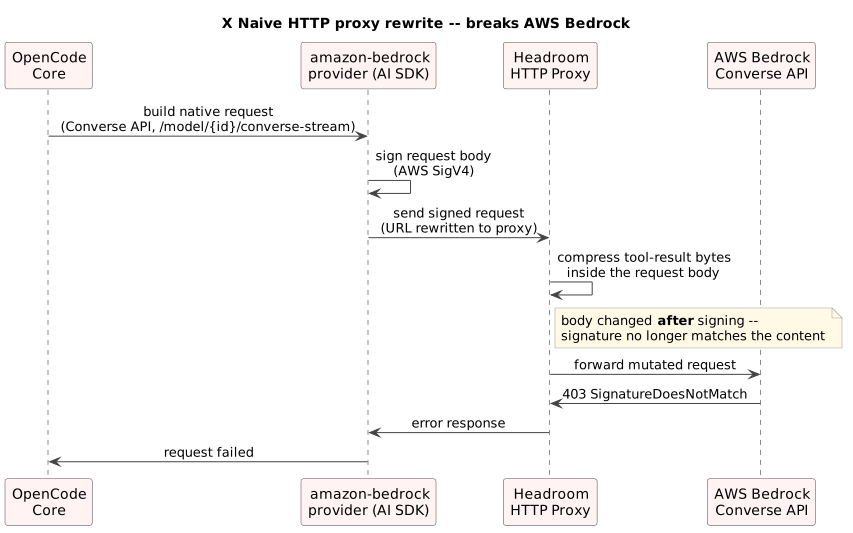
There's no clean fix within that approach: re-signing the request after compression would need a second, provider-aware hop (essentially a full SigV4-capable gateway) just for Bedrock — not transparent, not generalizable to whatever provider comes next.
✅ Current implementation: compression at the message level
Instead of touching HTTP traffic, the plugin hooks into session.hook("context", ...) — the point where OpenCode assembles the session's messages in its provider-agnostic shape, before "lowering" them to the provider's native protocol (Converse, Chat Completions, GenerateContent, ...) and, crucially, before that request is signed. Only role: "tool" parts are extracted, filtered (size, protected tools) and sent to Headroom's stateless POST /v1/compress; the compressed text is written back into the same ToolResultPart only after validating that role and tool_call_id didn't change. Everything downstream — provider lowering, SigV4 signing, transport — happens exactly as before, just on an already-compressed body.
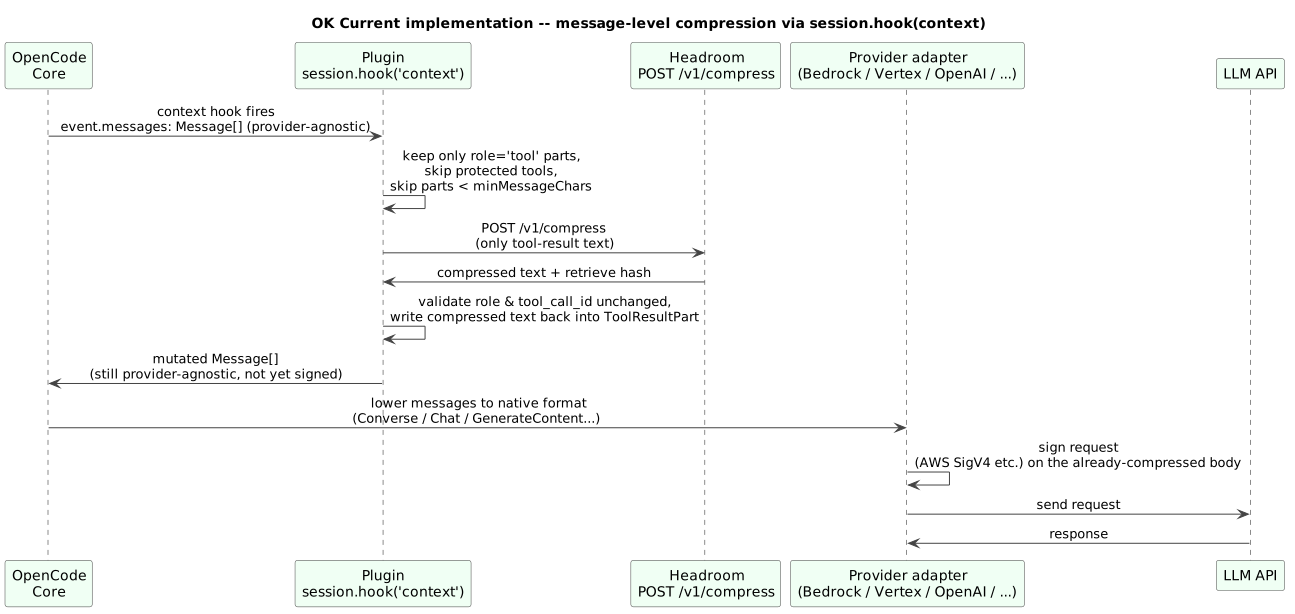
This works identically for every provider, Bedrock included, because it never touches the native HTTP body or its signature. Full architectural details and alternatives considered in MEMORY.md.
Sources
The compression logic, protected tools, replay cache, and loop guards are carried over from two Headroom extensions for Pi-Agent (MIT license): @casualjim/pi-headroom and, especially for the protected tools and the replay cache, @raquezha/noheadroom — both derive from @ryan_nookpi/pi-extension-headroom (Jonghakseo).
Tests
npm test
Suite built on node --test, no external framework:
test/bridge.test.js,test/config.test.js— pure logic, no dependency on@opencode/pluginor a running Headroom proxy.test/guard.test.js— replay cache and loop guards, pure and testable without the plugin.test/plugin.test.js— integration with the real@opencode/pluginlibrary,fetchstubbed (no real network), including a test that reproduces the Bedrock scenario, one for protected tools, and one for the cross-turn replay cache.test/resolution.test.js— verifies that OpenCode actually resolves the plugin from this folder (realHost.resolve/Host.load).
Support me – buy me a coffee! :) PayPal
同类生态推荐

Rtk
opencode-rtk-plugin
OpenCode v2 plugin that rewrites shell commands through rtk to cut LLM token usage by 60-90%.

Auto Fallback
opencode-auto-fallback
Advanced fallback plugin for OpenCode agents — model switching, retry with backoff, and context overflow handling

Context Pruner
opencode-context-pruner
Continuous verbatim context pruning for OpenCode, powered by TypeSafe Jev. Port of fast-jev-compaction adapted to OpenCode's context hook.