
Guardian
Universal quality and safety guardian plugin for OpenCode AI agents (Dual-Mode: OpenCode v1 & v2)
1
1,270
近 7 天 1.3k
41.5
生态多维模型
13 小时前
2026-10-04
快速安装与配置
opencode.json写入当前项目的 opencode.json,只对这个仓库生效。
opencode.json
{
  "$schema": "https://opencode.ai/config.json",
  "plugin": ["opencode-guardian@0.6.0"]
}
写入 ~/.config/opencode/opencode.json,对所有项目生效。
~/.config/opencode/opencode.json
{
  "$schema": "https://opencode.ai/config.json",
  "plugin": ["opencode-guardian@0.6.0"]
}
若你要在本地改造这个插件,先装到项目里再从本地路径引用。
shell
pnpm add -D opencode-guardianOpenCode 启动时会通过内嵌运行时自动加载 npm 依赖并缓存至本地目录,无需手动在全局环境执行安装。








Installation · Rules · Configuration · TUI Interface · Architecture · Verification
A high-performance, deterministic quality, safety, and verification plugin for OpenCode AI coding agents.
OpenCode Guardian continuously supervises agent turns: guiding model execution before calls, correlating tool results at session idle, intercepting recognized destructive shell actions and secret-bearing file writes, and requiring verifiable tool evidence before agents declare tasks complete.
📊 Verification & Live Acceptance
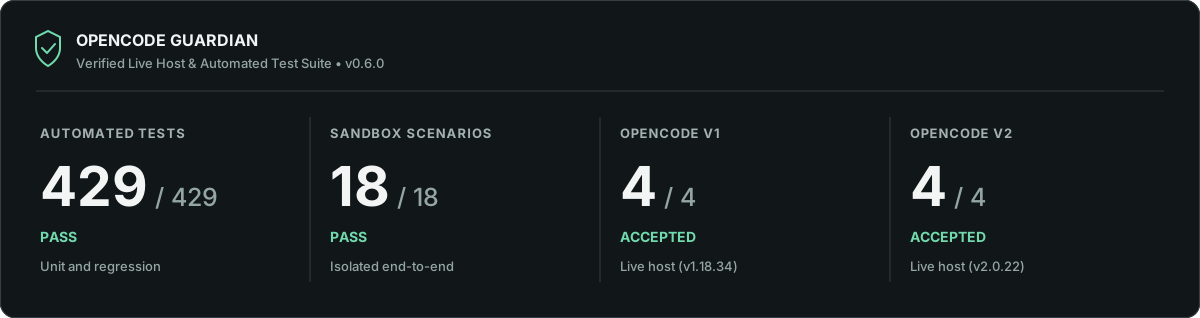
Guardian v0.6.0 is rigorously validated across both automated test suites and real host runtime environments:
- Dual-Host Live Acceptance: 4 / 4 — ACCEPTED on real OpenCode V1 (
1.18.34) and OpenCode V2 (2.0.22) host platforms. - Automated Verification: 429 / 429 unit and regression tests passing with 100% success rate.
- Sandbox Scenarios: 18 / 18 end-to-end multi-turn agent failure and recovery scenarios verified.
- Dependency Security: 0 vulnerabilities across production and development dependency audits.
Read the comprehensive Verification and Acceptance Report for full reproduction steps, methodology, and live host logs.
✨ Key Highlights
- Dual-Mode Architecture: Seamlessly supports both OpenCode v1 (
@opencode-ai/plugin) and OpenCode v2 (@opencode/plugin) with unified runtime adapters. - Compact TUI Sidebar: A compact two-column status widget that expands to show Guardian diagnostics with a single click.
- In-App Update Indicator: Shows a green
(↑)header icon and placesUpdate availablefirst in the sidebar when npm reports a newer release. - Guardian Commands: Ctrl+P and slash commands display detailed status, activity, diagnostics, rules, configuration and version; confirmed statistics reset preserves audit history.
- Project-Scoped Audit Log: Stores safe event codes, reasons and intervention outcomes in
<project>/.opencode/guardian-events.jsonlwith0600POSIX permissions, a 2 MiB limit and one rotated archive. Never stores prompt or command text. - Evidence-Based Task Contracts: Analyzes human requests across 13 languages to extract required verifications (tests, builds, source reviews) and detects premature completion claims. When the host provides a tool-after observation, SHA-256 evidence is tied to the observed file contents.
- 14 Deterministic Rules: Blocks shortcuts, empty stubs, unverified claims, masked errors, test weakening, leaked secrets, undeclared dependencies, and repetitive execution loops.
- Zero Configuration: Works instantly out of the box with production-tested defaults. Fully configurable via
opencode-guardian.json. - Zero Runtime Dependencies: Precompiled JavaScript (
dist/) has no mandatory third-party runtime dependencies. The optional TUI utilizes the host's OpenTUI/Solid runtime.
📦 Installation
Add opencode-guardian to your OpenCode configuration (opencode.json in your project or ~/.config/opencode/opencode.json):
🚀 OpenCode v1 (1.x)
To enable both the background safety engine and the interactive TUI sidebar widget, include both the engine and TUI entrypoints:
{
  "plugin": [
    "opencode-guardian@latest",
    "opencode-guardian/tui"
  ]
}
Tip: If you only need headless or background protection without mounting the sidebar UI (e.g. in CI or scripted pipelines), you can omit
"opencode-guardian/tui".
For local development with v1, use local file paths:
{
  "plugin": [
    "file:///path/to/opencode-guardian",
    "file:///path/to/opencode-guardian/tui.js"
  ]
}
⚡ OpenCode v2 (2.x)
Use the v2 plugins key in opencode.json or opencode.jsonc:
{
  "plugins": [
    "opencode-guardian@latest",
    "opencode-guardian/tui"
  ]
}
For local development with v2, use "plugins": ["file:///path/to/opencode-guardian", "file:///path/to/opencode-guardian/tui.js"].
Refer to the v1 plugin documentation and v2 plugin documentation for version-specific loading behavior.
🖥️ TUI Sidebar Interface
OpenCode Guardian includes a dedicated TUI extension that mounts into OpenCode's sidebar. It displays live status, intervention counters, and update notices.
🔌 Enabling the TUI Sidebar
In OpenCode, terminal UI widgets are registered via distinct entrypoints so that headless servers and interactive terminals remain modular and lightweight.
To mount the Guardian sidebar in your OpenCode terminal:
- Add
"opencode-guardian/tui"alongside"opencode-guardian@latest"in youropencode.json(pluginarray for v1,pluginsarray for v2). - Start OpenCode as usual (
opencode). - The Guardian widget appears in OpenCode's sidebar slot (
sidebar_contentin v1,sidebar.contentin v2) without replacing existing sidebar sections.
🔽 Collapsed View (Default)
▶ Guardian                 v0.6.0
Status                       ● Active
Interventions                 0w · 0r
- Header: Clickable header displaying the Guardian brand, current version, and an optional green
(↑)update badge when a newer npm release is detected. - Status: Most recent event, distinguishing verified, failed and unverified remediation as well as preflight decisions; counters reflect retained audit history.
- Interventions: Compact summary of warnings (
w) and remediation requests (r); independent outcomes are available throughGuardian: Status.
🔼 Expanded View (Click to Toggle)
Clicking the ▶ Guardian header expands the widget:
▼ Guardian                 v0.6.0
Preflight                  ○ disabled
Inspected                           0
Blocked                             0
Warnings                            0
Remediations                        0
- Preflight: Current shell protection mode (
○ disabledor● active). - Inspected / Blocked: Real-time count of commands evaluated and prevented.
- Blocked counts only commands denied by active preflight; post-turn remediation requests are tracked separately.
- Warnings / Remediations: Detailed intervention statistics for the active project.
- Update available: The first row immediately below the header in both views shows the newer published version; it stays hidden when there is no update.
- Auto-Refresh: The widget polls the project event log (
.opencode/guardian-events.jsonl) every 2.5 seconds to reflect live metrics without reloading. - Hiding / Disabling: Setting
"enabled": falseinopencode-guardian.jsonautomatically unregisters and hides the TUI sidebar.
⌨️ Guardian Commands (Ctrl+P / Command Palette)
When Guardian's TUI component is loaded, its commands appear under Guardian in the Ctrl+P palette:
| Command | Slash Shortcut | Purpose |
|---|---|---|
| Guardian: Status | /guardian-status |
Project counters and remediation outcomes |
| Guardian: Activity | /guardian-activity |
Recent redacted audit events |
| Guardian: Diagnostics | /guardian-doctor |
Configuration and last-reported host state |
| Guardian: Rules | /guardian-rules |
Effective rule severity across all 14 rules |
| Guardian: Configuration | /guardian-config |
Safe, redacted configuration overview |
| Guardian: Version | /guardian-version |
Installed and available stable versions |
| Guardian: Reset Statistics | /guardian-reset |
Confirmed counter reset, retaining security history |
In OpenCode V2, the general /guardian <command> dispatcher is also available (e.g. /guardian status, /guardian rules).
Reset appends a local statistics-reset event rather than wiping the audit log (normal bounded rotation still applies); it does not disable protection, change rules or undo previous findings.
🔒 Privacy-Safe Audit Events
Guardian stores a structured JSONL audit in <project>/.opencode/guardian-events.jsonl (or the configured state directory). Each entry has a timestamp, random event ID, event kind, action and outcome. Findings include only the rule ID and a predefined reason code, such as masked-verification-failure, destructive-operation-not-authorized or missing-follow-up-review. The session ID is reduced to a 16-character SHA-256 fingerprint. Custom tool names are replaced with a generic category.
{"at":"2026-10-04T00:00:00.000Z","id":"123e4567-e89b-42d3-a456-426614174000","kind":"post-remediation","action":"remediation-requested","outcome":"unverified","rules":["task/completion-gate"],"reasons":[{"rule":"task/completion-gate","code":"missing-follow-up-review"}]}
unverifiedmeans an instruction was sent, not that the agent completed it.- A warning uses
reported; a preflight denial usespreventedonly when the command was actually rejected before execution. - No prompts, assistant responses, raw commands, file contents, finding snippets, original session IDs, credentials or secrets are written.
- The active log is limited to 2 MiB, with one rotated archive (
guardian-events.jsonl.1); TUI counters cover the latest 2 MiB of available records. - To inspect recent events, run
tail -n 20 .opencode/guardian-events.jsonl.
📋 The 14 Guardrail Rules
OpenCode Guardian evaluates assistant turns against 14 deterministic rules. Rules can be configured as error, warn, or off; remediation is bounded and post-turn findings cannot undo an already-executed command:
| Category | Rule ID | Default | What It Enforces |
|---|---|---|---|
| Discipline | discipline/no-evasion |
error |
Blocks unsupported dismissals such as claiming a test failure is "pre-existing" or "out of scope" unless verified by baseline checks. |
| Discipline | discipline/no-apology |
error |
Blocks sycophantic, defensive, or repetitive apology language across multiple languages. |
| Quality | quality/no-shortcuts |
error |
Blocks concrete deferred-work phrases (TODO, FIXME, HACK, "will do later"). Ambiguous hedging phrases are flagged as advisory warnings. |
| Integrity | integrity/no-stubs |
error |
Blocks NotImplementedError, empty function stubs, Rust todo!()/unimplemented!(), and placeholder returns. |
| Integrity | integrity/no-unverified-claims |
error |
Correlates statements like "tests pass" or "build succeeded" against recorded tool exit codes. Direct contradictions block. |
| Integrity | integrity/no-silent-failure |
error |
Blocks test, build, lint, typecheck, or audit commands masked with || true, exit 0, or suppressed exit codes. |
| Safety | safety/no-truncation |
error |
Blocks lazy edit placeholders (e.g. // ... rest of code unchanged ...) that can accidentally truncate production code. |
| Safety | safety/destructive-operations |
warn |
Inspects hard resets, force pushes, recursive deletion (rm -rf), database drops, and unpublish actions. Plain rm requires explicit scoped user consent. |
| Testing | testing/no-cheat |
error |
Blocks malicious test tampering: targeted describe.skip, it.skip, test.skip, fit, or assertion stripping in test files. |
| Security | security/no-secrets |
error |
Blocks hardcoded API keys (OpenAI, Anthropic, Google, AWS, GitHub, Slack, Stripe, JWTs, private keys, database URLs with passwords). |
| Manifest | manifest/no-ghost-deps |
error |
Blocks undeclared third-party imports not found in package.json, pyproject.toml, requirements.txt, go.mod, or Cargo.toml. Local modules and stdlib are recognized. |
| Runtime | runtime/circuit-breaker |
error |
Blocks repetitive failing commands hitting identical errors 3 times consecutively without progress, breaking runaway agent loops. |
| Task | task/instruction-fidelity |
error |
Prevents the agent from refusing an explicit task solely because the user previously paused or deferred it in an earlier turn. |
| Task | task/completion-gate |
error |
Ensures requested verifications (fresh test execution, post-change source inspection) are observed before the agent declares completion. |
⚙️ Configuration (opencode-guardian.json)
Guardian works out of the box with zero configuration. You can customize rules and thresholds by placing opencode-guardian.json in your project root, .opencode/, or ~/.config/opencode/:
{
  "enabled": true,
  "remediationBudget": 1,
  "iterationBudget": 3,
  "updateNotice": {
    "enabled": true
  },
  "preflight": {
    "enabled": false
  },
  "rules": {
    "discipline/no-evasion": "error",
    "discipline/no-apology": "error",
    "quality/no-shortcuts": {
      "severity": "error",
      "customPhrases": ["not my job", "out of scope for me"],
      "exceptions": ["tempdir", "temporaryfile"]
    },
    "integrity/no-stubs": "error",
    "integrity/no-unverified-claims": "error",
    "integrity/no-silent-failure": "error",
    "safety/no-truncation": "error",
    "safety/destructive-operations": "warn",
    "testing/no-cheat": "error",
    "security/no-secrets": "error",
    "manifest/no-ghost-deps": "error",
    "runtime/circuit-breaker": "error",
    "task/instruction-fidelity": "error",
    "task/completion-gate": "error"
  }
}
🎛️ Severity Options:
"error": High-confidence violation triggers an automatic remediation prompt (bounded byremediationBudget)."warn": Recorded in telemetry and displayed in TUI, but does not interrupt agent flow."off": Completely disables the rule.
🌐 Task Contracts & Multilingual Support
When a user submits an instruction, Guardian extracts a deterministic task contract before model execution. Supported intent patterns include:
- Languages Supported: English, Turkish, Spanish, Portuguese, French, German, Russian, Arabic, Hindi, Chinese, Japanese, Korean, and Indonesian.
- Verification Modes: Requires observable evidence (e.g. running tests, building, typechecking, or performing a fresh post-change file inspection).
- Explicit Header Directive (Optional): For deterministic contract specification regardless of natural language phrasing:
@guardian-task {"mode":"iterative-review","review":"source","verify":["test"]}
Please refactor the authentication service and verify all tests pass.
🔒 Preflight Shell Protection (Opt-In)
By default, Guardian analyzes operations after tool execution. To block recognized destructive shell commands and hardcoded secrets in supported file writes before execution, explicitly enable preflight:
{
  "preflight": {
    "enabled": true
  }
}
- Intercepts recognized destructive commands (
rm -rf /, scoped/unscopedgit reset --hardand forced pushes,DROP DATABASE,mkfs, common literal fork-bomb signatures, encoded base64-to-shell pipelines). - Operates at the host hook level (
tool.execute.beforein v1,ctx.tool.hook("execute.before")in v2). Recognized file-writing actions (includingmcp__Node_Command__file_mutate) also check inspectable content and replacement edits for potential hardcoded secrets.
Standard MCP tool IDs ending in recognized shell actions (for example mcp__provider__shell_exec) are inspected automatically. For an MCP or custom tool with an unrecognized execution action, explicitly opt it in:
{
  "preflight": {
    "enabled": true,
    "shellTools": ["mcp.remote.exec_task"]
  }
}
📈 Telemetry & CLI Status
Guardian maintains a private, redacted log of local events:
- Project Log:
<project>/.opencode/guardian-events.jsonl(mode0600). - Global Fallback:
~/.local/state/opencode-guardian/guardian-events.jsonl. - Privacy: Contains only rule codes and SHA-256 session fingerprints. Never stores commands, file contents, secrets, or prompts.
💻 Command Line Interface
Check Guardian's status at any time from your terminal:
# Check status for the current project
opencode-guardian-status

# Or specify a target directory
opencode-guardian-status /path/to/project
Example output:
Guardian | preflight at last start: active
Shell inspected: 14 | blocked: 2
Post-turn warnings: 2 | remediations: 1 | errors: 0
Event log: /path/to/project/.opencode/guardian-events.jsonl
🔄 Architecture & Turn Lifecycle
flowchart TD
    User[User request] --> Hook[V1 / V2 prompt hook]
    Hook --> Contract[Extract task contract and guidance]
    Contract --> Agent[Agent execution and tool requests]

    Agent --> Preflight{Strict preflight enabled and tool recognized?}
    Preflight -->|Risky or uninspectable| Denied[Reject tool and record preflight block]
    Denied --> Agent
    Preflight -->|Disabled, out of scope or allowed| Execution[Host executes tool]

    Execution --> Observe[Observe available tool results and file changes]
    Observe --> Snapshot[Capture SHA-256 snapshot when supported and verifiable]
    Snapshot --> Complete{Turn complete?}
    Complete -->|No| Agent
    Complete -->|Native idle / V1 watcher / V2 event stream| Evidence[Normalize evidence and available snapshots]
    Evidence --> Rules[Evaluate enabled rules with task context and exceptions]
    Rules --> Findings{Blocking findings?}

    Findings -->|Yes| Budget{Remediation budget and progress allow retry?}
    Budget -->|Yes| Remediate[Send bounded remediation prompt]
    Remediate --> Agent
    Budget -->|No| Unresolved[Stop automatic retries; record unresolved findings]

    Findings -->|No| FollowUp{Response to a Guardian remediation?}
    FollowUp -->|No| Pass[Pass turn; record applicable warnings]
    FollowUp -->|Yes| Verify[Recheck fresh work, pending findings and supported file state]
    Verify --> Outcome{Observed correction?}
    Outcome -->|Confirmed by available evidence| Verified[remediation-verified]
    Outcome -->|Original findings remain| Failed[remediation-failed]
    Outcome -->|Evidence insufficient| Unverified[remediation-unverified]
The diagram illustrates the v0.6.0 dual-mode runtime. Strict preflight is opt-in and evaluates recognized or configured tools; an out-of-scope tool is still governed by host permissions. Tool-after observations and SHA-256 file snapshots are captured when the host supplies supported evidence. After a remediation, only supported, observable follow-up evidence can establish remediation-verified.
🔬 Scientific Foundation & Academic Research
OpenCode Guardian's architecture and security models are grounded in peer-reviewed computer science literature and industry security frameworks:
"Guardians of the Agents" (Erik Meijer, Communications of the ACM, Dec 2025):
- In Guardians of the Agents (Communications of the ACM, DOI:
10.1145/3777544), Erik Meijer formalized the paradigm of using independent, host-level supervisory software ("Guardians") that monitor and enforce behavioral invariants over autonomous AI agents before and after tool execution, without requiring prompt-level instructions or modifying model weights. - OpenCode Guardian directly realizes this paradigm through its dual-mode engine, evaluating preflight invariants before execution and correlating multi-step evidence at
session.idle.
- In Guardians of the Agents (Communications of the ACM, DOI:
The GuardFall Vulnerability Research (Adversa AI, June 2026):
- Discovered by Adversa AI in June 2026, the GuardFall research revealed systemic flaws across 10 out of 11 popular coding agents where string-matching blocklists failed to detect obfuscated shell commands (such as quote removal
r''m, variable expansion$IFS, paired backtick substitution, and encoded Base64 pipelines). - OpenCode Guardian incorporates dedicated conservative shell-pattern analysis (
src/shell-risk.ts) and regression suites (tests/guardfall-regression.test.mjs) to recognize documented GuardFall-style patterns during post-turn inspection and opt-in strict preflight.
- Discovered by Adversa AI in June 2026, the GuardFall research revealed systemic flaws across 10 out of 11 popular coding agents where string-matching blocklists failed to detect obfuscated shell commands (such as quote removal
OWASP Top 10 for Agentic Applications (2026):
- OpenCode Guardian is architected to address critical vulnerabilities defined in the OWASP Agentic Top 10 framework, including ASI01 (Agent Goal Hijacking), ASI02 (Tool Misuse), ASI03 (Identity & Privilege Abuse), ASI05 (Unexpected Code Execution), and ASI08 (Cascading Failures).
- Detailed mapping and capability boundaries are documented in
docs/owasp-agentic-top10-2026.md.
🧪 Verification & Testing
Run the checks locally:
npm ci
npm run typecheck
npm test
node sandbox/smoke-test.mjs
node sandbox/comprehensive-test.mjs
node scripts/check-docs.mjs
npm audit --omit=dev
node scripts/check-dev-audit.mjs
npm pack --dry-run
The automated suite includes both host adapters, preflight, rule regressions and lifecycle checks. Live host acceptance results across OpenCode V1 and V2 are detailed in the Verification Report.
Technical documentation: Verification Report · Security Benchmark · Adapter Architecture · Security Coverage.
📄 License
MIT © Hüseyin Hadi Çığ
同类生态推荐

Intent Gate
opencode-intent-gate
TypeSafe Jev-powered intent gate for OpenCode: makes the agent confirm intent before diving into underspecified requests.

Sonarqube
opencode-sonarqube
OpenCode Plugin for SonarQube integration - Enterprise-level code quality from the start

Auto Permissions
opencode-auto-permissions
Automatic, context-aware permission review for OpenCode