
Gpt Image
Plug-and-play image generation & editing tools for opencode, powered by OpenAI gpt-image-2.
0
130
近 7 天 31
31.3
生态多维模型
1 个月前
2026-08-28
快速安装与配置
opencode.json写入当前项目的 opencode.json,只对这个仓库生效。
opencode.json
{
  "$schema": "https://opencode.ai/config.json",
  "plugin": ["opencode-gpt-image@0.3.0"]
}
写入 ~/.config/opencode/opencode.json,对所有项目生效。
~/.config/opencode/opencode.json
{
  "$schema": "https://opencode.ai/config.json",
  "plugin": ["opencode-gpt-image@0.3.0"]
}
若你要在本地改造这个插件,先装到项目里再从本地路径引用。
shell
pnpm add -D opencode-gpt-imageOpenCode 启动时会通过内嵌运行时自动加载 npm 依赖并缓存至本地目录,无需手动在全局环境执行安装。
Image generation and editing tools for opencode, powered by OpenAI gpt-image-2.
Add one line to your config and any agent can create and edit images.
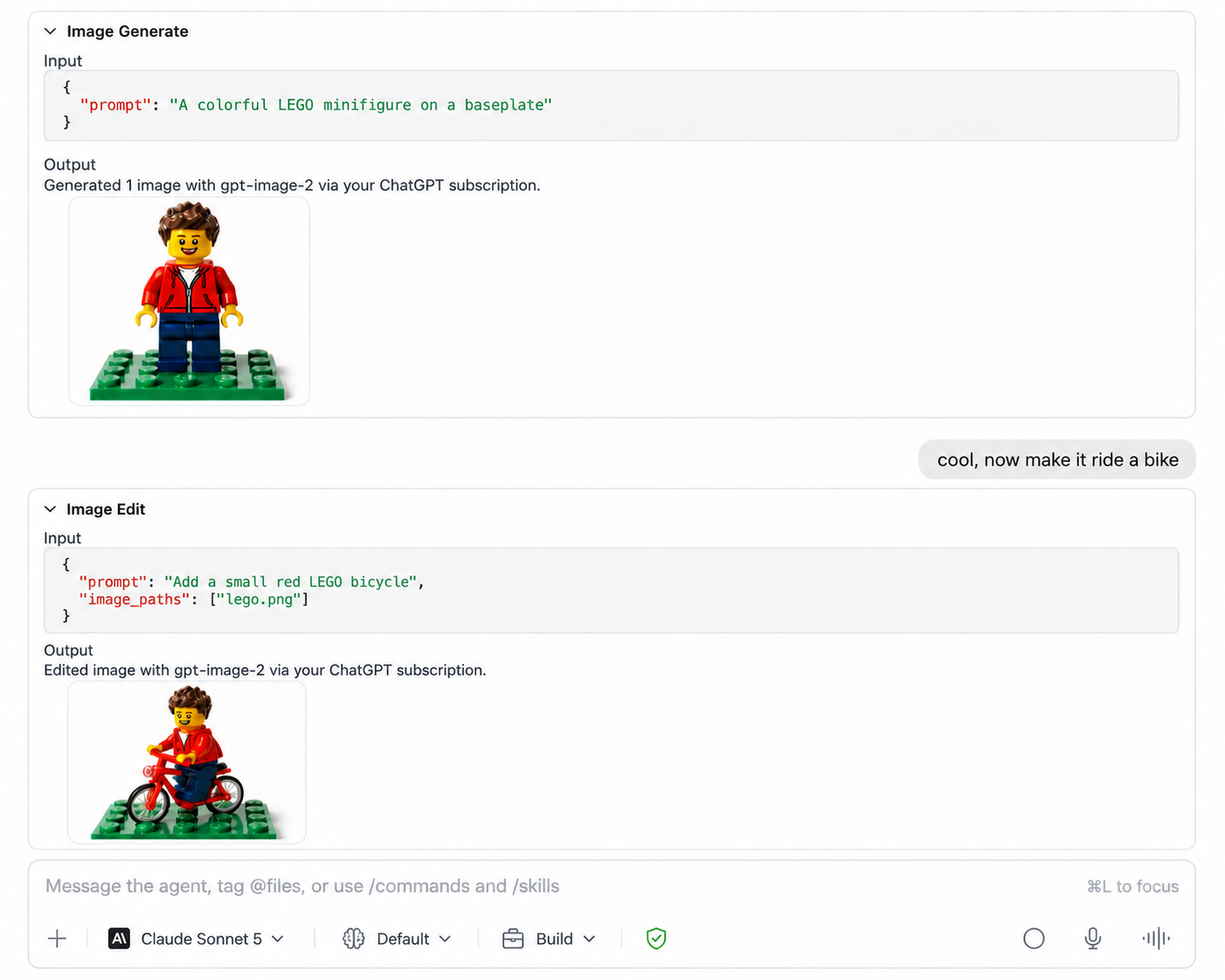
Install
Add it to the plugin array in your opencode.json (global: ~/.config/opencode/opencode.json):
{
  "$schema": "https://opencode.ai/config.json",
  "plugin": ["opencode-gpt-image"]
}
Restart opencode. Done — no key required if you've already run opencode auth login and connected OpenAI (see Auth below).
Auth
The tools are always registered; auth is only resolved when you actually call one, in this order:
OPENAI_API_KEYenv var — a platform API key, billed per image.- opencode's own
openaicredential, whatever you already connected viaopencode auth login(or the/connectcommand) — no separate setup:- a platform API key you entered there, reused directly, or
- your ChatGPT/Codex subscription (Plus/Pro/Business), if you signed in with "Sign in with ChatGPT". Rides the same session opencode itself uses for chat — refreshed automatically, no extra OAuth flow, no per-image API billing.
- A key file (
~/.config/opencode/openai.keyby default) — a fallback for headless/CI setups that don't want to touch opencode's managed auth store. - Nothing found → the tool call fails with a message telling you exactly what to do.
If you don't already have opencode auth login set up with OpenAI, either export OPENAI_API_KEY, or run:
opencode auth login
# pick OpenAI, then either "ChatGPT Pro/Plus" (browser or headless) or "Manually enter API Key"
[!NOTE] The ChatGPT/Codex subscription path calls the same undocumented
chatgpt.com/backend-api/codex/images/*endpoints Codex CLI/opencode use internally. It's not a publicly documented API and can change without notice.mask_pathand non-PNG output are only available in platform API key mode. Usage must comply with OpenAI's Terms of Use and Usage Policies.
Tools
| Tool | Does |
|---|---|
image_generate |
Text prompt (+ optional reference image(s)) -> image(s), saved to disk. |
image_edit |
Edit/transform existing image(s), optional mask, -> image(s). |
image_generate also accepts an optional image_paths array of existing reference images to guide/condition the generation.
Both support size, quality, background, output_format, n, and output_path.
Config
| Env var | Purpose |
|---|---|
OPENAI_API_KEY |
Platform API key (overrides opencode's stored credential and the key file). |
OPENCODE_OPENAI_KEY_FILE |
Custom key-file path. Default ~/.config/opencode/openai.key. |
OPENCODE_IMAGE_MODEL |
Override the model. Default gpt-image-2 (try gpt-image-1-mini for cheaper output). |
License
MIT
同类生态推荐

Gpt Imagegen
opencode-gpt-imagegen
OpenCode plugin for GPT Image 2 generation through your ChatGPT subscription, with reference images and safe PNG output.

Oc Codex Multi Auth
oc-codex-multi-auth
OpenCode plugin for ChatGPT Plus/Pro OAuth with Codex/GPT-5 routing, multi-account rotation, account switching, health checks, diagnostics, and recovery tools

Magic Compact
magic-compact
Lossless context compression plugin for OpenCode.