
Fetch Proxy
Route one OpenCode provider through an HTTP proxy — for a LAN model server reachable only via a corporate proxy — without touching the system proxy.
0
918
近 7 天 918
38.1
生态多维模型
8 天前
2026-10-12
快速安装与配置
opencode.json写入当前项目的 opencode.json,只对这个仓库生效。
opencode.json
{
  "$schema": "https://opencode.ai/config.json",
  "plugin": ["opencode-fetch-proxy@1.0.25"]
}
写入 ~/.config/opencode/opencode.json,对所有项目生效。
~/.config/opencode/opencode.json
{
  "$schema": "https://opencode.ai/config.json",
  "plugin": ["opencode-fetch-proxy@1.0.25"]
}
若你要在本地改造这个插件,先装到项目里再从本地路径引用。
shell
pnpm add -D opencode-fetch-proxyOpenCode 启动时会通过内嵌运行时自动加载 npm 依赖并缓存至本地目录,无需手动在全局环境执行安装。
Route one OpenCode provider through an HTTP proxy — without touching the system proxy, and without sending your other providers' traffic through it.
Built for a specific, common corporate shape: the workstation is on a VPN, your model server sits on the LAN, and the corporate HTTP proxy is the only route to it.
The problem
workstation ──VPN──► [ corporate proxy 192.168.10.101:3128 ] ──LAN──► [ vLLM 192.168.10.86:5005 ]
        └──────────────────► everything else on the internet: reachable directly
Measured on the machine this was written for:
| Probe | Result |
|---|---|
TCP connect to 192.168.10.86:5005 directly |
✗ connect timeout — no route |
TCP connect to 192.168.10.101:3128 |
✓ reachable |
CONNECT 192.168.10.86:5005 via the proxy |
✓ HTTP/1.1 200 Connection established |
So the proxy is a working path and the direct route is not. OpenCode has no setting for this:
- Provider settings have no
proxyfield.ProviderConfigis declaredadditionalProperties: false, so aproxykey besideoptionsfails validation. Onlyoptionsaccepts extra keys, and no UI writes there. - No plugin hook can attach a proxy to a request. The V1 hook surface is
config,provider,auth,event,tool,dispose,chat.message,chat.params,chat.headers,permission.ask,tool.execute.*andexperimental.*. HTTP_PROXYis not the answer. It is process-wide rather than per-provider, is honoured inconsistently depending on which HTTP stack runs, and usually breaks OpenCode's own loopback connection unlessNO_PROXYis also right.
The AI SDK provider packages fall back to the runtime global fetch when no fetch option is
supplied. That fallback is the seam this plugin uses.
What it does
Routes only the providers you name through a proxy. Everything else connects directly, so your external API traffic never passes through the corporate proxy.
Three ways to configure it, in precedence order:
| # | Where | Scope | Needs a working model? |
|---|---|---|---|
| 1 | options.proxy in opencode.jsonc |
that provider | no |
| 2 | the /proxy command |
the session's provider | yes |
| 3 | proxy in proxy.json |
targets, or every provider when opted in |
no |
// Option 1 — most reliable
{
  "provider": {
    "063": {
      "npm": "@ai-sdk/openai-compatible",
      "options": {
        "baseURL": "http://192.168.10.86:5005/v1",
        "proxy": "http://192.168.10.101:3128"
      }
    }
  }
}
# Option 2 — from inside a session
/proxy http://192.168.10.101:3128
/proxy remove
Install
One command, no config change. Install the package and run its installer:
npm install opencode-fetch-proxy
npx opencode-fetch-proxy-install
That copies the plugin to ~/.config/opencode/plugins/opencode-fetch-proxy.js, creating the
directory if needed, and refuses to overwrite a file that differs (use --force for that). It
respects OPENCODE_CONFIG_DIR and XDG_CONFIG_HOME. Run it with --print to see the target path
without writing anything.
OpenCode discovers the file at startup. On Windows the config path is the same
~/.config/opencode — it does not use %APPDATA%.
The file name is yours to choose; the extension is not. Discovery globs
{plugin,plugins}/*.{ts,js}, so the name is irrelevant — only.jsor.tsmatches. This package ships the file asindex.js, so if you are copying it out of a git checkout rather than using the installer, rename it on the way in..mjsand.cjsare silently skipped in that directory — a.mjsplugin there does nothing at all, with no error.
A subdirectory is not auto-discovered. The glob is single-segment:
plugins/anything/index.jsis invisible to it, however it is named. To keep the plugin in its own directory, declare the directory explicitly (route 1 below) — the loader accepts a directory and resolvesindex.js/index.mjsinside it, so this is where a.mjsname finally works:
// works: a directory containing index.js or index.mjs
{ "plugin": ["C:/Users/you/.config/opencode/plugins/opencode-fetch-proxy"] }
Three routes, in order of how much can go wrong:
1. Path to the file or its directory — nothing downloaded, any extension:
{ "plugin": ["C:/Users/you/.config/opencode/plugins/opencode-fetch-proxy.js"] }
A path plugin must export id; this one does (id: "fetch-proxy"), which is why the path route
works without a package.json. A directory with no package.json and no index file fails at
startup with "missing package.json or index file".
2. The GitHub tag — version-pinned, no registry involved:
{ "plugin": ["github:tespio/opencode-fetch-proxy#v1.0.25"] }
Pin the tag: without a tag the spec follows the default branch, so a later commit silently changes what you install. If the git spec does not resolve in your build, fetch the single file instead and use route 1:
https://raw.githubusercontent.com/tespio/opencode-fetch-proxy/v1.0.25/index.js
The pin above is the version this README was written against — check
releases for a newer one, since a pinned
tag stays where you put it and does not follow updates. The v1 tag always points at the newest 1.x
release if you would rather take patch updates automatically, at the cost of not controlling exactly
which commit you run.
3. npm — one line, and the only route that updates itself:
{ "plugin": ["opencode-fetch-proxy"] }
A bare package name is rewritten to @latest and installed automatically at startup with npm's
Arborist into ~/.cache/opencode/packages/.
Use
plugin, notplugins. The V2 keypluginsis discarded when config is lowered to the V1 shape — logged asconfiguration compatibility diagnostic ... kind=unsupportedand otherwise silent. If the plugin does not load, try the other key.
Configure
options.proxy — declare it on the provider
The most reliable option, and the only one that works when the gated provider is your only provider. See the snippet above.
options is the only schema-legal location: ProviderConfig is additionalProperties: false,
while options is an open record — the generated SDK type confirms it:
options?: {
    apiKey?: string;
    baseURL?: string;
    [key: string]: unknown | string | boolean | (number | false) | undefined;
};
set-proxy — a form, from outside the session
The reliable way to configure the first proxy, because it needs no model. Run it with no arguments and it opens a form in your browser:
npx opencode-fetch-proxy-set
It lists every provider it found in opencode.jsonc — endpoint, current mapping, model count — with
one field for the proxy URL. Pick a provider, paste the URL, save. That writes
proxy-providers.json, the same file /proxy writes. The local server exits as soon as you submit,
so nothing is left running.
For scripts, the command-line form still works:
npx opencode-fetch-proxy-set http://192.168.10.101:3128 --provider 063
npx opencode-fetch-proxy-set --list          # what is configured, and which providers exist
npx opencode-fetch-proxy-set --remove        # clear it
npx opencode-fetch-proxy-set --file          # print the mapping file path
It writes the same proxy-providers.json that /proxy writes, choosing the provider the same way —
explicitly, or the sole non-loopback provider in opencode.jsonc. It refuses a proxy URL containing
an unencoded backslash, because that parses as a URL while silently dropping the credentials.
No restart needed. The plugin re-reads the mapping every time OpenCode reloads its config, which happens during a session, so the change applies to the next request.
/proxy — configure it from inside a session
/proxy <proxyURL>                 configure the provider this session is using
/proxy <providerID> <proxyURL>    configure a specific provider
/proxy remove                     undo it for the current provider
/proxy list                       show what is configured
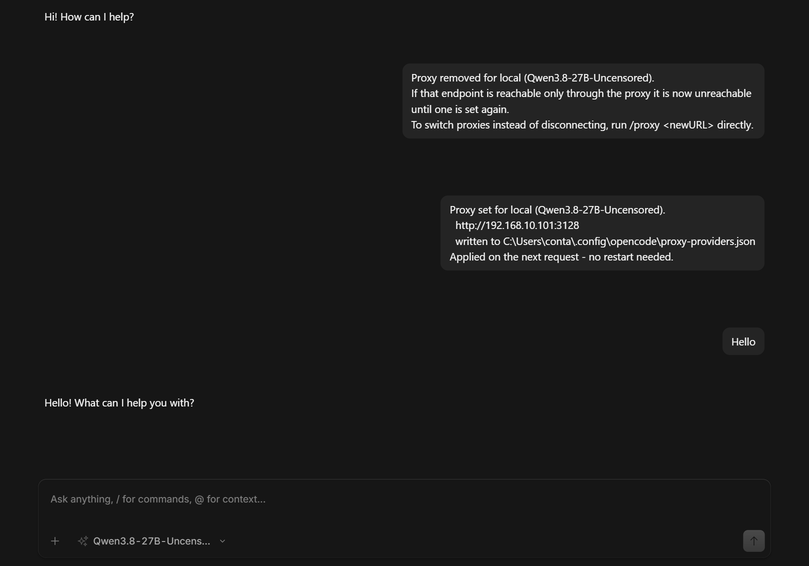
A real session. Both results appear as they happen, with no model reply, no "Thinking" indicator
and no connection error — even though the second one reconfigures a provider that is only reachable
through the proxy. The Hello below is a separate message the user sent afterwards.
This works with no reachable model, which matters because the situation /proxy exists for is
exactly the one where the provider is unreachable. Three mechanisms make that possible, and they are
worth understanding because the naive version does not work:
1. The work happens in a shell, not in a model turn. A slash command is a prompt template, so
submitting one normally starts a model turn — and the tool inside it only runs after the model
responds, which cannot happen for an unreachable provider. But the server expands !...`` in a
command template with a real shell before it calls the model:
const shellMatches = shell(template);
if (shellMatches.length > 0) {
  const results = yield* Promise.all(shellMatches.map(async ([, cmd]) =>
    (await text([cmd], { shell, nothrow: true })).text));
  template = template.replace(bashRegex, () => results[index++]);
}
yield* plugin.trigger("command.execute.before", {...}, { parts });
const result = yield* prompt({ ... });          // model call comes after
So the mapping is written by set-proxy.js run from that shell, before any model is involved. The
command reaches it as an argument, never through a pipe — cmd.exe answers a bare echo with the
literal text ECHO is on., which is how an earlier version managed to send that string down the
pipe.
2. The result is posted as its own message, with no model. Clearing the command's parts is not
enough: the turn is issued regardless, and after /proxy remove it retries a provider the command
just disconnected. So the plugin posts the outcome itself through the SDK's noReply flag, which
persists a message and skips the model loop:
if (input.noReply === true) return message;   // persist, no model
return yield* loop({ sessionID });
3. The turn that is still issued is answered in-process. It cannot be cancelled from a plugin,
but it travels through this plugin's patched global fetch, so the plugin returns an empty
completion itself — a few milliseconds, no socket, no network. Without it, the turn would spend about
a minute retrying and then report a connection error for a command that had already succeeded.
The result is a command that writes a file, reports what it did, and never depends on a provider being reachable.
The provider id can be omitted. A chat.params hook records the active provider before each model
request, and the command applies to it. When no request has succeeded yet, it falls back to the
provider declared in opencode.jsonc, provided there is exactly one non-loopback provider — it
will not guess between several. It writes ~/.config/opencode/proxy-providers.json and applies on
the next request, with no restart: the plugin re-reads the mapping whenever it changes on disk, so
this does not depend on any hook firing.
Two cases need care:
- Several providers configured, none proxied yet. The fallback cannot know which one you mean, so
name it explicitly once:
/proxy <providerID> <proxyURL>. options.proxyis set on the provider. That declaration wins over anything/proxywrites, and/proxy removecannot delete it. The command detects this and tells you where the proxy actually lives, rather than reporting that none is configured. Delete the key fromopencode.jsoncif you want/proxyto be in charge.
/proxy remove disconnects a provider that is reachable only through the proxy. To switch proxies,
just set the new one — that replaces the old mapping without a removal.
Password-protected proxies
Basic-auth proxies are supported by putting the credentials in the URL:
/proxy http://user:password@192.168.10.101:3128
or in config:
"proxy": "http://user:password@192.168.10.101:3128"
Percent-encode special characters. A backslash in the username — the usual
DOMAIN\user form — parses "successfully" as a URL while silently dropping the credentials,
so the proxy is contacted with no authentication and you get a confusing 407. The plugin detects
this and refuses with instructions rather than letting it fail obscurely:
/proxy http://DOMAIN%5Cuser:p%40ssword@192.168.10.101:3128
Also encode @ as %40 and : as %3A in a password.
Passwords are redacted from everything you see. Chat output, logs and error messages show
http://user:REDACTED@host:port. The username is kept, since it is what you need when
diagnosing a 407.
But the password is stored in plaintext in proxy-providers.json (or opencode.jsonc).
That is unavoidable — the proxy needs the credential — but it means:
- the file is exactly as sensitive as the password itself
- it is gitignored by the
.gitignoreOpenCode writes into its config directory, which is worth confirming if you keep that directory in version control - prefer a proxy account with no other privileges
proxy.json — a global proxy
{
  "proxy": "http://192.168.10.101:3128",
  "targets": ["192.168.10.86:5005"],
  "log": true
}
targets covers hosts that are not provider endpoints. To route every provider through the
global proxy instead, opt in explicitly:
{ "proxy": "http://192.168.10.101:3128", "routeAllProviders": true }
This is off by default on purpose. In the usual corporate setup, blanket routing would make unrelated providers depend on the corporate proxy and send their traffic through it — an unnecessary dependency, and for external API calls a privacy question too.
Reference
| Key | Where | Meaning |
|---|---|---|
proxy |
provider options (or settings) |
Proxy for that provider only. |
proxy |
proxy-providers.json |
Written by /proxy. Same effect. |
proxy |
proxy.json |
Global. Used with routeAllProviders or targets. |
routeAllProviders |
proxy.json |
Opt in to routing every non-loopback provider host. |
targets |
proxy.json |
Extra non-provider hosts to route. |
proxyTargets / noProxy |
provider options |
Explicit hosts for that provider. |
log |
proxy.json |
Log each proxied request and the chosen transport. |
Environment: OPENCODE_PROXY_URL, OPENCODE_PROXY_TARGETS (comma-separated),
OPENCODE_PROXY_ALL=1, OPENCODE_PROXY_LOG=1.
Save
proxy.jsonas UTF-8 without a BOM. A BOM makesJSON.parsefail; the plugin logsbad proxy.jsonand stays inactive rather than guessing.
Loopback is never proxied
127.0.0.0/8, localhost, ::1, 0.0.0.0 and *.localhost always go direct, and this is not
configurable. Two reasons:
- OpenCode's own client↔server traffic is loopback. Routing it through a proxy creates a routing loop — the "you must bypass the proxy for this connection" warning in OpenCode's network docs.
- A proxy reached over the network normally has no route back to your loopback, so the request
fails with an opaque error (typically
503) rather than anything actionable.
This was not theoretical: a test that proxied a loopback provider target failed with exactly that
503 before the guard existed.
How it works
No hook can attach a proxy to a provider request, so the plugin wraps the runtime fetch that AI
SDK providers fall back to, and routes only hosts it has a rule for. Rules are keyed by
host:port, and loopback entries are dropped at build time so logs and error messages never
advertise a target that will in fact go direct.
Two transports, chosen once per proxy URL:
undiciProxyAgentwhen it resolves — handles CONNECT tunnelling and proxy basic-auth for bothhttpandhttpstargets.- A manual CONNECT tunnel otherwise — opens the TCP connection, issues
CONNECT host:port, negotiates TLS inside the tunnel forhttpstargets, writes an origin-form HTTP/1.1 request, and returns the response as a streamed webResponse, so SSE streaming survives.
The manual path is a real fallback, not a formality: undici is not always importable from a
plugin directory, and the OpenCode 1.19 desktop runs its server on Node (no Bun markers in the
bundle; typeof Bun === "undefined" guards its Bun-only paths).
Commands are shipped as a markdown file at <config>/command/proxy.md, written and kept up to
date by the plugin. A plugin cannot register a slash command: the command list is built from
the command config map, markdown files, MCP prompts and skills, and its source union has no
"plugin" member.
Verify it loaded
With log: true:
[fetch-proxy] active - per-provider proxies only (options.proxy or /proxy)
[fetch-proxy] provider "063" -> http://192.168.10.101:3128 (declared on provider) for 192.168.10.86:5005
[fetch-proxy] GET http://192.168.10.86:5005/v1/models -> http://192.168.10.101:3128
[fetch-proxy] /proxy command file: created (.../command/proxy.md)
Only providers that actually have a proxy appear in that list. The desktop app writes server
output to <appdata>/ai.opencode.desktop/logs/<timestamp>/server.log; the shared
~/.local/share/opencode/log/opencode.log is not always current.
Verified behaviour
Exercised against a live proxy and a live LAN target:
| Test | Result |
|---|---|
Provider with options.proxy, another without |
✓ gated one proxied, other direct |
/proxy sets a mapping |
✓ provider routed, mapping persisted |
/proxy remove |
✓ provider returns to direct |
Unrelated host (example.com) |
✓ direct, 200 |
| Loopback target with a proxy declared | ✓ direct (bypass guard) |
https:// through the CONNECT tunnel |
✓ 200, TLS and certificate validation intact |
| Reachability probe | ✓ reachable for a live proxy, unreachable (ECONNREFUSED) for a dead one |
Global proxy without routeAllProviders |
✓ no blanket routing |
dispose() |
✓ original fetch restored |
Limitations
- It patches a global. It relies on providers falling back to global
fetch. A package that supplies its ownfetchor dispatcher cannot be intercepted. Native proxy support in provider settings is the correct long-term fix. - Rules are keyed by host. Two providers on the same host cannot use different proxies.
/proxyneeds a working model to run its turn — see above.- Proxy auth is basic-auth only. NTLM and Kerberos need an authenticating gateway.
- Not a security boundary. It routes traffic; it does not inspect or block it.
A design reference for the future
OpenCode has no supported way for a plugin to contribute UI or collect configuration interactively. Two related efforts are worth knowing about:
- #6549 proposed a declarative Intent abstraction for server→client UI. It was closed; the maintainer took a different route.
- The interactive question tool that replaced it (#7268, multi-select in #7386) is agent-driven: the model asks during a turn. A plugin cannot raise a form at startup and block on the answer, and the answer lands in the conversation with nowhere durable to put it.
If plugin-initiated forms with a plugin-owned config store are ever exposed, that becomes the
right way to collect this value. /proxy is the closest thing available today, and its
constraint is documented above rather than hidden.
License
MIT
同类生态推荐

Codesocks
@hallaxius/codesocks
Route selected OpenCode V2 providers through HTTP, HTTPS, or SOCKS proxies without changing baseURL.

Cache Compact
opencode-cache-compact
Cache-friendly context compaction for OpenCode (V1 and V2): append a summary in place, then cut what the model sees down to it.

Plugboard
opencode-plugboard
Use the ChatGPT, Claude, Copilot and OpenCode Go logins in your OpenCode server from any app: an OpenCode V2 plugin serving OpenAI, Anthropic and Gemini compatible APIs.