
0
214
近 7 天 26
34.3
生态多维模型
2 天前
2026-10-18
快速安装与配置
opencode.json写入当前项目的 opencode.json,只对这个仓库生效。
opencode.json
{
  "$schema": "https://opencode.ai/config.json",
  "plugin": ["opencode-context-trimmer@0.2.2"]
}
写入 ~/.config/opencode/opencode.json,对所有项目生效。
~/.config/opencode/opencode.json
{
  "$schema": "https://opencode.ai/config.json",
  "plugin": ["opencode-context-trimmer@0.2.2"]
}
若你要在本地改造这个插件,先装到项目里再从本地路径引用。
shell
pnpm add -D opencode-context-trimmerOpenCode 启动时会通过内嵌运行时自动加载 npm 依赖并缓存至本地目录,无需手动在全局环境执行安装。
⛲ context-trimmer
Give opencode an "infinite context"
Never hit the context-window ceiling, no matter how long the session runs. The full history stays on disk; the model fetches it back on demand.




English · 简体中文
| 🌊 Infinite context Keep chatting — never cut off by the context limit |
💸 No wasted spend Old history isn't resent, so it isn't re-billed |
⚡ Zero latency Instant, local — no extra model call |
🎯 Cache-safe Doesn't break the prompt cache |
🔎 Always recallable Trimmed content is fetchable on demand, even across projects |
60-second start
// ~/.config/opencode/opencode.json
{
  "$schema": "https://opencode.ai/config.json",
  "plugin": ["opencode-context-trimmer"]
}
Restart opencode — done. Works out of the box with no configuration. To tune it, see Configuration.
Why
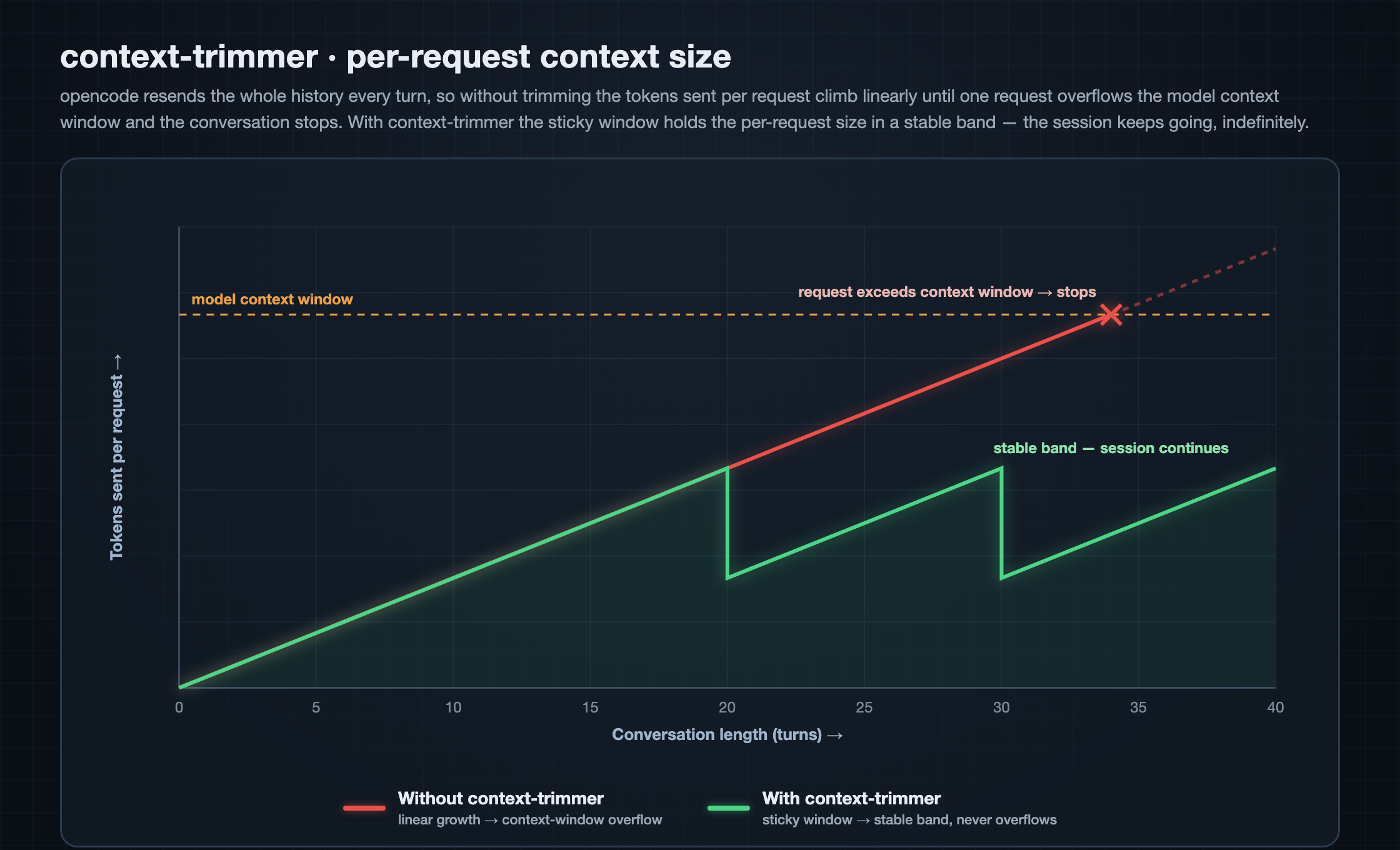
opencode is stateless toward the model: every request resends the entire
history. The longer the session, the more tokens are resent — tens of thousands,
hundreds of thousands — until one request exceeds the model context window and
the conversation stops dead.
And every one of those resends is billed, for real money. The longer the session, the more stale old tool output you keep re-uploading, the more input tokens pile up and the higher the bill climbs. context-trimmer trims that redundancy in place before the request goes out — tokens that are trimmed aren't sent, and what isn't sent isn't billed. It won't make your total cost go down, but it tames the "pricier the longer you chat" runaway curve and keeps a long session's cost in a roughly stable band.
The common "compaction/summarization" approach makes an extra model call to produce a summary: it costs money, adds latency, and mangles the original into a lossy digest. context-trimmer takes another road — pure message rewriting — trimming redundant turns in place before sending, with no model call and no loss of the original.
| Compaction/summary | context-trimmer | |
|---|---|---|
| Extra token cost | ❌ A model call every time | ✅ Zero |
| Extra latency | ❌ One more model round-trip | ✅ Instant, local |
| Fidelity | ❌ Lossy digest | ✅ Original kept in full on disk |
| Prompt cache | ❌ Prefix rewritten, invalidated | ✅ Sticky boundary, intact |
| Information recovery | ❌ Cannot be restored | ✅ Fetched back via context_recall |
It follows the "principle of locality"
What the model needs most is almost always the most recent turns; the older
something is, the less it gets referenced. Trimming therefore mirrors a CPU's
multi-level cache: recent turns stay in fast memory (sent in full), earlier
turns are demoted to a summary, and distant turns are paged back to main
memory (local disk), fetched on demand with context_recall. A tiny recall cost
buys a context that feels effectively "infinite."
How it works
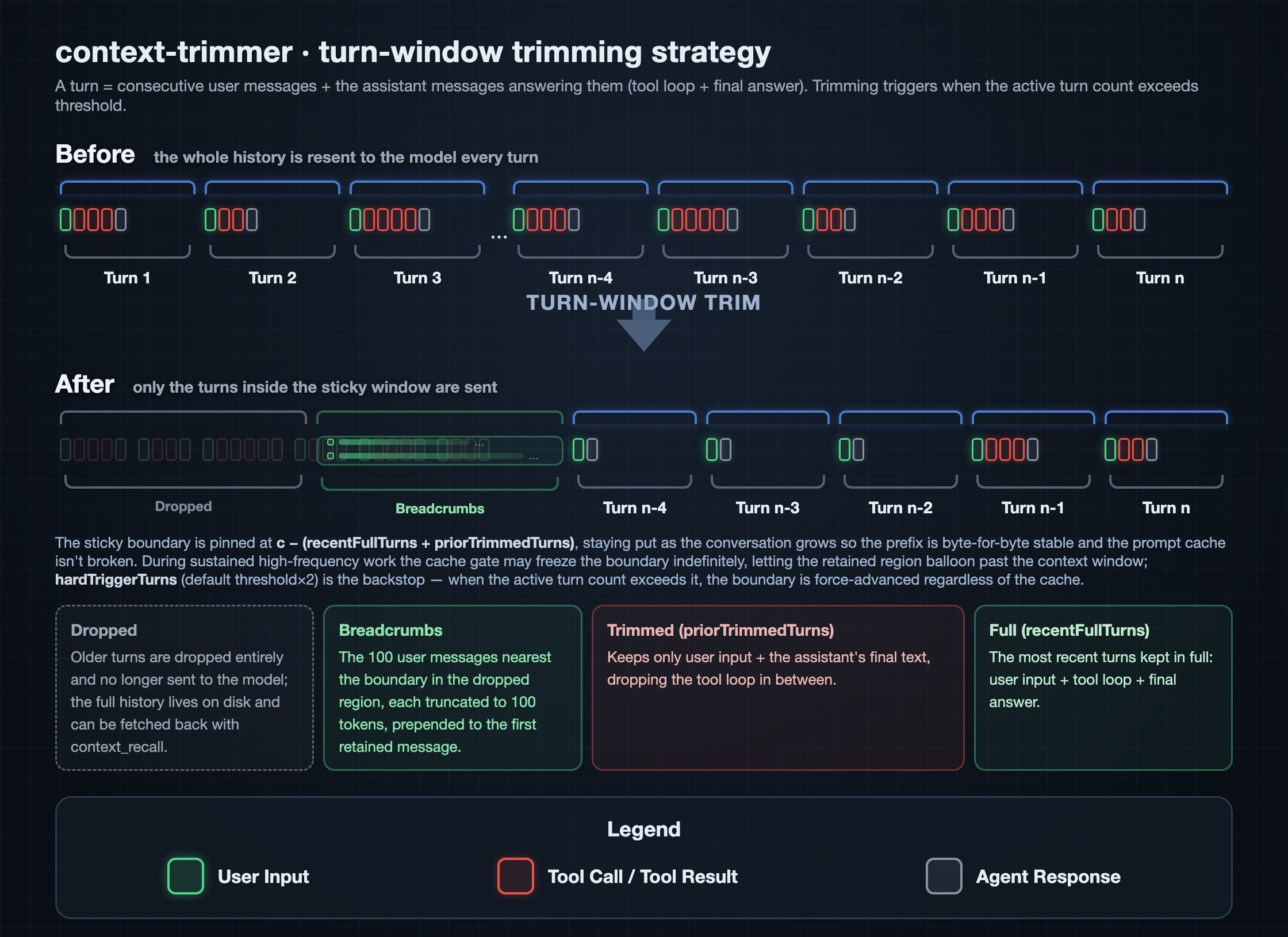
The plugin hooks experimental.chat.messages.transform (the point where
outgoing messages can be rewritten) and applies a pluggable strategy. The
built-in, default, and only strategy is turn-window:
- A turn = one or more consecutive user messages plus the assistant messages that answer them. Consecutive user messages are merged into one turn (to absorb messages "queued up" mid-turn).
- Trimming triggers when the active turn count exceeds
threshold:- the most recent
recentFullTurnsturns are kept in full (user input + tool loop + final answer); - the
priorTrimmedTurnsturns before those keep only user input + the assistant's final text (the tool loop is dropped); - everything older is dropped (breadcrumbs may be kept — see below).
- the most recent
- The trim boundary is sticky: pinned at
c - (recentFullTurns + priorTrimmedTurns), it stays put as the conversation grows so the serialized prefix remains byte-for-byte stable, which keeps the upstream prompt cache intact. The boundary only jumps forward when the active turn count exceedsthresholdagain (subject to the cache gate and hard cap below).
After trimming, a notice is merged into the first retained user message, telling the model that earlier context was trimmed and how to fetch it back (see the tool below).
Breadcrumbs (keeping summaries of dropped user messages)
The name "breadcrumbs" comes from the fairy tale Hansel and Gretel: before being led into the forest, the siblings scatter breadcrumbs along the path so they can follow the trail home. The idea here is the same — once the full history is dropped, we leave behind a short summary (a truncated "crumb") of each old user message, so the model can follow the trail and recall "what we talked about earlier" instead of going blank.
The most recent handful of user messages in the dropped region are kept as short "breadcrumbs," merged into that notice, so even without the full history the model has a thread to follow and doesn't lose the plot entirely.
breadcrumbUserMessages: how many of the most recent user messages in the dropped region to keep (default100,0disables).breadcrumbMaxTokens: how many tokens to keep per message; longer ones are truncated with an ellipsis (default100).
Truncation rules
Each breadcrumb is truncated by token count (estimated at 1 token ≈ 3.5 UTF-8 bytes, converted to a byte budget), without relying on any tokenizer library:
- Bytes are accumulated character by character; when adding a character would exceed the budget, it stops before that character.
- Never splits a character in half: the cut always lands on a character boundary — a multi-byte character (a 3-byte Chinese character, or a surrogate pair like an emoji) is kept whole or dropped whole, so the result is always valid UTF-8.
- When truncation happens, an ellipsis
…is appended.
For example, with a 3-token budget (≈10 bytes) and content 帮我修复登录 (3
bytes per character): it keeps 帮我修 (9 bytes); the 4th character would reach
12 bytes and exceed the budget, so it's truncated to 帮我修 ….
The assembled notice
Once trimming triggers, the plugin joins the "breadcrumb block" and the "trim
notice" with a blank line into one synthetic text part (id: context-trimmer-notice) prepended to the first retained user message (no
extra message is added). With the default config, and when earlier messages were
actually dropped, the inserted text looks like:
[context-trimmer] Summaries of earlier user messages that were trimmed (each truncated, as recall hints only):
  1. Help me fix the error on the login page — clicking submit returns a 500 …
  2. Which file holds the database connection pool config …
  3. Make that function async, then add retries …

[context-trimmer] Earlier context has been trimmed, but the full history is still saved in full and can be searched anytime.

When you need the trimmed-away information, call the context_recall tool to fetch the original text:
  - query: keywords to search for; space-separated words are AND-matched (case-insensitive).
  - scope: where to search — a keyword or a session id. "session" (default): this session only, fastest and most relevant. "project": every session in the current project (including subagent child sessions). "all": every session across all projects on the machine — expensive, use ONLY when the user explicitly asks to search across projects, don't escalate on your own. Or pass a session id (e.g. "ses_...") to search exactly that one session.

No need to confirm any path or database location — just call context_recall.
Composition and edge cases:
- Breadcrumb block: a one-line heading + a numbered list, each item the
truncated text of a dropped user message; it lists at most
breadcrumbUserMessagesitems (default 100), each truncated tobreadcrumbMaxTokens(default 100). It appears only when messages were dropped andbreadcrumbUserMessages > 0. - Trim notice: tells the model that context was trimmed and how to fetch it
back with
context_recall. Customizable via thenoticeconfig option; set it to""to disable. - If both are empty, no notice is inserted and messages are left untouched.
Because the wording is constant, when the sticky boundary is stable the serialized prefix stays byte-for-byte stable and the upstream prompt cache isn't broken.
Cache-aware gate
(Re)triggering a trim reshapes the prefix and invalidates the upstream prompt
cache (which typically has a ~5-minute TTL). cacheAwareMinutes defers the
trigger until the session has been idle for at least that many minutes — by which
point the cache has already expired, so no extra cache-miss cost is paid.
Trimming is deferred during active conversation; set it to 0 to trim as soon as
the threshold is hit.
Overflow hard cap (hardTriggerTurns)
The cache gate has a risk: during sustained high-frequency work, every
request's gap is shorter than cacheAwareMinutes, so the gate defers the trigger
indefinitely — the sticky boundary never advances, the retained region grows by
one turn each round without bound, and eventually it blows past the model's
context window (surfacing as the upstream returning The request exceeds the model context window).
hardTriggerTurns is the overflow backstop: when the active turn count exceeds
it, the boundary is force-advanced even if the cache is still "hot" (trading one
cache miss for avoiding a hard overflow). The default 0 means auto threshold * 2.
Session attribution (subagent safety)
The experimental.chat.messages.transform hook receives empty input and can't
see the current session id, so the plugin bridges each session's model info via
chat.params into a store keyed by session id. The key point: when transform
fires, it locates the context by the real info.sessionID in the message
list, not by guessing from the "most recent chat.params".
This is critical for subagents. A subagent runs in the same process as its parent session, interleaved: while the subtask runs it points the "most recent session" pointer at the child session; when the parent session then takes over, guessing by "most recent session" would hand it the child's context, so the parent's sticky boundary can't be found under the wrong key — trimming silently fails, the entire untrimmed history is sent as-is, and eventually it blows past the context window. Locating by the message's real sessionID means the parent always finds its own boundary on takeover and trims normally.
Installation
Option 1: npm package (recommended)
Add the package name to the plugin array in your opencode config
(~/.config/opencode/opencode.json or a project-level opencode.json); opencode
installs it with Bun automatically at startup:
{
  "$schema": "https://opencode.ai/config.json",
  "plugin": ["opencode-context-trimmer"]
}
Only one
pluginkey per config. JSON silently keeps the last duplicate, so a stray second"plugin": []elsewhere in the file will overwrite this entry and the plugin never loads.
Updating the npm package
opencode caches npm plugins under ~/.cache/opencode/packages/ and reuses the
cached copy on every startup — it does not re-check npm for a newer version.
To upgrade, clear the cache and restart so the next startup re-pulls the latest:
rm -rf ~/.cache/opencode/packages/opencode-context-trimmer*
Then confirm the version in the log (see Confirm it loaded below).
Option 2: local file
opencode also auto-discovers plugins under ~/.config/opencode/plugin/ (or
plugins/). Copy the plugin entry file and its directory over together:
mkdir -p ~/.config/opencode/plugin
cp -R context-trimmer.ts context-trimmer ~/.config/opencode/plugin/
Confirm it loaded
Restart opencode, then check the log:
grep "\[context-trimmer\]" ~/.local/share/opencode/log/opencode.log
You should see a plugin loaded version=… line — use it to confirm the plugin is
active and which version is running (after an upgrade or reinstall, check it to
verify the new build actually took effect). Each time a request is trimmed you'll
also see a trimmed before=… after=… line.
@opencode-ai/plugin and @opencode-ai/sdk are provided by the opencode
runtime — no manual install needed.
Configuration
Optional. Built-in defaults are used when no config file is present. To customize, create:
$XDG_CONFIG_HOME/opencode/context-trimmer.json
# default: ~/.config/opencode/context-trimmer.json
{
  "enabled": true,
  "threshold": 20,
  "recentFullTurns": 5,
  "priorTrimmedTurns": 5,
  "cacheAwareMinutes": 5,
  "hardTriggerTurns": 0,
  "breadcrumbUserMessages": 100,
  "breadcrumbMaxTokens": 100
}
| Field | Default | Meaning |
|---|---|---|
enabled |
true |
Master switch. When false, no request is altered. |
threshold |
20 |
(Re)trigger trimming when the active turn count exceeds this. |
recentFullTurns |
5 |
Number of most recent turns kept in full. |
priorTrimmedTurns |
5 |
Turns before those that keep only "user input + final output". |
cacheAwareMinutes |
5 |
(Re)trigger only after the session has been idle this many minutes (cache already expired). 0 disables the gate. |
hardTriggerTurns |
0 |
Overflow hard cap: when the active turn count exceeds it, force-advance the boundary regardless of the cache gate. 0 means auto threshold * 2. |
breadcrumbUserMessages |
100 |
How many of the most recent user messages in the dropped region to keep as breadcrumbs. 0 disables. |
breadcrumbMaxTokens |
100 |
Max tokens kept per breadcrumb (converted at ≈3.5 bytes/token, cut at a character boundary). |
Changes take effect on the next request — no restart needed (the file is re-read via an mtime cache). A missing or malformed file falls back to defaults; a single invalid field falls back to just that field's default without affecting the rest.
Example: looser trimming
Triggers later and keeps more — suited to cases that value context completeness over token cost:
{
  "enabled": true,
  "threshold": 30,
  "recentFullTurns": 8,
  "priorTrimmedTurns": 8,
  "cacheAwareMinutes": 5
}
Fetching back trimmed history
Trimming only reshapes the upstream request — opencode still keeps the full
history on disk. The plugin registers a context_recall tool so the model can
fetch trimmed-away content on demand:
query— keywords; space-separated words are AND-matched (case-insensitive).scope— where to search; a single overloaded value, either a keyword or a concrete session id, narrow to wide:session(default) — the current session only, fastest and most relevant.project— every session in the current project (sibling + subagent child sessions).all— every session across all projects on this machine. Can be slow (it scans the whole history when nothing matches), so use it only when you explicitly ask to search across projects; the model won't escalate toallon its own just because a narrower scope found nothing.- a specific session id (e.g.
ses_...) — search exactly that one session, the most precise lookup. Any value other than the three keywords is treated as a session id.
scope: all has a handy use: when you remember discussing a topic but can't
recall which project/session it was in — explicitly ask the model to search
across all projects with all and it can pull that conversation back without you
digging through history.
Extending
Add a strategy file under context-trimmer/strategies/, implement the Strategy
interface (enabled(ctx) + apply(messages, ctx)), and register it in
context-trimmer/strategies/index.ts. Strategies run in order, each seeing the
previous one's output; a strategy that throws is skipped (fail-open), so a buggy
strategy can never break a request.
Project layout
context-trimmer.ts              Plugin entry (hooks + tool registration)
context-trimmer/
  config.ts                     Global config loader (mtime cache, fail-safe)
  context.ts                    Per-session model/provider info bridged from chat.params
  logger.ts                     Fail-safe logger over client.app.log
  pipeline.ts                   Runs enabled strategies in order (fail-open)
  globals.d.ts                  Minimal ambient declarations (no @types/node)
  strategies/
    types.ts                    Strategy contract
    index.ts                    Strategy registry
    turn-window.ts              Sticky turn-window strategy
  tools/
    recall.ts                   context_recall tool
Tests live next to the files they cover, named *.test.ts, run with bun run <file>.test.ts.
同类生态推荐

Context Pruner
opencode-context-pruner
Continuous verbatim context pruning for OpenCode, powered by TypeSafe Jev. Port of fast-jev-compaction adapted to OpenCode's context hook.

Tell Sessions
opencode-tell-sessions
Inter-session direct messaging (DM) for OpenCode V1 & V2: agents in different sessions can message each other

Visual Cache
opencode-visual-cache
OpenCode TUI plugin displaying real-time token cache hit rate in the sidebar