
1
165
近 7 天 12
35.5
生态多维模型
17 天前
2026-09-18
快速安装与配置
opencode.json写入当前项目的 opencode.json,只对这个仓库生效。
opencode.json
{
  "$schema": "https://opencode.ai/config.json",
  "plugin": ["opencode-context-sidebar@1.0.0"]
}
写入 ~/.config/opencode/opencode.json,对所有项目生效。
~/.config/opencode/opencode.json
{
  "$schema": "https://opencode.ai/config.json",
  "plugin": ["opencode-context-sidebar@1.0.0"]
}
若你要在本地改造这个插件,先装到项目里再从本地路径引用。
shell
pnpm add -D opencode-context-sidebarOpenCode 启动时会通过内嵌运行时自动加载 npm 依赖并缓存至本地目录,无需手动在全局环境执行安装。
Provider-agnostic Context Usage sidebar for OpenCode TUI.
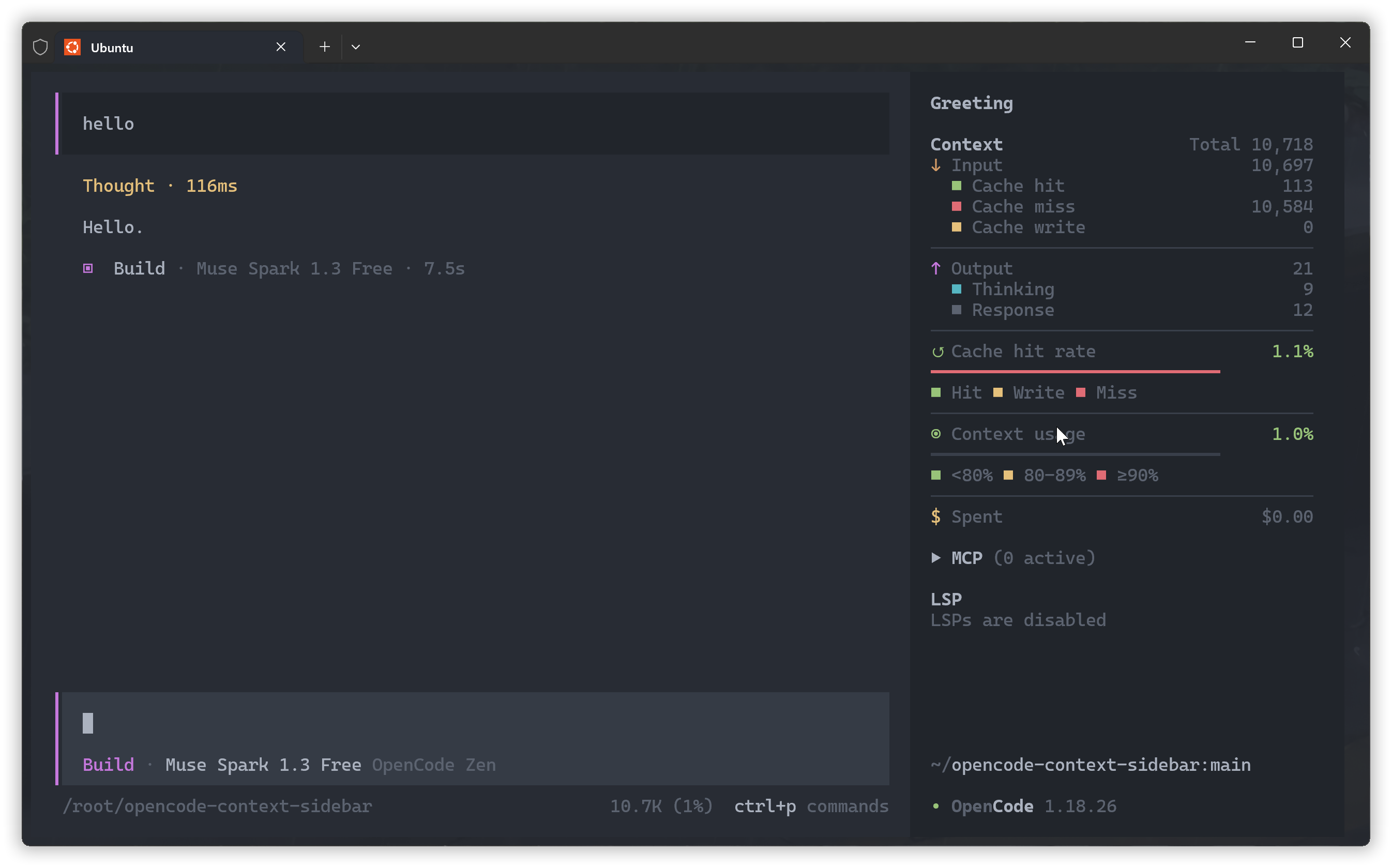
Features
- Latest assistant call token totals
- Input, cache hit, cache miss, and cache write breakdown
- Output, thinking, and response breakdown
- Cache hit rate and colored distribution bar
- Context-window usage with green, yellow, and red thresholds
- Session cumulative cost, matching OpenCode's built-in Context behavior
- Dynamic separators that follow the available sidebar width
The plugin works with any provider that reports standard OpenCode token usage fields.
Install
Install the package with OpenCode, then disable the built-in Context panel in ~/.config/opencode/tui.json or .opencode/tui.json:
{
  "$schema": "https://opencode.ai/tui.json",
  "plugin": ["opencode-context-sidebar"],
  "plugin_enabled": {
    "internal:sidebar-context": false
  }
}
Restart OpenCode after changing the configuration.
How It Works
The plugin uses data already normalized by OpenCode; it does not call provider APIs directly.
Provider response
  -> OpenCode normalizes token usage
  -> Plugin reads the latest assistant message
  -> Sidebar calculates and renders the breakdown
| Display | OpenCode field | Meaning |
|---|---|---|
| Cache miss | tokens.input |
Regular input not read from or written to cache |
| Cache hit | tokens.cache.read |
Input reused from cache |
| Cache write | tokens.cache.write |
Input written to cache for later requests |
| Response | tokens.output |
Generated output excluding reasoning |
| Thinking | tokens.reasoning |
Reasoning tokens reported by the model |
The displayed totals are calculated as follows:
Input         = Cache miss + Cache hit + Cache write
Output        = Response + Thinking
Total         = Input + Output
Context usage = Total / model context limit * 100%
The context limit comes from the active model metadata. The displayed cost is OpenCode's cumulative session.cost, so provider-specific token pricing remains OpenCode's responsibility. Because the values are derived from the current session state, the sidebar updates as new assistant messages arrive.
Development
npm install
npm run build
For local loading:
{
  "$schema": "https://opencode.ai/tui.json",
  "plugin": ["file:///root/opencode-context-sidebar"],
  "plugin_enabled": {
    "internal:sidebar-context": false
  }
}
License
MIT
同类生态推荐

Context Usage
opencode-context-usage
OpenCode TUI plugin: a /context command with the exact token breakdown behind the built-in Context panel (last request) plus session-wide usage, subagent totals, cache hit rate and cost.

Thinking Meter
opencode-thinking-meter
OpenCode TUI plugin: counts the turns cut off mid-thought, says whether the output cap or the context window did it, and shows what thinking costs per turn and after which tool.

Requesty
@christiangalsterer/opencode-requesty-plugin
opencode TUI plugin: shows Requesty.ai monthly budget, current spend, and per-model cost distribution in the session sidebar, in the session prompt and with a detail dialog via the /requesty command