
18
近 30 天 +7
2,163
近 7 天 623
56.5
生态多维模型
2 天前
2026-10-02
快速安装与配置
opencode.json写入当前项目的 opencode.json,只对这个仓库生效。
opencode.json
{
  "$schema": "https://opencode.ai/config.json",
  "plugin": ["opencode-codex-usage@2.2.2"]
}
写入 ~/.config/opencode/opencode.json,对所有项目生效。
~/.config/opencode/opencode.json
{
  "$schema": "https://opencode.ai/config.json",
  "plugin": ["opencode-codex-usage@2.2.2"]
}
若你要在本地改造这个插件,先装到项目里再从本地路径引用。
shell
pnpm add -D opencode-codex-usageOpenCode 启动时会通过内嵌运行时自动加载 npm 依赖并缓存至本地目录,无需手动在全局环境执行安装。
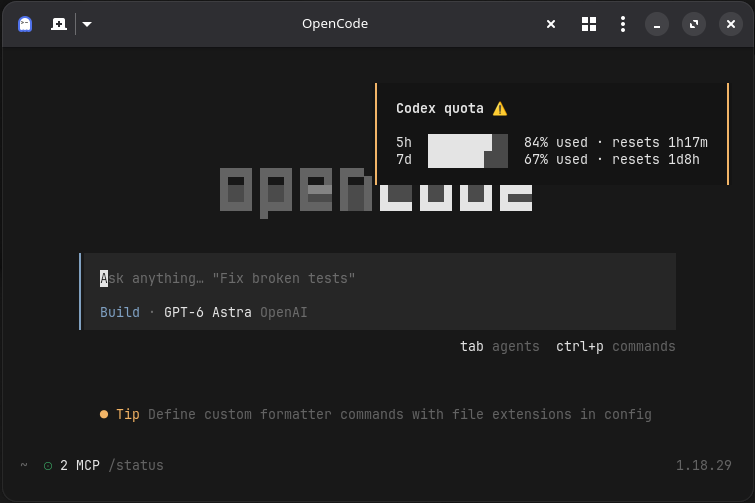
Check your Codex quota without leaving OpenCode. Ask the assistant, run /codex-usage, or get automatic quota alerts.
Install
Connect your ChatGPT account with /connect in OpenCode, then:
npm install -g opencode-codex-usage
opencode-codex-usage --install
Restart OpenCode. Installation defaults to OpenCode 2.
Check your usage
Ask the assistant:
How much Codex quota do I have left, and when does it reset?
The assistant uses the codex_usage tool. Results cover Codex quota, not ChatGPT message limits or API billing.
Get a quick toast:
/codex-usage
No assistant turn needed.
Automatic alerts (OpenCode 2): checks run when you enter a session using OpenAI with a ChatGPT OAuth connection, then every 10 minutes while that session stays selected. Switching to another provider, API-key authentication, or the home screen pauses polling. Sessions without an explicit model selection use OpenCode's project default. /codex-usage still works while polling is paused.
By default, toasts appear when quota status worsens to warning or higher.
From the terminal
opencode-codex-usage --pretty  # Readable usage bars
opencode-codex-usage --json    # JSON for scripts
opencode-codex-usage --help    # All options
Terminal queries require the plugin installed and opencode on your PATH.
Settings & troubleshooting
For expired-token errors, reconnect your ChatGPT account with /connect.
Optional settings
Set environment variables before starting OpenCode:
| Variable | Default | Purpose |
|---|---|---|
OPENCODE_CODEX_QUOTA_POLL_MS |
600000 |
Background check interval in milliseconds |
OPENCODE_CODEX_QUOTA_TOAST_THRESHOLD |
warn |
Alert threshold: warn, critical, error, always, or never |
OPENCODE_CODEX_QUOTA_TOAST_DURATION_MS |
5000 |
Toast duration in milliseconds |
OPENCODE_CODEX_QUOTA_RETRY_COUNT |
1 |
Transient failure retries (0–2) |
OPENCODE_CODEX_QUOTA_MODEL |
Auto-detected | Override the probe model |
Show only critical alerts:
OPENCODE_CODEX_QUOTA_TOAST_THRESHOLD=critical opencode
Upgrade, uninstall, or use OpenCode 1
To upgrade:
npm install -g opencode-codex-usage@latest
opencode-codex-usage --install
To remove the plugin and package:
opencode-codex-usage --uninstall
npm uninstall -g opencode-codex-usage
Restart OpenCode after changing the installation.
For OpenCode 1, add --opencode 1 to install, uninstall, or usage commands.
Development
npm install
npm run build
npm link
opencode-codex-usage --install
Restart OpenCode to load the local plugin. Before submitting changes:
npm test
npm run lint
npm run build
npm run format:check
同类生态推荐

Codex Usage
opencode-plugin-codex-usage
OpenCode TUI plugin that shows live Codex usage limits in the session sidebar.

Tui Quota Usage
opencode-tui-quota-usage
OpenCode quota usage sidebar tracker for OpenCode V2 CLI/TUI

Openai Codex Headers
opencode-openai-codex-headers
Stopgap opencode plugin that smooths the OpenAI/Codex GPT-5.6 rough edges (Luna 404s, missing session titles, reasoning-summary markers) until native support lands