
Shell
Background shells for OpenCode: the agent starts, waits on and drives PTYs; you watch them in a docked TUI panel
3
近 30 天 +1
3,851
近 7 天 339
49.0
生态多维模型
5 小时前
2026-10-05
快速安装与配置
opencode.json写入当前项目的 opencode.json,只对这个仓库生效。
opencode.json
{
  "$schema": "https://opencode.ai/config.json",
  "plugin": ["@opencode-cockpit/shell@0.10.0"]
}
写入 ~/.config/opencode/opencode.json,对所有项目生效。
~/.config/opencode/opencode.json
{
  "$schema": "https://opencode.ai/config.json",
  "plugin": ["@opencode-cockpit/shell@0.10.0"]
}
若你要在本地改造这个插件,先装到项目里再从本地路径引用。
shell
pnpm add -D @opencode-cockpit/shellOpenCode 启动时会通过内嵌运行时自动加载 npm 依赖并缓存至本地目录,无需手动在全局环境执行安装。




Your agent, on instruments. Cockpit adds what OpenCode doesn't ship with: shells that keep running, subagents you can watch, a pull request in the terminal, and a trail of everything each conversation made.
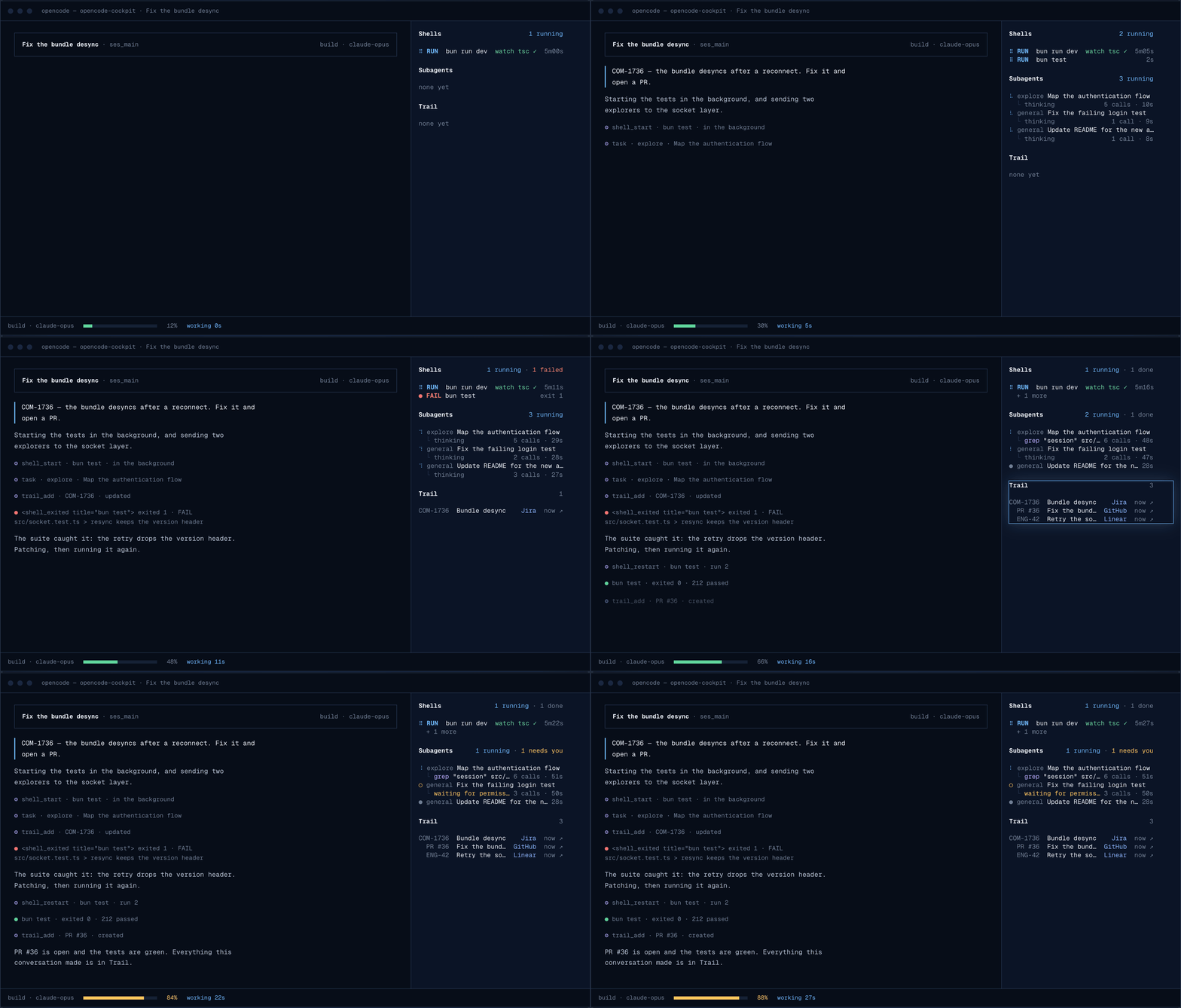
Drawn by Cockpit's own renderers, the same code that runs in your terminal: a test run failing and passing in the background, subagents at work, the PR landing in Trail, the context filling. Every bay, live, is on the site.
Install
OpenCode 1
opencode plugin opencode-cockpit@0.10.0 --global --force
OpenCode 2
opencode plugin add opencode-cockpit@0.10.0
opencode service restart    # after installing, and after every update
Requires OpenCode 1.18+ or 2.0.15+, on macOS or Linux.
The version is pinned on purpose: OpenCode resolves a plugin once, so a bare name or @latest stays
on whatever it installed first. The same line moves you to a newer release.
Stuck on an old version? This runs from npm, outside OpenCode, so it works whatever you have installed:
npx opencode-cockpit@latest update
What you get
Seven bays, all on by default. Each one draws its block in the sidebar, or says none yet until it
has something.
| Bay | What it gives you | Key or command | Docs |
|---|---|---|---|
| Trail | What every conversation shipped — PRs, tickets, deploys — and which one shipped it | ctrl+x f · /trail |
Trail |
| Shell | Terminals that outlive the turn; the agent waits on a port or a pattern, you watch | ctrl+x o panel · ctrl+x j console |
Shell |
| Subagents | Every helper in the sidebar with what it's doing now, and its whole run one key away | ctrl+x d |
Subagents |
| Review | Review changes like a pull request: notes on lines, which the agent reads and resolves | ctrl+x v |
Review |
| Status | How full the context is, where the tokens went, what changed, what it costs | /status-setup |
Status |
| Trust | Approve the same command three times and Trust answers it for you | ctrl+x p · /trust |
Trust |
| Updater | Every plugin you have: what runs, what is published, and an update you pick | /plugins-update |
Updater |
Every key is the same on OpenCode 1 and 2, and none of them is one of OpenCode's own. Each bay is
also published on its own, as @opencode-cockpit/<bay> — see
Install.
Set up in one sentence
Install, restart, then type /cockpit-setup.
The agent reads your settings, asks only what matters — which bays show, in what order, how quiet when empty — and writes the smallest correct file. Every setting is in the Configuration reference.
Something wrong?
npx opencode-cockpit@latest doctor
It checks OpenCode, its config, Cockpit's logs and the daemon, and prints the fix for anything wrong. Troubleshooting covers the rest.
Links
- Documentation — start with What Cockpit is
- OpenCode 1 and 2 — what differs between the two
- Changelog
- Troubleshooting
- Contributing
Contributing
Issues and pull requests are welcome. CONTRIBUTING.md covers the architecture, the invariants worth knowing before changing anything, and how to run your working copy inside OpenCode.
bun install
bun run check    # lint, typecheck, tests (real PTYs, real daemon)
License
同类生态推荐

Cockpit
opencode-cockpit
OpenCode superpowers, all in one: installs every opencode-cockpit feature (Shell, Statusline, Review, Updater, Subagents, Trail, Trust), each can be switched off
Status
@opencode-cockpit/status
A statusline for OpenCode you can actually configure: declarative segments, a typed module, or your existing Claude Code statusline command
Trust
@opencode-cockpit/trust
Permissions that learn: approve the same command enough times and it approves itself, visibly