
1
427
近 7 天 24
38.2
生态多维模型
15 天前
2026-08-05
快速安装与配置
opencode.json写入当前项目的 opencode.json,只对这个仓库生效。
opencode.json
{
  "$schema": "https://opencode.ai/config.json",
  "plugin": ["opencode-agents-monitor@0.1.2"]
}
写入 ~/.config/opencode/opencode.json,对所有项目生效。
~/.config/opencode/opencode.json
{
  "$schema": "https://opencode.ai/config.json",
  "plugin": ["opencode-agents-monitor@0.1.2"]
}
若你要在本地改造这个插件,先装到项目里再从本地路径引用。
shell
pnpm add -D opencode-agents-monitoropencode 启动时会通过内嵌运行时自动加载 npm 依赖并缓存至本地目录,无需手动在全局环境执行安装。

Keep every OpenCode sub-agent in sight.


English | 中文
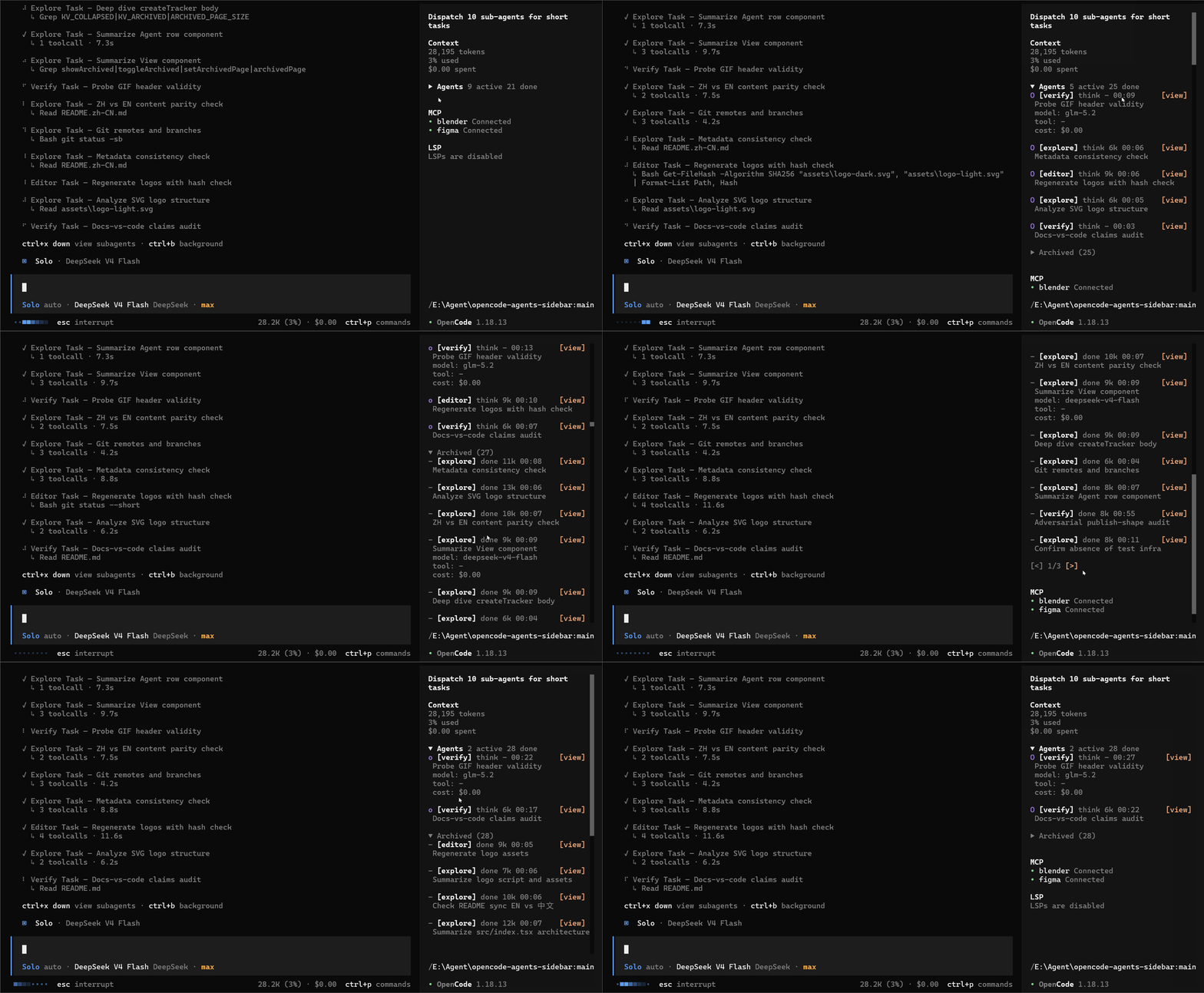
An OpenCode TUI plugin that brings live sub-agent progress straight into the session sidebar. See which agents are still working, what each one is doing, and the elapsed time, context, and cost for each, all without leaving your main session.
Expand an agent for its model, current tool, and cost. When you need the full story, open the child session directly from the sidebar.
Why use it?
Once a session fans out across several tasks, it becomes hard to tell what is still moving and what has already finished. The widget keeps that picture visible: active work updates in real time, completed agents move out of the way, and earlier child sessions reappear when the TUI starts.
What you get
- Live progress at a glance: distinguish
thinking,tool,retry,done, andidlestates as they change - The current tool, while it runs: see a concise call such as
bash npm testbefore it finishes - Useful numbers, not noise: context, elapsed time, model, and cost for each agent
- A tidy long-running session: completed agents are sorted into the paginated
Archived (n)section automatically - Details on demand: keep rows compact, expand the ones you care about, or use
[view]to open the full child session; pressupto return - History after a restart: context and elapsed time for earlier agents are restored lazily from the API
Installation
Requires OpenCode 1.18.0 or later.
opencode plugin opencode-agents-monitor
Restart OpenCode after installation. The widget appears in the session sidebar; press ctrl+x, then b if the sidebar is hidden.
Manual installation
Add to ~/.config/opencode/tui.json (global) or .opencode/tui.json (project):
{
  "plugin": ["opencode-agents-monitor"]
}
Usage
| Action | Result |
|---|---|
Click the Agents header |
Collapse or expand the entire widget (persists) |
| Click an agent row | Show or hide its model, current tool, and cost |
Click [view] |
Open the agent's complete child session |
Click Archived (n) |
Show or hide completed agents (persists) |
Click [<] / [>] |
Move through archived pages |
Status markers breathe while an agent is active; ! means retrying, and - means idle or done.
How it works
- Uses the TUI's official
sidebar_contentslot, the same extension point as the built-in Context and Todo widgets. No host patching required. - Finds child sessions (
parentID) fromsession.created,session.updated, andsession.deletedevents, plus one initialsession.list()call. - Combines
session.statusevents (busy/retry/idle) with the shared message store to show live state and the latest tool call. - Fetches
session.messagesonce for completed agents when needed, restoring context size and elapsed time for historical sessions. - Keeps widget state outside the slot component tree, so slot re-renders do not reset your expanded and archived preferences.
Development
git clone https://github.com/Dqz00116/opencode-agents-monitor
cd opencode-agents-monitor
bun install
Reference the source from tui.json while developing locally:
{
  "plugin": ["./path/to/opencode-agents-monitor/src/index.tsx"]
}
After changing the logo source, regenerate both variants with node script/logo.mjs.
Publishing
The npm package must ship a compiled ESM entry. The host only applies its Solid JSX transform outside node_modules, so exporting raw src/index.tsx would cause the plugin to be skipped during loading.
bun install
bun run build # writes dist/index.js
Run npm publish after npm login. The source-based file-plugin setup above remains the recommended local development flow.
License
MIT