
Agent Arcade
An OpenCode TUI plugin that turns agent wait time into a tiny runner game.
1
22
近 7 天 3
23.8
生态多维模型
4 个月前
2026-05-25
快速安装与配置
opencode.json写入当前项目的 opencode.json,只对这个仓库生效。
opencode.json
{
  "$schema": "https://opencode.ai/config.json",
  "plugin": ["opencode-agent-arcade@0.2.0"]
}
写入 ~/.config/opencode/opencode.json,对所有项目生效。
~/.config/opencode/opencode.json
{
  "$schema": "https://opencode.ai/config.json",
  "plugin": ["opencode-agent-arcade@0.2.0"]
}
若你要在本地改造这个插件,先装到项目里再从本地路径引用。
shell
pnpm add -D opencode-agent-arcadeOpenCode 启动时会通过内嵌运行时自动加载 npm 依赖并缓存至本地目录,无需手动在全局环境执行安装。



Agent Arcade is an experimental OpenCode TUI plugin that turns agent wait time into tiny terminal arcade games.
Open it while the agent works, play a quick game, watch tool events fly through the overlay, and approve pending permissions without leaving the game.
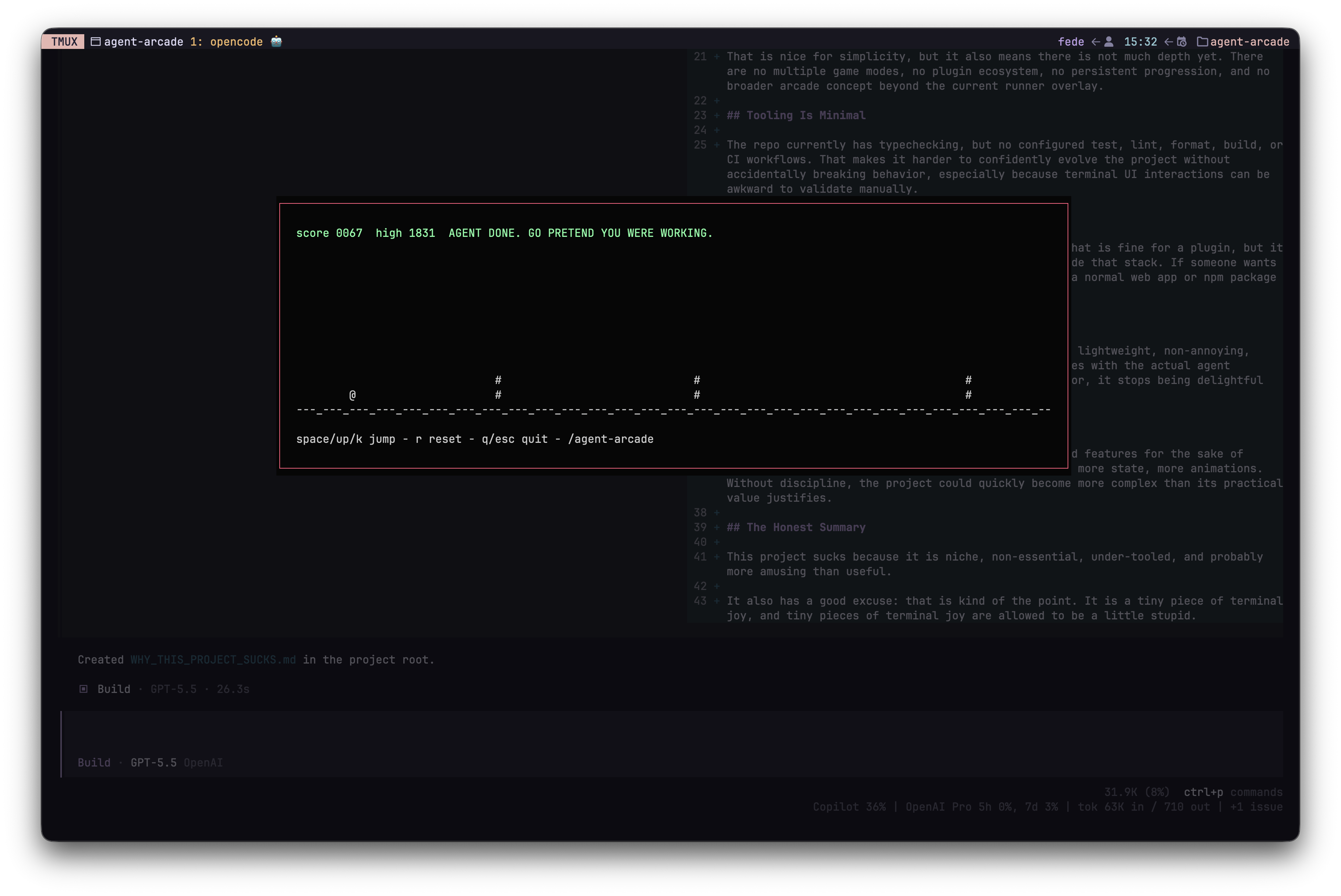
Games
- Runner: jump over terminal gremlins while agent events become in-game floaters.
- Tetris: stack pieces while waiting for the agent to finish.
The overlay includes a native game selector, so /agent-arcade and ctrl+shift+g can open a game or close the active overlay.
Install
Add the plugin to your OpenCode TUI config at .opencode/tui.json:
{
  "$schema": "https://opencode.ai/tui.json",
  "plugin": ["opencode-agent-arcade"]
}
Then restart OpenCode. TUI plugins are loaded when OpenCode starts.
Optional auto-start opens the last selected game when an agent becomes busy:
{
  "$schema": "https://opencode.ai/tui.json",
  "plugin": [["opencode-agent-arcade", { "autoStart": true }]]
}
You can also choose a specific auto-start game or randomize it:
{
  "$schema": "https://opencode.ai/tui.json",
  "plugin": [["opencode-agent-arcade", { "autoStart": true, "autoStartGame": "random" }]]
}
autoStartGame accepts last, runner, tetris, or random.
Usage
/agent-arcade: open the game selector, or close the active game overlay./agent-arcade-auto: toggle auto-start and persist it locally.ctrl+shift+g: open the game selector, or close the active game overlay.- Game selector: use arrows to navigate,
enterto select, andescto close.
Runner controls:
space,up, ork: jump.r: reset after game over.m: return to the game selector.qoresc: quit the overlay.a: approve the currently pending OpenCode permission once.
Tetris controls:
leftorh: move left.rightorl: move right.downorj: soft drop.up,k, orspace: rotate.c: hold the current piece.d: hard drop.p: pause or resume.r: reset.m: return to the game selector.qoresc: quit.a: approve the currently pending OpenCode permission once.
The a binding only replies to an active OpenCode permission prompt with once. Review what the agent is asking for before approving.
Local Development
This repo uses Bun and publishes the TUI plugin source directly.
bun install
bun run typecheck
For local OpenCode usage from this repo, .opencode/tui.json points at packages/opencode-plugin/src/tui.tsx.
Status
This is an alpha plugin. It is ready for people to try, but expect rough edges while OpenCode's TUI plugin surface keeps evolving.
Links
同类生态推荐

Goal
@prevalentware/opencode-goal-plugin
OpenCode goal plugin that adds Codex-style long-running goal mode, /goal commands, persistence, and TUI status for AI coding agents.
Loop
@prevalentware/opencode-loop-plugin
OpenCode loop plugin that adds Claude Code-style /loop recurring prompts: a persistent scheduler that re-injects an instruction into a session on an interval while it is idle.

Tui
@skwid138/opencode-tui
Configurable TUI plugin for OpenCode — custom logo and prompt placeholders