
Minimalist Skill
Subtraction-first engineering for AI agents. The smallest correct change wins — with every guard intact.
3
近 30 天 +1
40
近 7 天 1
33.0
生态多维模型
2 个月前
2026-07-20
快速安装与配置
opencode.json写入当前项目的 opencode.json,只对这个仓库生效。
opencode.json
{
  "$schema": "https://opencode.ai/config.json",
  "plugin": ["minimalist-skill@1.0.0"]
}
写入 ~/.config/opencode/opencode.json,对所有项目生效。
~/.config/opencode/opencode.json
{
  "$schema": "https://opencode.ai/config.json",
  "plugin": ["minimalist-skill@1.0.0"]
}
若你要在本地改造这个插件,先装到项目里再从本地路径引用。
shell
pnpm add -D minimalist-skillOpenCode 启动时会通过内嵌运行时自动加载 npm 依赖并缓存至本地目录,无需手动在全局环境执行安装。


Make coding agents write less code, use fewer tokens, and skip the bloat.


What it does: Minimalist helps coding agents do less. It pushes them to write smaller diffs, use fewer tokens, skip extra dependencies, and avoid features you did not ask for. It also keeps a record of what it refused to build, so the same bloat does not come back later.
It is minimal, but not reckless: it does not remove validation, auth, error handling, cleanup, tests, or secret-safety checks just to save lines.
In short: in a real Claude Code LOC benchmark, Minimalist wrote on average about 41% less code, used 24% fewer tokens, cost 24% less, and ran 20% faster than no-skill baseline. All 288 LOC cells were correct.
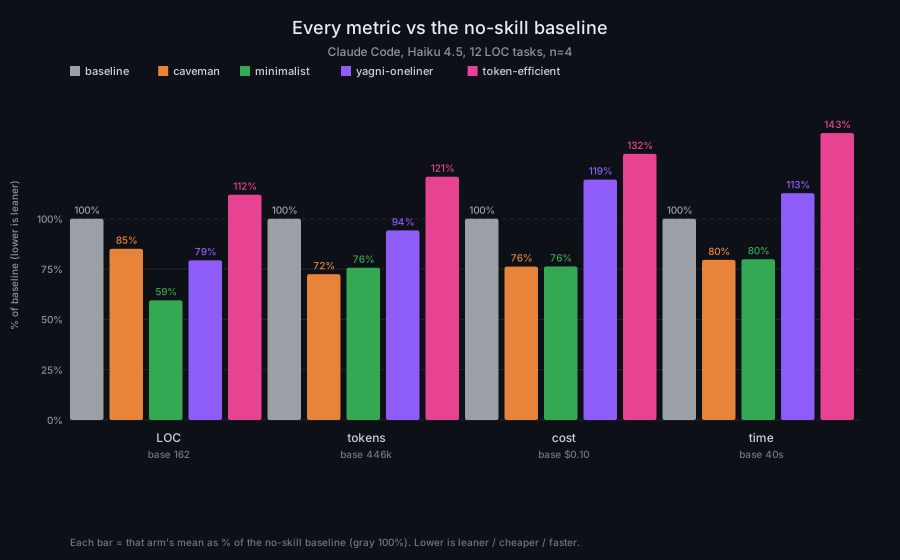
This is a real agentic run, not a single-shot prompt: Claude Code edited a
pinned FastAPI + React template and the benchmark scored the git diff it
left behind.
| arm | LOC | tokens | cost | time |
|---|---|---|---|---|
| baseline | 100% | 100% | 100% | 100% |
| caveman | 85% | 72% | 76% | 80% |
| minimalist | 59% | 76% | 76% | 80% |
| yagni-oneliner | 79% | 94% | 119% | 113% |
| token-efficient | 112% | 121% | 132% | 143% |
Raw files:
It ships as two skills:
/minimalistfor coding tasks: less code, fewer tokens, fewer invented requirements, no unsafe shortcuts./minimalist-generalfor writing, planning, research, and decisions: the same subtraction discipline without code-specific rules.
Ask your agent for a date picker. Left alone, it installs a library, writes a wrapper component, a stylesheet, and a paragraph about timezones you didn't ask for. With minimalist:
<!-- descent step 4: the platform already has one -->
<input type="date">
Minimalist makes the agent ask simple questions before it writes code: does this need to exist, is it already in the repo, does the language or browser already do it, can it be one line? Only after that does it write new code. Every rejected abstraction or dependency can be logged, so the same scope debate does not have to happen again next week.
[!TIP] Turn it on: it's active by default the moment the plugin's installed. Switch modes with
/minimalist lite|full|ultra|off, or say "stop minimalist" / "normal mode" to step out any time.
[!IMPORTANT] Honest numbers, not vibes. Minimalist never invents a savings figure. Every number above is a real measured run, not a guess.
The ledger
Every time the agent skips a dependency or a piece of extra code, it logs the decision to a file on your machine — so you can check later what it skipped and why, instead of just trusting a line in chat:
$ node scripts/log-rejection.js --report
3 rejected-scope entries in ~/.minimalist/ledger.jsonl

- [platform] date picker library -> <input type="date">
- [yagni] config flag for a value that never changes
- [stdlib] custom debounce helper -> AbortController + setTimeout
/minimalist-gain reads this file back — real history, not the model's
memory of the last five minutes.
Install
Node.js 18+ on PATH (for the two lifecycle hooks; skills work without it).
 Claude Code
/plugin marketplace add DivyeshJayswal/minimalist
/plugin install minimalist@minimalist
Desktop app: Customize → personal plugins → Add from repository → repo URL.
 Codex
Codex
codex plugin marketplace add DivyeshJayswal/minimalist
/plugins → install Minimalist → /hooks → trust its two hooks → new thread.
 GitHub Copilot CLI
copilot plugin marketplace add DivyeshJayswal/minimalist
copilot plugin install minimalist@minimalist
Commands are namespaced: /minimalist:minimalist ultra.
 Gemini CLI
gemini extensions install https://github.com/DivyeshJayswal/minimalist
Antigravity CLI
agy plugin install https://github.com/DivyeshJayswal/minimalist
Reuses the Gemini extension; also ships .agents/rules/ for always-on rules.
π Pi agent harness
pi install git:github.com/DivyeshJayswal/minimalist
 OpenCode
{ "plugin": ["minimalist-skill"] }
Or from a checkout: { "plugin": ["./.opencode/plugins/minimalist.mjs"] }.
OpenCode also auto-loads this repo's AGENTS.md.
☰ Hermes
hermes plugins install DivyeshJayswal/minimalist --enable
🦞 OpenClaw
clawhub install @divyeshjayswal/minimalist
The review, audit, gain, and help skills install the same way
(clawhub install @divyeshjayswal/minimalist-review, and so on — the @divyeshjayswal/
prefix disambiguates from unrelated same-named skills on the registry). Without
ClawHub, skills ship in .openclaw/skills/; point your skills path at the repo.
Cursor · Windsurf · Cline · Kiro · Devin · CodeWhale · Swival — rule files
are pre-generated, copy the one you need: .cursor/rules/minimalist.mdc,
.windsurf/rules/minimalist.md, .clinerules/minimalist.md,
.kiro/steering/minimalist.md, .github/copilot-instructions.md,
.devin-plugin/, or generic AGENTS.md.
Update
Most installs point back to this repo. After a release, Git-based installs update by pulling/reinstalling from GitHub; registry installs update from the registry they came from.
| install type | examples | update path |
|---|---|---|
| Git-based | Gemini, Antigravity, Pi, local OpenCode, copied rule files | pull or reinstall from GitHub; copy rule files again if needed |
| Marketplace/plugin wrapper | Claude Code, Codex, Copilot CLI, Hermes | update/reinstall through that tool's plugin command |
| Registry copy | npm/OpenCode package, ClawHub/OpenClaw | publish the new package there, then update through that registry |
Uninstall
node scripts/uninstall.js
Commands
| command | does |
|---|---|
/minimalist [lite|full|ultra|off] |
for coding tasks — set intensity (default full) |
/minimalist-general [lite|full|ultra|off] |
for everything else: writing, planning, research |
/minimalist-review |
review a diff for bloat — and for missing guards |
/minimalist-audit |
ranked deletion candidates across the codebase |
/minimalist-gain |
the ledger, read back — measured, never invented |
/minimalist-help |
the whole tool in 15 lines |
lite just flags over-engineering and lets you decide. full (the default) actually enforces the rules. ultra goes further and keeps its own explanations to almost nothing. The safety guardrail never turns off, at any of the three. Say "stop minimalist" or "normal mode" to switch it off entirely.
How it works
Minimalist has one rulebook (skills/minimalist/SKILL.md). Every supported
tool — Claude Code, Codex, Copilot, Gemini, OpenCode, and the rest — gets its
own copy generated from that single file, so the rules stay identical
everywhere instead of drifting between nine hand-maintained versions.
Your chosen level (lite/full/ultra/off) and the rejection ledger both
persist in ~/.minimalist/, so they carry over between sessions.
If you're also running another instruction skill (like an output-style skill), minimalist won't fight it — it defers on prose style and keeps enforcing code-minimalism.
Star this repo
Costs nothing, helps someone else find the smaller version of what they were about to build. Fair trade. ⭐
Write less. Prove it. Break nothing.
同类生态推荐

Jev Guard
jev-guard
Prompt-injection and dangerous-action guard for coding agents (Claude Code, Codex, pi, ACP), powered by Jev.

Frank
@himanshujangir/frank
Local receipt and pushback guardrails for AI coding agents.

Ponytail
@dietrichgebert/ponytail
Lazy senior dev mode for AI agents. The best code is the code you never wrote.