
Litopencode
Workflow plugin for OpenCode: add lit to a prompt and the work is planned, built, checked and written down so the next session can pick it up.
2
4,025
近 7 天 1.1k
46.0
生态多维模型
1 天前
2026-10-19
快速安装与配置
opencode.json写入当前项目的 opencode.json,只对这个仓库生效。
opencode.json
{
  "$schema": "https://opencode.ai/config.json",
  "plugin": ["@litfamily/litopencode@1.0.29"]
}
写入 ~/.config/opencode/opencode.json,对所有项目生效。
~/.config/opencode/opencode.json
{
  "$schema": "https://opencode.ai/config.json",
  "plugin": ["@litfamily/litopencode@1.0.29"]
}
若你要在本地改造这个插件,先装到项目里再从本地路径引用。
shell
pnpm add -D @litfamily/litopencodeOpenCode 启动时会通过内嵌运行时自动加载 npm 依赖并缓存至本地目录,无需手动在全局环境执行安装。
LitOpenCode
LitOpenCode is a workflow plugin for OpenCode. Add lit to a prompt and the work gets planned, built, checked and written down, so the next session knows where you stopped.



 Guide
Guide Screens
 MIT
MIT
Why you might want it
OpenCode is good at the conversation in front of it. The trouble starts when that conversation ends. A long session gets compacted, you close the terminal, and the next morning you are piecing together what you decided, what you already checked and what was left. OpenCode keeps no goal of its own from one session to the next.
LitOpenCode gives the work a routine and a memory. Add lit to a prompt and the task goes through the same steps each time: frame it, plan it, build it, check it, and write down the next step. Those notes go into .litopencode/litgoal/ inside your project, so the next session reads them and carries on from there. Bigger jobs can be planned first by an agent that is locked out of your files, then carried out and reviewed.
In practice it looks like this:
Evening:  lit add a --shout flag that prints the greeting in capitals, with a test
          → the flag lands with its test, and the run is written to .litopencode/litgoal/
Morning:  /lit-recap
          → what was built, what was checked, what is next
Quick start
You need Node.js with npm, and OpenCode 1.18 or 1.19 with a model provider already set up. LitOpenCode is built for OpenCode 1. OpenCode 2 changed how plugins load, and LitOpenCode does not support it yet. Install with one command:
npm exec --package @litfamily/litopencode@latest -- litopencode install
The installer asks which models to use and how much freedom the agents get. Add --dry-run when you want to see what would change before anything is written, or --yes when the defaults are fine and you'd rather skip the questions. Permissions start at safe, where OpenCode asks you before acting.
Or let a coding agent install it
Paste this into the agent you already use. It checks first, shows you the plan and waits for your yes before anything changes.
Please install LitOpenCode, the lit workflow plugin for OpenCode, on this machine.
1. Check that Node.js, npm and OpenCode are installed (node --version, npm --version, opencode --version). If one is missing, stop and tell me.
2. Use only the official npm package @litfamily/litopencode. No forks, mirrors, curl scripts or other packages.
3. Before changing anything, run: npm exec --package @litfamily/litopencode@latest -- litopencode install --dry-run
   Show me what it would change and ask me whether to go ahead with the defaults.
4. When I say yes, run: npm exec --package @litfamily/litopencode@latest -- litopencode install --yes
   Do not edit OpenCode's config files by hand.
5. Run: npm exec --package @litfamily/litopencode@latest -- litopencode doctor
   Tell me whether install.ok, install.plugin.ok and install.nativeSkills.ok are true, and quote any warning.
6. Remind me to restart OpenCode, press Tab and choose lit-loop.
Your first task
Restart OpenCode, press Tab, and pick lit-loop. Then open an empty folder and send:
lit Build a to-do list in one index.html with no dependencies; check adding and completing items, then leave results and next steps.
For six seconds a toast appears that reads 🔥 LIT IGNITED with the name of the workflow that started, which tells you LitOpenCode picked up your prompt. When the work is done you have an index.html to open and try, and a record of what was built and checked in .litopencode/litgoal/. Come back another day, type /lit-recap, and it tells you what was done and what comes next. Screens shows the installer, the toast, the health check and the planner's locked permissions, so a healthy install looks familiar.
The model inside OpenCode does the work, and models make mistakes. When a reply says something passed, open the file and check it yourself.
What you get
Start with one word
Put lit at the end of any request, or type /lit. The task is framed, planned, built, verified and recapped, and each step leaves a note you can read later.
Add a dark-mode toggle to the settings page and keep the existing tests passing lit
Plan first when the job is big
Press Tab and pick lit-plan. The planner reads your project and writes a checklist, then waits for explicit user confirmation; it cannot edit files, run shell commands or hand work to another agent. Run /start-work to carry the approved plan out one slice at a time, and /review-work to have the change looked at from five angles, worst findings first.
Pick up where you stopped
Type a bare handoff, or /lit-handoff, to leave a continuation file for the next session, and /lit-recap to read back what is done, what is blocked and what is next. If you like, automatic handoff writes the handoff for you before the context window fills up.
Research with sources
/litresearch works in rounds and keeps a source next to each claim, along with what is still uncertain.
lit research Which SQLite settings matter most for a write-heavy local app?
Reports, decks and figures
Ask for a report or slides with lit and you get an editable Word file or PowerPoint deck, built from a Markdown source you keep, in a design direction the skill picks and names first. Journal-sized figures from measured data come from /lit-scientific-visualization, and concept diagrams have a skill of their own.
lit Turn notes.md into a ten-slide deck for Friday's team review
Writing that sounds like a person
/lit-humanizer rewrites stiff English or Korean prose while keeping the facts, the writer's voice and the qualifiers that matter.
And the rest
There is more: debugging, refactoring, code cleanup, commits, language servers, repository rules that load once per session and again for files you edit (/rules), interface work, browser automation and a project wiki. The skills gallery shows each one with a picture of what it makes.
Who it's for
LitOpenCode is for people who already use OpenCode and give it work that spans more than one sitting: a feature that takes a few sessions, a refactor with a plan behind it, research you come back to, or a report or deck built from your notes. It also suits anyone who wants each change checked and reviewed before calling it done.
You keep using OpenCode the way you do now. It still runs the model and asks for permission the way it always has, and your provider login stays where it is. LitOpenCode needs no other LitFamily product.
The LIT card
With LitOpenCode installed, every OpenCode session gets a small card along the bottom of the screen. It stays there for the whole session and keeps the same four rows whether anything is running or not, so your prompt never jumps.
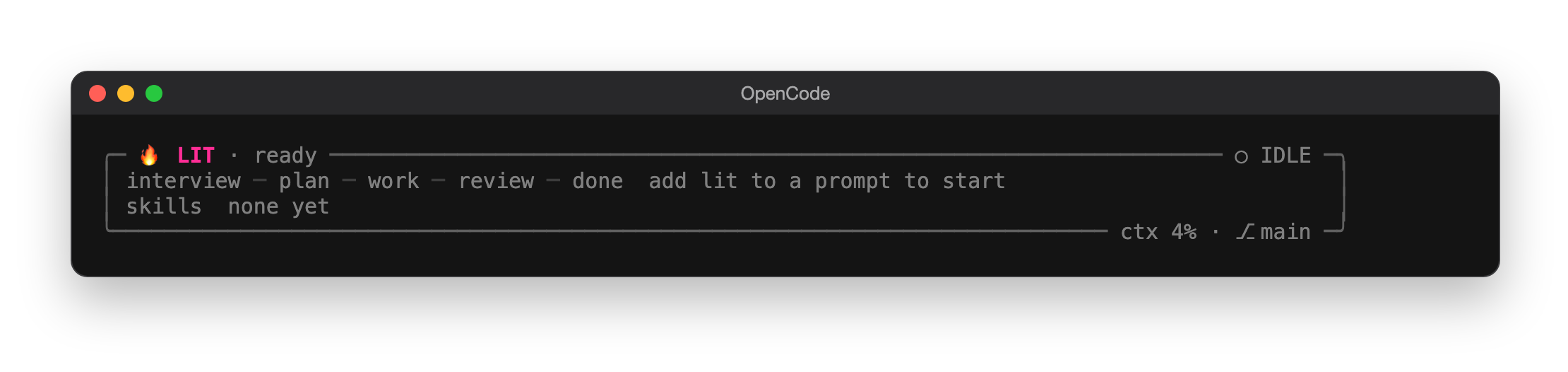
Before your first lit prompt the card is quiet. The title reads 🔥 LIT · ready with ○ IDLE beside it, the workflow map is dim, and the card tells you how to start. Its bottom edge shows how full the context window is and which git branch you are on.
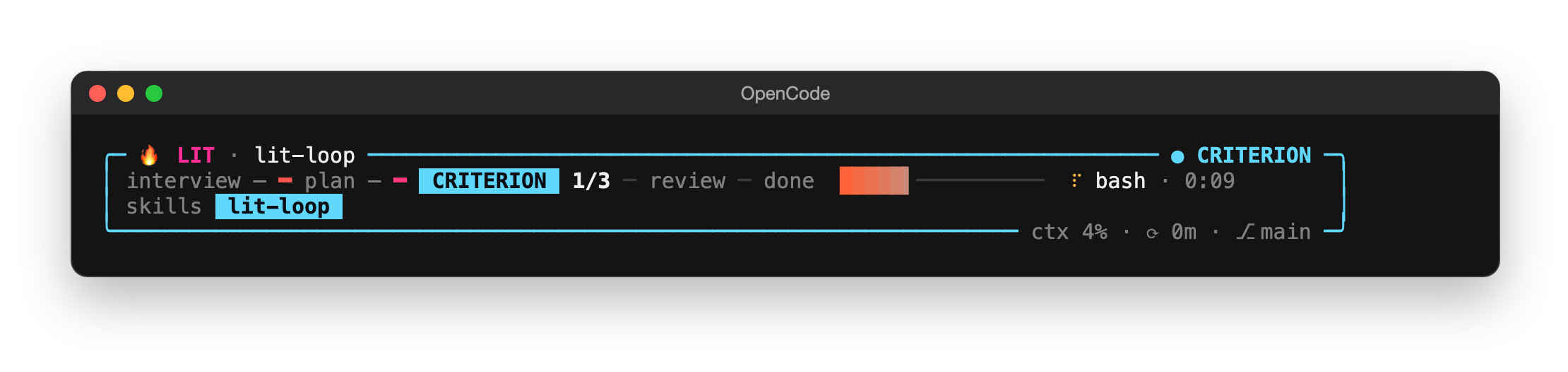
Send a prompt with lit and the card wakes up. The title names the workflow and the step it is on, and the map lights that step with its count. In this lit-loop request the goal has three criteria and one has passed, so the map reads CRITERION 1/3, the steps the request went past without doing carry –, and the bar shows the share that is done. While a tool runs, its name and running time sit beside the bar. Each LitOpenCode skill the request uses gets a bright chip of its own, with a short sweep of light as it arrives; skills from earlier turns wait in grey.
When the turn ends the card settles: the title switches to ○ IDLE, no step stays lit, and the next open item takes the place of the live step. The chips dim but stay, newest first, so you can still see what ran. Your next prompt wakes it again. A skill used again lights up again, and when there are more chips than room, the rest fold into +N.
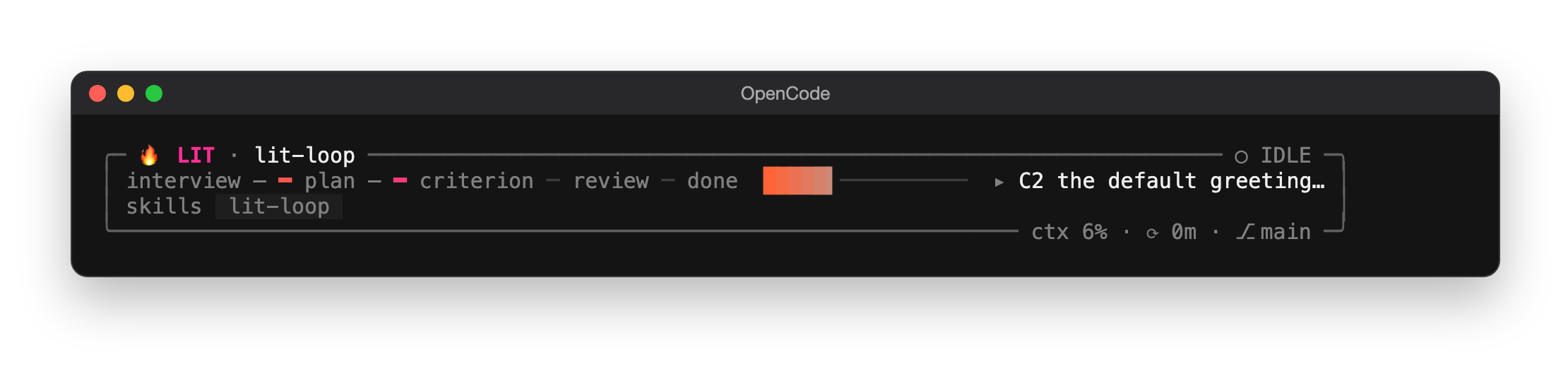
The track is a map of the whole workflow. A request that starts with an interview walks through interview › plan › work › review › done, and the step you are on is lit with its count, such as WORK 3/7 while /start-work works through a saved plan. A lit-loop goal counts its criteria and loop turns instead, and a litresearch run follows its own steps from decompose through each wave to synthesis. The chip beside the prompt shows the same map around the current step, the sidebar draws it top to bottom with a line that fills as you move forward, and while a tool runs its name and elapsed time sit beside it, like ⠹ bash · 0:48. If you step away during long work, { "notify": true } in the same tui.json entry sends a desktop notification and a sound when the mission finishes, once OpenCode's own "attention": { "enabled": true } is on as well; it stays off until you add it.
The card is on by default. To keep the bottom of the screen clear, give the LitOpenCode entry in OpenCode's tui.json the option { "band": false }. When you want more detail, { "band": { "card": true } } adds a second card underneath with the goal, the next task and any warnings. The reference explains every part of the card.
Automatic handoff
A long conversation eventually fills the model's context window, and whatever falls out of it is forgotten. Automatic handoff saves your place before that happens. It stays off until you turn it on, and the percent is yours to choose.
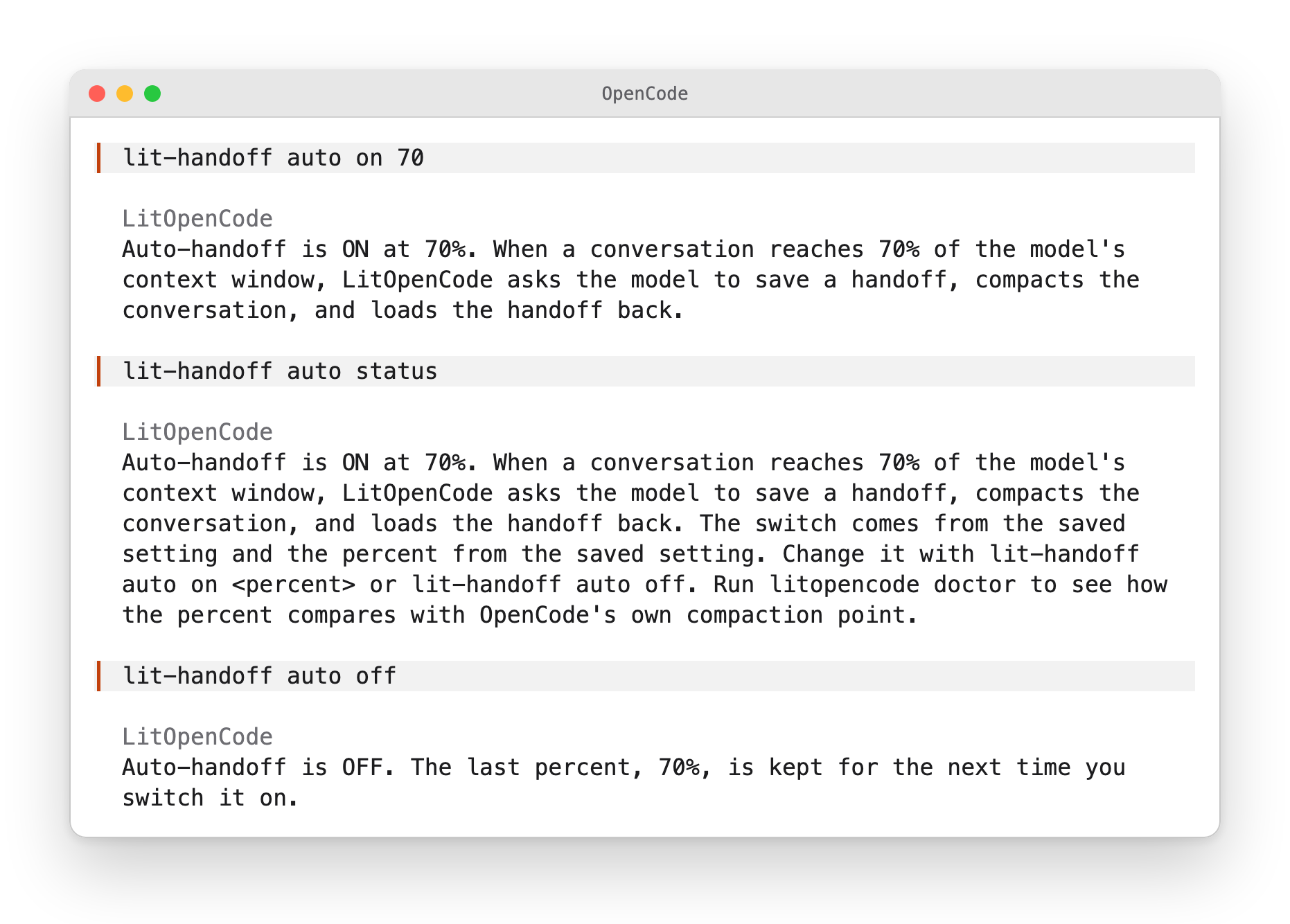
To turn it on, send lit-handoff auto on 70 as a message on its own, with your own number in place of 70; /lit-handoff auto on 70 does the same. LitOpenCode answers with the new setting, and the model passes it on in a sentence or two. lit-handoff auto status tells you where things stand and where the setting came from. lit-handoff auto off turns it off and keeps your number, so a later lit-handoff auto on without a number picks it up again.
From then on LitOpenCode keeps an eye on how full the context window is. Once the conversation reaches your percent and the current turn ends, it sends the model a short message asking for a handoff. The saved file has to carry the marker line from that message, so a handoff left over from earlier never counts. When the new one checks out, the plugin compacts the conversation itself, says so in a toast, and puts the start of the handoff in front of the model on the next turn. You never have to type /compact.
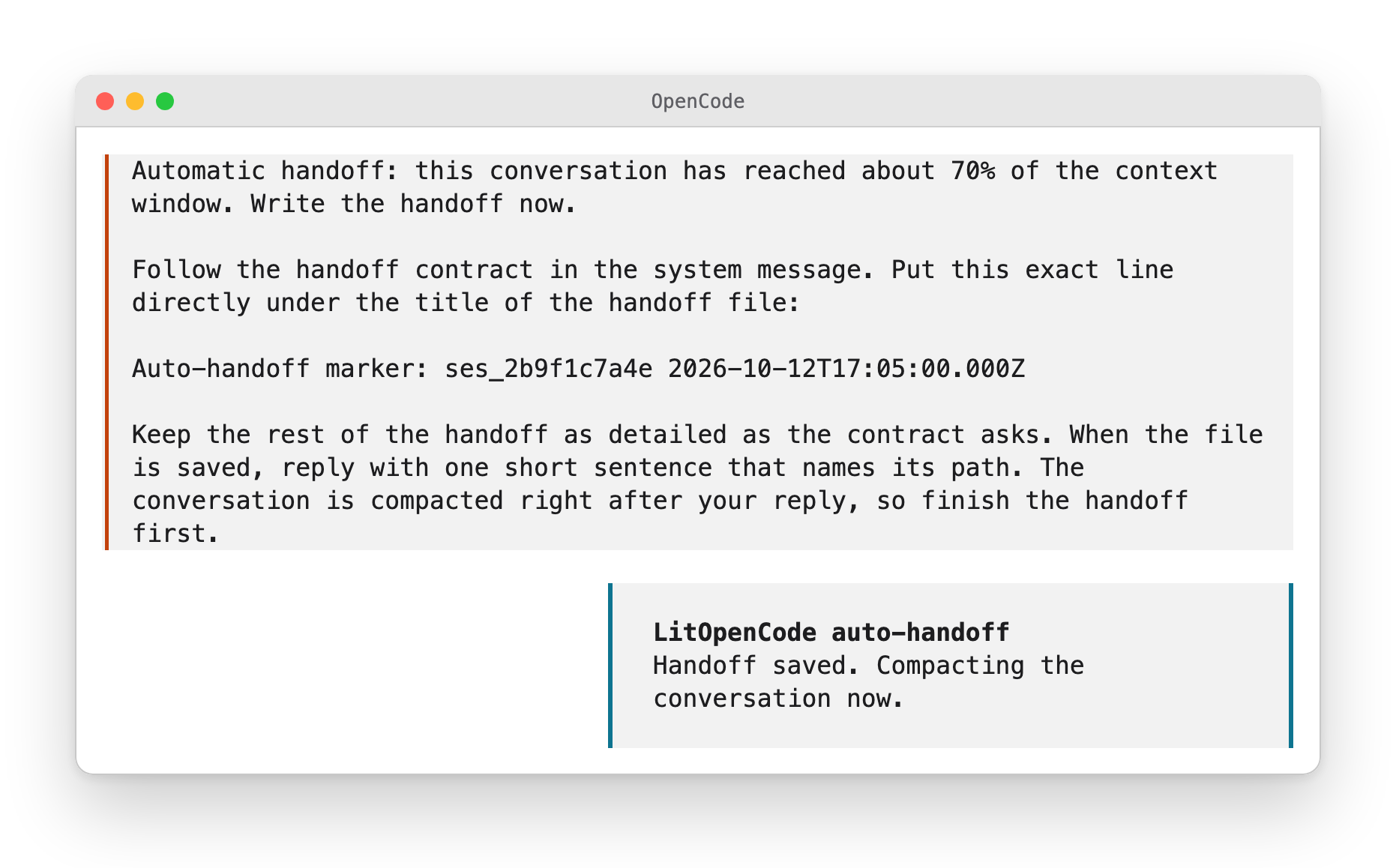
If no handoff was saved, the conversation stays as it is and a toast tells you. If OpenCode refuses to compact, a toast asks you to run /compact yourself.
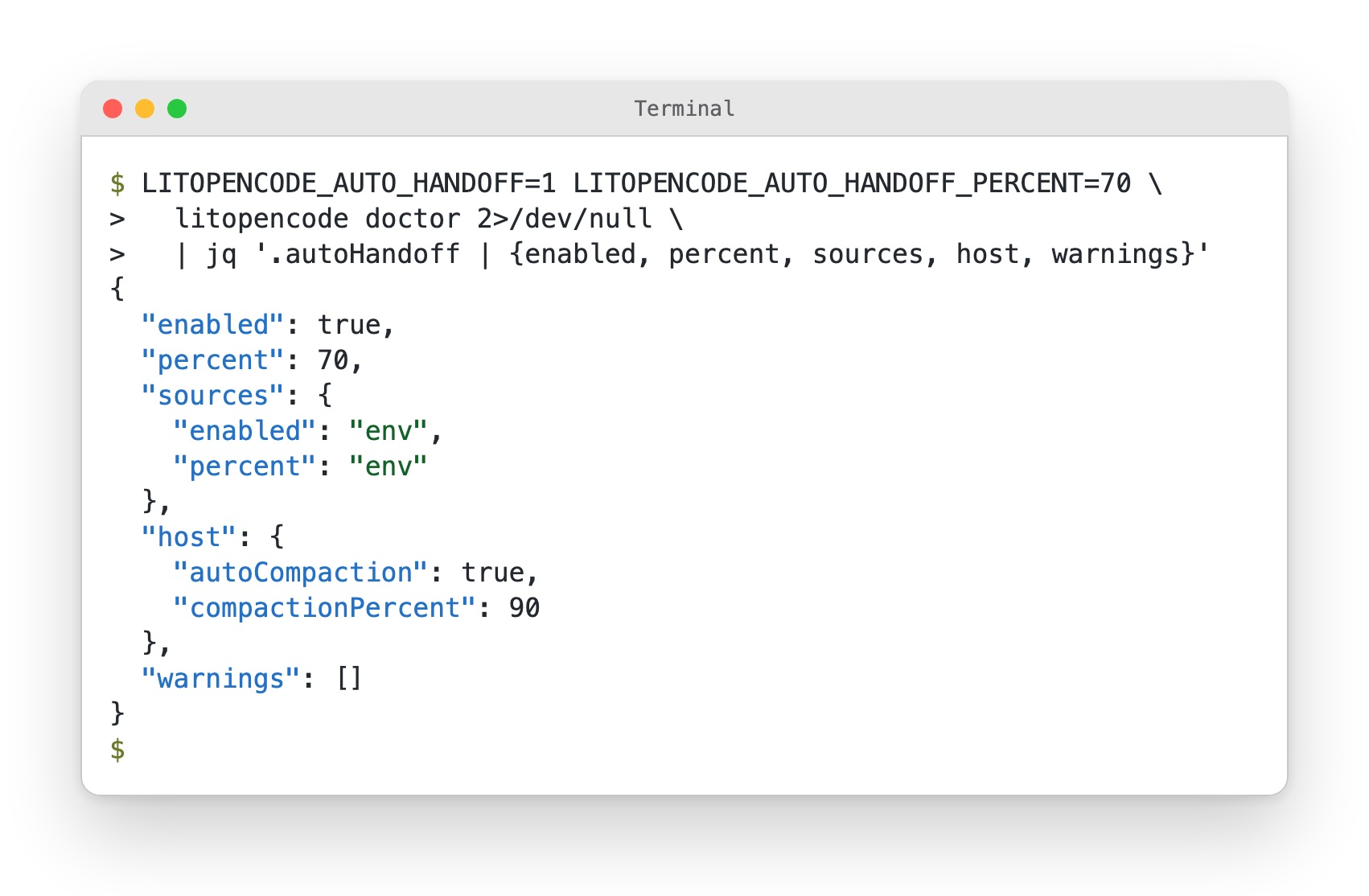
Pick a percent below the point where OpenCode compacts on its own, because the handoff needs room to run first. With the limits LitOpenCode installs, OpenCode compacts at 90%, and litopencode doctor warns you when your percent is at or above that. Run it from your project and doctor also shows the setting and where it came from, whether you saved it in chat, in a config file or in the environment that starts OpenCode. In the environment, LITOPENCODE_AUTO_HANDOFF=1 switches it on, LITOPENCODE_AUTO_HANDOFF_PERCENT takes a whole number from 1 to 99, and the environment wins over the chat setting.
To keep the setting in a file, add an autoHandoff block to .litopencode/config.json in your project, or to ~/.config/opencode/litopencode.json for every project. The environment and the chat setting both come before the file.
{ "autoHandoff": { "enabled": true, "percent": 70 } }
The guide walks through each step, and the reference lists every setting and what is written to disk.
How it works
OpenCode loads LitOpenCode as a plugin from its config file. When you send a prompt or a command, the plugin picks the workflow that fits and points the model at the skills it needs. Its tools and hooks write down what happened in your project, and /lit-recap or the next session reads that record back.
flowchart LR
    Prompt["Your prompt with lit"] --> Plugin["LitOpenCode plugin inside OpenCode"]
    Plugin --> Agents["lit-loop, lit-plan, lit-implement and skills"]
    Agents --> Record[".litopencode/litgoal/ in your project"]
    Record -->|"/lit-recap, next session"| Agents
Install registers the plugin in OpenCode's config (opencode.jsonc), copies commands and skills into your OpenCode config folder, and keeps your model routes in ~/.config/opencode/litopencode.json. The guide has the details.
Requirements, updates and removal
Requirements
Node.js with npm, and OpenCode 1.18 or 1.19 with a provider you have already logged in to. On the OpenAI provider, a fresh install plans and reviews with GPT-6 Astra and builds with GPT-6 Luna; you can choose others during install.
Check the install
When something looks off, or right after installing, litopencode doctor tells you whether the plugin and skills are wired up. It only reads and changes nothing.
npm exec --package @litfamily/litopencode@latest -- litopencode doctor
Updates
LitOpenCode checks for a new release when it starts interactively and after an install or doctor run succeeds. If you'd rather choose when to update, for example on a machine you keep pinned, pass --no-auto-update or set LITOPENCODE_NO_AUTO_UPDATE=1. Running the install command again also updates it, and routes you have customized are kept.
Uninstall
Remove the @litfamily/litopencode entry from the plugin array in OpenCode's opencode.jsonc, then restart OpenCode. If you installed it globally, also run:
npm uninstall -g @litfamily/litopencode
The full removal steps cover the copied commands and skills, and which files to keep if you plan to come back.
Learn more
- Guide: install options, a first task and a planned task, automatic handoff, safety and updates, troubleshooting and full removal.
- Skills and commands: every route and skill, each with a picture, plus documents, slides, design and browser notes.
- Screens: what the installer, the health check, the toast and the planner look like, and a 22-second film.
- Workflow reference: models, permissions, host hooks, every skill, and reproducible verification. In Korean: 한국어 상세 안내.
- Migration notes · Changelog · Privacy and network behavior
- Artwork and licenses · Terminal mark and activation probes
- Release checklist, for maintainers. It stays in this repository and is not part of the npm package.
- LitFamily hub: the same
litworkflow for Claude Code, Codex CLI, Hermes Agent and Grok Build. Each product installs and runs on its own.
Contributing and license
If LitOpenCode saves you a morning of "where was I?", a star on GitHub helps other OpenCode users find it, and so does telling a friend the short version: add lit to an OpenCode prompt, and tomorrow's session knows where today's stopped.
Bug reports and pull requests are welcome. Start with Contributing, and see Support, Security and the Code of conduct.
MIT. See LICENSE. Reference material bundled for lit-handoff and lit-scientific-visualization keeps its own license and provenance files under vendor/.
Copy ASCII logo
                             ▄▄▄▄
                   ▗███▌   ▗██████▖
 ▗▄▄▄▄▄          ▗▟████▌   ▝██████▘
 ▐█████        ▗▟██████▌    ▝▀▜█▀▘
 ▐█████      ▗▟███████▄▄▄▄▄▄▄▄▄▄▄▄▄▄▄▄▄▄▄▄
 ▐█████    ▗▟█████████████████████████ ▐█▀
 ▐█████    ████████████████████████████▀
 ▐█████    ██▛▘   ▄ ▄▄▄▄▖▄▄▄▄▄▄▄▄▄▄▄▄▄▖
 ▐█████    ▀    ▄██ ████▌█████████████▌
 ▐█████       ▄████ ████▌█████████████▌
 ▐█████     ▄█████▛                                 litopencode
 ▐█████  ▗▟█████▀▘       ▄▄▄▄▄     ▗▖
 ▐█████ ▐█████▀          █████     ▐▛▀
 ▐█████ ▐███▀            █████
 ▐█████ ▐█▀              █████
 ▐█████ ▝                █████
 ▐█████▄▄▄▄▄▄▄▖          █████
 ▐███████████▛           █████
 ▐██████████▀            █████
Icons: Lucide. ASCII glyphs: JetBrains Mono, OFL.
同类生态推荐

Plan
@bandonker/opencode-plan
Register a /plan command that guides the agent through a thorough planning phase: research the task, ask clarifying questions, present a detailed plan, then execute it by spawning child sessions (free models first, paid as fallback).

Dejavu Gates
dejavu-gates
Cross-session error gates for AI coding agents: detects recurring tool-call failures and promotes them into enforced gates. Remind first, block on same-session repeat offense. Works with OpenCode, Claude Code, Codex CLI, Gemini CLI, Cursor, Copilot CLI, a

Manager
@nguyenthdat/opencode-manager
Project-scoped OpenCode TUI manager for MCPs, plugins, rules, standalone agents, agent teams, and skills.