
Agents
Bring your own coding agent (Claude Code or opencode) into a Kelabo meeting: an MCP server that streams the live transcript into the session you already have open, posts answers to the meeting's board, and leaves the whole discussion in context when the m
3
0
24.9
生态多维模型
6 天前
2026-10-15
快速安装与配置
opencode.json写入当前项目的 opencode.json,只对这个仓库生效。
opencode.json
{
  "$schema": "https://opencode.ai/config.json",
  "plugin": ["@kelabome/agents@0.0.4"]
}
写入 ~/.config/opencode/opencode.json,对所有项目生效。
~/.config/opencode/opencode.json
{
  "$schema": "https://opencode.ai/config.json",
  "plugin": ["@kelabome/agents@0.0.4"]
}
若你要在本地改造这个插件,先装到项目里再从本地路径引用。
shell
pnpm add -D @kelabome/agentsOpenCode 启动时会通过内嵌运行时自动加载 npm 依赖并缓存至本地目录,无需手动在全局环境执行安装。

Kelabo
Live rooms with transcription, an AI assistant that answers into the meeting,
your own coding agent in the meeting, helping live and then building what was agreed,
minutes written for you, and a searchable archive of everything your team decided.



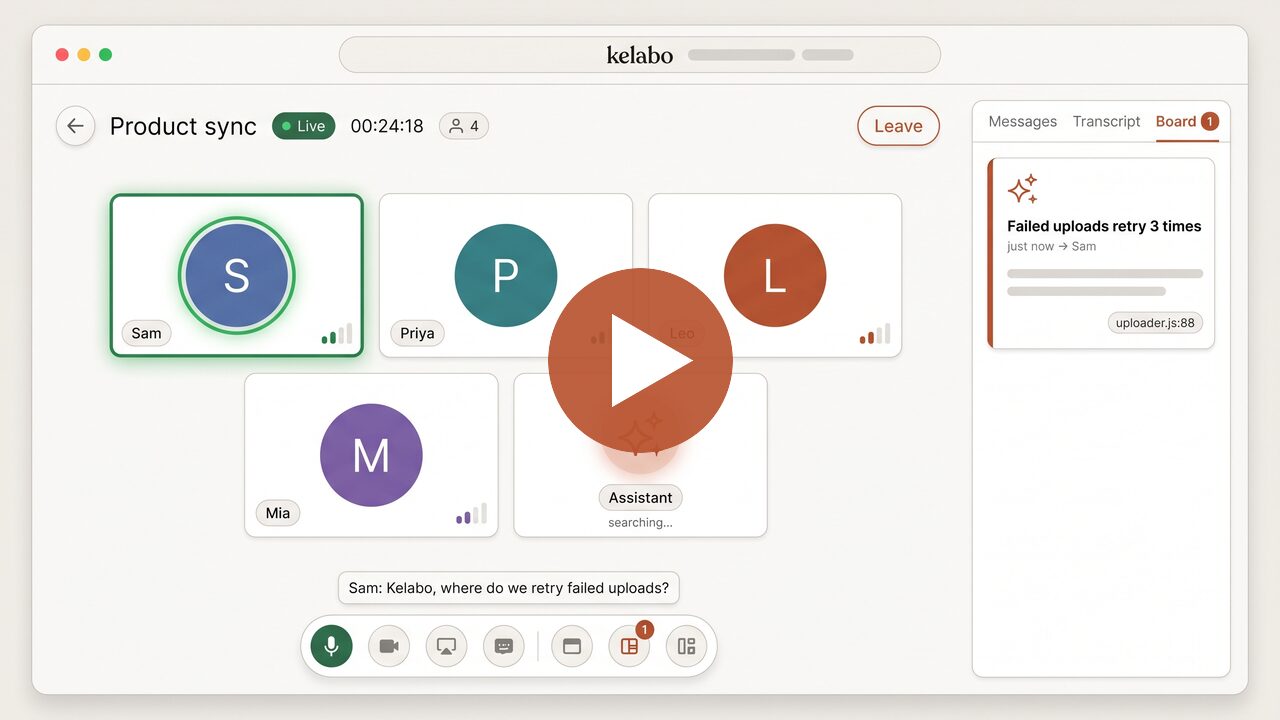
Kelabo in 75 seconds (YouTube)
[!IMPORTANT] Kelabo is transparent by design, and that is not a setting you can turn off. Everything said in a kelabo with the mic on is transcribed live and shown to everyone in the room. The assistant reads all of it and answers onto a board that everyone sees; it has no private channel to any one person. When a participant brings their own coding agent, the room is told. A kelabo ends as written minutes and a searchable record of who said what and what was decided.
Kelabo is built for organisations and people who genuinely believe in fair, open communication, where what is said in a meeting stays on the record and the people who were there can read it back. If your team is not ready to work that way, Kelabo is not the right choice. We would rather you know that before you start.
Each live room is a kelabo — not quite a call, not quite a meeting, its own kind — and that is the word the app, the code and the URLs use. Open source, MIT. You can run the whole thing in your own AWS account, or use the hosted service at kelabo.me. Same product either way; this README is the guide to choosing.
Bring your coding agent into the meeting
If you already work with Claude Code or opencode, this is the part to read. Kelabo lets your own coding-agent session join a kelabo as a participant. It keeps your model, your repository, your MCP servers and your permission prompts. It hears the meeting, contributes while it is happening, and is still in your terminal when the meeting is over, with the whole discussion in context.
Before the meeting. Attach the agent to a scheduled kelabo. It reads the agenda note, investigates your codebase, and posts what it found to the board, so the findings are waiting when the first person walks in.
During the meeting. The transcript streams into your session as it is
spoken. The agent stays quiet by default. When someone addresses it ("Kelabo,
where do we retry failed uploads?") or asks something the room cannot answer,
it searches your repository in the background and posts a short answer that
cites file:line, while it keeps listening. Kelabo never runs your agent and
never sees your code; only what the agent chooses to post reaches the room.
Every tool call still asks for your approval in your own terminal, and the room
can see that an agent is present.
After the meeting, skip the briefing. The kelabo ends; your coding session does not. It heard the requirements, the trade-offs that were argued, the constraints someone mentioned in passing and what was finally agreed. So the next thing you type can be "right, build what we just decided". You do not have to retype the design background into a fresh prompt or paste the minutes into a new chat. If the kelabo belongs to a journey, the agent can also read earlier meetings' minutes, documents and reports. When the work is done, it can post the outcome back to the journey, so the next meeting starts from it.
npm i -g @kelabome/agents
kelabo setup        # wires Claude Code and/or opencode, and pairs this machine with your Kelabo account
kelabo claude       # or: kelabo opencode, then /kstart
Then ask your agent to join your kelabo. This works against
kelabo.me and against a self-hosted deployment alike, and
kelabo uninstall restores your agent's configuration exactly as it was.
Details: connector/README.md and
docs/components/16-agent-bridge.md.
Two ways to run Kelabo
| Self-hosting | kelabo.me | |
|---|---|---|
| What it is | The full product deployed into your AWS account | The same product, operated as a hosted service |
| You need | An AWS account and real comfort deploying AWS services, a domain on Route 53, your own supplier accounts (Soniox or Deepgram, an LLM provider of your choice, optionally Cloudflare), and an approved SES production-access request | An email address |
| Time to first kelabo | An afternoon, mostly waiting on signups and certificates | Minutes |
| Functionality | Identical | Identical |
| Cost | Your own AWS + supplier bills (an idle deployment ≈ US$15–20/month) | Run at cost: prepaid top-up, per-call metered pricing with published rates, a weekly free allowance — no seats, no plans, no subscription |
| Data boundary | Everything stays in infrastructure you control | Hosted — though audio still never touches any Kelabo server, in either deployment (see transcription) |
Neither path is the "right" one — they trade effort for control.
Self-host if you (or someone at your organisation) are genuinely familiar
with AWS. The self-hosting guide walks from an empty
account to kelabo.mycompany.com, but be honest about what it takes:
- an AWS account with admin access, and comfort with a terminal, DNS, CDK deployments and an AWS bill (the stack is CloudFront + Lambda + one Fargate container + DynamoDB/S3);
- a domain (or delegated subdomain) whose DNS lives in a Route 53 hosted zone — if your domain is managed elsewhere and cannot be delegated, stop here;
- your own accounts and API keys with the suppliers: Soniox or Deepgram (speech-to-text), an LLM provider you trust with your meeting text (the assistant and minutes — Anthropic, OpenAI, or any OpenAI-compatible endpoint, including one you host yourself; see choosing a model), and optionally Cloudflare Realtime (conference audio/video at scale);
- an application to AWS for SES production access so sign-in emails reach your team — approval usually takes a day, refusals happen (there is a MailerSend fallback, but it is one more account and one more DNS setup).
None of this is exotic to someone who deploys to AWS regularly, and from then
on upgrades are git pull && make deploy. If that list reads like a normal
Tuesday, self-host — you get the identical feature set with the data boundary
inside your own account.
Use kelabo.me if that list does not describe you — a small business without its own managed domain, a team with nobody who wants to own an AWS deployment, or anyone who just wants to try Kelabo before deciding. Sign in with any email address (or Google/Apple) and you are in a kelabo minutes later; guests can even join a room with nothing but a display name. kelabo.me is run as a communication utility, at cost: you top up a prepaid balance, each call is billed at the exact metered supplier cost plus small published flat amounts, every account gets a weekly free allowance, and the rate card and running figures are public on the site. No per-seat pricing, no subscription, no invoice arriving later.
The two ideas: kelabos and journeys
A kelabo is one live room: conference audio, live transcript, a chat, a shared board the assistant posts to. When it ends it is archived — transcript, board and generated minutes — and becomes a searchable record.
A journey is what carries memory between kelabos. Two people finish a kickoff having made three decisions; three weeks later the follow-up kelabo would normally start from nothing. Link both into a journey and the second room starts with the first one's minutes, the journey's running description, health/progress indicators, pinned board messages and pasted documents — all visible to the people in the room and injected into the assistant's context, so it answers from what the project already decided instead of researching it again. A journey also keeps an append-only Q&A history: ask it a question ("what did we decide about the rollout?") and the answer is generated from every linked kelabo's minutes and stored forever next to the question. Journeys are many-to-many (a kelabo can belong to several), public to your organisation or private to a chosen roster, and everything that happens in one lands on a filterable timeline. Full design: docs/20-journey.md.
What you get
- A live room with conference audio, camera and screen share. Two
transports:
sfu(Cloudflare's edge, scales) ormesh— a "secure kelabo" where media stays peer-to-peer and no server can decrypt it. Peer-to-peer means the media path, not "serverless": browsers cannot find each other on their own, so a mesh call still needs the Gateway to relay signalling (SDP offers/answers and ICE candidates) and a STUN server for each browser to learn its public address. Where no direct route exists (symmetric NAT, strict firewalls) the media is relayed through TURN — still encrypted end to end, so the relay cannot decrypt it either. docs/components/15-conference-rtc.md. - Live transcription as people speak, streamed browser → STT provider directly: the server receives transcripts, never audio.
- Messages beside the transcript — the room's chat, with history that survives leaving and re-entering, day dividers when a room outlives a day, and paging back through weeks of it.
- An assistant in the room that answers while the question still matters,
onto a shared board. Address it directly with
@kelabo. - Minutes, written for you, and a searchable archive of every ended kelabo.
- Journeys — named containers that link related kelabos so decisions, documents and Q&A history carry from one meeting to the next.
- Scheduling and invitations — schedule a kelabo, invite by email, change the roster before it starts; cancellations and reschedules notify everyone.
- Contacts and presence — see who in your organisation is online, and ring them into a huddle straight from Contacts.
- Your organisation's directory, imported — upload the people list your mail system already exports (Microsoft 365, Google Workspace, or any CSV) and invite fields find colleagues by name, typos and all, before they have ever signed in.
- Bring your own coding agent. Attach your own opencode or Claude Code session to a kelabo. It hears the transcript, answers onto the board, and leaves the meeting with the whole discussion in context (above).
- Everything optional degrades, nothing jams. No STT key? The room is typed messages and calls. No LLM? No assistant surface at all — not a broken one. No Cloudflare creds? Peer-to-peer calling still works, over public STUN only — so peers on networks that need a TURN relay cannot connect. The capability ladder is a design rule, not an accident: docs/19-optional-capabilities.md.
- An admin console, so day two is not a deploy.
/adminpublishes the model, the transcription engine, the mail transport, every rate limit and TTL, and holds the supplier keys — live in seconds, versioned, with an author and a note on every change. What still needs a deploy is what CloudFormation reads at synth: the account, the domains, the machine sizes. docs/23-operational-configuration.md.
How transcription works
Your browser captures the mic (voice-activity gated) and streams audio directly to the speech-to-text provider — Deepgram or Soniox, chosen per deployment — using a short-lived token the server mints. Audio never touches Kelabo's infrastructure, self-hosted or hosted: the server receives text. Interim captions follow you live; a pure client-side composer seals them into messages, and only sealed messages are persisted, fanned out to every participant over SSE, and offered to the assistant. Speakers are authenticated identities, or diarization labels when one mic covers a room. The whole pipeline: docs/13-transcript-lifecycle.md.
How the LLM helps
During the meeting. Every sealed message passes a cheap trigger gate (a
small model asking "does the room need something?"). On a hit, the main agent
— which holds the rolling transcript, its working memory and any journey
context — decides to stay silent or dispatch sub-agents that search the web
and query MCP servers, then post a concise answer card to the kelabo's board.
It stays quiet by default; @kelabo addresses it directly. Design:
docs/components/14-agent-orchestration.md.
After the meeting. The host can request minutes at any time, and when a kelabo ends it is archived: minutes (summary, decisions, action items, open questions), the full transcript and board go to your records, all searchable. If the kelabo was linked to a journey, its minutes join the journey's context for every future kelabo there — and anyone can ask the journey a question later, building an append-only report history of what was asked and answered across the whole sequence of meetings.
Choosing a model and a supplier
Kelabo is model- and supplier-independent. The assistant, the trigger gate
and the minutes speak two wire protocols — Anthropic's Messages API and the
OpenAI-compatible Chat Completions API — so any supplier that offers either
works, and so does a model you serve yourself (vLLM, Ollama, LM Studio, an
internal gateway). Provider, model, small model and endpoint are published
from /admin → Assistant and take effect in seconds; switching supplier is a
config change, never a code change or a deploy.
The model and the supplier are two separate choices, and the second one is where your privacy lives: every transcript the assistant reads and every set of minutes it writes is sent to whoever serves the model. Before picking one, check where it processes data, whether it retains prompts or trains on them, and whether that is acceptable for what your team says in meetings. The same open-weight model is usually available from several hosts with very different answers to those questions.
What works well: a fast, inexpensive model for the gate and orchestrator
(smallModel) and, optionally, a stronger one for research sub-agents
(model). Open-weight models such as DeepSeek V4.1 Flash, GLM, Kimi or
Qwen are good value for this; Claude and GPT models work equally well. The
template ships with DeepSeek V4.1 Flash served by
DeepInfra (OpenAI-compatible, with zero-data-retention
listed per model) as a working example — not a recommendation over any other host. Replace it with
whatever your organisation already trusts.
How it is put together
| Piece | What it is | Docs |
|---|---|---|
spa/ |
The web app — room, board, records, journeys. React + Vite, served from CloudFront | 01-spa |
gateway/ |
The live half: SSE fan-out, captions, calls, the in-room agent. Node on ECS Fargate | 03-gateway |
rest-api/ |
The control plane: auth, kelabos, journeys, records, scheduling. Lambda | 02-rest-api |
connector/ |
The agent bridge — one package, one kelabo command, every runtime |
16-agent-bridge |
contracts/ |
Shared schemas and wire shapes; everything speaks these | 10-data-contracts |
infra/ |
The whole deployment as CDK stacks | 07-cdk-infra |
The architecture overview lives in ARCHITECTURE.md; the numbered design docs under docs/ go deep on each subsystem — transcript lifecycle, agent orchestration, conference RTC, journeys, data flows.
The five-minute tour
make bootstrap        # npm install in every package
make test             # every package's test suite, no AWS needed
make help             # everything is a make target
Deploying for real
You need an AWS account, a Route 53 domain, and API keys for an STT provider
(Soniox or Deepgram) and an LLM provider of your choice (assistant + minutes;
see choosing a model). Put your own
address in rootAdminEmail — it is the one identity that can administer the
deployment, it is deploy-time on purpose, and leaving it empty fails closed, so
you get a console that refuses everyone. The
self-hosting guide walks from an empty account to
kelabo.mycompany.com. Keys you skip just switch their capability off —
the deployment tells the app what it can run, and the app offers exactly that —
and you can fill them in later from /admin without touching a terminal.
From then on, upgrades are git pull && make deploy; changing how the
deployment behaves is a page in the app.
License
MIT.
同类生态推荐

Ocm
@wntic/ocm
Plugin marketplace for opencode: install skills, agents, commands, JS plugins and MCP servers from any git repo — once, globally, kept up to date

Ssh
opencode-plugin-ssh
Persistent interactive SSH sessions, profiles, remote SFTP/SCP transfers, and background jobs for Claude Code, OpenCode, and MCP clients

Matrixx
opencode-matrixx
The Best AI Agent Harness - Batteries-Included OpenCode Plugin with Multi-Model Orchestration, Parallel Background Agents, and Crafted LSP/AST Tools