
Recall
OpenCode plugin that adds semantic + lexical recall over your local session history, with cursor-paginated ChatML transcript reads.
4
近 30 天 +1
464
近 7 天 33
44.2
生态多维模型
5 天前
2026-09-29
快速安装与配置
opencode.json写入当前项目的 opencode.json,只对这个仓库生效。
opencode.json
{
  "$schema": "https://opencode.ai/config.json",
  "plugin": ["@josxa/opencode-recall@1.1.3"]
}
写入 ~/.config/opencode/opencode.json,对所有项目生效。
~/.config/opencode/opencode.json
{
  "$schema": "https://opencode.ai/config.json",
  "plugin": ["@josxa/opencode-recall@1.1.3"]
}
若你要在本地改造这个插件,先装到项目里再从本地路径引用。
shell
pnpm add -D @josxa/opencode-recallOpenCode 启动时会通过内嵌运行时自动加载 npm 依赖并缓存至本地目录,无需手动在全局环境执行安装。


Give your OpenCode agent a memory of every conversation you've had with it.
You've solved this before. Six weeks ago, in another project, you tracked down this exact error. Last month you worked out the release steps in a session you can't find anymore. OpenCode kept all of it, but your agent can't look back. With Recall it can:
@recall how did we fix the flaky auth test last time?
Why Recall?
🔎 Find the right session in seconds. Hybrid lexical + semantic search across every project you've used OpenCode in.
📜 Read the actual conversation, not a summary. The agent pages a bounded window of messages around the match. Tool calls, patches, and file attachments render as structured ChatML, not a wall of JSON.
🎯 Explicit by design. Recall doesn't auto-inject memories. You (or the agent, when you ask) decide when to search. Your context window stays lean and you always know why something showed up in the prompt.
🔒 Local and read-only. Your opencode.db is never written to. The embedding index lives in a sidecar SQLite file you can delete any time.
What it looks like
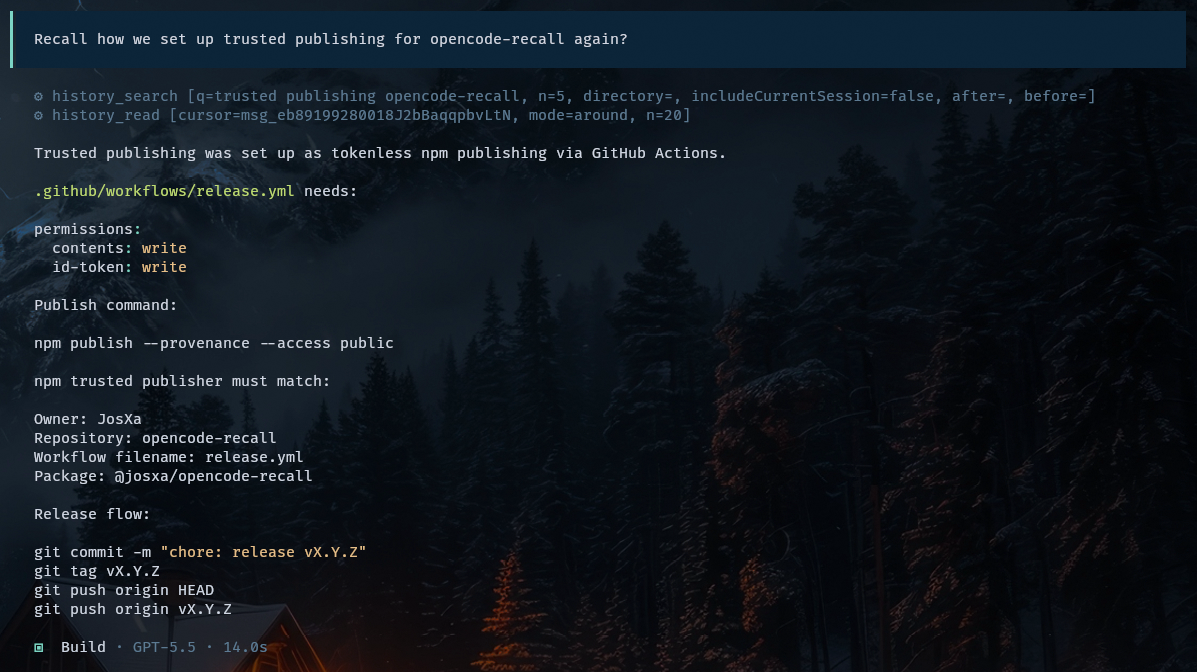
"Remind me how we did this." One search, one read, and the answer comes back with the actual config and commands.
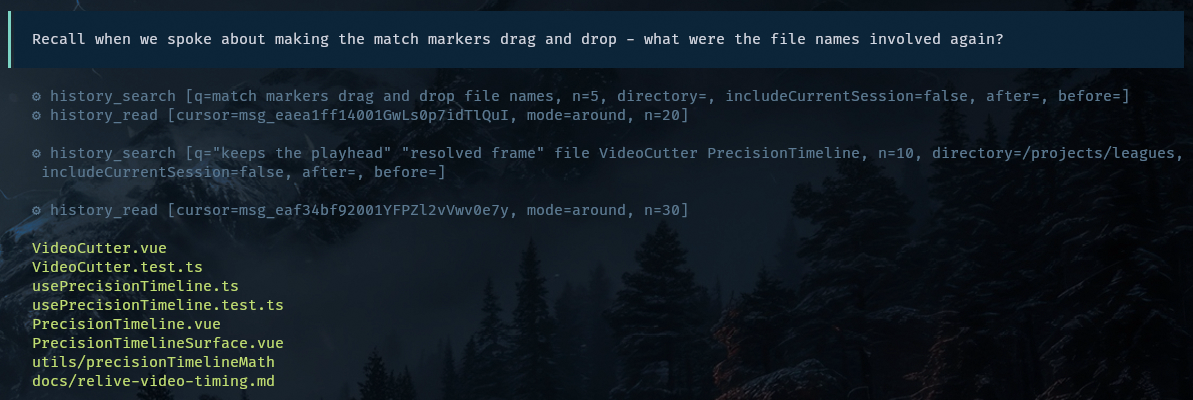
When the first search comes up thin, it tries again. The agent narrows the query and filters by project until it finds the exact files.
Install
opencode plugin @josxa/opencode-recall -gf
This installs the package and wires it into your global OpenCode config.
Manual installation
pnpm add -D @josxa/opencode-recall
Then register the plugin in opencode.json or ~/.config/opencode/opencode.json:
{
  "$schema": "https://opencode.ai/config.json",
  "plugin": ["@josxa/opencode-recall"]
}
Search by meaning with Ollama
To match on meaning, Recall uses Ollama on your machine. Install it and you're done:
ollama --version # prints a version if installed; otherwise get it from https://ollama.com/download
On the first search, Recall starts Ollama if needed, downloads a small embedding model, and builds its index. Without Ollama, Recall still works but only matches exact words, so rephrased questions miss more often.
Usage
Mention @recall whenever old context would help:
@recall how did we set up trusted publishing last time?
@recall find the session where we debugged the Postgres connection pool
@recall what did we decide about the rate limiter design?
Plain requests also work, because your agent hands them to Recall:
- "Recall how we set up the GitHub Actions release workflow."
- "Did we ever debug the Postgres connection pool exhaustion? Find that conversation."
- "Pull up the session where we discussed the rate limiter design."
- "Search my history for anything about Figma MCP and Azure."
- "What were the file names involved when we worked on the timeline component?"
How the recall subagent works
Recall does its digging in a dedicated subagent, so the search work stays out of your main conversation:
- It starts with fresh context. The subagent receives only your question, so nothing from the current chat biases the search.
- It searches and reads. It runs
history_search, picks a promising hit, and loads the messages around it withhistory_read. When the first results are thin, it rephrases the query or narrows it to a project. When a match needs more context, it pages forward or back through the transcript. - It returns a concise answer. The parent agent receives the findings plus the source sessions (id, title, and directory). Raw transcript pages stay inside the subagent, and internal
msg_...cursors appear only if you explicitly ask for read anchors. - Follow-ups go back to Recall. If you ask more about a recalled session, the parent calls
@recallagain and does not answer from what it remembers of the first summary.
The subagent sees only your OpenCode history. It does not read current files, run commands, or check whether facts from old sessions are still true, so verify anything that may have changed since then.
You can give the subagent its own, cheaper model. See Choosing the recall subagent model.
Configuration
Recall creates a config file automatically on first use:
<opencode-config-base-path>/recall.jsonc
On a normal Linux/macOS setup that is ~/.config/opencode/recall.jsonc.
Most users never need to edit it. Open it when your OpenCode database lives somewhere unusual, you want the sidecar index somewhere else, or you want to try a different embedding model.
{
  "$schema": "https://raw.githubusercontent.com/JosXa/opencode-recall/main/schema/config.schema.json",

  "database": {
    // OpenCode session database. Opened read-only; recall never writes here.
    // Default: ~/.local/share/opencode/opencode.db
    "path": "~/.local/share/opencode/opencode.db",

    // Sidecar embedding index. Safe to delete; rebuilt on next search.
    // Default: a filename derived from the canonical source path.
    "indexPath": "~/.local/share/opencode/opencode-recall-index.db"
  },

  "embeddings": {
    // Ollama base URL.
    // Default: http://127.0.0.1:11434
    "ollamaUrl": "http://127.0.0.1:11434",

    // Try "mxbai-embed-large" for higher quality at the cost of speed and memory.
    // Default: all-minilm
    "model": "all-minilm"
  }
}
Environment variables still work as overrides for CI, MCP, and temporary experiments: OPENCODE_DB_PATH, OPENCODE_RECALL_DB_PATH, OPENCODE_RECALL_OLLAMA_URL, and OPENCODE_RECALL_EMBED_MODEL.
Read V1 and V2 history from either runtime
Set the same named sources in both runtimes' recall.jsonc files:
{
  "database": {
    "sources": [
      { "id": "v1", "path": "~/.local/share/opencode/opencode.db", "indexPath": "~/.local/share/opencode/recall-v1.db" },
      { "id": "v2", "path": "~/.local/share/opencode/opencode-v2.db", "indexPath": "~/.local/share/opencode/recall-v2.db" }
    ]
  }
}
Each source has one sidecar shared by all Recall hosts. Event cursors, embeddings, sync locks and stale-row cleanup remain local to that source. Source databases remain read-only, and the hosts keep their own session databases. Missing sources are skipped without opening or pruning their sidecars. A cursor naming an unavailable source reports an error.
Source IDs must be unique and contain only letters, digits, _ or -. Keep them stable across configs so saved cursors remain usable. Each canonical source path must be unique, each sidecar must be unique, and a sidecar cannot alias any source. Existing symlinks are resolved. A sidecar records its source identity atomically; conflicting configurations fail instead of reconciling the wrong database. Existing unbound indexes are rebuilt when first bound because their source cannot be established reliably. Use fresh per-source sidecars when migrating a previously shared index.
With multiple sources, results include sourceId, and cursors are qualified, for example v1::msg_example or v2::ses_example. Copy these exact values into read and save calls, including navigation cursors. Do not append offsets. Raw msg_... and ses_... inputs still work when only one available source contains the ID; ambiguous IDs produce an error listing qualified choices. Copies in different sources remain distinct results, and ranking, result limits, recent entries and session lists merge globally. A qualified excludeSessionId filters only that source; a raw exclusion applies to every source. Current-session exclusion is scoped to the host database when it matches a configured source.
The SDK accepts the same list as new OpenCodeRecall({ sources: [...] }) or searchHistory(query, { sources: [...] }). Hits and transcript windows retain raw IDs plus sourceId; use the cursor and navigation fields to read. The worker SDK and direct SDK with a custom embedding provider share the same federation coordinator.
database.path / database.indexPath and SDK historyDbPath / sidecarDbPath remain supported for one source, with unchanged cursor output. The default source follows OPENCODE_DB, or opencode.db in the OpenCode data directory. Default sidecars use opencode-recall-<source-path-hash>.db so V1 and V2 cannot accidentally share an index. OPENCODE_DB_PATH or OPENCODE_RECALL_DB_PATH suppresses the configured source list for isolated runs; explicit SDK source lists take precedence. The former legacyPath option resolves to a separate legacy source; new configurations should use sources.
Run pnpm run eval:embeddings to compare installed embedding models against the local regression cases in docs/real-history-regressions.md.
Choosing the recall subagent model
Recall integrates with the native OpenCode agent.recall configuration instead of replacing it. The plugin always supplies Recall's description, subagent mode, prompt, and history-only tool permissions. Other agent settings, including model, variant, and temperature, stay under your control.
For example, configure a small model for Recall independently of the parent agent:
// ~/.config/opencode/opencode.json
{
  "$schema": "https://opencode.ai/config.json",
  "agent": {
    "recall": {
      "model": "example-provider/recall-mini",
      "variant": "low"
    }
  }
}
Recall keeps this model when a parent agent uses a different one, matching native OpenCode subagent behavior. Each machine can select a provider and model available in its own OpenCode configuration. When agent.recall is unset, Recall uses OpenCode's normal default model resolution.
Tool reference
Recall exposes four history tools. They are intended to be called by the recall subagent, not by the main agent directly.
session_index: browse sessions by recency and usefulness
| Arg | Type | Notes |
|---|---|---|
n |
number | Max sessions (default 20, max 100). |
title |
string | Case-insensitive session title filter. |
directory |
string | Exact OpenCode session directory filter. |
after |
ISO date | Only sessions updated at or after this timestamp. |
before |
ISO date | Only sessions updated at or before this timestamp. Defaults to now − 30 s unless includeCurrentSession is set. |
includeCurrentSession |
boolean | Include the calling session. Default false: the current session is excluded by id, and before defaults to now − 30 s. |
Returns newest-first session rows with a ses_... cursor for history_read and quick usefulness signals:
[
  {
    "cursor": "ses_...",
    "sid": "ses_...",
    "title": "Release debugging notes",
    "directory": "/Users/you/projects/foo",
    "updated": "2026-04-12T08:21:44.000Z",
    "messages": 84,
    "turns": 18,
    "assistantMessages": 32,
    "toolMessages": 9,
    "textParts": 76,
    "approxContextChars": 118420
  }
]
Use this when you do not have a search term yet and want to spot substantial past sessions at a glance.
session_save: materialize a session file
| Arg | Type | Notes |
|---|---|---|
cursor |
string | Required. An exact session cursor, including source-qualified ses_... cursors. |
path |
string | Required. Workspace-relative destination. |
format |
chatml | markdown | jsonl |
Transcript encoding. Default chatml. |
Writes the full normalized session transcript and returns a compact receipt:
{
  "path": "recall/ses_....chatml",
  "bytes": 48321,
  "messages": 94
}
The destination is always overwritten and must stay inside the active workspace.
history_search: return ranked hits for a query
| Arg | Type | Notes |
|---|---|---|
q |
string | Free-text query. Omit or leave empty to list the most recent messages instead. |
n |
number | Max hits (default 8, max 25). |
directory |
string | Exact OpenCode session directory filter. |
after |
ISO date | Only messages at or after this timestamp. |
before |
ISO date | Only messages at or before this timestamp. Defaults to now − 30 s unless includeCurrentSession is set. |
includeCurrentSession |
boolean | Include the calling session. Default false: the current session is excluded by id, and before defaults to now − 30 s. |
Returns a JSON array of compact hits:
[
  {
    "cursor": "msg_…",     // opaque; pass to history_read
    "sid":    "ses_…",     // OpenCode session id
    "dir":    "/Users/you/projects/foo",
    "title":  "Figma MCP server on Azure API Center",
    "time":   "2026-04-12T08:21:44.000Z",
    "role":   "assistant",
    "score":  0.7421,
    "text":   "…snippet capped at 280 chars…"
  }
]
history_read: read a bounded transcript window around a cursor
| Arg | Type | Notes |
|---|---|---|
cursor |
string | Required. An exact cursor from search or navigation, including source-qualified cursors; raw msg_… and ses_… inputs also work when unambiguous. |
mode |
string | around (default), next, prev, head, or tail. full is rejected; page instead. |
n |
number | Message count. Default 12, max 50. |
Returns a ChatML-like transcript window:
<hist sid="ses_…" dir="/…" mode="around" range="42-53" anchor="48" total="120" title="…">
<|im_start|>user name="msg_…" index="42" time="2026-04-12T08:21:44.000Z"
…text and tool_call blocks…
<|im_end|>
…more messages…
<nav cur="…" prev="…" head="…" next="…" tail="…" />
</hist>
Tool calls, patches, and file attachments render as structured tags with explicit truncated / original_chars markers when content is capped. The <nav/> element gives the agent cursors to keep paging without re-searching. To read from the end upward, start with mode="tail", then pass the returned prev cursor back with mode="prev" until enough context is loaded. mode="full" is intentionally rejected because large transcript responses can still be truncated by the outer tool transport.
How it works
┌───────────────────┐    history_search    ┌──────────────────────┐
│     OpenCode      │ ───────────────────► │  Ranked anchors      │
│                   │                      │  (opaque cursors)    │
└───────────────────┘ ◄─────────────┐      └──────────┬───────────┘
         │      history_read        │                 │
         ▼                          │ ChatML window   │
┌───────────────────┐   pagination  │                 │
│  ChatML window    │ ◄─────────────┘                 │
│  with <nav/>      │                                 │
└───────────────────┘                                 │
                                                      ▼
                                     ┌──────────────────────────────┐
                                     │  opencode.db   (read-only)   │
                                     │  + sidecar embedding index   │
                                     └──────────────────────────────┘
- Source of truth.
opencode.dbis opened read-only. The plugin never writes to it. - Sidecar index. A separate SQLite database (
opencode-recall-index.db) stores text chunks, content hashes, andFloat32embedding blobs. Syntheticsession-title:<id>rows are indexed so proper-noun title queries beat noisy snippet matches. - Sync. Searches use OpenCode's persisted event log to reconcile only changed sessions, including deletions. There is no watcher or background process. Existing sidecars upgrade automatically; custom eventless databases retain the timestamp fallback.
- Vector scoring. Semantic search scores existing embeddings with the native
sqlite-vecextension inside SQLite, so only the best candidate rows cross into JavaScript. The scan keeps cosine similarity, Unicode keyword boosts, and date/directory/session filters. Existing sidecars need no rebuild, and vectors from a different model or dimension are excluded. The SDK and the OpenCode history tools share this engine. - Ranking. Lexical and semantic candidates are merged, scored with title/text/directory term ratios plus phrase boosts, filtered to require enough query-term overlap, and diversified to at most two hits per session. A small semantic-rescue lane admits paraphrase matches that miss lexical filters but have high embedding similarity.
- Reads. Windows are computed by
row_number()over(session_id, time_created, id), then parts are normalized intotext | tool | patch | fileand capped (tool input 2 000 chars, output 6 000 chars).
Development
pnpm install
pnpm run ai:check           # biome + tsc type-check
pnpm test                   # deterministic ranking + cursor tests
pnpm run eval:real-history  # regression suite against your local opencode.db
pnpm run build              # emits dist/
To compare speed, peak process memory, and top-result overlap against a built baseline checkout, run node scripts/benchmark-search.mjs BASELINE_ROOT SIDECAR. The benchmark starts fresh processes, alternates execution order, reuses each query embedding, and does not sync history. It measures vector search separately from embedding generation and lexical search.
Code quality is enforced by biome and tsc --noEmit. See AGENTS.md for the style guide.
License
MIT © JosXa
同类生态推荐

Telescope
@bojackduy/opencode-telescope
OpenCode TUI plugin for fuzzy and semantic search across local conversation history, session transcripts, and AI coding chats

Memory
@navopw/opencode-memory
Persistent semantic memory for OpenCode

Session Recall
opencode-session-recall
Everything your agent ever did is already in the database — this plugin lets it look