
Copy Last
Copy recent agent, user, or user-agent messages from the current OpenCode session.
1
259
近 7 天 174
37.3
生态多维模型
4 天前
2026-10-01
快速安装与配置
opencode.json写入当前项目的 opencode.json,只对这个仓库生效。
opencode.json
{
  "$schema": "https://opencode.ai/config.json",
  "plugin": ["@jfrz38/opencode-copy-last@0.1.2"]
}
写入 ~/.config/opencode/opencode.json,对所有项目生效。
~/.config/opencode/opencode.json
{
  "$schema": "https://opencode.ai/config.json",
  "plugin": ["@jfrz38/opencode-copy-last@0.1.2"]
}
若你要在本地改造这个插件,先装到项目里再从本地路径引用。
shell
pnpm add -D @jfrz38/opencode-copy-lastOpenCode 启动时会通过内嵌运行时自动加载 npm 依赖并缓存至本地目录,无需手动在全局环境执行安装。



Copy the latest agent, user, or user-agent exchange from your current OpenCode session directly to the clipboard.
[!IMPORTANT] Check OpenCode's built-in options before installing this plugin: Copy last assistant message copies the latest assistant response, while Copy session transcript copies the entire conversation. If either option covers your needs, you do not need this plugin. Use this plugin when you want command-based selection of user messages, multiple assistant messages, or complete user-assistant pairs.
Why?
@jfrz38/opencode-copy-last is a small OpenCode plugin for quickly reusing recent conversation context without selecting text manually.
It helps when you want to:
- Paste the last agent answer into an issue, PR, note, or chat.
- Copy your latest prompt exactly as you wrote it.
- Export recent user-agent exchanges as clean Markdown.
- Keep useful context before restarting OpenCode, switching branches, or moving to another tool.
Install
Install via CLI:
opencode plugin @jfrz38/opencode-copy-last@latest --global
Or add the plugin to your OpenCode configuration:
{
  "$schema": "https://opencode.ai/config.json",
  "plugin": ["@jfrz38/opencode-copy-last"]
}
Restart OpenCode after changing plugin configuration.
Usage
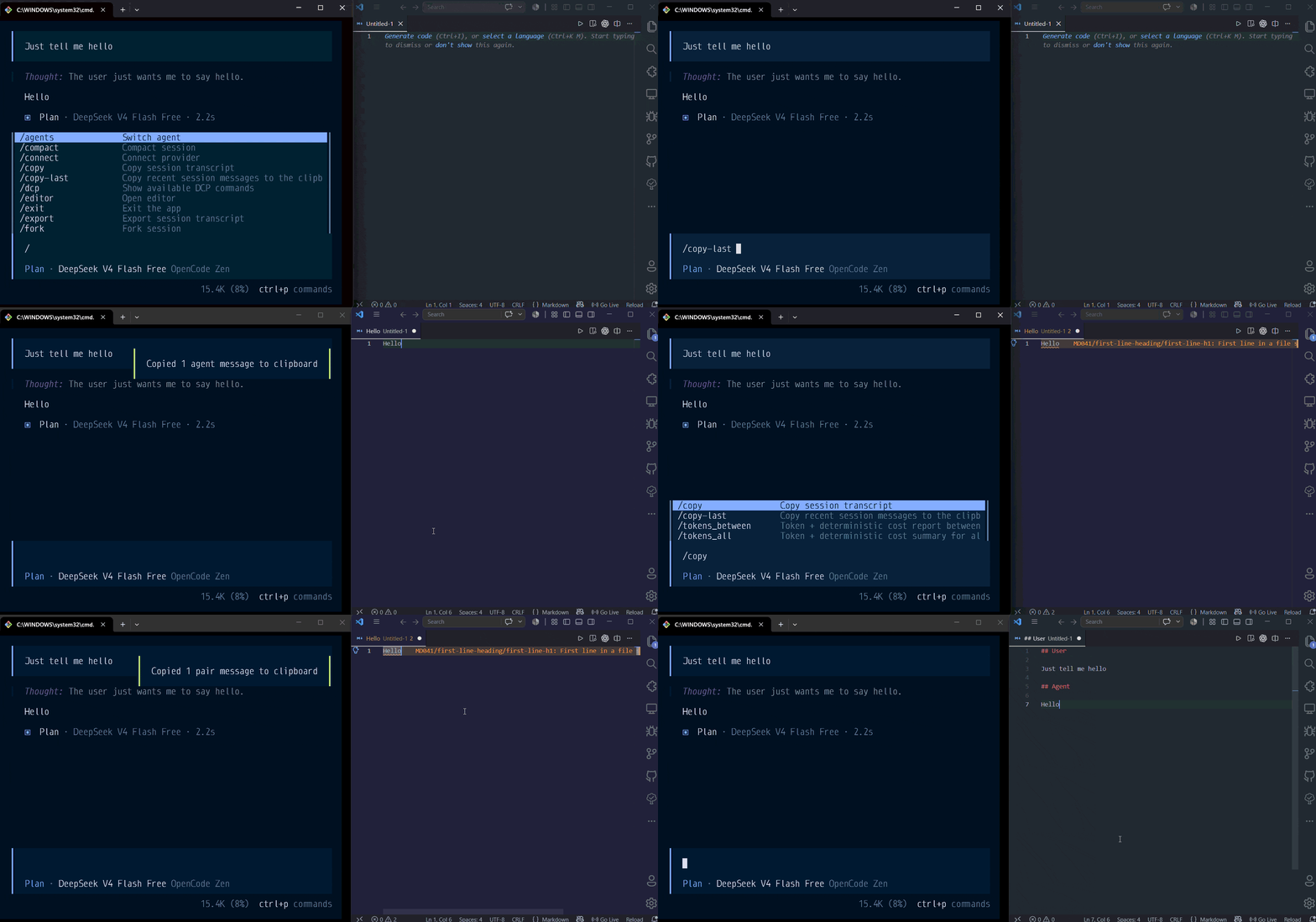
/copy-last [agent|user|pair] [count|all]
By default, it copies the latest agent message:
/copy-last
Examples
Copy the latest agent response:
/copy-last
Copy the latest two agent responses:
/copy-last agent 2
Copy your latest prompt:
/copy-last user
Copy the latest three user-agent exchanges:
/copy-last pair 3
Copy all complete user-agent exchanges:
/copy-last pair all
Use shorter aliases when you prefer:
/copy-last me
/copy-last us 2
Targets
agent: copies the latest assistant/agent messages.user: copies the latest user messages.pair: copies complete user-agent exchanges.me: alias foruser.us: alias forpair.
you is intentionally unsupported because it is ambiguous.
Count
count: copies the latest matching messages or pairs, from1to20.all: copies every matching message or complete pair for the selected target.
Output Format
Single messages are copied as trimmed Markdown content.
Pairs are copied like this:
## User

Your prompt here

## Agent

The agent response here
Multiple copied items are separated with a Markdown horizontal rule:
---
How It Works
The plugin registers the /copy-last command with OpenCode and intercepts it before it reaches the LLM. It reads the current session, selects the requested messages, formats them as Markdown, copies the result to the clipboard, and shows a toast.
Because the command is handled locally by the plugin, running /copy-last does not send a new prompt to the model.
For pair, the plugin uses the last visible agent response before the next user message. This avoids copying an intermediate response produced while tools or subagents are still running. Reasoning, tool output, synthetic text, ignored text, and child-session messages are not included.
OpenCode Built-ins
OpenCode already provides Copy last assistant message for copying the latest assistant response and Copy session transcript for copying the entire conversation. These are built-in features and require no plugin.
This plugin is useful when you want command-based selection of recent assistant messages, user prompts, or complete user-assistant pairs; a count such as the last two responses; all; or normalized Markdown output ready to paste elsewhere.
同类生态推荐

Better Hashline
opencode-better-hashline
Fail-closed, snapshot-bound line editing for OpenCode

Model Fallback
@smart-coders-hq/opencode-model-fallback
OpenCode plugin for ordered model fallback chains, preemptive redirect, and automatic rate limit recovery.

Windows Encoding
opencode-windows-encoding
OpenCode V2 plugin to fix UTF-8 encoding issues in PowerShell on Windows