
0
2,503
近 7 天 260
40.9
生态多维模型
13 小时前
2026-10-04
快速安装与配置
opencode.json写入当前项目的 opencode.json,只对这个仓库生效。
opencode.json
{
  "$schema": "https://opencode.ai/config.json",
  "plugin": ["gutchapa-opencode-telegram@1.4.0"]
}
写入 ~/.config/opencode/opencode.json,对所有项目生效。
~/.config/opencode/opencode.json
{
  "$schema": "https://opencode.ai/config.json",
  "plugin": ["gutchapa-opencode-telegram@1.4.0"]
}
若你要在本地改造这个插件,先装到项目里再从本地路径引用。
shell
pnpm add -D gutchapa-opencode-telegramOpenCode 启动时会通过内嵌运行时自动加载 npm 依赖并缓存至本地目录,无需手动在全局环境执行安装。
Telegram bot for opencode with a daily AI morning briefing — every news item and trending repo judged ✅ useful / ⏭️ skip against your actual setup. Plus 70+ slash commands, file sharing both ways, plugin + standalone modes.




Morning briefing (the reason to install)
Every day at 07:30 your bot brews this — AI news, trending repos, your tracked repos — then judges every item against what you actually run:
• TabX — ✅ useful (free tab recall by meaning, try for Chrome research)
• Llestia — ⏭️ skip (agent hiring marketplace, duplicate of what you run)
• Trump AI Force — ⏭️ skip (news only, politics, no install)
Bottom line: nothing to install today.
/digest fires one on demand. Real example from ~/.config/github-digest/sent/ — verdicts backed by live shell checks, never guesses.
Demo
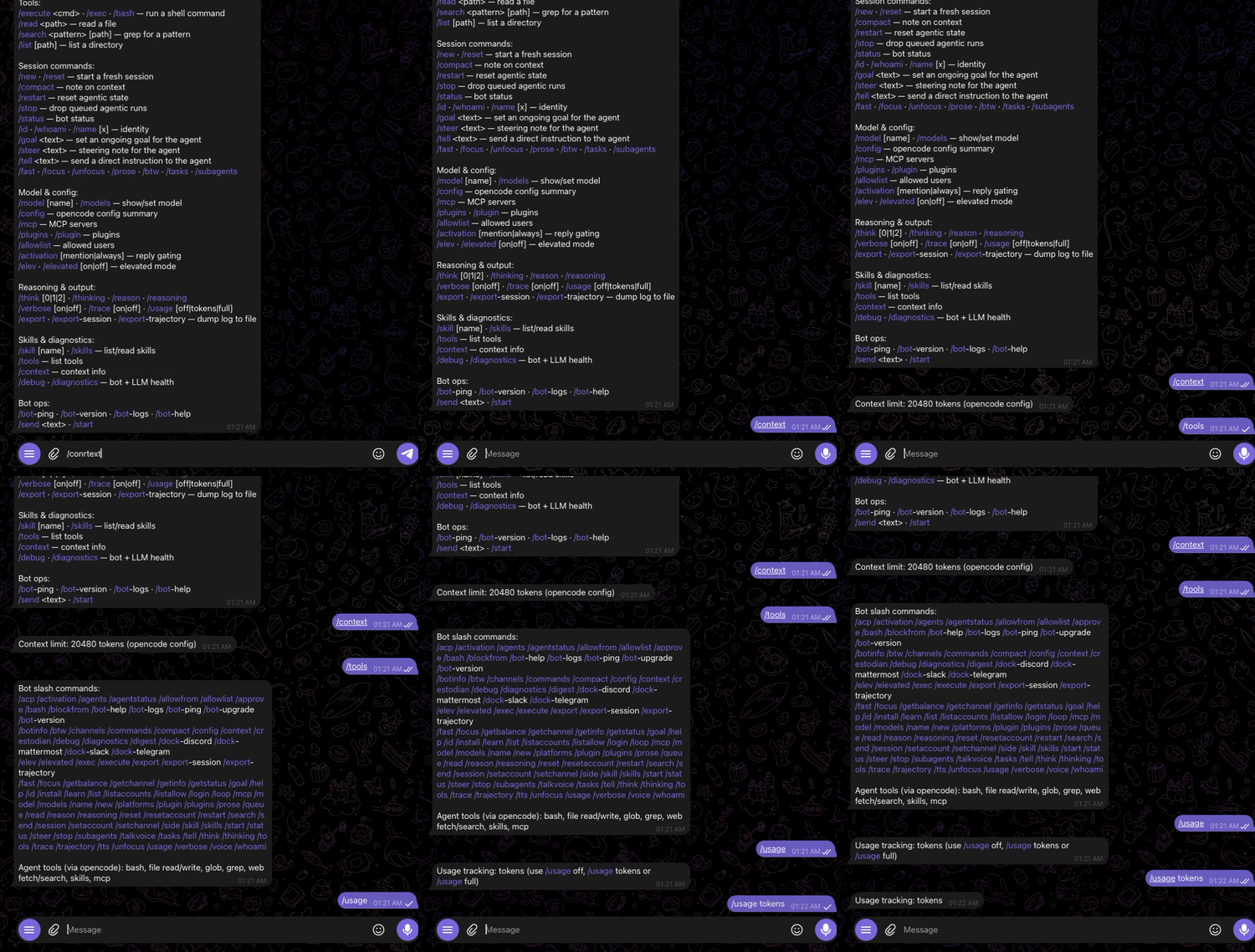
Telegram →
/status→ agent reply → file tool. Real session, ~30 seconds.⭐ If this is useful, star the repo — it's the only signal that keeps it maintained.
Install
One line, ready to go:
npm install gutchapa-opencode-telegram
It ships a CLI (opencode-telegram-bot) plus an opencode plugin. Set your bot
token and allowed users, then run it (see the setup section below for the full
walkthrough — standalone, launchd/systemd, or Docker).
A Telegram bot for opencode. Chat with your local AI
assistant from Telegram — run commands, read/search/list files, and control the
agent with 70+ slash commands (/reset, /status, /model,
/goal, /skills, /tell, ...).
Two ways to run it:
- As an opencode plugin — load it from
opencode.jsonand it registers with the running opencode instance (TUI,opencode serve, oropencode run). Telegram polling is opt-in; enable it per config (see below). Agentic replies run against the hosting opencode server via the SDK client. - As a standalone bot (
opencode-telegram-bot/npm start) — a long-running Telegram poller that spawnsopencode runfor agentic replies. Use this if you want the bot available even when opencode is not running (e.g. via launchd, systemd, or Docker).
Install as a plugin
Add it to your opencode config (~/.config/opencode/opencode.json):
{
  "plugin": [
    "gutchapa-opencode-telegram"
  ]
}
Configure your bot token. The plugin looks for it in this order:
- plugin options:
{ "plugin": [ ["gutchapa-opencode-telegram", { "botToken": "123456:ABC..." }] ] } - the
TELEGRAM_BOT_TOKENenvironment variable
Telegram polling is opt-in so installing the plugin never silently starts a second poller. Enable it with a plugin option:
{
  "plugin": [
    ["gutchapa-opencode-telegram", { "enabled": true }]
  ]
}
or with TELEGRAM_PLUGIN_ENABLED=1 in the opencode process environment.
Create a bot with @BotFather to get a token.
Standalone mode
npm install -g gutchapa-opencode-telegram
TELEGRAM_BOT_TOKEN=123456:ABC... opencode-telegram-bot
Or from a checkout:
npm install
npm run build
TELEGRAM_BOT_TOKEN=123456:ABC... npm start
For 24/7 availability, run it under launchd/systemd (see
examples/launchd.plist for a macOS template).
Note: do not run the standalone bot and the plugin at the same time with the same token — both poll Telegram's
getUpdatesand will steal each other's updates.
Configuration
| Variable | Default | Description |
|---|---|---|
TELEGRAM_BOT_TOKEN |
(required) | Bot token from BotFather |
TELEGRAM_PLUGIN_ENABLED |
(unset) | Set to 1 to enable Telegram polling when running as an opencode plugin |
ALLOWED_TELEGRAM_USERS |
<your_telegram_user_id> |
Comma-separated numeric Telegram user IDs allowed to run shell commands and agentic replies |
OPENCODE_BIN |
opencode |
Path to the opencode binary (standalone mode) |
OPENCODE_CWD |
~/.opencode-bot-ws |
Working directory for agentic runs / sessions |
OPENCODE_TIMEOUT_MS |
180000 |
Agentic timeout |
OPENCODE_MODEL |
(unset) | Model for all replies (e.g. opencode/muse-spark-1.3-contributor-free); unset inherits the opencode-config default. Switch live with /model <id> |
Every conversational message goes through opencode run on the configured
model. There is no local-LLM fallback: if the run fails, the bot says so
plainly instead of answering from a weaker model.
Daily digest (bundled, on by default)
The bot ships a morning briefing — AI news, trending repos, your tracked
repos, each judged for fit — formatted by your configured model and sent to
your chat. First run starts with an empty memory: verdicts are verified live
(ls, which, brew list) and anything unverifiable is marked as such, so
early briefings under-claim rather than over-claim. Confirmed stable tools
accumulate in deployed.json; review it occasionally, it is yours to curate.
| Variable | Default | Description |
|---|---|---|
DIGEST_ENABLED |
1 |
Set to 0 to disable (or /digest off) |
DIGEST_TIME |
07:30 |
Daily send time (24h, local) |
DIGEST_CHAT_ID |
(active chat) | Override delivery target |
DIGEST_HOME |
~/.config/github-digest |
Config, manifest, sent archive |
DIGEST_CONTEXT |
(generic) | Who the fitment judges for |
GITHUB_TOKEN |
(unset) | Optional, raises API rate limits |
/digest sends one now, /digest on|off|status controls the scheduler.
Pick ONE scheduler: the bundled in-bot scheduler (default on) or an
external cron/launchd job calling the digest entrypoint — never both, or the
briefing sends twice. Using external scheduling? Set DIGEST_ENABLED=0
(or /digest off) to silence the built-in one. The once-per-day claim file
(digest-claim-<date> in the state dir) also guards twin bot processes.
Commands
Type / in Telegram to see the command menu (synced automatically at startup,
both in private chats and groups). Highlights:
- Tools:
/execute,/exec,/bash,/read,/search,/list - Session:
/new,/reset,/restart,/status,/stop,/goal,/steer,/tell,/fast,/focus,/prose - Model & config:
/model,/models,/config,/plugins,/skills,/activation - Info:
/help,/commands,/whoami,/id
Security
- The bot token is read from env / options / local config only — never from
source code.
config.jsonand.envare excluded from the published npm package. - Shell commands (
/execute) and agentic replies are restricted toALLOWED_TELEGRAM_USERS. /activation mentionmakes the bot only reply when mentioned or when a message starts with/.
Development
npm install
npm run build
Feedback & Support
Found a bug, have a feature request, or want to say hi? Feedback lives on GitHub:
- Issues: https://github.com/gutchapa/opencode-telegram/issues
- Discussions: https://github.com/gutchapa/opencode-telegram/discussions
- Stars: https://github.com/gutchapa/opencode-telegram — star it if you installed it; 3.5k installs / 0 stars is why this stays invisible.
Check npm run status in a checkout of the repo for download and traffic stats.
License
MIT
同类生态推荐

Tell Sessions
opencode-tell-sessions
Inter-session direct messaging (DM) for OpenCode V1 & V2: agents in different sessions can message each other

Goal
@prevalentware/opencode-goal-plugin
OpenCode goal plugin that adds Codex-style long-running goal mode, /goal commands, persistence, and TUI status for AI coding agents.

Commandcode
@brainervirus/opencode-commandcode
Command Code API provider for opencode — use Claude, GPT, Gemini, DeepSeek, Qwen, Kimi, GLM, MiniMax, and Step models via Command Code