
Tool Audit
Flight recorder for every tool call: tool, args, status, duration and error land in a local SQLite DB, with secrets redacted before they touch disk.
0
0
20.0
生态多维模型
7 天前
2026-09-28
快速安装与配置
opencode.json写入当前项目的 opencode.json,只对这个仓库生效。
opencode.json
{
  "$schema": "https://opencode.ai/config.json",
  "plugin": ["@bandonker/opencode-tool-audit@1.1.0"]
}
写入 ~/.config/opencode/opencode.json,对所有项目生效。
~/.config/opencode/opencode.json
{
  "$schema": "https://opencode.ai/config.json",
  "plugin": ["@bandonker/opencode-tool-audit@1.1.0"]
}
若你要在本地改造这个插件,先装到项目里再从本地路径引用。
shell
pnpm add -D @bandonker/opencode-tool-auditOpenCode 启动时会通过内嵌运行时自动加载 npm 依赖并缓存至本地目录,无需手动在全局环境执行安装。
A pack of local plugins for opencode Desktop v2 — session orchestration and handoff, decision/error journals, a snippet library, codebase search, a tool-call flight recorder, slash commands, context pruning and prompt slimming, transcript export, local-first memory, autonomous goal loops, secret redaction, and a lifetime usage dashboard.




Contents
- Getting started — install, verify, layout
- Plugins — the 15 plugins at a glance
- Plugin details — what each one does, with its options
- Reference
- Development — repo workflow and publishing
- FAQ
- Contributing
- License
Getting started
Quick start
Requires opencode v2. Install the pack from npm — no clone, no build:
CFG="$HOME/.config/opencode"
mkdir -p "$CFG/toolbox" && cd "$CFG/toolbox"
npm init -y >/dev/null 2>&1
npm install @bandonker/opencode-sessions @bandonker/opencode-decision-log @bandonker/opencode-error-journal @bandonker/opencode-snippet-library @bandonker/opencode-codebase-index @bandonker/opencode-tool-audit @bandonker/opencode-command-pack @bandonker/opencode-context-pruner @bandonker/opencode-session-export @bandonker/opencode-memory @bandonker/opencode-goal @bandonker/opencode-secret-shield @bandonker/opencode-finish-guard @bandonker/opencode-strip-skills-catalog @bandonker/opencode-usage-stats
Register the packages in the global config. This merges into an existing
opencode.jsonc rather than overwriting it (entries from other plugins are
kept):
node -e '
const fs=require("fs"),os=require("os"),path=require("path");
const cfgDir=path.join(os.homedir(),".config/opencode");
const scope=path.join(cfgDir,"toolbox","node_modules","@bandonker"), file=path.join(cfgDir,"opencode.jsonc");
const raw=fs.existsSync(file)?fs.readFileSync(file,"utf8"):"{}";
const cfg=JSON.parse(raw.replace(/\/\*[\s\S]*?\*\//g,"").replace(/^\s*\/\/.*$/gm,""));
const mine=fs.readdirSync(scope).filter(n=>fs.existsSync(path.join(scope,n,"package.json"))).sort().map(n=>path.join(scope,n));
cfg.plugins=[...(cfg.plugins??[]).filter(p=>typeof p!=="string"||!p.includes("@bandonker/opencode-")),...mine];
fs.writeFileSync(file,JSON.stringify(cfg,null,2)+"\n");
console.log("registered "+mine.length+" plugins -> "+file);
'
Then reload opencode (opencode reload, or restart the app). Every tool
below is now available to your agent.
Install just one plugin
Each plugin is its own package — install only what you want and register its directory:
CFG="$HOME/.config/opencode"
mkdir -p "$CFG/toolbox" && cd "$CFG/toolbox"
npm init -y >/dev/null 2>&1
npm install @bandonker/opencode-memory
Then add "$CFG/toolbox/node_modules/@bandonker/opencode-memory" to the
plugins array in opencode.jsonc and reload.
Build from source instead
Clone the repo and build the packages locally — same layout npm install
produces, useful for development or offline installs:
git clone https://github.com/Bandonker/open-toolbox.git
cd open-toolbox
npm install
npm run build:packages        # emits packages/<name>/ (package.json + index.js)

CFG="$HOME/.config/opencode"
mkdir -p "$CFG/toolbox"
cp -r packages/* "$CFG/toolbox/"
(cd "$CFG/toolbox" && npm install)
Then register with the same node -e snippet above (it scans
toolbox/node_modules/@bandonker/), and reload.
Windows / PowerShell
npm install works identically on Windows — run the first snippet in
PowerShell (with $CFG = "$HOME\.config\opencode"), or in WSL/Git Bash
unchanged. Registering the plugins array uses the same node -e snippet —
it relies on os.homedir() and path.join(), so it is platform-neutral. Note
that a backslashed path in JSON must be escaped (C:\\path\\to); the
snippet emits forward slashes, which opencode accepts on Windows.
Project-local (one repo instead of globally)
Same packages, but under <repo>/.opencode/toolbox/ instead of
$HOME/.config/opencode/toolbox/, and registered in the project
opencode.jsonc rather than the global one:
mkdir -p .opencode/toolbox && cd .opencode/toolbox
npm init -y >/dev/null 2>&1
npm install @bandonker/opencode-sessions @bandonker/opencode-memory
Verify
From the repo root — no opencode server needed:
npm install --no-audit --no-fund
npm test          # helper unit tests + mock-context checks for the pack
npm run typecheck # tsc --noEmit over plugins/ and lib/
The same two commands run on every push in CI.
Layout
After npm run build:packages and installing, this is what your config dir
looks like. Each plugin is a package directory registered in the
plugins array — not a loose .ts file in plugins/:
~/.config/opencode/        # or <repo>/.opencode/ — this is under your HOME dir,
                           # not relative to the repo
├── opencode.jsonc         # the "plugins" array pointing at toolbox/*/
└── toolbox/               # one directory per plugin
    ├── package.json       # shared dependency manifest
    ├── node_modules/      # one install, shared by all 15
    ├── opencode-sessions/ # index.js + helpers.js
    │   └── node_modules -> ../node_modules
    ├── memory/
    │   ├── package.json
    │   ├── index.js
    │   ├── lib/sqlite.js
    │   └── node_modules -> ../node_modules
    ├── context-pruner/
    ├── secret-shield/
    └── … 15 in total
Why a directory per plugin, and not loose files in plugins/?
Two independent reasons, both of which make the flat layout fail:
- Resolution. opencode v2 auto-discovers loose
.tsfiles underplugins/, but does not resolve bare npm specifiers from the config directory for them. A plugin that doesimport { Plugin } from "@opencode/plugin"fails to load withCannot find package '@opencode/plugin'. Registered as a package directory, it resolves normally. - The loader treats every export as a plugin factory. A stray helper
export in
plugins/fails the load withprompt.split is not a functionand cascades into config/provider errors. Keeping helpers in their own files outsideplugins/avoids that entirely.
Why does every package need its own node_modules symlink?
Because resolution is anchored at the package directory, not hoisted to the
config root. A single npm install in toolbox/ populates the shared copy;
the per-package symlink is what makes it reachable from each plugin. This is
the same layout pnpm uses.
Plugins
Click any plugin name to jump to its expandable documentation below.
| Plugin | Tools | Description |
|---|---|---|
| opencode-sessions | 9 | Spawn child sessions, wait for them, read results, send follow-ups, answer permission prompts, cancel them — and hand off the current working point into a fresh session. Created sessions are real opencode sessions, so they show up in the Desktop session switcher as if you'd pressed +. Also adds targeted project presence: a brief about only the sessions that bear on yours, and file-collision warnings so two agents don't write the same file at once. |
| decision-log | 5 | Record and search architectural decisions in a local SQLite FTS5 database. decision_log, decision_search, decision_list, decision_get, decision_update. |
| error-journal | 5 | Log errors with context, search past ones, and record resolutions so you stop re-debugging the same failure. |
| snippet-library | 5 | Save reusable code snippets and search them by language, tag, or full text. |
| codebase-index | 4 | Index a codebase directory and run BM25-ranked full-text search over it. |
| tool-audit | 3 | Flight recorder for every tool call: tool, args, status, duration and error land in a local SQLite DB, searchable with trace_query, summarised with trace_stats, exportable with trace_export. Secrets in arguments are redacted before they touch disk. |
| command-pack | — | Registers 7 slash commands so the pack is one keystroke away (see Commands). |
| context-pruner | 1 | Token-accurate context compiler: trims stale tool output out of the request only (session.hook("context")), plans changes once per epoch so the prompt-cache prefix stays stable, dedupes and purges stale output, and never touches the transcript on disk. context_pruner_stats shows what it trimmed; context_report shows budget, epoch, cache hit ratio and active decisions; context_pruner_recall returns a pruned output on demand so it need not be re-run. |
| session-export | 2 | Dump a session transcript to markdown / json / jsonl / text with a model + message/tool/token/cost header, role and tool filters, optional reasoning, per-part truncation, secret redaction with home-path rewriting, and safe non-overwriting filenames. session_export writes a file (or returns it inline); session_export_info reports config and the last export. |
| memory | 5 | Local-first long-term memory in SQLite FTS5 — memory_remember, memory_recall, memory_forget, memory_list, memory_stats. No embedding API, no cloud, no network. Relevant memories are auto-injected into each request (session.hook("context")) within a hard character budget, deduped per session. DB at ~/.opencode-plugins/memory/memory.db. |
| goal | 3 | Set an objective for a session and keep working until it is actually reached. /goal <objective> (add - lines for success criteria) starts the loop; the goal is re-injected into every request (session.hook("context")) so it survives long turns, and when a turn ends the model is auto-continued (session.prompt) with the remaining budget. The loop stops only on goal_complete (with evidence) or goal_blocked, a user interrupt (which pauses), a detected stall (turns that run no tools and repeat themselves), a failure streak, or the iteration/time budget. Goal state is persisted per session, so it survives a plugin reload. Tools: goal_complete, goal_blocked, goal_progress. |
| secret-shield | 4 | v2-native secret detector and redactor. Scrubs the outbound HTTP body (session-title, compaction and generate calls), the prompt, tool arguments/results and child-process env; observe/redact/block modes, 69 high-precision rules plus a Shannon-entropy fallback, allowlist precedence, and a hashed JSONL audit that never stores the value. Tools: secret_shield_scan, secret_shield_stats, secret_shield_shape, secret_shield_keys. |
| finish-guard | — | Normalises OpenAI-compatible SSE streams at the session.hook("http.response") seam so a content/reasoning/tool delta that arrives after the finish_reason chunk cannot abort the turn. Fixes AI.Error.InvalidProviderOutput: OpenAI Chat received content after the finish reason (and the Failed to drain Session cascade) from reasoning models behind strict OpenAI-compatible gateways. |
| strip-skills-catalog | — | Strips the <available_skills> catalog from the system prompt to save tokens. The skill tool still works on demand — agents can call it by name. |
| usage-stats | 5 | Lifetime token / dollar / tool accounting in local SQLite. Cumulative session.usage.updated totals are delta-attributed to the session's current model; title/compaction spend is tracked separately as background. stats_summary, stats_tools, stats_tokens, stats_heatmap and /stats expose the numbers; stats_dashboard writes a self-contained HTML dashboard (heatmap + bar chart + tables) to ~/.opencode-plugins/usage-stats/dashboard.html. |
All SQLite-backed plugins use
bun:sqlitewhen available and fall back tonode:sqlite. Databases land in~/.opencode-plugins/.
Plugin details
Expand a plugin to read what it does and how to configure it — every plugin with options documents them in its own table below.
Zero config is required: everything loads with defaults. Each knob is read
from the plugin options object (npm installs) or its env var (always works),
when the plugin loads, so restart opencode after changing values:
{
  "plugins": [
    // a bare package name
    "@bandonker/opencode-context-pruner",
    // or an object carrying options
    { "package": "@bandonker/opencode-tool-audit", "options": { "retentionDays": 90 } },
    // a name starting with "-" removes that plugin
    { "package": "-some-plugin" }
  ]
}
Local
.tsplugins take nooptions. The loader rejects a bare file path withconfigured plugin path must be a directory, and files inplugins/load with defaults — that is why every knob below has an env var.
opencode-sessions — session orchestration and handoff
Spawn child sessions, wait for their results, send follow-ups, answer permission prompts, cancel them, and hand off the current working point into a fresh session. Created sessions are real opencode sessions and appear in the Desktop session switcher.
It also adds project presence: any session working in a repo can see the
other sessions in that repo — including ones this plugin did not spawn — and can
message them. opencode has no session.list(), so peers are discovered from the
server-wide event stream and announced by each session on its first turn.
The brief injected into each request is targeted, not a roster: a session is
told about a peer only when that peer could affect its work — it holds a file this
session is writing, it is in this session's lineage, it is mid-turn, or it declared
overlapping work. When nothing is relevant, nothing is injected. With
fileLocks: "enforce" two agents about to write the same file don't just get told
to take turns — the write actually waits for the holder, and fails loudly naming
who has it if the wait runs out. A peer that has gone quiet is verified with
session.get rather than assumed dead, and a session you closed or deleted is
confirmed absent and dropped from the list instead of lingering as a ghost.
Tools: 9. See the opencode-sessions package documentation for the complete tool list and configuration knobs.
decision-log — durable architecture decisions
Record architectural decisions with context and consequences, then search and update them from a local SQLite FTS5 database.
Tools: decision_log, decision_search, decision_list, decision_get, and
decision_update.
error-journal — searchable debugging history
Log errors with context, search previous failures, and record resolutions so recurring problems do not have to be debugged from scratch.
Tools: 5, including error logging, search, listing, and resolution tracking.
snippet-library — reusable code snippets
Save reusable code snippets locally and search them by language, tags, or full text. Everything is stored locally in SQLite with full-text search.
Tools: 5 for saving, retrieving, listing, updating, and searching snippets.
codebase-index — local codebase search
Index a codebase directory and run BM25-ranked full-text search over it. The index is local and can be refreshed incrementally as the project changes.
Tools: 4 for indexing, searching, inspecting status, and managing the index.
tool-audit — local tool-call flight recorder
Record every tool call with its tool name, arguments, status, duration, and
error. Use trace_query to search the audit log, trace_stats to summarise it,
and trace_export to export it. Secrets in arguments are redacted before they
touch disk.
Tools: trace_query, trace_stats, and trace_export.
Options
Each option is read from the plugin options object (npm installs) or the env
var (always works):
| Option | Env var | Default | Meaning |
|---|---|---|---|
dir |
OPENCODE_TOOL_AUDIT_DIR |
~/.opencode-plugins/tool-audit |
Where the SQLite DB lives |
enabled |
OPENCODE_TOOL_AUDIT_ENABLED |
true |
Turn recording off without uninstalling |
redact |
OPENCODE_TOOL_AUDIT_REDACT |
true |
Scrub secrets from arguments before writing |
maxInputChars |
OPENCODE_TOOL_AUDIT_MAX_INPUT_CHARS |
2000 |
Per-call argument cap |
retentionDays |
OPENCODE_TOOL_AUDIT_RETENTION_DAYS |
30 |
Prune rows older than this (0 = keep forever) |
ignoreTools |
OPENCODE_TOOL_AUDIT_IGNORE |
todowrite + its own tools |
Comma-separated tools to skip |
Values are read when the plugin loads, so restart opencode after changing them.
opencode-sessions has its own knobs — see
its README.
command-pack — slash commands for the toolbox
Registers slash commands for the most common toolbox actions, including
/handoff, /decide, /journal, /recall, /index, /trace, /toolbox,
and /stats.
See Commands for the command list. Commands inject short instructions into the current session and use the corresponding toolbox tools.
context-pruner — token-accurate context compiler
Trims stale tool output from the outgoing request only. The session transcript on disk is unchanged, and pruned tool output can be recalled or re-run. The planner preserves a stable prompt-cache prefix, removes superseded output, and can proactively summarise stale context before the model window fills.
Use context_pruner_stats to inspect savings, context_report to inspect the
active budget and epoch, and context_pruner_recall to retrieve pruned output
without re-running the original tool.
Options
context-pruner is a context compiler: it trims stale tool output from the
outgoing request only. The session transcript on disk is unchanged, and a pruned
tool can simply be re-run.
It measures tokens (calibrated against provider usage), plans prune changes once
per epoch, and reuses those decisions verbatim so the prompt-cache prefix
stays stable between replans. By default it also keeps the outgoing request near
a steady ceiling well below the model window (steadyTargetRatio, default
0.06), so stale closed topics are summarised before the window ever fills; set
proactiveSummarize: false or steadyTargetRatio: 0 for window-only behaviour.
Without a resolvable window it falls back to the positional rules below.
On top of that it removes output that is provably superseded (a newer read or
write of the same file), and over the target it summarises the largest stale
units — tool output and, since prose is on by default, assistant/user text — with
the session model automatically, so savings land even when the model ignores
nudges. It reads optional config from
.opencode/context-pruner.jsonc (project) then
~/.config/opencode/context-pruner.jsonc (global), and can also read a DCP
dcp.jsonc for migration.
Session-scoped state and the digests a session produced are reclaimed when the
host reports session.deleted, with a startup sweep covering sessions deleted
while opencode was closed. The non-session digest/calibration caches are capped
by count (storageGc).
| Option | Env var | Default | Meaning |
|---|---|---|---|
enabled |
OPENCODE_CONTEXT_PRUNER_ENABLED |
true |
Turn pruning off without uninstalling |
keepRecent |
OPENCODE_CONTEXT_PRUNER_KEEP_RECENT |
6 |
Most-recent tool results to leave untouched |
minChars |
OPENCODE_CONTEXT_PRUNER_MIN_CHARS |
2000 |
Only prune results longer than this |
keepHeadChars |
OPENCODE_CONTEXT_PRUNER_KEEP_HEAD |
200 |
Characters of the result kept as a preview |
keepErrors |
OPENCODE_CONTEXT_PRUNER_KEEP_ERRORS |
true |
Never prune error results |
ignoreTools |
OPENCODE_CONTEXT_PRUNER_IGNORE |
context_pruner_stats |
Comma-separated tools to never prune |
log |
OPENCODE_CONTEXT_PRUNER_LOG |
false |
Log each prune to stderr |
budgetRatio |
OPENCODE_CONTEXT_PRUNER_BUDGET_RATIO |
0.9 |
Fraction of the model window treated as input budget |
targetRatio |
OPENCODE_CONTEXT_PRUNER_TARGET_RATIO |
0.85 |
Fraction of the budget to prune down to |
maxOutputReserve |
OPENCODE_CONTEXT_PRUNER_MAX_OUTPUT_RESERVE |
8192 |
Tokens reserved for the model's output |
keepRecentTurns |
OPENCODE_CONTEXT_PRUNER_KEEP_RECENT_TURNS |
2 |
Recent turns left untouched |
minReplanTokens |
OPENCODE_CONTEXT_PRUNER_MIN_REPLAN_TOKENS |
2000 |
New tokens saved needed to justify a replan |
dedupe |
OPENCODE_CONTEXT_PRUNER_DEDUPE |
true |
Stub duplicate tool output |
purgeErrors |
OPENCODE_CONTEXT_PRUNER_PURGE_ERRORS |
true |
Stub stale errors (only when keepErrors is false) |
charsPerToken |
OPENCODE_CONTEXT_PRUNER_CHARS_PER_TOKEN |
3.6 |
Seed estimator before calibration |
protectedTools |
OPENCODE_CONTEXT_PRUNER_PROTECTED_TOOLS |
task,skill,compress,context_report |
Tools never pruned |
protectedPatterns |
OPENCODE_CONTEXT_PRUNER_PROTECTED_PATTERNS |
(none) | Regexes of tools never pruned |
notify |
OPENCODE_CONTEXT_PRUNER_NOTIFY |
true |
Receipt verbosity: off | minimal | detailed |
notifyType |
OPENCODE_CONTEXT_PRUNER_NOTIFY_TYPE |
toast |
chat posts the receipt inline (session.synthetic); toast logs to stderr |
notifyMinTokens |
OPENCODE_CONTEXT_PRUNER_NOTIFY_MIN_TOKENS |
500 |
Turn savings needed to trigger a receipt (0 = every prune) |
notifyOnTopic |
OPENCODE_CONTEXT_PRUNER_NOTIFY_ON_TOPIC |
true |
Also send a receipt when a summary is applied, even below the token floor |
collapseRanges |
OPENCODE_CONTEXT_PRUNER_COLLAPSE |
true |
Collapse fully-pruned message spans |
collapseStubs |
OPENCODE_CONTEXT_PRUNER_COLLAPSE_STUBS |
true |
Also collapse spans that are only stubbed (max savings) |
superseded |
OPENCODE_CONTEXT_PRUNER_SUPERSEDED |
true |
Prune output superseded by a newer read/write of the same file |
autoSummarize |
OPENCODE_CONTEXT_PRUNER_AUTO_COMPRESS |
true |
Summarise automatically when the token target is exceeded |
autoSummarizeMaxCalls |
OPENCODE_CONTEXT_PRUNER_AUTO_COMPRESS_MAX |
0 |
Max automatic summariser calls per session (0 = unlimited) |
autoSummarizeMinTokens |
OPENCODE_CONTEXT_PRUNER_AUTO_COMPRESS_MIN |
4000 |
Minimum tokens a range must hold to be auto-summarised |
maxAutoSummaries |
OPENCODE_CONTEXT_PRUNER_MAX_AUTO_SUMMARIES |
12 |
Max stale units covered per proactive summary (0 = unlimited; lower trades coverage for fewer calls) |
proactiveSummarize |
OPENCODE_CONTEXT_PRUNER_PROACTIVE |
true |
Keep the request near the steady ceiling even when the window is wide |
steadyTargetRatio |
OPENCODE_CONTEXT_PRUNER_STEADY_RATIO |
0.06 |
Steady ceiling as a fraction of the window (0 disables) |
steadyTargetMinTokens |
OPENCODE_CONTEXT_PRUNER_STEADY_MIN |
1500 |
Floor for the steady ceiling |
compressText |
OPENCODE_CONTEXT_PRUNER_COMPRESS_TEXT |
true |
Let the summariser cover assistant/user prose, not just tool output |
compactionCheckpoint |
OPENCODE_CONTEXT_PRUNER_COMPACTION |
true |
Replace native compaction with a deterministic checkpoint |
retryOnOverflow |
OPENCODE_CONTEXT_PRUNER_RETRY |
true |
Recover from context-limit errors by trimming harder and retrying |
titleShortCircuit |
OPENCODE_CONTEXT_PRUNER_TITLE |
false |
Skip model title generation using the first user line |
cacheAware |
OPENCODE_CONTEXT_PRUNER_CACHE_AWARE |
true |
Defer voluntary replans until the cache rewrite premium amortises |
cacheAmortize |
OPENCODE_CONTEXT_PRUNER_CACHE_AMORTIZE |
4 |
Requests over which a cache rewrite must pay back |
recall |
OPENCODE_CONTEXT_PRUNER_RECALL |
true |
Keep pruned output locally so it can be recalled instead of re-run |
recallKeep |
OPENCODE_CONTEXT_PRUNER_RECALL_KEEP |
50 |
Most pruned outputs kept per session |
recallMaxChars |
OPENCODE_CONTEXT_PRUNER_RECALL_MAX_CHARS |
200000 |
Max characters returned by a single recall |
storageGc |
OPENCODE_CONTEXT_PRUNER_STORAGE_GC |
true |
Bound the non-session KV caches (digest + calibration) |
summaryCacheMax |
OPENCODE_CONTEXT_PRUNER_SUMMARY_CACHE_MAX |
500 |
Max persisted digest-cache entries (0 = unlimited) |
calibrationMax |
OPENCODE_CONTEXT_PRUNER_CALIBRATION_MAX |
256 |
Max persisted calibration entries (0 = unlimited) |
compressEnabled |
OPENCODE_CONTEXT_PRUNER_COMPRESS |
true |
Enable the model-callable compress tool |
compressMaxSourceChars |
OPENCODE_CONTEXT_PRUNER_COMPRESS_MAX_CHARS |
24000 |
Max characters sent to the summariser per call |
protectTags |
OPENCODE_CONTEXT_PRUNER_PROTECT_TAGS |
true |
Preserve <protect> blocks during summarisation |
protectUserMessages |
OPENCODE_CONTEXT_PRUNER_PROTECT_USER |
false |
Never summarise user messages |
summaryBuffer |
OPENCODE_CONTEXT_PRUNER_SUMMARY_BUFFER |
true |
Let summary tokens extend the effective budget |
minContextLimit |
OPENCODE_CONTEXT_PRUNER_MIN_CONTEXT_LIMIT |
(none) | Token count or percent at which nudges start |
maxContextLimit |
OPENCODE_CONTEXT_PRUNER_MAX_CONTEXT_LIMIT |
(none) | Token count or percent treated as the hard window |
nudgeEnabled |
OPENCODE_CONTEXT_PRUNER_NUDGE |
true |
Tell the model to compress when context grows |
nudgeFrequency |
OPENCODE_CONTEXT_PRUNER_NUDGE_FREQUENCY |
5 |
Requests between nudges |
nudgeForce |
OPENCODE_CONTEXT_PRUNER_NUDGE_FORCE |
soft |
soft or strong nudge wording |
iterationNudgeThreshold |
OPENCODE_CONTEXT_PRUNER_ITERATION_NUDGE |
15 |
Tool results after which a nudge is sent |
protectedFilePatterns |
OPENCODE_CONTEXT_PRUNER_PROTECTED_FILES |
(none) | Globs of file paths never pruned |
debug |
OPENCODE_CONTEXT_PRUNER_DEBUG |
false |
Write a debug log under ~/.config/opencode/logs/context-pruner |
session-export — transcript exports
Export session transcripts to Markdown, JSON, JSONL, or text with a model and usage header. Exports support role and tool filters, optional reasoning, per-part truncation, secret redaction, and safe non-overwriting filenames.
session_export writes a file or returns the export inline;
session_export_info reports the current configuration and last export.
Options
| Option | Env var | Default | Meaning |
|---|---|---|---|
enabled |
OPENCODE_SESSION_EXPORT_ENABLED |
true |
Disable exporting without uninstalling |
dir |
OPENCODE_SESSION_EXPORT_DIR |
<cwd>/.opencode-exports |
Default output directory |
format |
OPENCODE_SESSION_EXPORT_FORMAT |
markdown |
markdown | json | jsonl | text |
includeReasoning |
OPENCODE_SESSION_EXPORT_INCLUDE_REASONING |
false |
Include assistant reasoning parts |
includeToolResults |
OPENCODE_SESSION_EXPORT_INCLUDE_TOOL_RESULTS |
true |
Include tool results/errors |
maxCharsPerPart |
OPENCODE_SESSION_EXPORT_MAX_PART_CHARS |
4000 |
Truncate each part to this many chars |
redact |
OPENCODE_SESSION_EXPORT_REDACT |
true |
Scrub secrets; rewrite home paths to ~ |
memory — local-first long-term memory
Store and recall durable local memories without an embedding API, cloud service, or network request. Relevant memories are injected into each request within a character budget and deduplicated per session.
Tools: memory_remember, memory_recall, memory_forget, memory_list, and
memory_stats. The database lives at
~/.opencode-plugins/memory/memory.db.
Options
| Option | Env var | Default | Meaning |
|---|---|---|---|
enabled |
OPENCODE_MEMORY_ENABLED |
true |
Turn the plugin off without uninstalling |
autoRecall |
OPENCODE_MEMORY_AUTO_RECALL |
true |
Inject relevant memories into each request |
budgetChars |
OPENCODE_MEMORY_BUDGET_CHARS |
1200 |
Hard character budget per injection |
topK |
OPENCODE_MEMORY_TOP_K |
5 |
Max memories per recall/injection |
minScore |
OPENCODE_MEMORY_MIN_SCORE |
0 |
Minimum BM25 score (0 = any FTS hit) |
scope |
OPENCODE_MEMORY_SCOPE |
project |
Default scope: global | project | session |
maxEntries |
OPENCODE_MEMORY_MAX_ENTRIES |
0 |
Prune least-important rows beyond this (0 = unlimited) |
log |
OPENCODE_MEMORY_LOG |
false |
Log activity to stderr |
goal — persistent autonomous goal loops
Start an objective with /goal <objective> and optional - success
criteria. The goal is re-injected into requests and the model is automatically
continued when a turn ends, until goal_complete, goal_blocked, an
interrupt, a stall, repeated failures, or the iteration/time budget stops it.
Goal state is persisted per session, so it survives plugin reloads and long
turns. Tools: goal_complete, goal_blocked, and goal_progress.
Options
| Option | Env var | Default | Meaning |
|---|---|---|---|
enabled |
OPENCODE_GOAL_ENABLED |
true |
Turn the goal loop off without uninstalling |
maxIterations |
OPENCODE_GOAL_MAX_ITERATIONS |
30 |
Max continuation turns per goal |
maxMinutes |
OPENCODE_GOAL_MAX_MINUTES |
180 |
Wall-clock budget per goal (minutes) |
stallLimit |
OPENCODE_GOAL_STALL_LIMIT |
3 |
Turns with no tool use and an unchanged reply before stopping as stalled |
maxFailures |
OPENCODE_GOAL_MAX_FAILURES |
3 |
Consecutive execution errors before stopping |
requireEvidence |
OPENCODE_GOAL_REQUIRE_EVIDENCE |
true |
Require evidence in goal_complete |
maxInjectChars |
OPENCODE_GOAL_MAX_INJECT_CHARS |
1600 |
Character cap on the injected goal reminder |
notify |
OPENCODE_GOAL_NOTIFY |
true |
Post loop start/stop notes into the session |
log |
OPENCODE_GOAL_LOG |
false |
Log loop activity to stderr |
The loop. /goal Ship the login fix stores the objective and starts a normal
turn. Follow it with - lines to list success criteria. The objective is
re-injected into every request, so it survives long turns and compaction; when a
turn ends (session.idle/session.execution.succeeded) the plugin queues a
continuation prompt carrying the objective and the remaining budget. It stops
when the model calls goal_complete (which requires concrete evidence unless
requireEvidence is off) or goal_blocked, when you interrupt a turn (the goal
pauses rather than fighting you), when stallLimit turns run no tools and the
reply is unchanged, after maxFailures consecutive execution errors, or when the
iteration/time budget is exhausted. Goal state is persisted per session, so a
paused or budget-stopped goal can be resumed with /goal resume.
secret-shield — secret detection and redaction
Detect and redact secrets across outbound HTTP bodies, prompts, tool arguments
and results, and child-process environments. Choose observe, redact, or
block mode, with high-precision rules, entropy fallback detection, allowlists,
and a hashed JSONL audit that never stores the secret value.
Tools: secret_shield_scan, secret_shield_stats, secret_shield_shape, and
secret_shield_keys.
Options
| Option | Env var | Default | Meaning |
|---|---|---|---|
enabled |
OPENCODE_SECRET_SHIELD_ENABLED |
true |
Turn the shield off without uninstalling |
mode |
OPENCODE_SECRET_SHIELD_MODE |
observe |
observe (audit only) | redact | block |
entropy |
OPENCODE_SECRET_SHIELD_ENTROPY |
true |
Shannon-entropy fallback for unlabelled tokens |
allow |
OPENCODE_SECRET_SHIELD_ALLOW |
(none) | Comma-separated literals, /regex/, globs or rule ids |
blockEnvReads |
OPENCODE_SECRET_SHIELD_BLOCK_ENV_READS |
true |
In block mode, deny protected secret-file reads |
log |
OPENCODE_SECRET_SHIELD_LOG |
false |
Emit diagnostics to stderr |
finish-guard — resilient SSE stream handling
Normalise OpenAI-compatible SSE streams when a content, reasoning, or tool delta
arrives after the provider's finish_reason chunk. This prevents invalid
provider-output failures and the follow-on failed-session-drain cascade for
reasoning models behind strict gateways.
Options
| Option | Env var | Default | Meaning |
|---|---|---|---|
enabled |
OPENCODE_FINISH_GUARD_ENABLED |
true |
Turn stream normalisation off without uninstalling |
log |
OPENCODE_FINISH_GUARD_LOG |
false |
Log each normalised stream to stderr |
retry |
OPENCODE_FINISH_GUARD_RETRY |
true |
Ask opencode to retry the turn when a stream is malformed |
retryMax |
OPENCODE_FINISH_GUARD_RETRY_MAX |
3 |
Maximum retry attempts before the turn is allowed to fail |
strip-skills-catalog — smaller system prompts
Strips the <available_skills> catalog from the system prompt to save tokens.
The skill tool remains available on demand, so agents can still load a skill
when they need it.
usage-stats — lifetime usage dashboard
Track lifetime tokens, cost, tool calls, model usage, and background title or
compaction spend in local SQLite. Use stats_summary, stats_tools,
stats_tokens, stats_heatmap, or /stats for the data, and stats_dashboard
to write a self-contained HTML dashboard.
The dashboard includes an activity heatmap, a 30-day token chart, tool and model tables, exact hover breakdowns for daily activity and chart bars, searchable multi-select model filtering, responsive layout, and automatic refresh without spending model tokens.
Options
| Option | Env var | Default | Meaning |
|---|---|---|---|
dir |
OPENCODE_USAGE_STATS_DIR |
~/.opencode-plugins/usage-stats |
Where the SQLite DB and dashboard live |
enabled |
OPENCODE_USAGE_STATS_ENABLED |
true |
Turn recording off without uninstalling |
retentionDays |
OPENCODE_USAGE_STATS_RETENTION_DAYS |
0 |
Prune daily rollups older than this (0 = keep forever) |
heatmapMetric |
OPENCODE_USAGE_STATS_HEATMAP_METRIC |
tokens |
Heatmap metric (tokens | cost | calls) |
heatmapWeeks |
OPENCODE_USAGE_STATS_HEATMAP_WEEKS |
26 |
Heatmap width in weeks |
includeBackground |
OPENCODE_USAGE_STATS_INCLUDE_BACKGROUND |
true |
Include title/compaction spend in charts |
autoRefreshSec |
OPENCODE_USAGE_STATS_AUTO_REFRESH |
20 |
Regenerate the dashboard this often (s) when data changed; 0 disables |
pricingRefreshMin |
OPENCODE_USAGE_STATS_PRICING_REFRESH_MIN |
10 |
Re-fetch model price lists this often (min); 0 disables |
prices |
OPENCODE_USAGE_STATS_PRICES |
(none) | JSON rate overrides keyed providerID/modelID, e.g. for local models |
openOnStart |
OPENCODE_USAGE_STATS_OPEN |
false |
Open the dashboard in your browser when opencode starts |
log |
OPENCODE_USAGE_STATS_LOG |
false |
Log plugin activity to stderr |
Dashboard screenshots
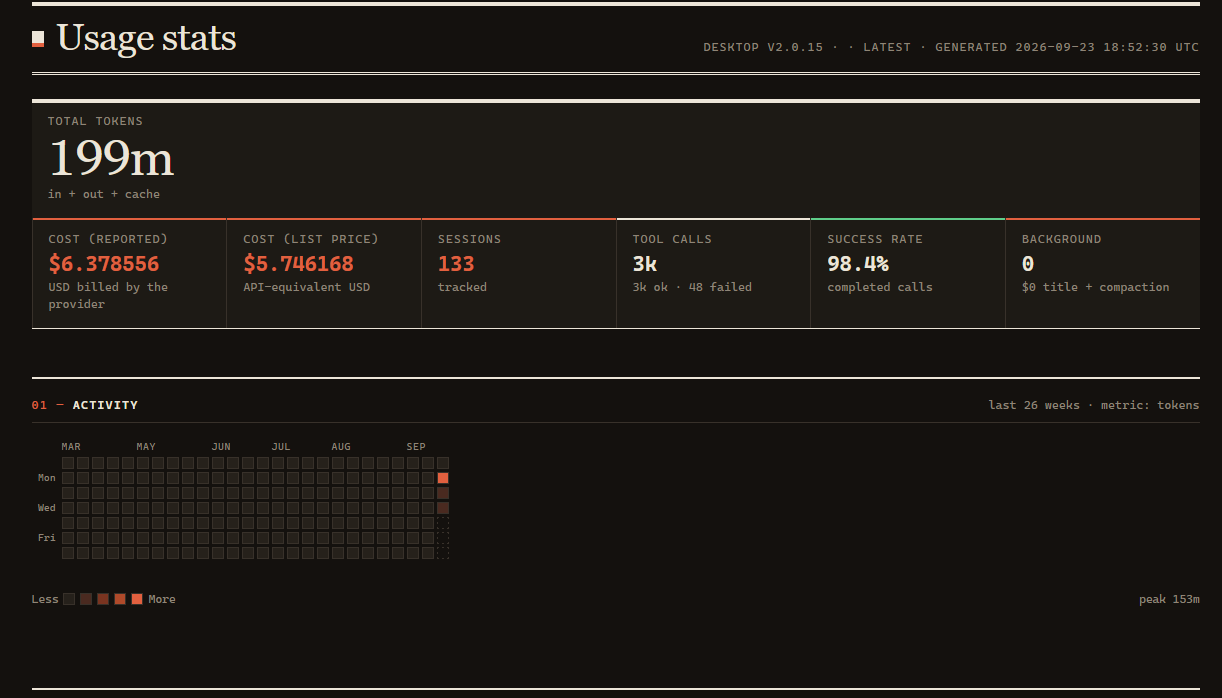
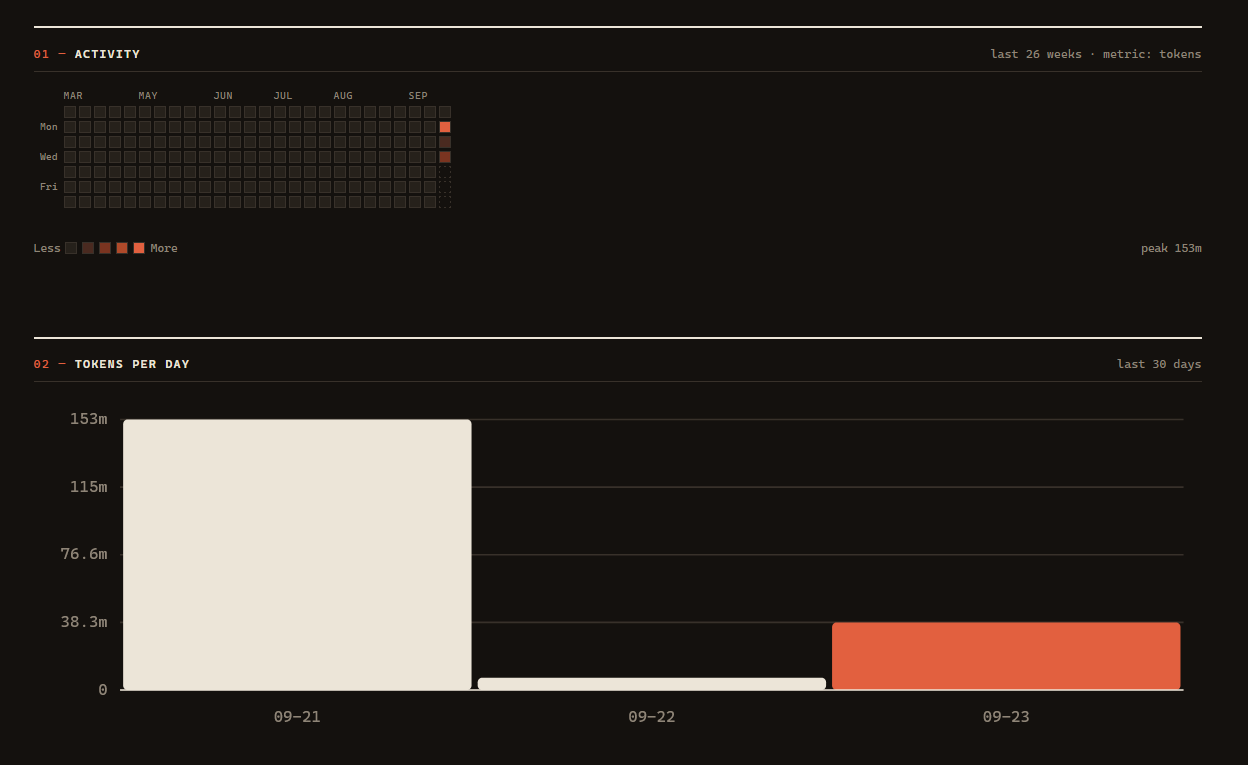
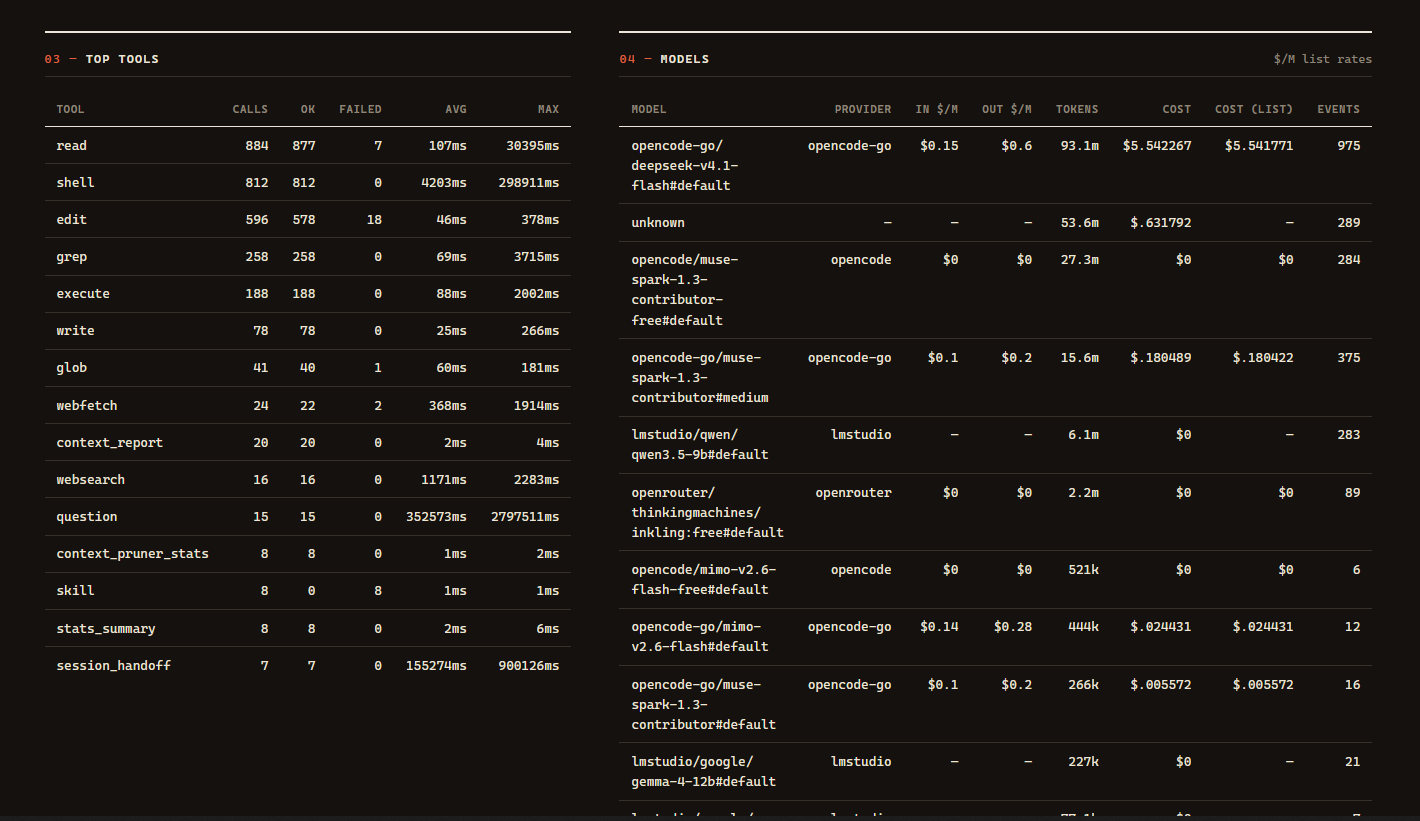
Cost is computed from the provider's real price list. The plugin reads each
model's published per-million-token rates via ctx.model.list() and shows both
reported (what opencode billed) and list price (API-equivalent) — so free
models show $0.00, unpriced ones show — (never a fake zero), and flat-rate
subscriptions still show what the usage was worth. Local models have no published
price; give them one with prices, e.g.
OPENCODE_USAGE_STATS_PRICES={"lmstudio/qwen3-coder":{"input":0,"output":0,"cache":{"read":0,"write":0}}}.
Token counts, tool calls and the heatmap are captured for every model regardless
of pricing.
The plugin API has no way to add a Settings tab, so /stats opens the dashboard
for you directly from the server process — it never calls the model. Set
OPENCODE_USAGE_STATS_OPEN=true to open it automatically at startup, or
OPENCODE_USAGE_STATS_NO_OPEN=1 to suppress browser launches (headless).
Note:
https://opencode.ai/config.jsondescribes the TUI's settings, not the server config. The server validates aplugins(plural) array — that is the key the runtime reads, confirmed in the server log when the config is reloaded.
Reference
Commands
command-pack adds these to your command palette (usage-stats adds /stats, goal adds /goal):
| Command | Does |
|---|---|
/handoff |
Hand the current working point off to a fresh session |
/decide |
Record a decision in the decision log |
/journal |
Log a bug or recurring failure in the error journal |
/recall |
Search past decisions, errors, snippets and indexed code |
/index |
Index this project for full-text code search |
/trace |
Inspect the tool-call audit log |
/toolbox |
Show which pack tools are installed in this session |
/stats |
Refresh and open the usage dashboard — runs server-side, so it costs zero model tokens |
/goal |
Set an objective the agent keeps working toward until it is reached (/goal status, pause, resume, done, clear manage it) |
Each command injects a short instruction into the current session, so the agent does the work with its normal tools. If a command's tool isn't installed, the instruction says so instead of failing silently.
Development
opencode-sessions/ is the source of truth for the sessions plugin (the copy in
plugins/ is the built artifact):
node opencode-sessions/sync.mjs        # install: repo -> plugins/ (fixes the helpers import)
node opencode-sessions/sync.mjs pull   # pull:    plugins/ -> repo
Publishing
Each plugin also ships as its own scoped npm package (the v2 loader allows exactly one plugin per package). The build inlines each plugin's helpers and rewrites the relative imports, so the published package is self-contained:
npm run build:packages   # transpile + write packages/<dir>/ and smoke-load each entry
npm run pack:check       # the above, plus `npm pack --dry-run` per package
Then publish (one package at a time):
npm login                                  # once per machine
cd packages/decision-log
npm publish --access public                # scoped packages need --access public
packages/ is generated and gitignored. Publish order does not matter — the
packages have no runtime dependency on each other.
Release rule: one version for all 15. Bump version in the root
package.json; the build stamps that value onto every package, and they are
always published in lockstep. Never publish packages at mixed versions — a
user installing the pack over time would otherwise end up with an untested
combination. Publish only from a green main (npm test, typecheck,
pack:check).
Releases go through the publish workflow, not npm publish by hand.
Pushing a tag vX.Y.Z runs the full gate (tests, typecheck, pack check),
refuses to publish when the tag disagrees with the root version, then
publishes all 15 with provenance via OIDC trusted publishing — no npm token
involved, so the 2FA-token restrictions don't apply:
npm version minor   # or major/patch; bumps root package.json
git push origin main
git tag v1.2.0 && git push origin v1.2.0
One-time setup, per package: npmjs.com → package → Settings → Trusted
publisher → GitHub Actions, this repo, workflow publish.yml. Until that is
done for a package, its publish step fails and the workflow stops — add all
15 before the first tagged release.
FAQ
opencode logs failed to load plugin / Cannot find package '@opencode/plugin'
The loose-file layout is the cause. If you copied plugins/*.ts into
~/.config/opencode/plugins/, opencode v2 will discover those files but
cannot resolve their npm imports from the config directory, so every
plugin fails identically.
Fix: install the built packages and register them instead. See Quick start. Remove the old loose files afterwards — leaving them in place produces a load error per plugin per reload:
rm -rf ~/.config/opencode/plugins
opencode logs prompt.split is not a function
A helper file ended up inside plugins/. opencode treats every export of
a file under plugins/ as a plugin factory, so a stray helper export breaks
the load. The package layout avoids this by construction; if you are on the
flat layout, move lib/ and opencode-sessions/ out of plugins/ and
restart.
Tools don't appear after installing
npm run build:packagesactually producedpackages/<name>/package.json.toolbox/node_modulesexists (onenpm installat thetoolbox/level).- Every
toolbox/<name>/node_modulessymlink exists. - The absolute paths in the
pluginsarray ofopencode.jsoncare the package directories, not the.tsfiles. - You reloaded (
opencode reload) or restarted — a reload is required, and for a fresh install a full restart is safer.
Confirm what opencode actually registered:
opencode plugin list
opencode plugin list reports the configured plugin paths, including ones
that failed to load. To verify a plugin truly loaded, check the log for
loading plugin and confirm there is no matching failed to load plugin:
grep -E 'loading plugin|failed to load plugin' ~/.local/share/opencode/log/opencode.log | tail
A third-party npm plugin fails to load
Third-party packages are often still v1-only. A v1 plugin depends on
@opencode-ai/plugin and/or exports Plugin differently, and will fail under
v2. Check its package.json for a dependency on @opencode/plugin (v2) versus
@opencode-ai/plugin (v1), and confirm the release you are installing
predates the v2 migration, before adding it to the plugins array.
Contributing
Issues and PRs are welcome. Keep changes scoped, run npm test and
npm run typecheck before opening a PR, and describe the tool behavior you changed.
License
MIT © Bandonker
同类生态推荐

Usage Stats
@bandonker/opencode-usage-stats
Lifetime token / dollar / tool accounting in local SQLite with a self-contained HTML dashboard and Unicode heatmaps.
Memory
@bandonker/opencode-memory
Local-first long-term memory: store and BM25-recall fragments with SQLite FTS5. No embedding API, no cloud. Auto-injects relevant memories into each request within a hard character budget.
Error Journal
@bandonker/opencode-error-journal
Log errors with context, search past ones, and record resolutions so you stop re-debugging the same failure.