
4
462
近 7 天 462
42.1
生态多维模型
1 天前
2026-08-19
快速安装与配置
opencode.json写入当前项目的 opencode.json,只对这个仓库生效。
opencode.json
{
  "$schema": "https://opencode.ai/config.json",
  "plugin": ["@aerovato/operator-opencode@1.0.3"]
}
写入 ~/.config/opencode/opencode.json,对所有项目生效。
~/.config/opencode/opencode.json
{
  "$schema": "https://opencode.ai/config.json",
  "plugin": ["@aerovato/operator-opencode@1.0.3"]
}
若你要在本地改造这个插件,先装到项目里再从本地路径引用。
shell
pnpm add -D @aerovato/operator-opencodeopencode 启动时会通过内嵌运行时自动加载 npm 依赖并缓存至本地目录,无需手动在全局环境执行安装。
Durable context for agent-driven development.
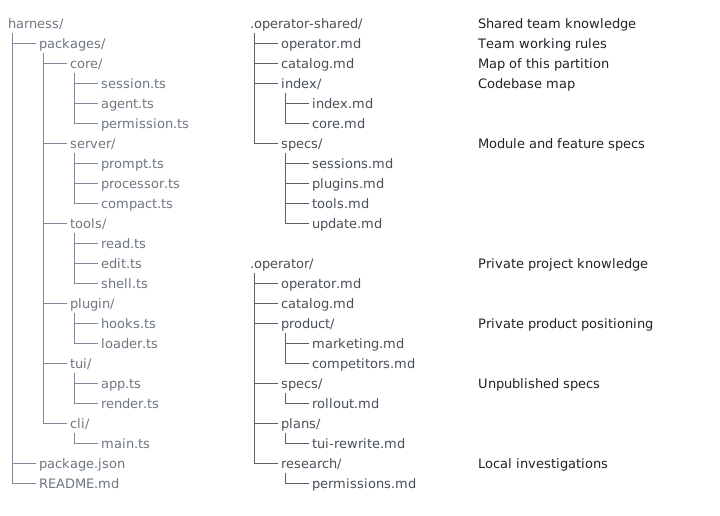
Operator Memory turns agent work into lasting project knowledge. It gives the agent a durable workspace of ordinary Markdown, kept in three places: shared files that travel with the team, private project files that stay on your machine, and user rules that follow you across projects.
Each new session starts from those files. As the agent works, it writes and updates them — specs, decisions, standards, research, and lessons — instead of leaving that understanding trapped in a chat. You can open any file, correct it, share it, or remove it.
Continuous documentation is the practice. Durable memory is what it produces.
Why Operator Memory
Agents excel in a single session. Multi-session work breaks down for two reasons:
- Context resets every conversation. Prior exploration, architecture, constraints, decisions, and conventions are often lost forever.
- Agents are strong at execution and weak at documentation. Specs, design choices, decisions, standards, and lessons rarely survive as durable project knowledge.
Memory plugins solve the wrong problem
Standard memory plugins treat forgetting as a problem. They try to fix by capturing fragments from transcripts and replaying these fragments — or they try to compress a single session along forever and never write down durable organizational facts. Both approaches fall short.
- Snippets are not knowledge. Memory plugins record snippets as memory — incomplete, lacking context, and stale almost instantly.
- Retrieval is a lottery. RAG-based plugins accumulate thousands of chunks and returns a lossy top-k slice.
- Compression is not documentation. Summarizing the session keeps the chat window alive but persists zero project truth.
- Memory fails silently. The store is a black box: you cannot see what was remembered, what was forgotten, or why — failures surface later as bad answers.
- You pay to maintain garbage. Every background dreamer, curator, and analyst is a token furnace that burns quota without ever producing a document you can read or trust.
Operator fixes it at the source
Operator Memory fixes the problem at the source: agents write lasting project knowledge as ordinary Markdown they maintain during normal work. Those files are yours to inspect and direct: read, create, consolidate, split, correct, or remove. No embeddings, vector database, or hidden retrieval taxes.
New sessions start from that knowledge instead of rediscovering the project. When truth changes, the agent updates the canonical file instead of adding a competing record.
Knowledge is separated by ownership:
.operator/— private project knowledge.operator-shared/— project knowledge intentionally published with the repository~/.operator/user/— private instructions used across projects
For partitions and how sessions load them, see Architecture.
Install Operator
Operator is managed via the Operator Helper. Install the Helper with npm:
npm install --global @aerovato/operator-helper
Or Bun:
bun add --global --minimum-release-age 0 @aerovato/operator-helper@latest
Then install the Operator plugin for OpenCode. Other harnesses will be supported soon.
operator-helper install opencode
Setup Operator
Setup is a conversation with your agent. Run each command in a new conversation.
- First time only:
/operator:user-init— set your user-global instructions. - In each new project:
/operator:project-init— scaffold Operator and migrate existing documents. - In existing repositories:
/operator:index— map the repo so later sessions can navigate it. - Start a new conversation and do normal work.
When starting cold on an existing project, it's recommended to ask the agent to create their first specs for specific features, modules, or systems that you will work on. Once those documents exist, later sessions will automatically maintain them.
Everyday Workflow
Operator gives the agent a durable workspace. Agents consult and maintain existing documents as they work.
- Give the agent normal development work.
- Agents refer to existing project knowledge: index for navigating code, specs for module contracts, guides for 3rd party integration details.
- When project truth changes: agents proactively update files while reasoning is still fresh. Specs, decisions, standards, research, lessons.
- The next session continues from those files.
Sometimes, agents hesitate to create new documents, consolidate documents, or split documents; in that case, steer the agent towards making larger architectural decisions:
- “Write a spec for this feature before implementing it.”
- “Record this research so we do not repeat the investigation.”
- “These two documents overlap. Consolidate them.”
- “This document is too large. Split it.”
- “Promote this spec to Shared so the team receives it.”
Roadmap
Operator Memory is under active development. More features are on the way, including support for other harnesses.
Brain Improvements
- Observation Engine — Learn durable user observations over time, kept separate from explicit User Instructions.
- Reliable Brain Updates — Keep specs and other Brain documents current during long conversations, instead of relying only on the agent to remember.
Context Management
- Cache-Aware Context Management — Automatically refresh preamble and apply tool call pruning when cache expires.
- Lossless Context Compression — Losslessly extend context via lossless context compression.
Additional Harnesses
- Pi — Next adapter
- Claude Code — Pending research
- Codex — Pending research
Learn More
- Workflow - how to direct continuous documentation and maintain a useful Brain. Includes the command reference.
- Architecture - how partitions, catalogs, indexes, and deterministic context loading work.
- Troubleshooting - installation, validation, repair, and update recovery.
- Demo - a Minecraft-like web app built agent-driven with Operator. The recorded conversation shows the brain being used and maintained throughout.
License
BSD 3-Clause. See LICENSE.