
Ocm
Plugin marketplace for opencode: install skills, agents, commands, JS plugins and MCP servers from any git repo — once, globally, kept up to date
1
2,774
284 in 7 days
43.5
Multi-signal model
9 days ago
2026-09-26
Install and configure
opencode.jsonWrites to this project's opencode.json — applies to this repository only.
opencode.json
{
  "$schema": "https://opencode.ai/config.json",
  "plugin": ["@wntic/ocm@1.0.4"]
}
Writes to ~/.config/opencode/opencode.json — applies to every project.
~/.config/opencode/opencode.json
{
  "$schema": "https://opencode.ai/config.json",
  "plugin": ["@wntic/ocm@1.0.4"]
}
If you want to modify the plugin locally, install it into the project and reference the local path.
shell
pnpm add -D @wntic/ocmOpenCode loads npm dependencies through its embedded runtime on startup and caches them locally — no manual global install needed.



Stop copy-pasting opencode skills, agents and commands between repos.
ocm installs them from any git repository — once, into your global opencode
config — so they work in every project and stay current with one
ocm update. Share a whole toolkit with your team as a single git URL.
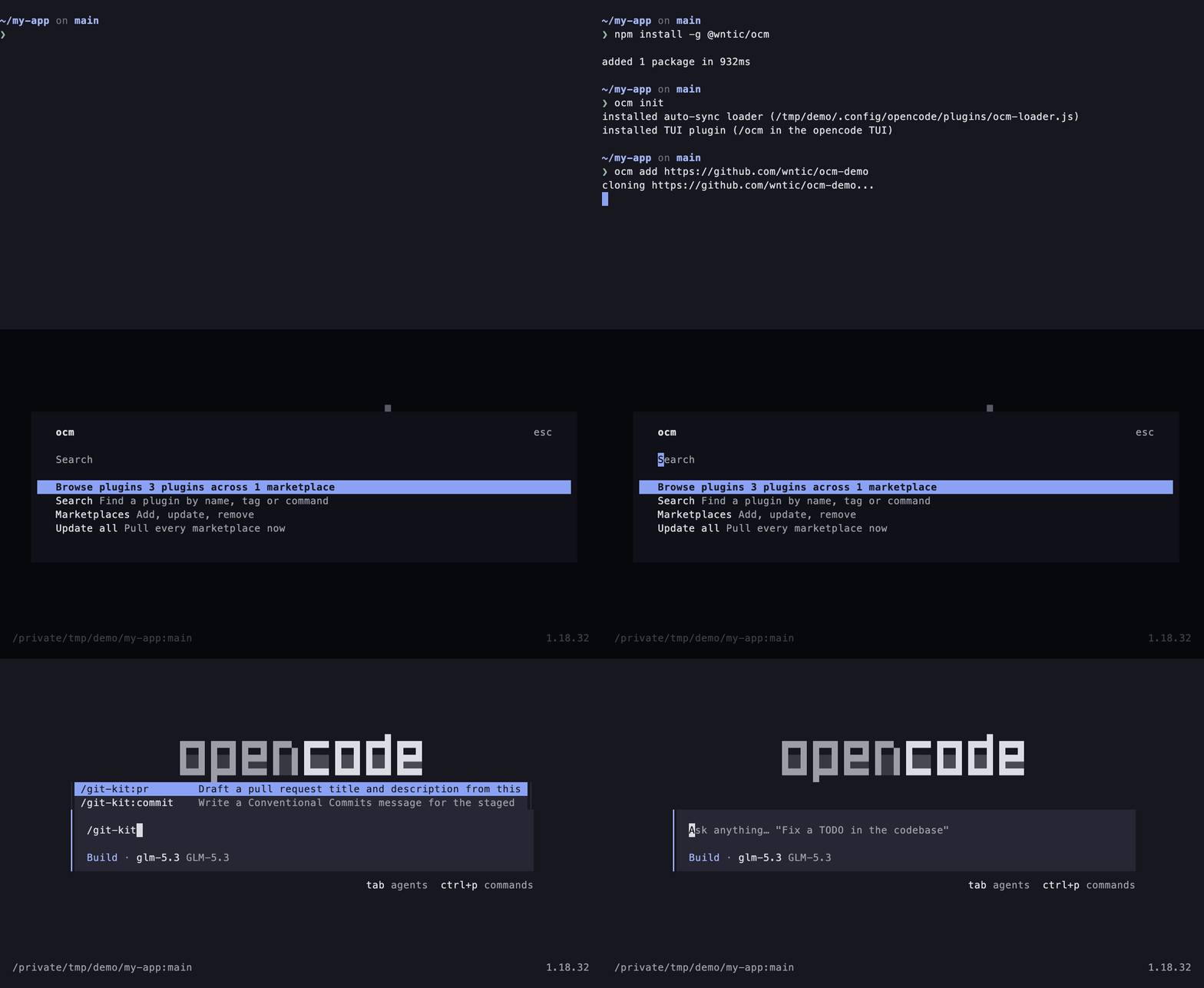
Try it in 30 seconds with the example marketplace, wntic/ocm-demo:
npm install -g @wntic/ocm
ocm add https://github.com/wntic/ocm-demo
# restart opencode, then type /ocm — or /git-kit:commit
Why ocm?
opencode reads skills, agents and commands from a project's .opencode/ and
from your global ~/.config/opencode/, and its plugin setting can load JS
plugins from npm. What it does not have is a way to distribute them:
Copy into each repo's .opencode/ |
Copy into ~/.config/opencode/ |
npm plugin setting |
ocm | |
|---|---|---|---|---|
| Available in every project | — | ✓ | ✓ | ✓ |
| Skills, agents, commands | ✓ | ✓ | — | ✓ |
| JS plugins and MCP servers | by hand | by hand | JS only | ✓ |
| Updates | by hand, per repo | by hand | npm versions | ocm update, plus auto-sync on start |
| Share a toolkit with your team | commit it to every repo | — | one package per plugin | one git URL |
| Asks before running a plugin's code | — | — | — | ✓ |
| Your own files are never overwritten | — | — | — | ✓ |
A marketplace is just a git repository — start your own from the ocm-demo template and see Write a marketplace.
Install
npm install -g @wntic/ocm          # latest
npm install -g @wntic/ocm@1.0.3    # a specific version
Or with bun:
bun install -g @wntic/ocm          # for the `ocm` binary on PATH
bunx @wntic/ocm add <url>          # or run it without installing
The npm package is @wntic/ocm; the binary it installs is ocm. Bun must
be on PATH whichever way ocm is installed — the ocm binary is TypeScript
run by Bun (bin/ocm.ts, "engines": { "bun": ">=1.0.0" }). Also requires
git and opencode.
Quickstart
A session against the public demo marketplace, github.com/wntic/ocm-demo — three small plugins for git, review and docs work:
ocm add https://github.com/wntic/ocm-demo
ocm list
ocm add clones the marketplace and materializes its plugins (git-kit,
review-kit, docs-kit); ocm list shows what landed. Restart opencode
to activate, then open /ocm to browse and update plugins across
marketplaces, or use a command directly — /git-kit:commit writes a
Conventional Commits message for the staged changes.
ocm update                # pull + re-materialize
ocm remove ocm-demo       # full teardown
Changes apply on the next opencode start — there is no reload API.
Commands
| Command | What it does |
|---|---|
ocm add <url|path> [--ref <ref>] [--explicit] [--name <name>] [--trust|--no-trust] |
add a marketplace (github url or local dir) |
ocm init |
install auto-sync loader |
ocm remove <name> |
remove a marketplace and its links |
ocm update [marketplace] [--quiet] [--json] [--trust|--no-trust] |
pull latest changes (all or one marketplace) |
ocm pin <name> <ref> |
follow a branch or tag |
ocm pin <name> --clear |
back to the default branch |
ocm list [--all] [--json] |
list marketplaces and plugins |
ocm search <query> [--enabled-only] [--json] |
search cached plugin metadata |
ocm info <plugin>[@<marketplace>] [--json] |
show a plugin's cached record |
ocm install <plugin>[@<mp>] [--force] |
enable a plugin and materialize its components |
ocm uninstall <plugin>[@<mp>] |
disable a plugin and remove its links |
ocm enable <plugin>[@<mp>] / ocm disable <plugin>[@<mp>] |
aliases of install / uninstall |
ocm mode <name> <auto|explicit> |
change when new upstream plugins install |
ocm trust <name> [--yes] |
approve a marketplace's executable components |
ocm untrust <name> |
revoke trust and remove executable components |
ocm scan <url|path|plugin> |
dry-run: show what would be installed |
ocm validate [path] |
lint a marketplace repo (default: current directory) |
ocm doctor [--fix] |
diagnose this installation; --fix applies safe fixes |
ocm loader uninstall |
remove auto-sync loader |
ocm --version |
print the version |
Documentation
- Write a marketplace — the repository format, manifests and validation rules.
- Reference — how it works, per-plugin installs, exit codes, precedence, config safety, trust, the loader, the TUI, migration.
Requirements
Tested on macOS and Linux — CI runs the full test suite and a probe against the real opencode on both. Windows is untested: ocm installs components as symlinks, which Windows restricts.
Contributing
Bug reports, marketplaces you'd like listed as examples, and PRs are welcome —
see CONTRIBUTING.md. Issues tagged
good first issue
are a good place to start.
If ocm saves you copy-pasting skills between repos, a star helps others find it.
License
Similar plugins

Manager
@nguyenthdat/opencode-manager
Project-scoped OpenCode TUI manager for MCPs, plugins, rules, standalone agents, agent teams, and skills.

Architect
opencode-architect
OpenCode plugin and CLI with ten specialist agents for agent skills, slash commands, custom tools, plugins, and MCP server integration

Pty
opencode-pty
OpenCode plugin for interactive PTY management - run background processes, send input, read output with regex filtering