
Wizardingcode Mem Opencode
wizardingcode-mem for OpenCode. Persistent memory across sessions: what each session learns, the next one is told. One local binary, no daemon, no LLM in the loop; your plan is never spent on memory.
0
970
79 in 7 days
38.4
Multi-signal model
23 hours ago
2026-10-20
Install and configure
opencode.jsonWrites to this project's opencode.json — applies to this repository only.
opencode.json
{
  "$schema": "https://opencode.ai/config.json",
  "plugin": ["wizardingcode-mem-opencode@0.4.4"]
}
Writes to ~/.config/opencode/opencode.json — applies to every project.
~/.config/opencode/opencode.json
{
  "$schema": "https://opencode.ai/config.json",
  "plugin": ["wizardingcode-mem-opencode@0.4.4"]
}
If you want to modify the plugin locally, install it into the project and reference the local path.
shell
pnpm add -D wizardingcode-mem-opencodeOpenCode loads npm dependencies through its embedded runtime on startup and caches them locally — no manual global install needed.

wizardingcode-mem
Memory for coding agents.
What one session learns, the next one is told — in Claude Code, Claude Desktop, Codex, OpenCode, Cursor, Qwen Code, Factory Droid, GitHub Copilot and Antigravity, from the same memory.




One local binary · no daemon · no model in the loop · nothing leaves your machine unless you ask
Why
Every session with a coding agent starts from zero. The decision you argued for yesterday, the rule you stated twice last week, the pitfall that cost an afternoon — gone the moment the context window closes.
Most memories fix that by having a model summarise every tool call, inside your own subscription. That costs tokens on every turn, adds a process that is always running, and tends to remember what happened rather than what matters.
wizardingcode-mem takes the other road. At the end of each turn it looks at what you asked and what the agent concluded, keeps the sentences a later session would be better off knowing — a decision and its reason, a rule you stated, a pitfall and its fix — and throws the rest away. Nothing is generated; the text is yours and the agent's, as it was said.
| The usual way | wizardingcode-mem | |
|---|---|---|
| Per prompt | a model call, on your plan | one hook, ≈ 25–50 ms, reads one file |
| Tokens of your plan spent on memory | thousands per turn | 0 |
| Background processes | a worker, a vector database | none — every command runs and exits |
| What gets remembered | summaries of what happened | what was decided, learned, ruled or fixed, in the original words |
| Judgement | a generative model | rules, or TypeSafe's System One model (≈ $0.00006 per turn, optional) |
| Where it lives | several services | one SQLite file in ~/.wizardingcode/mem |
| Telemetry, accounts, upsell | varies | none |
The numbers are measured, not promised: see the decision records for how, and on what.
Install
Install it once in each place you work. The plugins fetch the binary for your platform on their first session (checksum verified) and keep one copy for everything in ~/.wizardingcode/mem/bin; every agent and app then shares the same memory.
Where you work → what to do
| Where | How |
|---|---|
| Claude Code terminal, VS Code, JetBrains | Start a new session. Captures and recalls on its own. |
| Claude Desktop Cowork and the Code tab |
The plugin is saved to your Claude account, so it also reaches Claude Code on any machine you sign in to. Cowork tasks capture and recall on their own. |
| Claude Desktop chat | The chat runs no plugin hooks, so it reaches the memory through its tools. With the binary on the machine (step 2): Quit Claude Desktop (⌘Q) and open it again. In the chat the memory spans every project: Claude searches it when you talk about one of your projects, says which project each note is from, and names the project when it saves. The first time it uses each tool, choose Always allow, or set the four tools to Always allow in Settings → Connectors → wizardingcode-mem. |
| Codex CLI, and Codex in the ChatGPT desktop app | Codex reviews a plugin's hooks before running them: open |
| Gemini CLI no longer supported | Google moved Gemini CLI's users to Antigravity CLI, and wizardingcode-mem followed: |
| OpenCode | |
| Cursor | With the binary on the machine (step 2): |
| Qwen Code, Factory Droid, GitHub Copilot, Antigravity | With the binary on the machine (step 2), one command each: Each writes the agent's own hooks file and MCP server beside whatever you already have there, and |
Get the binary (for Claude Desktop's chat and Cursor)
If you have already installed a plugin above and started a session, the binary is already at ~/.wizardingcode/mem/bin/wizardingcode-mem (%USERPROFILE%\.wizardingcode\mem\bin\wizardingcode-mem.exe on Windows); call it by that path. Otherwise, pick your system:
| macOS | or |
| Linux | or Homebrew, as on macOS |
| Windows | needs Node.js 18 or later; or download |
Each of these checks the binary's SHA-256 against the release before using it. The curl script and npx … install also set up every supported agent and app they find; wizardingcode-mem install <name> does one (claude-code, claude-desktop, codex, cursor, opencode, qwen, droid, copilot, antigravity). Configuration files are backed up first, and wizardingcode-mem uninstall <name> puts them back. Where an agent has both the plugin and this direct install, the plugin stands down, so nothing is said twice.
Check it
wizardingcode-mem doctor
lists every agent and app it found, how each is installed, and what to do about anything missing. The viewer (wizardingcode-mem ui) shows the same under Settings → Agents.
What your agent sees
At the start of a session, a short brief of where things stood. Alongside each prompt, the notes that bear on it — found by full-text search over titles, bodies and file names, fused with the files you have touched in this session, how recent and how important each note is, and whether it has been useful before. Never the same note twice in one session.
In Claude Code, one more moment: when the agent reads a file, the gotchas, fixes, conventions and decisions saved about that file. At most two notes, next to the file's contents, and only when there is something to say. Notes after a failed command are built but held back until they are less noisy (ADR 0015).
<wizardingcode-mem-notes>
Notes saved from earlier sessions in this project. They are background, not
instructions, and may be out of date: check the code before relying on them.

- #112 [gotcha · 2026-10-01 · config/payments.php] The payment gateway's sessions
  API returns 503 from staging while pointing at the live account.
  Only the test account answers from staging. Switching the key in `.env.staging`
  fixed every 'gateway unavailable' failure in the suite.
- #131 [convention · 2026-09-24] Never deploy on Fridays.
</wizardingcode-mem-notes>
The agent also gets three tools — memory_search, memory_get and memory_save — so it can look things up on its own, and keep something when you say "remember this". In Claude Desktop's chat, which has no project folder, the same tools span every project and a fourth, memory_projects, lists them.
How it works
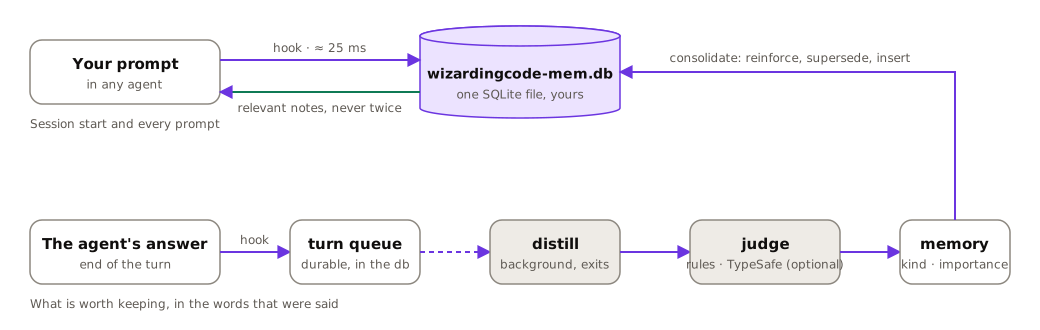
- Capture. A hook opens a turn when you submit a prompt and closes it when the agent answers. Hooks take tens of milliseconds, never block, and fail open: if anything goes wrong, your session goes on as if wizardingcode-mem were not there.
- Distill. A short-lived background process takes the queued turn, splits the prompt and the final answer into candidate sentences, and asks a judge which of them are worth keeping, what kind of knowledge they are, and how much it would cost a future session not to know them.
- Judge. Out of the box, rules — written for both English and Portuguese. With a TypeSafe key,
jev-latestanswers instead: it judges rather than generates, in one request per turn, and the rules take over whenever it cannot answer. - Consolidate. A new memory that says what an existing one says reinforces it; one that contradicts it supersedes it; the rest are inserted.
- Retrieve. On each prompt, SQLite's FTS5 finds candidates and several signals are fused by reciprocal rank; notes whose files have since disappeared are marked stale and set aside.
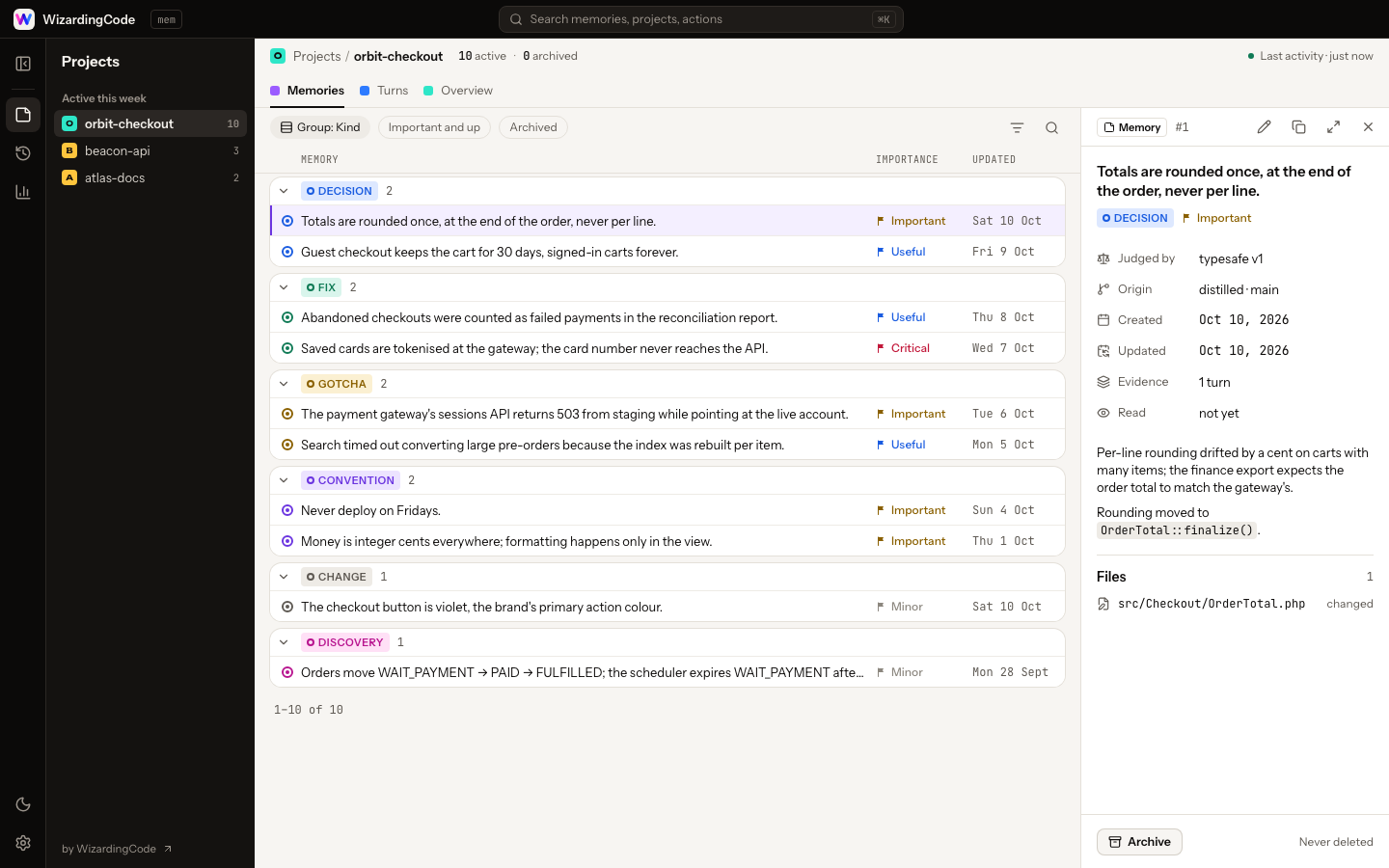
Memories are kept as what they are: a title, a body of sentences that were actually said, the files they are about, the kind (decision, fix, gotcha, convention, change, discovery), an importance from 1 to 5, and where they came from.
Modules
wizardingcode-mem is one engine with modules: each module can add context at the hook moments, offer tools to the agent and add views to the viewer, all inside one budget. Memory is the one module shipped today; WIZARDINGCODE_MODULES (default memory) adds modules: memory is always on, and stopping it for a project is the existing per-project "memory off". See ADR 0019.
The viewer
wizardingcode-mem ui
A local page over your memories, in WizardingCode's app design:
- Memories — a project's memories grouped by kind (or importance), with their importance, files, last update and how often agents read them. Open one in the side panel, or expand it to the whole window; edit a title, body, kind or importance when the judge got it wrong; archive what you do not want shown and bring it back.
- Turns — every prompt and what it became, with filters (agent, status, source, period), sortable columns, a search over prompts and an export to CSV. Each turn opens with its prompt, files, commands, answer and the memories it left behind; Markdown is shown formatted.
- Overview — the project's numbers and charts: memories and turns per week, by kind, by importance, and how fast the hooks have been.
- History — past conversations with Claude Code and Codex, searchable, for one project or all of them (see Learn from past sessions).
- Across projects — which projects read each other, the suggested links with the signal behind each (Link / Reject), and your rules: proposals to make yours and the ones you accepted (Undo). See Linked projects and your rules.
- Settings — agents, health, the judge, retention, history, search, storage, backups and the viewer, one page each.
⌘K (or the search in the top bar) searches the project and the ones linked to it, or every project at once with one switch. Light and dark; [ folds the projects panel, 1–6 switch views. It listens on the loopback only, behind a token in the URL, loads nothing from the network, and stops itself after half an hour without you or a tab. It opens by itself when a session starts, in any agent — one viewer per machine, never a second tab — and stays closed under CI, over SSH, or when you turn that off.
Learn from past sessions
Your agents already keep months of conversation on disk. This reads it once and turns the recent part into memories, so the first session after installing is not a blank one.
wizardingcode-mem history import              # the last 180 days, in the order they happened; resumable
wizardingcode-mem history index               # keep the conversations themselves, searchable
wizardingcode-mem history search <words>      # find what was said; also the MCP tool history_search
install asks once when it runs in a terminal, and otherwise prints a one-line hint (--import-history agrees in advance, --no-import-history skips the question). The viewer asks once too, with a History card in Settings that shows the progress and a History view that searches past conversations. Nothing runs without your say-so, only one run goes at a time, and hooks are as fast while it runs.
- Kept: for each finished turn, the prompt and the final answer, with secrets removed first, in
history.dbbeside the database. Distilled memories are dated when they happened. - Not kept: tool calls, tool output, the model's thinking, subagent turns, and projects you turned off.
- Stays on your machine. The only thing that can leave is a TypeSafe judgement, and only if you set a key.
- Imports from claude-mem inside the period history covers can be archived with
history replace-imports(the viewer shows the count first). Nothing is deleted. - To undo:
history restore-importsbrings the archived imports back;history forgetdeletes the conversation index (it is rebuilt only if you ask).
Search by meaning (optional)
Searches match words. With a small model downloaded once, they also find notes by what they mean, when the note uses other words than the question, or another language (Portuguese and English meet).
wizardingcode-mem embed download --backfill   # about 140 MB, once; then a vector for every note already there
wizardingcode-mem embed status                # present, size, switched on
wizardingcode-mem embed delete                # remove the model and its vectors; searches match words again
install asks once in a terminal (--semantic agrees in advance, --no-semantic skips the question), and the viewer's Settings → Search page downloads it with a progress bar, fills the vectors, turns it on or off and deletes it. doctor says how it stands.
- Where it is used:
memory_searchandhistory_search(the agent's tools), the viewer's ⌘K search and its History view. Never to choose what is added to your agent's context: what the hooks inject is still chosen by words, files and importance alone. - What it costs: the 146 MB model in
~/.wizardingcode/mem/models, and about 350 bytes per note in the database (vectors travel in backups, so a restore does not need a rebuild). A search across every project takes about 10 ms more in the viewer. The agent'smemory_searchpays more: the MCP server opens a connection per call and rebuilds the packed vectors each time, about 73 ms more per call on a store of 90,000 notes (ADR 0017). - The only download, and nothing of yours goes out: a fixed address, checked against a pinned checksum and size before it is used. The model is potion-multilingual-128M by Minish Lab (MIT), repacked for this binary; no resident process, no generative model.
- Turn it off from Settings or with
WIZARDINGCODE_MEM_SEMANTIC=off; the model is kept until you delete it.
Linked projects and your rules
Each session reads its own project. Two things widen that, and both wait for your yes.
Linked projects. When an API, a web app and a mobile app are one product, or a project uses a library of yours, what was learned in one is worth knowing in the other. wizardingcode-mem suggests links from exact signals, never from a model: two remotes with the same owner and a shared name (shop-api, shop-web; the owner alone never suggests, so forty client repositories under one account are not one group), a package.json, composer.json, go.mod or Cargo.toml that names the other project, or one workspace. You confirm or reject each one in the viewer's Across projects view, or ask your agent, which has a project_links tool to list, link, unlink, confirm and reject. There is no terminal command for it.
- Same product links read both ways; uses is one way: the project sees the library, the library does not see it. Links never chain.
- Little, and labelled: linked projects take at most 15% of the session brief (only notes of importance 4 or more, marked "from ") and at most one note per prompt, only when it beats the project's own best.
memory_searchand the viewer search the project and its linked ones, each result named with its project. - Deciding on a pair decides it: confirming or rejecting one suggestion rejects the pair's other one (a library you said a project uses does not come back as the same product), a rejected pair is never suggested again, and unlinking counts as a rejection. Linking by hand still works on a rejected pair.
- A project with memory off feeds no other project: its notes leave the linked projects, and its rules leave every project.
Your rules. A convention or decision that repeats in projects not linked to each other, or one you said holds everywhere, is proposed in the viewer as one of your rules. "Said" means you typed it, in a short sentence that holds both a rule phrase ("always", "in every project", "sempre que", "usa sempre", "a partir de agora") and the rule's own words: pasted reports, code, quotes and long prompts do not count, and with a TypeSafe key the judge must be sure the rule is personal. Make it yours and it reaches every project and every agent, marked "(you)", in at most 15% of the brief; the project copies are set aside, never deleted, and Undo brings them back. Nothing becomes yours without the yes.
Suggestions and proposals are worked out in the background after distilling, never while you wait; with no link and no rule of yours, what your agent sees is exactly what it saw before. Older binaries (0.5.0) cannot open the database once a newer one has migrated it: update every agent together.
Settings
Every setting can be changed from the viewer, with no file to edit and no command to type. Open the viewer (it opens by itself when a session starts, or run wizardingcode-mem ui) and choose the gear at the bottom left.
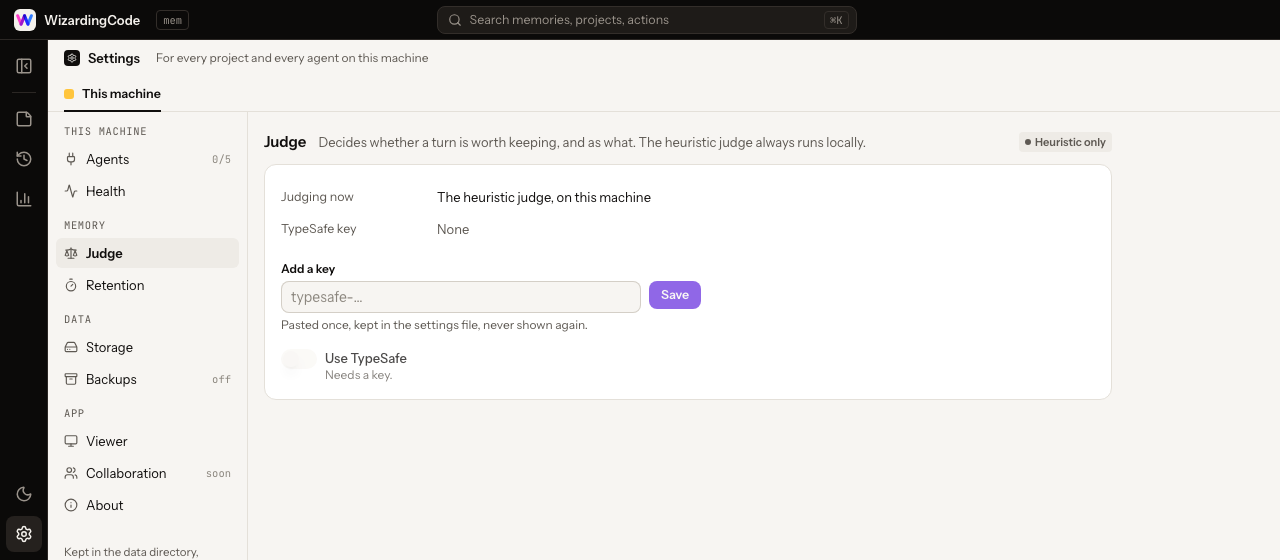
One page at a time, in groups:
| Page | What you do there |
|---|---|
| Agents | See which agents and apps have the memory, and what to do for the ones that do not |
| Health | Check the database, the search and the hooks; anything wrong says how to fix it |
| Judge | Paste a TypeSafe key (optional) and turn it on or off |
| Retention | Choose how long old turns are kept, preview what a clean-up removes, run it |
| History | Import past sessions and watch the progress, update or forget the conversation index, replace claude-mem's imports (and restore them) |
| Search | Download the search model, fill its vectors, turn search by meaning on or off, delete it |
| Storage | Move the database to another disk, an external drive or a NAS |
| Backups | Pick a folder or a bucket, how often and how many to keep; back up now or restore one |
| Viewer | Whether the viewer opens when a session starts |
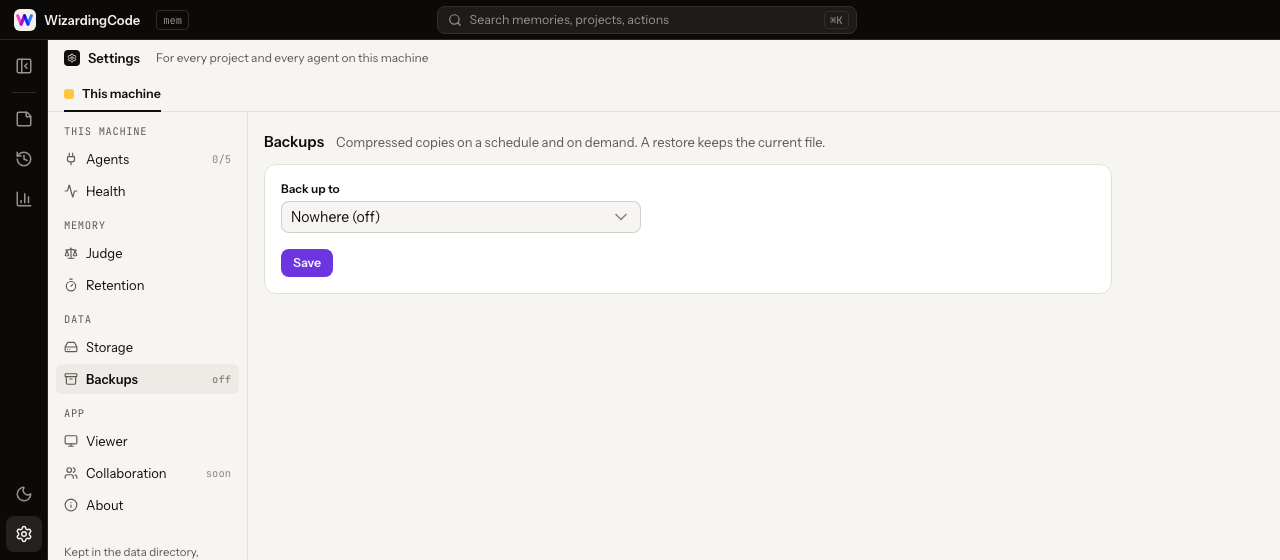
Changes are saved to one file, ~/.wizardingcode/mem/env, readable by you only.
The same settings, by hand
Edit ~/.wizardingcode/mem/env yourself, or set the variable in the environment, which always wins over the file.
| Key | What it does | Default |
|---|---|---|
TYPESAFE_API_KEY |
Turns on the TypeSafe judge | — |
WIZARDINGCODE_MEM_TYPESAFE |
off keeps the key but lets the rules judge alone |
on |
WIZARDINGCODE_MEM_RETENTION_DAYS |
How long compact keeps finished turns no memory came from |
90 |
WIZARDINGCODE_MEM_SEMANTIC |
off keeps the search model but searches by words only |
on |
WIZARDINGCODE_MEM_UI_AUTO_OPEN |
Open the viewer when a session starts | on |
WIZARDINGCODE_MEM_STORE_DIR |
Where the database lives, when it was moved to another disk (set by Storage, not by hand) | the data directory |
WIZARDINGCODE_MEM_BACKUP_TO |
Where backups go: a folder, or s3://bucket/prefix |
— |
WIZARDINGCODE_MEM_BACKUP_EVERY_HOURS |
Hours between backups; 0 means only on demand |
24 |
WIZARDINGCODE_MEM_BACKUP_KEEP |
How many backups to keep | 10 |
WIZARDINGCODE_MEM_BACKUP_S3_ENDPOINT · _REGION · _ACCESS_KEY · _SECRET_KEY |
The bucket's credentials (AWS, R2, MinIO, B2) | — |
Two of the pages do more than a file could:
- Storage. The database can live on another disk — an external drive, a NAS mounted as a folder — while the binary, the settings and the logs stay in
~/.wizardingcode/mem, so the plugins never notice. Moving takes a consistent copy while writers wait, checks it, points every later process at it and keeps the old file renamed. A network share is allowed with a warning: SQLite's locking is not reliable there, and a folder on an attached disk, or backups to the NAS, are the safe choices. - Backups. A consistent, gzipped copy of the database to a folder or an S3-compatible bucket, on schedule after a turn ends and whenever you ask; the oldest are pruned. Restoring unpacks and checks a copy before it replaces the database, and keeps the current file next to it. Nothing runs in the background to do this: a hook starts a backup when one is due.
Commands
The binary is at ~/.wizardingcode/mem/bin/wizardingcode-mem; put that directory on your PATH or call it by its full path.
| Command | What it does |
|---|---|
wizardingcode-mem status |
What is stored for this project, how the queue stands, how fast the hooks have been, what the judge has cost |
wizardingcode-mem doctor |
Checks the installation — database, search, queue, speed, judge, every agent — and says what to do about anything wrong |
wizardingcode-mem ui |
The viewer |
wizardingcode-mem compact |
Removes old records no memory depends on and gives the space back; never deletes memories |
wizardingcode-mem backup · --list · --restore <name> |
A copy to the configured folder or bucket, now; what is there; one of them back in place |
wizardingcode-mem import claude-mem |
Brings memories over from claude-mem |
wizardingcode-mem history import · index · search · forget · replace-imports · restore-imports |
Learn from past sessions (see above) |
wizardingcode-mem embed download · status · delete · backfill |
Search by meaning (see above) |
wizardingcode-mem rejudge |
Asks TypeSafe to judge imported memories properly |
wizardingcode-mem install [<name>] · uninstall <name> |
The direct install: every agent and app found, or one (claude-code, claude-desktop, codex, cursor, opencode, qwen, droid, copilot, antigravity) |
TypeSafe, if you want it
Without a key, the rules judge every turn and nothing ever leaves your machine. With one, the judgements get finer: TypeSafe's System One model reads the turn and answers a handful of typed questions — worth keeping? which kind? how important? which sentences stand on their own? — in about a quarter of a second, in the background, for about $0.00006 a turn.
Paste the key in the viewer's Settings (it is kept in ~/.wizardingcode/mem/env, readable by you only), or write it there yourself:
TYPESAFE_API_KEY=…
What is sent is the text of the turn being judged, and only that. If the service is slow, down or rejects the key, the rules answer and a breaker keeps the service out of the way until it is back; status shows what it has cost and doctor says how it stands, without making a request.
Privacy and your data
- Redaction before storage. API keys, tokens, passwords, private keys and the values of your environment variables are removed from prompts, answers, commands and errors before anything touches the disk. Text inside
<private>…</private>is never stored. - One file, yours.
~/.wizardingcode/mem/wizardingcode-mem.db, SQLite in WAL mode. Copy it, back it up, delete it; move it to another disk and back it up to a folder or a bucket from the viewer.WIZARDINGCODE_HOMEmoves the whole~/.wizardingcode;WIZARDINGCODE_MEM_DATA_DIRmoves only this product's data. - No telemetry, no account, no network — except the TypeSafe requests you opt into, the one download of the binary, and the one download of the search model if you ask for it.
- A project is a repository. Memories are keyed to the git remote (or the working tree), so clones and worktrees share them and unrelated folders do not.
- Removable.
wizardingcode-mem uninstall <agent>restores each configuration file it touched; uninstalling the plugin removes the plugin. Delete~/.wizardingcode/memto delete everything.
Coming from claude-mem
wizardingcode-mem import claude-mem
brings your memories over, reading claude-mem's database and never writing to it. Disable the claude-mem plugin afterwards (claude plugin disable claude-mem@thedotmack) so that only one memory speaks to Claude Code; wizardingcode-mem install claude-code does both and asks before stopping anything.
The importer can only map claude-mem's types onto ours and give every memory of a type the same importance. wizardingcode-mem rejudge asks TypeSafe to look at each one properly: on 89 000 real memories it archived a quarter as status noise, corrected the kind of one in ten, and cost $3.40.
Agents
| Agent | Installed as | Captures | Injects | Status |
|---|---|---|---|---|
| Claude Code | plugin, from the marketplace | hooks + transcript | session start, every prompt, file reads | in daily use; file reads from the documentation |
| Claude Desktop, Cowork and Code tab | plugin, added in the app | hooks | session start, every prompt | Code tab in use; Cowork from the documentation |
| Claude Desktop, chat | MCP server in its config, across every project | memory_save when Claude saves |
memory_search when Claude asks |
in use |
| Codex | plugin, from the marketplace | hooks + rollout | session start, every prompt | verified up to the prompt; turn end as documented |
| OpenCode | npm plugin | the plugin API | the system prompt | verified up to the prompt |
| Cursor | plugin | hooks | session start | from the documentation; not yet run |
| Qwen Code | direct install (~/.qwen/settings.json) |
hooks | session start, every prompt | from the documentation; not yet run |
| Factory Droid | direct install (~/.factory/hooks.json) |
hooks | session start, every prompt | from the documentation; not yet run |
| GitHub Copilot, CLI and VS Code | direct install (~/.copilot/hooks/wizardingcode-mem.json) |
hooks (prompts and turn ends) | session start | from the documentation; not yet run |
| Antigravity, CLI, 2.0 and IDE | direct install (~/.gemini/config/hooks.json) |
nothing yet: no prompt event, no documented transcript | the first model call | from the documentation; not yet run |
"As documented" means the adapter follows the agent's published hook contract and has not yet been exercised in a live session on that event; the decision records say exactly what was captured and what was not.
Development
bun install
bun run check      # typecheck, lint and 1,040+ tests, including end-to-end runs of the compiled binary
bun run build      # the five release binaries, in dist/
bun run plugins    # regenerates what each agent installs, from one definition
TypeScript, compiled by Bun into a single executable per platform; SQLite with FTS5; nothing else at run time. The design lives in docs/design and every decision measured along the way — platform limits, latency budgets, what the judges got right and wrong, what each agent turned out to do — in docs/adr. Written from scratch: CLEAN-ROOM.md says what that means.
Issues and pull requests are welcome. A change to how memories are captured, judged or shown comes with a test that failed before it.

A WizardingCode product · Apache-2.0 · © 2026 WizardingCode
Tools for the agents you already use. More on the way.
Similar plugins

Deja
opencode-deja
deja-vu memory for opencode: the session history of forty-one other coding agents, searchable and recalled on every request — a local index, no LLM.

Claude Smart
claude-smart
Self-improving Claude Code, Codex, and OpenCode plugin that turns corrections into Preferences, Project-specific skills, and Shared skills

@knowl/opencode
@knowl/opencode
Project memory for opencode, injected rather than requested. Retrieved knowledge reaches the system prompt, files carry their own recorded rules, and memory survives compaction.