
@weldall/opencode
Routes company-system requests through Weldall's live, per-user skill catalog instead of general knowledge or an invented API call.
114
+109 in 30 days
129
129 in 7 days
59.8
Multi-signal model
1 day ago
2026-10-03
Install and configure
opencode.jsonWrites to this project's opencode.json — applies to this repository only.
opencode.json
{
  "$schema": "https://opencode.ai/config.json",
  "plugin": ["@weldall/opencode@0.3.2"]
}
Writes to ~/.config/opencode/opencode.json — applies to every project.
~/.config/opencode/opencode.json
{
  "$schema": "https://opencode.ai/config.json",
  "plugin": ["@weldall/opencode@0.3.2"]
}
If you want to modify the plugin locally, install it into the project and reference the local path.
shell
pnpm add -D @weldall/opencodeOpenCode loads npm dependencies through its embedded runtime on startup and caches them locally — no manual global install needed.

Serve AI-agent skills centrally and connect company resources to the right people, groups, and machines.







What is Weldall CLI?
Weldall CLI is a central access layer between employees with their agents (like Claude, Copilot, pi, Open Code, ...) on one side and company APIs and skills on the other. It defines, in one place:
- Which capabilities agents may use — published as skills in a central catalog.
- Who gets them — per person, per group, or per machine, configured in the UI or in YAML files.
- Where they apply — each resource (a service or API) defines its own supported permissions and request scope.
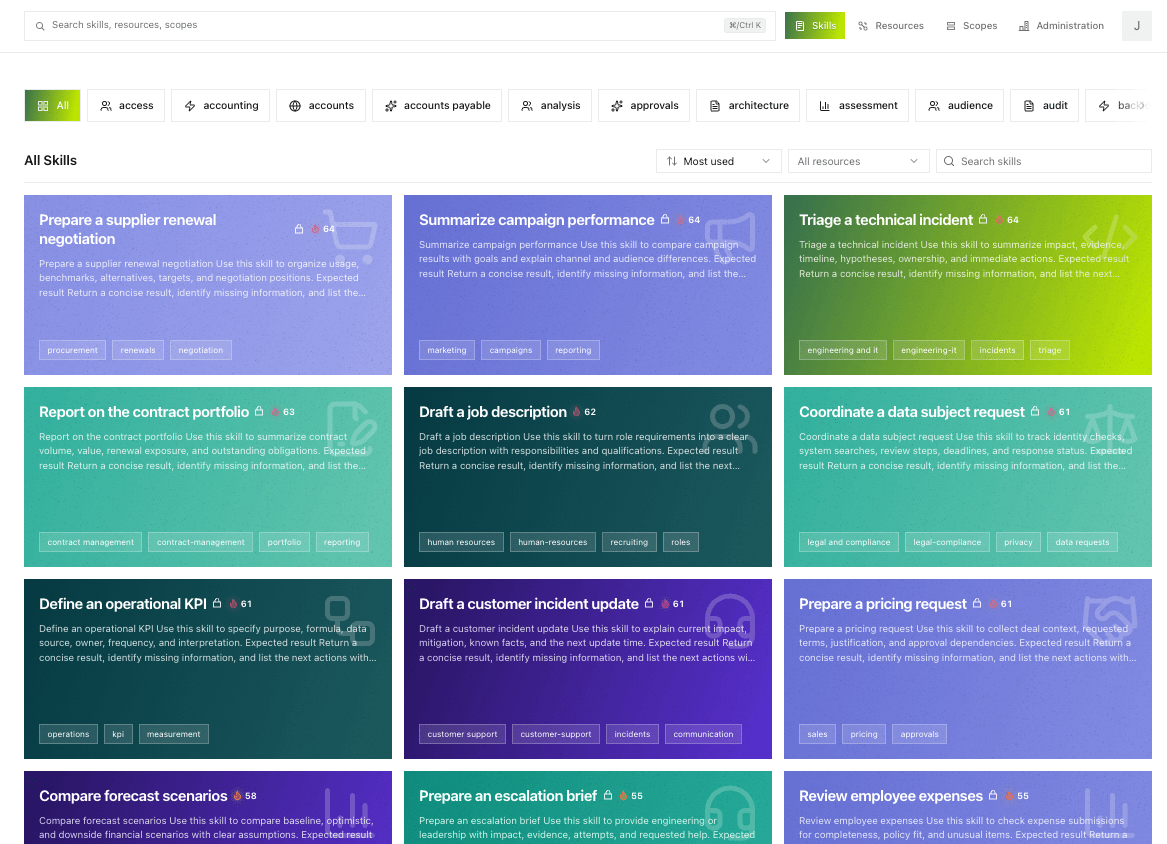
Capabilities are defined centrally by administrators. Agents discover what they are allowed to do via the Weldall CLI. Each employee's agent gets its own skill set from the catalog, so you steer what your agents can do centrally and roll out the same workflows consistently across the company.
Built-in managed connections add owner-only Google Workspace, Jira, and Confluence access: provider tokens stay encrypted on Weldall, and users choose the configured permissions during setup. Non-secret connector settings and the immutable envelope-provider choice support both the admin UI and IaC.
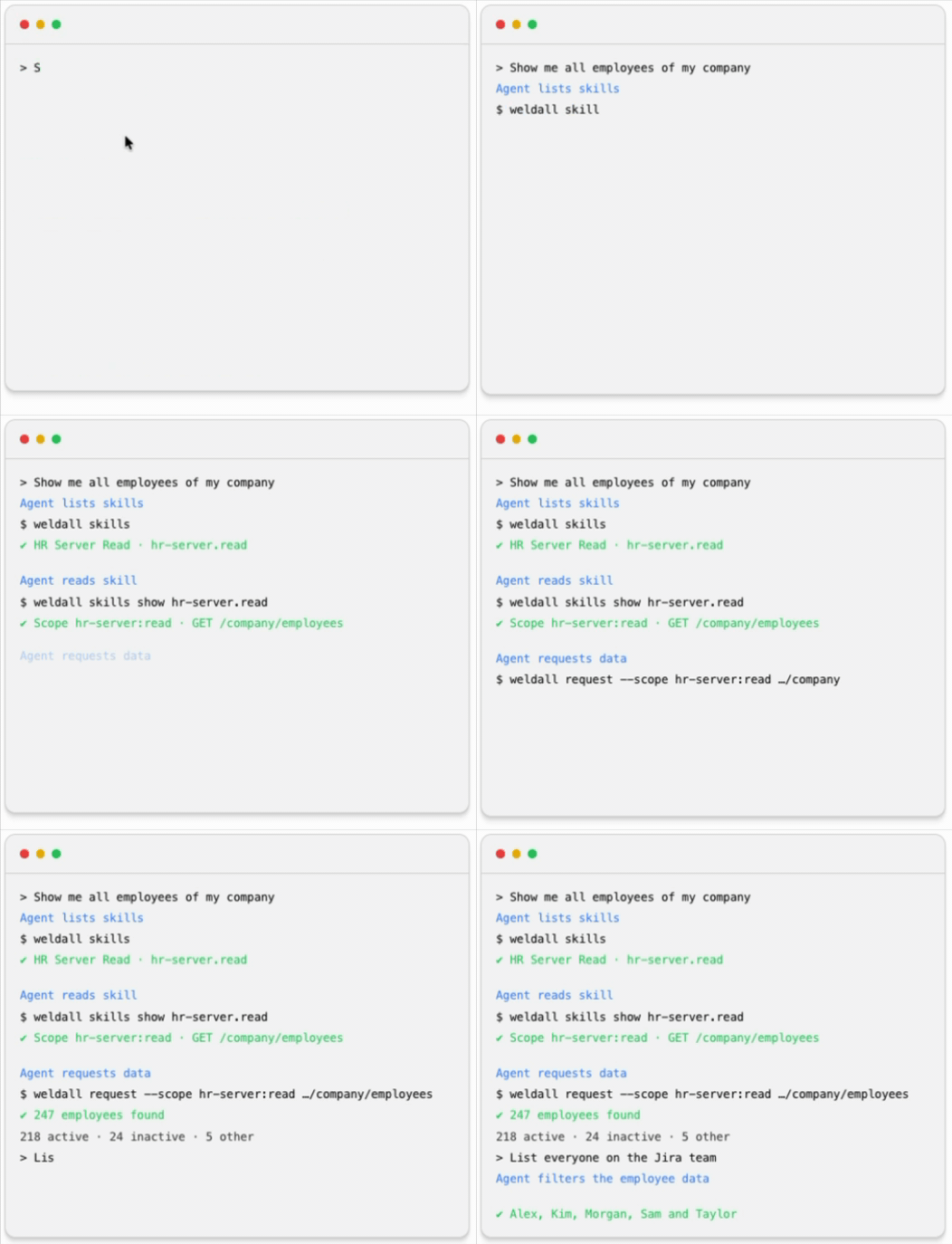
The agent never sees an access token. The local CLI keeps credentials in the operating system's secure credential store and sends short-lived, device-bound (DPoP) requests itself. Captured tokens cannot be replayed on another machine, and every granted or denied request is recorded for audit.
Who is this for?
- You run a company (or an IT department) and a couple of vibe coders are building important apps for it. Instead of letting them sprinkle API tokens all over the place, you get one place to see what those apps can touch and to revoke it again.
- You serve AI-agent skills centrally — a federated skill directory, so what your systems can do lives in one catalog. Everyone gets their own directory, based on their permissions.
- You connect different services to different groups — some scopes for one team, other scopes for another, all without editing code.
- You run your own identity provider — users sign in through the SSO they already use; machines authenticate as their own registered identities, and groups can come from LDAP or Active Directory.
- You build internal APIs and don't want to roll your own auth for every one — there are drop-in resource-server SDKs for TypeScript (Fetch, Hono, Next.js, Astro) and Python (FastAPI, Django).
A reference implementation of modern OAuth
Weldall CLI is a reference implementation of the next generation of OAuth for agentic applications: it uses DPoP-bound API requests and ID-JAGs to reduce the risk of credential leaks.
| Specification | What it provides |
|---|---|
| ID-JAG — Identity Assertion JWT Authorization Grant | The authorization server issues a short-lived identity assertion for a specific resource, client, scope set, and device — the core grant that lets an agent act without holding a token. |
| JWT Authorization Grant with DPoP | The downstream authorization server verifies the DPoP proof against the ID-JAG assertion's key binding and exchanges it for an access token bound to the same key. |
| RFC 9449 — DPoP (Demonstrating Proof of Possession) | Sender-constrained tokens: a stolen token is useless on another machine. |
| RFC 8252 — OAuth 2.0 for Native Apps | Browser-based sign-in for the CLI, with explicit consent. |
| RFC 7636 — PKCE | Protects the native authorization code exchange. |
| RFC 9700 — OAuth Security Best Current Practice | Applied throughout the authorization server and client. |
Quick start
Install the local CLI
npm install --global @weldall/cli@latest
weldall --version
weldall config set-issuer https://weldall.example.com
weldall login
Standalone binaries (no Node.js required) are available for Linux x64, Windows x64, and macOS from the releases page.
A typical inspection flow
weldall status          # who am I, what can I do?
weldall whoami --json
weldall scopes          # which scopes are granted?
weldall skills find expense
weldall skills list     # browse all visible capabilities
weldall skills expenses.review
Make an authenticated request
weldall request --scope expenses:read \
  https://expenses.example.com/api/expenses
Every request requires an absolute HTTPS URL and at least one --scope; the CLI checks the target against the registered resources before sending anything.
What's in the box
| Workspace | Purpose |
|---|---|
@weldall/weldall |
The Next.js authorization server and administration UI. |
@weldall/cli |
Cross-platform CLI: IaC, interactive OAuth login, capability discovery, authenticated requests. |
@weldall/sdk |
TypeScript resource-server SDK for Fetch, Hono, Next.js, and Astro. |
weldall-sdk |
Python resource-server SDK for framework-neutral use, FastAPI, and Django. |
@weldall/dev-idp |
A local-only OpenID Connect provider for development. |
@weldall/expenses |
A demo resource server protected by the SDK. |
@weldall/docs |
The documentation site (German and English). |
@weldall/db |
The Prisma database package and migrations. |
Compatibility
Weldall works with any agent that can invoke the CLI. We recommend the open-source agents we use every day:
 OpenWork OpenWork |
 Pi Pi |
|---|---|
| Desktop app | Terminal agent |
Claude Code, OpenCode, Codex CLI, and Gemini CLI can also invoke the CLI.
Runs on  macOS (Apple Silicon + Intel),
  Windows (x64), and
  Linux (x64).
Works with every OIDC provider:


Vendor names and logos are trademarks of their respective owners and indicate interoperability only.
Deployment encryption
Weldall encrypts application secrets, including connector OAuth client secrets, with WELDALL_CREDENTIAL_ENCRYPTION_KEY. For user connection credentials, you choose how encryption keys are managed when you create the connector:
LOCAL_ENVusesWELDALL_CONNECTOR_KEK, a separate key shared by all local connectors. It encrypts the individual data keys that Weldall generates for each credential write.OPENBAOuses OpenBao Transit instead. SetWELDALL_OPENBAO_HOSTandWELDALL_OPENBAO_TOKENon the server. OpenBao creates aweldall-connector-<uuid>key for each connector on first use. Weldall only contacts it to encrypt or decrypt connection data and never rotates or deletes these keys itself.
Both local deployment keys must be canonical base64 encodings of 32 bytes. Keep them unchanged and back them up securely, separate from the database backups. Losing or replacing a key makes the secrets encrypted with it unreadable. This encryption protects against a stolen database, not an attacker who also controls the Weldall server or its environment.
See setup and connectors for configuration and backup guidance.
Documentation
Full documentation lives at docs.weldall.ai
- Compatibility — recommended agents and supported operating systems.
- A complete agent run — the protocol walkthrough.
- Security model and OAuth standards — DPoP, ID-JAG, and the protocol's security guarantees.
- How to integrate a service — protect your API with the SDK.
- Machine authentication — machines as first-class identities.
- Group providers — read groups and memberships from LDAP or Active Directory environments.
@weldall/sdkreference — TypeScript route protection, skill catalogs, framework adapters.weldall-sdkreference — Python core, FastAPI/Django adapters, and machine client.- Local development — set up the full stack on your machine.
Screenshots
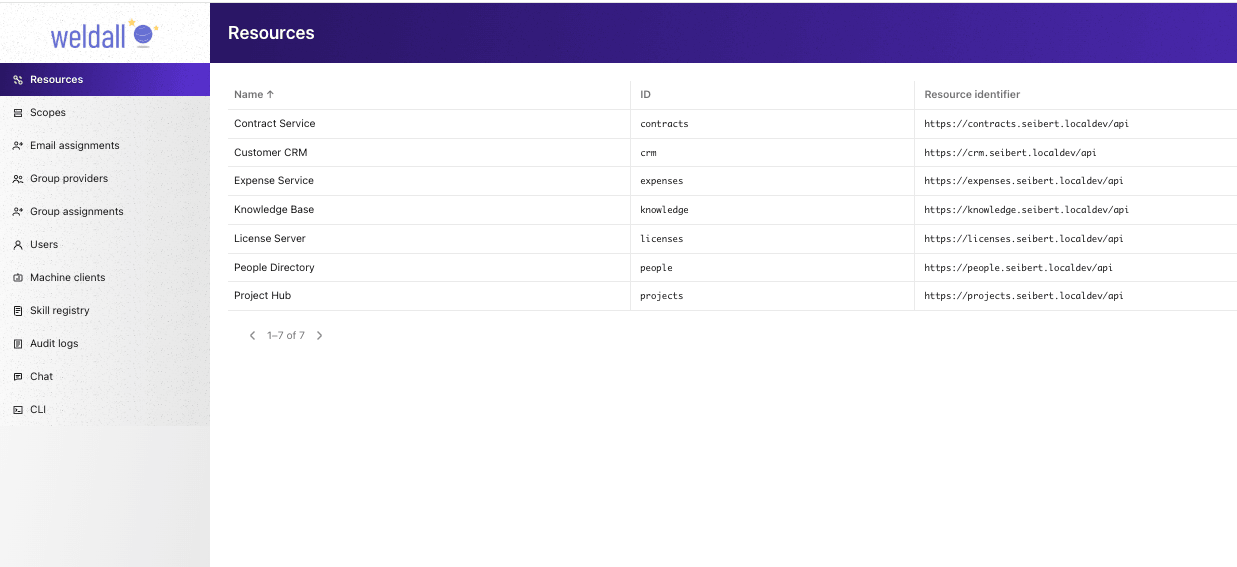
Register downstream services and control where each scope may be used.
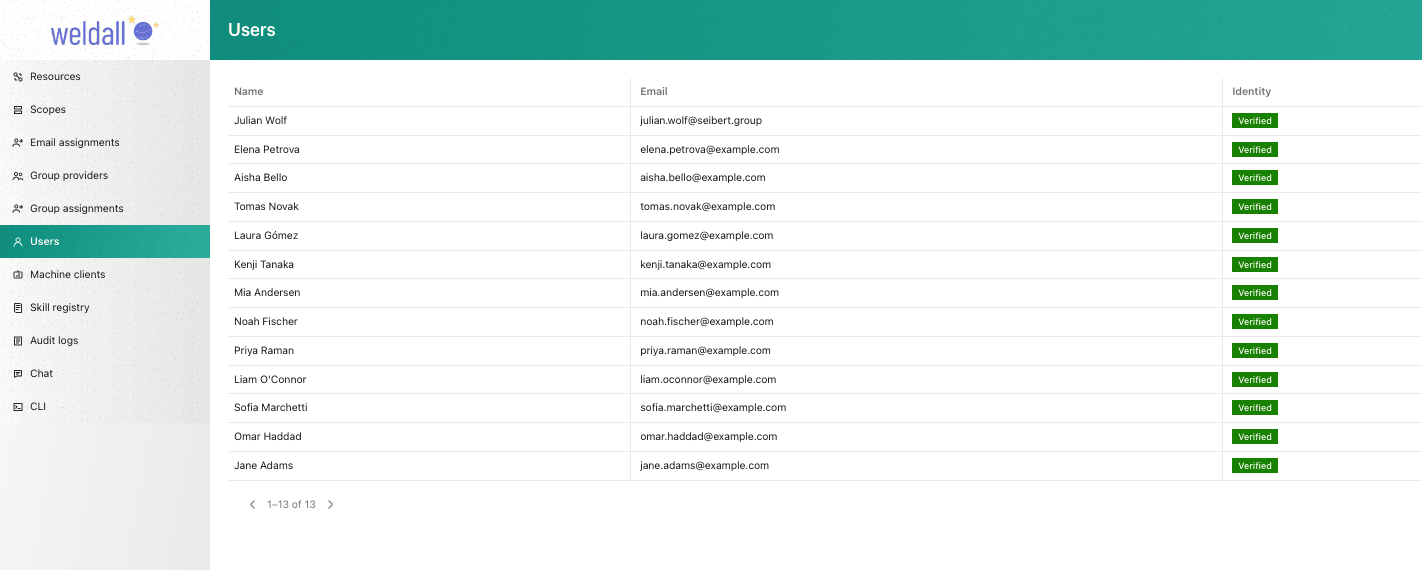
Manage who can sign in; identities are verified through the company SSO.
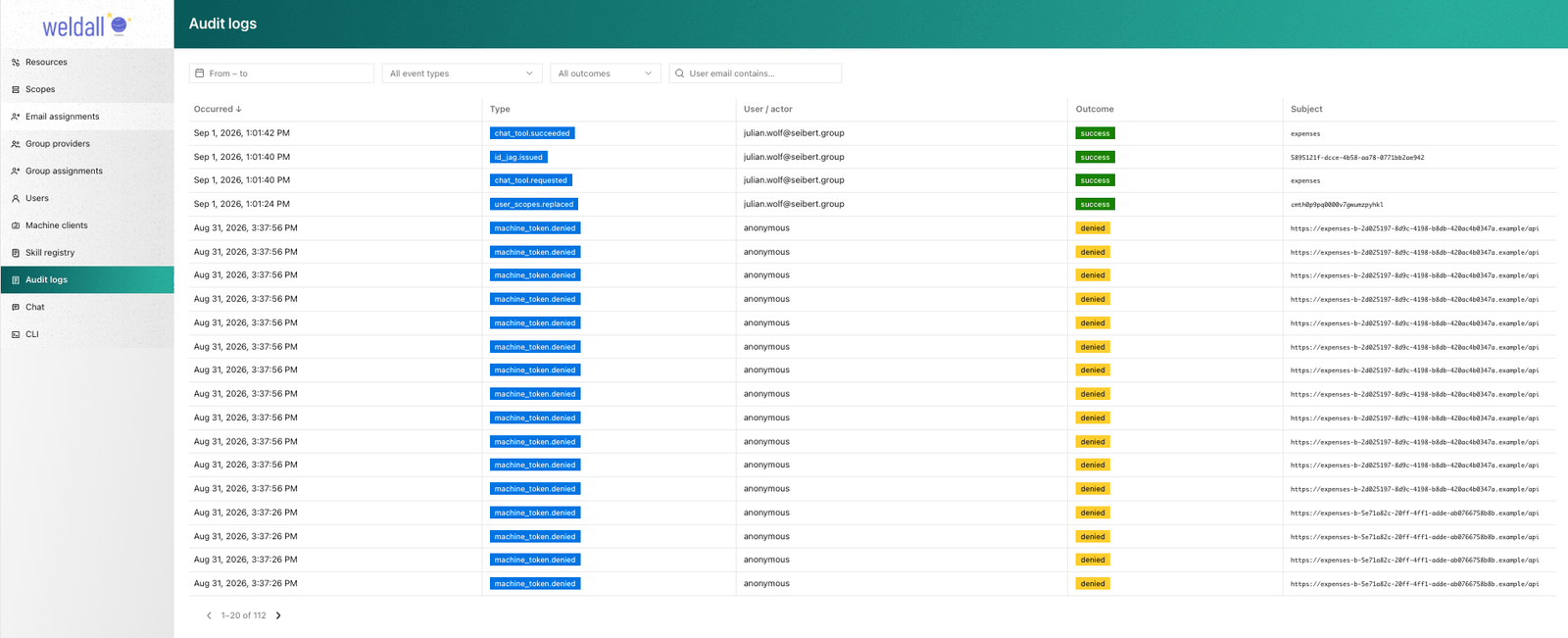
Every granted or denied request is recorded, so administrators can trace who asked for what.
License
FSL-1.1-ALv2 (Functional Source License). Source-available and free to use, modify, and distribute for any purpose other than offering it as a competing commercial service. Each released version converts to Apache-2.0 on its second anniversary.
Similar plugins

Cursor
@openchamber/opencode-cursor
Cursor models in OpenCode — native OAuth, live catalog discovery, agent-grade streaming. Direct API, no cursor-agent binary.

Open Grok Build
open-grok-build
Grok Build provider, OAuth, multi-account rotation, quota tracking and Imagine image generation for OpenCode v2.

Kimi Subscription
opencode-kimi-subscription
Use your Kimi Code (Moonshot) subscription in OpenCode via OAuth — sign in with the device flow, no API tokens.