
Dcp
OpenCode plugin that optimizes token usage by pruning obsolete tool outputs from conversation context
0
1,265
390 in 7 days
39.0
Multi-signal model
3 hours ago
2026-10-05
Install and configure
opencode.jsonWrites to this project's opencode.json — applies to this repository only.
opencode.json
{
  "$schema": "https://opencode.ai/config.json",
  "plugin": ["@vikrant82/opencode-dcp@3.7.0"]
}
Writes to ~/.config/opencode/opencode.json — applies to every project.
~/.config/opencode/opencode.json
{
  "$schema": "https://opencode.ai/config.json",
  "plugin": ["@vikrant82/opencode-dcp@3.7.0"]
}
If you want to modify the plugin locally, install it into the project and reference the local path.
shell
pnpm add -D @vikrant82/opencode-dcpOpenCode loads npm dependencies through its embedded runtime on startup and caches them locally — no manual global install needed.

This is a personal fork of
@tarquinen/opencode-dcpwith additional optimizations for aggressive context reduction.
Fork Improvements
On-Demand Pruning (/dcp prune & /dcp unprune)
Adds deliberate, LLM-free context cleanup: /dcp prune marks completed and
errored tool outputs older than N LLM steps for removal, without waiting for
automatic strategies or the next compression. Supports --dry-run previews
with estimated token savings and explicit --tools glob selection that
overrides the default protections; /dcp unprune reverts the last prune batch
(--all reverts everything). Placeholders land on the next request; stored
session history is never touched.
/dcp prune --older-than 150 --dry-run   # preview candidates + estimated savings
/dcp prune --older-than 150             # prune; recorded as an undoable batch
/dcp unprune [--all]                    # revert the last batch (or all batches)
See On-demand pruning (no LLM) under Commands for full syntax and edge cases.
Agent-Initiated Pruning (dcp_prune)
Adds an opt-in tool that lets the model propose pruning old tool outputs and
eligible prior reasoning. It is disabled by default and requires OpenCode's
native ask permission before applying a frozen selection. Targets are checked
again after approval; if they changed or became unavailable, nothing is pruned.
Pruned tool outputs take effect on the next request and remain undoable with
/dcp unprune; session history is not modified.
Enable it in dcp.jsonc:
{
    "prune": {
        "enabled": true,
        "permission": "ask",
        "nudge": {
            "enabled": true,
            "contextThreshold": 200000,
            "minSavingsRatio": 0.20,
            "growthTokens": 50000,
            "olderThan": 1,
            "tools": ["*"]
        }
    }
}
The optional nudge is an ephemeral note appended to an outbound prompt when its
criteria are met; it is event-driven, not a background poll. It uses the latest
reported prompt input plus cache-read/write tokens; output and reasoning tokens
are excluded. It triggers only above contextThreshold, after at least
growthTokens of growth from the episode baseline, and when eligible tool
pruning's estimated net savings reach minSavingsRatio of that prompt size.
Net tool estimates account for the replacement placeholder; the percentage
does not include reasoning. After an accepted prune, the first fresh prompt
report becomes the new baseline; after a declined or ignored proposal, current
reported usage becomes the baseline. Manual dcp_prune calls do not depend on
these nudge thresholds.
The tool accepts a single args string. all mirrors /dcp prune all: age 1,
the top five tool groups, and eligible reasoning, overriding protections.
Without all, default selection respects protections; explicitly supplied
--tools globs override them. If no top-N/index selector is supplied, explicit
flags select all matching tool groups. --dry-run returns an estimate without
requesting approval or pruning:
dcp_prune(args="all")
dcp_prune(args="--older-than 1 --tools * --reasoning")
dcp_prune(args="--older-than 1 --tools * --reasoning --dry-run")
--tools * explicitly selects every matching tool, including protected tools;
use a narrower glob when that is not intended. Reasoning savings are shown
separately and are model-dependent: they help only when the model retains prior
reasoning, and reasoning pruning cannot be restored by /dcp unprune.
OpenCode's native approval is required for each batch. DCP rejects a known
effective allow rule rather than silently applying it, but private or
remembered host permission rules may not be visible to the plugin and can
bypass the native prompt. Review host permissions if approval prompts are
important. The feature is restricted to the primary session via
experimental.primary_tools and a runtime guard; experimental.allowSubAgents
continues to control other DCP features and does not enable agent pruning in
subagents.
Displayed token counts and net-savings percentages are estimates/reported prompt usage, not provider billing or cache measurements. Live cache effects of agent pruning have not been empirically verified.
Stale Tool Pruning (staleTools strategy)
Automatically prunes completed tool outputs after a configurable number of turns (default: 3). In the upstream plugin, only errored tool calls were pruned — completed tool outputs (often 75%+ of context) were never cleaned up. This strategy continuously marks old tool outputs for removal, significantly reducing context size between compression events.
"strategies": {
    "staleTools": {
        "enabled": true,       // Enable stale tool pruning
        "turns": 3,            // Prune completed tools older than N turns
        "protectedTools": []   // Additional tools to protect (added to defaults)
    }
}
Strategies Run in Hook Pipeline
Upstream only runs pruning strategies (purgeErrors, deduplicate) during compress tool preparation. This fork runs all strategies on every hook invocation, so state.prune.tools is populated before pruneToolOutputs executes. Tool outputs are cleaned up immediately instead of waiting for the next compression event.
Configurable Summary Budget (compress.summaryBudget)
Adds a character budget for compression summaries (default: 0 / disabled). When set, the compress tool prompt instructs the LLM to keep summaries within the budget, preventing oversized summaries that negate the savings from compression.
"compress": {
    "summaryBudget": 2000    // Max chars per summary (0 = disabled)
}
Smarter Nudge Thresholds (compress.minSavingsThreshold)
Adds a minimum token savings threshold for compression nudges (default: 0 / disabled). When context is between min/max limits, the plugin estimates how many tokens are actually compressible. If below the threshold, the nudge is suppressed — avoiding wasteful compressions that destroy prompt cache for negligible savings.
"compress": {
    "minSavingsThreshold": 5000    // Min estimated token savings to nudge (0 = disabled)
}
Enhanced Debug Logging
When debug: true, logs detailed metrics for stale tool pruning (token counts, tool names), summary budget compliance (over-budget warnings), nudge threshold decisions, and per-invocation session metrics.
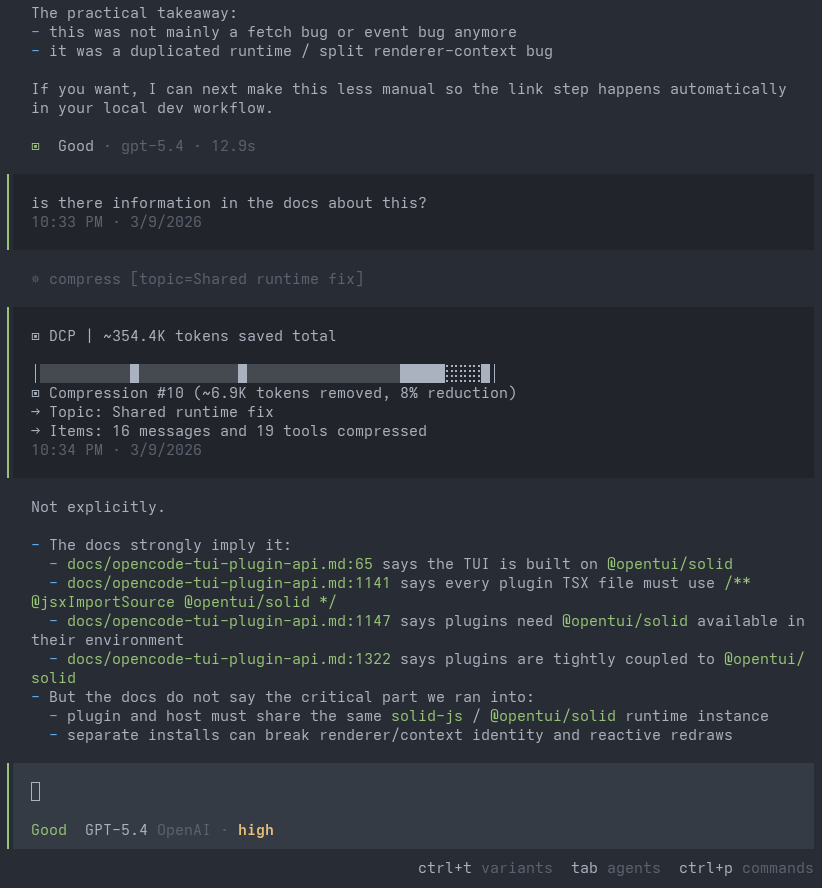
Automatically reduces token usage in OpenCode by managing conversation context.
Installation
Prerequisites
Bun is required. OpenCode uses Bun to install npm plugins at startup. If Bun is not installed, the plugin install will silently fail.
curl -fsSL https://bun.sh/install | bash
Install
From the CLI:
opencode plugin @vikrant82/opencode-dcp@latest --global
Or manually add to your ~/.config/opencode/opencode.json:
{
    "plugin": ["@vikrant82/opencode-dcp"]
}
Then restart OpenCode. The plugin is cached in ~/.cache/opencode/packages/.
When running from a local checkout, build the distributable before loading it:
npm run build
Restart or reload OpenCode after the build so it loads the updated dist/ files.
Verify
After restarting, check the DCP log to confirm the plugin loaded:
grep "DCP initialized" ~/.config/opencode/logs/dcp/daily/$(date +%Y-%m-%d).log
# Expected: INFO DCP initialized | version=3.3.2 | strategies={...}
Troubleshooting
If no DCP log appears after restart, check the OpenCode system log for errors:
# Find the latest log
ls -lt ~/.local/share/opencode/log/ | head -2

# Search for plugin errors
grep -i "vikrant82\|dcp\|failed" ~/.local/share/opencode/log/<latest>.log
Common issues:
ENOENT ... failed to resolve plugin server entry— Bun/npm install failed. Clear cache and retry:rm -rf ~/.cache/opencode/packages/@vikrant82- No plugin lines at all — Check that
@vikrant82/opencode-dcpis in thepluginarray inopencode.json - Plugin loaded but wrong version — Clear cache:
rm -rf ~/.cache/opencode/packages/@vikrant82and restart
Project Status
Development on DCP has slowed because most new context-management work has moved to Sleev and the sleev CLI. Sleev is a local proxy for Claude Code, Codex, and OpenCode that builds on DCP's core ideas with newer context-management features and will work with any harness/client.
DCP remains available for OpenCode plugin users, but new features are landing in Sleev first. If you are starting fresh, we recommend trying Sleev:
npm i -g sleev
sleev
How It Works
DCP reduces context size through a compress tool and automatic cleanup. Your session history is never modified — DCP replaces pruned content with placeholders before sending requests to your LLM.
Compress
Compress is a tool exposed to your model that replaces closed, stale conversation content with high-fidelity technical summaries. You can think of this as a much smarter version of Opencode's compaction process. Instead of triggering statically when your session reaches its maximum context and on the entire coding session, Compress allows the model to pick when to activate based on task completion, and to only compress the specific messages that are no longer needed verbatim.
DCP supports two compression modes:
rangemode compresses contiguous spans of conversation into one or more summaries.messagemode (experimental) compresses individual raw messages independently, letting the model manage context much more surgically.
In range mode, when a new compression overlaps an earlier one, the earlier summary is nested inside the new one so information is preserved through layers of compression rather than diluted away. In both modes, protected tool outputs (such as subagents and skills) and protected file patterns are kept in compression summaries, ensuring that the most important information is never lost. You can also enable protectUserMessages to preserve your messages verbatim during compression, though note that large prompts (e.g. copy-pasting log files in the prompt) will then never be compressed away.
DCP state is isolated per session, so parent and subagent sessions no longer share or reset each other's state. Task outputs are expanded only with the answer the subagent produced by the time that task call completed. Background launch placeholders remain unchanged because the result arrives in the completion notice.
Deduplication
Identifies repeated tool calls (same tool, same arguments) and keeps only the most recent output. Recalculated when the compress tool runs, so prompt cache is only impacted alongside compression.
Purge Errors
Prunes inputs from errored tool calls after a configurable number of turns (default: 4). Error messages are preserved; only the potentially large input content is removed. Recalculated on compress tool use.
Configuration
DCP uses its own config file, searched in order:
- Global:
~/.config/opencode/dcp.jsonc(ordcp.json), created automatically on first run - Custom config directory:
$OPENCODE_CONFIG_DIR/dcp.jsonc(ordcp.json), ifOPENCODE_CONFIG_DIRis set - Project:
.opencode/dcp.jsonc(ordcp.json) in your project's.opencodedirectory
Each level overrides the previous, so project settings take priority over global. Restart OpenCode after making config changes.
[!NOTE] If you use models with smaller context windows, such as GitHub Copilot models or local models, lower
compress.minContextLimitandcompress.maxContextLimitin your configuration to match the available context.
[!IMPORTANT] Defaults are applied automatically. Expand this if you want to review or override settings.
Default Configuration (click to expand)
{
    "$schema": "https://raw.githubusercontent.com/Opencode-DCP/opencode-dynamic-context-pruning/master/dcp.schema.json",
    // Enable or disable the plugin
    "enabled": true,
    // Automatically update npm-installed DCP when a newer npm latest is available.
    // Version-locked plugin specs are not updated.
    "autoUpdate": true,
    // Enable debug logging to ~/.config/opencode/logs/dcp/
    "debug": false,
    // Notification display: "off", "minimal", or "detailed"
    "pruneNotification": "detailed",
    // Notification type: "chat" (in-conversation) or "toast" (system toast)
    "pruneNotificationType": "chat",
    // Slash commands configuration
    "commands": {
        "enabled": true,
        // Additional tools to protect from pruning via commands (e.g., /dcp sweep)
        "protectedTools": [],
    },
    // Agent-initiated pruning is opt-in; enabled mode still requires host ask permission
    "prune": {
        "enabled": false,
        "permission": "ask",
        "nudge": {
            "enabled": true,
            "contextThreshold": 200000,
            "minSavingsRatio": 0.2,
            "growthTokens": 50000,
            "olderThan": 1,
            "tools": ["*"],
        },
    },
    // Manual mode: disables autonomous context management,
    // tools only run when explicitly triggered via /dcp commands
    "manualMode": {
        "enabled": false,
        // When true, automatic cleanup (deduplication, purgeErrors)
        // still runs even in manual mode
        "automaticStrategies": true,
    },
    // Protect from pruning for <turns> message turns past tool invocation
    "turnProtection": {
        "enabled": false,
        "turns": 4,
    },
    // Experimental settings
    "experimental": {
        // Allow DCP processing in subagent sessions
        "allowSubAgents": false,
        // Enable user-editable prompt overrides under dcp-prompts directories
        // When false (default), prompt override files/directories are ignored
        "customPrompts": false,
    },
    // Protect file operations from pruning via glob patterns
    // Patterns match tool parameters.filePath (e.g. read/write/edit)
    "protectedFilePatterns": [],
    // Unified context compression tool and behavior settings
    "compress": {
        // Compression mode: "range" (compress spans into block summaries)
        // or experimental "message" (compress individual raw messages)
        "mode": "range",
        // Permission mode: "allow" (no prompt), "ask" (prompt), "deny" (tool not registered)
        "permission": "allow",
        // Show compression content in a chat notification
        "showCompression": false,
        // Let active summary tokens extend the effective maxContextLimit
        "summaryBuffer": true,
        // [FORK] Max characters for compression summaries (0 = disabled).
        // When set, the compress tool prompt instructs the LLM to keep
        // summaries within this budget.
        "summaryBudget": 0,
        // [FORK] Minimum estimated compressible tokens to trigger a nudge
        // (0 = disabled). When context is between min/max limits and
        // estimated savings are below this, the nudge is suppressed.
        "minSavingsThreshold": 0,
        // Soft upper threshold: above this, DCP keeps injecting strong
        // compression nudges (based on nudgeFrequency), so compression is
        // much more likely. Accepts: number or "X%" of model context window.
        "maxContextLimit": 100000,
        // Soft lower threshold for reminder nudges: below this, turn/iteration
        // reminders are off (compression less likely). At/above this, reminders
        // are on. Accepts: number or "X%" of model context window.
        "minContextLimit": 50000,
        // Optional per-model override for maxContextLimit by providerID/modelID.
        // If present, this wins over the global maxContextLimit.
        // Accepts: number or "X%".
        // Example:
        // "modelMaxLimits": {
        //     "openai/gpt-5.3-codex": 120000,
        //     "anthropic/claude-sonnet-4.6": "80%"
        // },
        // Optional per-model override for minContextLimit.
        // If present, this wins over the global minContextLimit.
        // "modelMinLimits": {
        //     "openai/gpt-5.3-codex": 50000,
        //     "anthropic/claude-sonnet-4.6": "25%"
        // },
        // How often the context-limit nudge fires (1 = every fetch, 5 = every 5th)
        "nudgeFrequency": 5,
        // Start adding compression reminders after this many
        // messages have happened since the last user message
        "iterationNudgeThreshold": 15,
        // Controls how likely compression is after user messages
        // ("strong" = more likely, "soft" = less likely)
        "nudgeForce": "soft",
        // Tool names whose completed outputs are appended to the compression
        "protectedTools": [],
        // Preserve text wrapped in <protect>...</protect> when compressed
        "protectTags": false,
        // Preserve your messages during compression.
        // Warning: large copy-pasted prompts will never be compressed away
        "protectUserMessages": false,
    },
    // Automatic pruning strategies
    "strategies": {
        // [FORK] Prune completed tool outputs after N turns
        "staleTools": {
            "enabled": true,
            // Number of turns before completed tool outputs are pruned
            "turns": 3,
            // Additional tools to protect from pruning
            // (`skill` is already protected by default)
            "protectedTools": [],
        },
        // Remove duplicate tool calls (same tool with same arguments)
        "deduplication": {
            "enabled": true,
            // Additional tools to protect from pruning
            "protectedTools": [],
        },
        // Prune tool inputs for errored tools after X turns
        "purgeErrors": {
            "enabled": true,
            // Number of turns before errored tool inputs are pruned
            "turns": 4,
            // Additional tools to protect from pruning
            "protectedTools": [],
        },
    },
}
Commands
DCP provides a TUI panel and one prompt-producing slash command:
/dcp— Opens the DCP panel with context, stats, and manual-mode controls./dcp-compress [focus]— Asks the model to run one compression pass. Optional focus text directs what content to compress, following the activecompress.mode.dcp_prune— When enabled inprune.enabled, lets the model request approval for pruning eligible tool outputs and optional prior reasoning. This is separate from the manual/dcp prunecommand below.
On-demand pruning (no LLM)
/dcp prune marks old tool outputs for removal from the outbound prompt. Placeholders land on the
next request; stored session history is never touched, and /dcp unprune reverts.
/dcp prune --older-than 150                                       # completed + errored tools ≥150 LLM steps old
/dcp prune --older-than 150 --tools serena_*,codebase-memory-*    # only these tool globs (overrides protection)
/dcp prune --older-than 150 --dry-run                             # preview candidates + estimated savings
/dcp prune --older-than 150 --reasoning                           # prune tools and eligible prior reasoning
/dcp prune --older-than 150 --reasoning --dry-run                 # preview both; reasoning is all-or-nothing
/dcp prune all                                                    # one-step: unprotected top 5 tools + all eligible reasoning (age ≥1)
/dcp prune all --older-than 10 --top-3 --tools bash               # one-step with overrides
/dcp prune all --dry-run                                          # preview only, marks selected tool rows
/dcp unprune                                                      # revert the last prune batch
/dcp unprune --all                                                # revert all manual prune batches
Preview matching calls first, then select from that preview by rank or index (the slash-command
* is a tool glob, not a shell wildcard, so it needs no quoting):
/dcp prune --older-than 1 --tools * --dry-run
/dcp prune --older-than 1 --top-5                                # prune top five (preview optional)
/dcp prune --older-than 1 --indexes 1,3-5                         # or prune these preview indexes
Selection inherits the preview's --tools globs when omitted; an explicitly different --tools
value is rejected. Its selected call IDs stay fixed even if eligible-call ranking changes, and
the command rejects the selection if any ID is unavailable.
For --top-N, a matching saved preview is respected; otherwise current eligible rows are ranked fresh. --indexes always requires a saved preview. Rerun --dry-run to update the preview. Pruning without an index selector remains supported. /dcp prune all rejects --indexes.
/dcp prune all selects tools as if --tools '*' were specified, so it ignores configured tool protections and the built-in question, edit, and write skips. An explicit --tools <globs> replaces that default. Use /dcp prune --older-than N --top-5 for top-five selection that respects protections.
Notes:
question,edit, andwriteoutputs are skipped unless explicitly selected via--tools;/dcp prune allignores these and configured tool protections.- Tools already inside active compression blocks, or already pruned, are skipped (reported).
- Prune batches persist with the session state; undo survives restarts.
--reasoningselects every eligible old reasoning part as one oldest-first prefix; it ignores--indexes/--top-Nrow selection and never removes reasoning after the latest user message (active tool loop protection).- Reasoning pruning is one-way for the session:
/dcp unprunecannot restore it. Dry-run always lists eligible reasoning withstep-finishreasoning tokens split across each step's parts; when the provider count is zero or missing, it estimates from reasoning text (some Copilot paths report zero despite real content). This is potential savings and only helps models that retain prior-turn reasoning.
Prompt Overrides
DCP exposes six editable prompts:
systemcompress-rangecompress-messagecontext-limit-nudgeturn-nudgeiteration-nudge
This feature is disabled by default. Set experimental.customPrompts to true in your DCP config to activate it.
When enabled, managed defaults are written to ~/.config/opencode/dcp-prompts/defaults/ as plain-text prompt files. A single README.md in that directory explains each prompt and how to create overrides.
To customize behavior, add a file with the same name under an overrides directory and edit it as plain text.
To reset an override, delete the matching file from your overrides directory.
Protected Tools
By default, these tools are always protected from pruning:
task, skill, todowrite, todoread, compress, batch, plan_enter, plan_exit, write, edit, get_feedback
The protectedTools arrays in commands and strategies add to this default list.
For the compress tool, compress.protectedTools ensures specific tool outputs are appended to the compressed summary. By default it includes task, skill, todowrite, and todoread.
Impact on Prompt Caching
LLM providers cache prompts based on exact prefix matching. When DCP prunes content, it changes messages, which invalidates cached prefixes from that point forward.
Trade-off: You lose some cache reads but gain token savings from reduced context size and fewer hallucinations from stale context. In most cases, especially in long sessions, the savings outweigh the cache miss cost.
[!NOTE] In testing, cache hit rates were approximately 85% with DCP vs 90% without.
No impact for:
- Request-based billing — Providers like GitHub Copilot that charge per request, not tokens.
- Uniform token pricing — Providers like Cerebras that bill cached and uncached tokens at the same rate.
License
AGPL-3.0-or-later
Similar plugins

Better Compact
better-compact
OpenCode plugin that improves long-session context with boundary-time pruning

Dcp
@tarquinen/opencode-dcp
OpenCode plugin that optimizes token usage by pruning obsolete tool outputs from conversation context
Dcp
@keakon/opencode-dcp
OpenCode plugin that optimizes token usage by pruning obsolete tool outputs from conversation context