
Artifact Server Opencode
OpenCode plugin bridge for Artifact Server: receives annotation bundles as follow-up prompts and closes them through the comment API.
196
+16 in 30 days
0
45.2
Multi-signal model
6 days ago
2026-09-28
Install and configure
opencode.jsonWrites to this project's opencode.json — applies to this repository only.
opencode.json
{
  "$schema": "https://opencode.ai/config.json",
  "plugin": ["@plannotator/artifact-server-opencode@0.1.2"]
}
Writes to ~/.config/opencode/opencode.json — applies to every project.
~/.config/opencode/opencode.json
{
  "$schema": "https://opencode.ai/config.json",
  "plugin": ["@plannotator/artifact-server-opencode@0.1.2"]
}
If you want to modify the plugin locally, install it into the project and reference the local path.
shell
pnpm add -D @plannotator/artifact-server-opencodeOpenCode loads npm dependencies through its embedded runtime on startup and caches them locally — no manual global install needed.

Artifact Server
The open-source, self-hostable alternative to Claude Code artifacts.
Artifact Server gives people and agents one place to publish, review, comment on, version, and share the artifacts they create while building products. Its built-in MCP server gives agents direct access to the same work.
Run it on a laptop for one developer. Deploy it for a private team on Cloudflare, one server, Kubernetes, AWS, or Google Cloud.


Contents
- Why Artifact Server
- Built for AI agents and team collaboration
- Cloudflare and Artifact Server
- Deploy it for a team
- Run it locally
- Usage
- Security model
- Development and project records
Why Artifact Server
Teams now use HTML, images, and video for plans, mockups, prototypes, code reviews, and other work created during product development. That work quickly becomes disorganized, and providers try to lock it inside their platforms.
Artifact Server gives teams a self-hosted place to organize and collaborate on that work. Store artifacts by project, share them, comment on them, and keep control of the files and data.
Built for AI agents and team collaboration






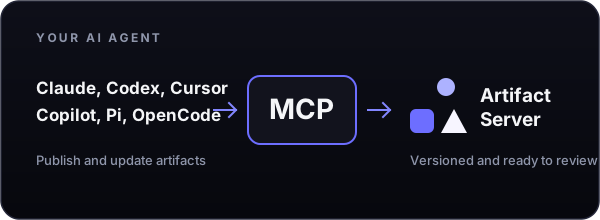
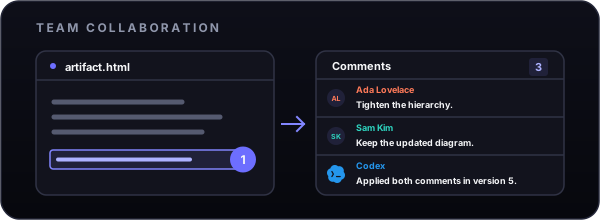
Artifact Server includes a built-in MCP server and a portable Agent Skill. Agents publish and update versioned artifacts. Teams review, comment on, and share the same work.
Connect the agent and install the skill:
artifactserver connect
npx skills add plannotator/artifact-server
Then ask:
/artifact-server upload that HTML design doc
The agent returns the full-screen review link first. Read the MCP guide for source checkouts, remote servers, permissions, and supported operations.
Live session delivery is available from source for Pi and Claude Code Channels. Claude Channels require its research-preview development flag and, on managed plans, the organization policy. The OpenCode adapter is not release-qualified; live-host verification and contributions are welcome.



Cloudflare and Artifact Server
Cloudflare is the main hosted deployment target. Cloudflare Artifacts can add private Git-backed history for selected projects. It is off by default and currently requires closed beta access.

- Deploy Artifact Server on Cloudflare
- Configure optional Git history
- Read the Cloudflare Artifacts documentation
Cloudflare is optional. Artifact Server also runs locally, on Compose, on Kubernetes, on AWS, and on Google Cloud.

Deploy it for a team
Every remote deployment uses one trusted application origin and one isolated wildcard content domain.
| Deployment | Data layer | Guide |
|---|---|---|
| Cloudflare | D1 and R2 | Cloudflare guide |
| Compact Compose | SQLite and one file volume | Compose guide |
| External-storage Compose | PostgreSQL and S3-compatible storage | Compose guide |
| Kubernetes | PostgreSQL and object storage | Helm guide |
| AWS | ECS, RDS, and S3 | AWS Pulumi guide |
| Google Cloud | Cloud Run, Cloud SQL, and Cloud Storage | Google Cloud Pulumi guide |
Azure teams deploy through the Helm chart on AKS; there is no separate Azure installer. Azure Blob Storage is available as a preview adapter and has not passed live Azure qualification.
Read the deployment guide for shared requirements, storage choices, authentication, and backups.
Run it locally
Local mode stores metadata in SQLite and files on disk. It grants owner access only from the same loopback origin. Running from source requires Node.js 24.12 or newer and pnpm 10.34.3.
git clone https://github.com/plannotator/artifact-server.git
cd artifact-server
pnpm install
pnpm dev
Open the printed URL. You can also download the portable Node.js package from the latest GitHub release. See Get started locally for package verification and startup instructions.
Usage
Most artifacts are published by an agent through the Artifact Server Skill or MCP. For direct access, use the artifactserver CLI to publish files and directories, connect to remote servers, and create new versions. Read the CLI guide.
Security model
Artifact Server serves untrusted artifact content from isolated version hosts, separate from the trusted application origin used for authentication, review, comments, API, and MCP. Private content uses version-scoped browser sessions, and untrusted paths cannot select storage locations.
Read the security model or report a vulnerability.
Read about Artifact Server's software supply-chain security.
Development and project records
Install dependencies and run the focused development checks:
pnpm install
pnpm check
pnpm test:web
Run the complete iteration gate before a handoff:
pnpm verify:iteration
Repository engineering rules live in AGENTS.md.
The project directory contains specifications, conformance evidence, performance records, prototypes, and research. Start with:
Public guides live in the documentation index.
License
Artifact Server is dual-licensed under either of
at your option, © 2026 backnotprop.
Unless you explicitly state otherwise, any contribution intentionally submitted for inclusion in this project by you, as defined in the Apache-2.0 license, shall be dual licensed as above, without any additional terms or conditions.
created by backnotprop
Similar plugins

Magic Compact
magic-compact
Lossless context compression plugin for OpenCode.

Mugiwara
@ionivetech/mugiwara
The Straw Hat crew of AI agents and skills: brainstorm, plan, execute, checkpoint, quality, gates, review, security, self-healing. Installs into Claude Code, opencode, Copilot, Gemini, Codex, Cursor, Kimi, pi, Windsurf, Cline, Kilo, Antigravity.

Double Ctrl C
opencode-double-ctrl-c
OpenCode TUI plugin: press ctrl+c twice to exit, replicating Claude Code and Codex CLI. One press clears the prompt; on an empty prompt it asks for a second press instead of quitting.