
Vision Analyze
OpenCode plugin: vision_analyze tool — describe images & image URLs with your own vision model for text-only main models; native-image fast path for multimodal models. Zero runtime dependencies.
2
+1 in 30 days
1,734
33 in 7 days
45.3
Multi-signal model
18 days ago
2026-09-17
Install and configure
opencode.jsonWrites to this project's opencode.json — applies to this repository only.
opencode.json
{
  "$schema": "https://opencode.ai/config.json",
  "plugin": ["opencode-vision-analyze@1.0.2"]
}
Writes to ~/.config/opencode/opencode.json — applies to every project.
~/.config/opencode/opencode.json
{
  "$schema": "https://opencode.ai/config.json",
  "plugin": ["opencode-vision-analyze@1.0.2"]
}
If you want to modify the plugin locally, install it into the project and reference the local path.
shell
pnpm add -D opencode-vision-analyzeOpenCode loads npm dependencies through its embedded runtime on startup and caches them locally — no manual global install needed.



English | 简体中文
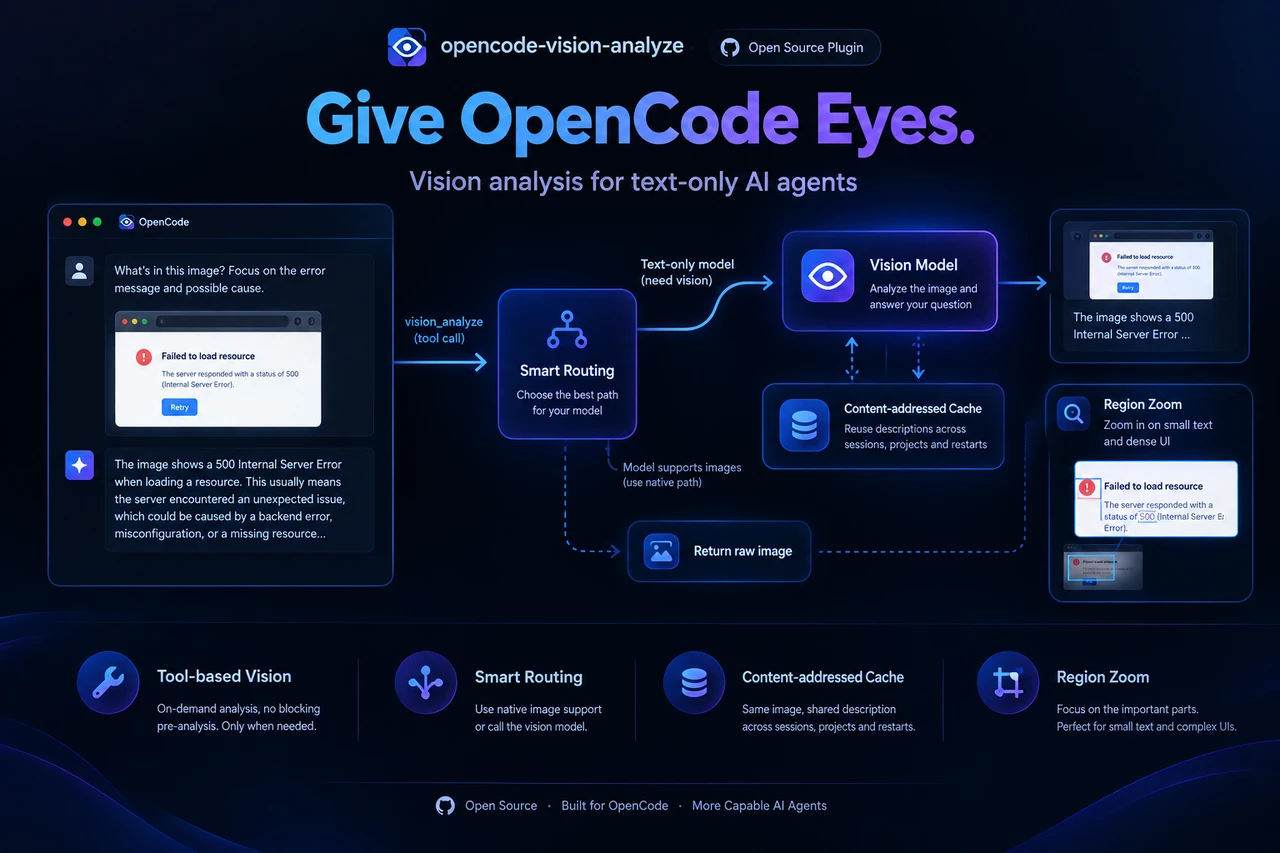
A tool-based vision routing plugin for opencode: when the main model can't see images, it calls the vision_analyze tool on demand — your dedicated vision model describes the image and the description flows straight back into the conversation. When the main model already supports images, pasted images pass through untouched and the tool short-circuits to return raw pixels.
Zero runtime dependencies. Only node builtins (crypto/fs/path/os/child_process) and type-only imports — nothing to install beyond the plugin itself.
Features
- Tool-based, not pre-analysis. The turn starts immediately; the model decides when (and with which question) to look. No blocking on submit, failures are visible and retryable inside the agent loop. Same philosophy as production-proven agent designs.
- Question-aware descriptions. The model passes its own focused question to
vision_analyze— not a one-shot generic caption computed at submit time. For a general parse of an image the model leavesquestionempty, and the tool falls back to a fixed prompt so all generic descriptions of the same image share one cache entry (see Content-addressed cache). - Native fast path. If the main model is vision-capable,
vision_analyzeskips the vision model entirely and returns the raw image as a tool attachment. - Content-addressed cache. Images and descriptions are stored by content hash in user-level shared dirs and reused across sessions, projects and restarts — the same image is never described twice, and all generic full-image parses collapse onto that image's single entry. Storage layout, size limits and the canonical prompt are detailed in Storage and caches below.
- Region cropping (zoom into detail). Small text and dense UI in a large image get blurred by the model's internal downscaling. The main model can describe the whole image first, then call
vision_analyzeagain with aregion(normalized 0–1000 coordinates); the plugin crops that region out before downscaling, so the small area keeps the full resolution budget — effectively a zoom. Cropping shells out to ImageMagick / ffmpeg (detected at runtime), so there are still zero runtime dependencies; when neither is installed it returns a clear error and full-image analysis is unaffected. - Unified auth. The vision call runs through an opencode sub-session, so it reuses the provider credentials opencode already manages. No extra API key plumbing.
Installation
Method 1 — Let your agent install it (one paste)
Copy this prompt into any OpenCode session:
Install and configure opencode-vision-analyze by following the instructions here:
https://raw.githubusercontent.com/MwumLi/opencode-vision-analyze/main/docs/INSTALL.md
The agent reads docs/INSTALL.md, asks for the install scope and your
preferred vision model, merges the plugin entry into your opencode.json, and verifies it —
no manual editing.
Agents can fetch the guide directly:
curl -fsSL https://raw.githubusercontent.com/MwumLi/opencode-vision-analyze/main/docs/INSTALL.md
Method 2 — npm (recommended)
// opencode.json (project or global)
{
  "plugin": [
    ["opencode-vision-analyze", { "models": ["openai/gpt-4o-mini"] }]
  ]
}
opencode installs npm plugins automatically at startup.
Method 3 — curl single file (no npm)
The plugin is a single self-contained TypeScript file with zero runtime dependencies — you can just download it:
mkdir -p .opencode
curl -fsSL https://raw.githubusercontent.com/MwumLi/opencode-vision-analyze/main/src/index.ts \
  -o .opencode/vision-analyze.ts
// opencode.json
{
  "plugin": [
    ["./.opencode/vision-analyze.ts", { "models": ["openai/gpt-4o-mini"] }]
  ]
}
Notes for the curl path:
- The URL above points at the
mainbranch (latest source); for a pinned release, swapmainfor a release tag (e.g.v0.1.0) and re-run curl. - The file is TypeScript source — opencode loads plugins with Bun, so this works as-is.
- Options must be passed via the
plugintuple (the auto-discovered.opencode/plugins/directory can't carry options).
Options
| Option | Required | Default | Description |
|---|---|---|---|
models |
no | — | Ordered candidate list of vision models (provider/model), tried one after another until one succeeds. A single vision model is written as models: ["..."]. When omitted (or an empty array) the plugin auto-discovers all image-capable models. |
unlisted_fallback |
no | false |
When an explicit models chain is configured and it is exhausted, keep going with image-capable models that were not listed. |
free_first |
no | false |
In auto-discovery, prefer anonymous/built-in free providers (custom source) ahead of config-defined ones — reverses the source-tier order. |
timeout_ms |
no | 60000 |
Timeout (ms) budget for each individual create/prompt request inside the vision sub-session |
crop_command |
no | — | Executable used for region cropping (e.g. /usr/bin/ffmpeg); when omitted, auto-detected in order magick → convert → ffmpeg. The argument template is inferred from the filename (ffmpeg → ffmpeg syntax, otherwise ImageMagick). |
Supported image extensions: png / jpg / jpeg / gif / webp.
An ordered-candidates example with auto-fallback and free-first discovery:
// opencode.json
{
  "plugin": [
    [
      "opencode-vision-analyze",
      {
        "models": ["anthropic/claude-sonnet-4-5", "openai/gpt-4o-mini"],
        "unlisted_fallback": true,
        "free_first": true
      }
    ]
  ]
}
Storage and caches
Two user-level shared caches live side by side under <cache>/opencode-vision-analyze/, shared across sessions, projects and restarts, independent of git scope — no .gitignore entry is needed anywhere.
| Cache | Directory | Content | Naming | Cap |
|---|---|---|---|---|
| Images | vision/ |
image bytes | <sha256>.<ext> |
2000 entries / 500 MB |
| Descriptions | descriptions/ |
description text (JSON) | sha256(key) |
2000 entries / 50 MB |
Image storage (vision/)
- Written to cache: clipboard images (raw pixels, no source path) and
http(s)downloads. - Read in place (never copied): path-pasted attachments (the message part carries a real
source.path, e.g. a file path copied to the clipboard) and already-local paths passed straight to the tool — the file is re-read at analysis time, so re-pasting a path always analyses the latest content. - Eviction: LRU by file mtime; when either 2000 entries or 500 MB is exceeded, the oldest entries are removed.
- Concurrency: atomic temp-file + rename, so concurrent opencode processes can safely share the store.
Description cache (descriptions/)
- Key: without
region,<image-sha>:<effective-question>(byte-identical to older versions, so existing entries keep hitting); withregion,<image-sha>:r<x1>,<y1>,<x2>,<y2>|<effective-question>(raw normalized coordinates, isolated from full-image entries). Filenamesha256(key). - General full-image parse (empty / omitted
question): normalised to the fixed promptDescribe this image in full detail, including all text, UI elements, diagrams, or content visible., so every generic parse collapses onto one entry. - Specific follow-ups: keep their own
<image-sha>[:region]:<question>keys (full-image format unchanged, existing entries keep hitting). - Write threshold: generic entries are only written when the description is ≥ 100 chars (≥ 24 chars when a
regionis present, since a region description can legitimately be short), so a short refuse/fail answer can't poison a shared entry. - Eviction: LRU by file mtime, capped at 2000 entries / 50 MB; concurrency as above.
Default cache root per platform
- Linux:
$XDG_CACHE_HOME || ~/.cache - macOS:
~/Library/Caches(a$XDG_CACHE_HOMEoverride is honored) - Windows:
%LOCALAPPDATA% || ~/AppData/Local - An empty cache-root env var is treated as unset (falls back to the default).
How it works
User pastes image + question
 └─ chat.message hook (before persist)
     ├─ message model ∈ candidate chain → do nothing (recursion guard)
     ├─ main model has image input capability → do nothing (raw image goes to model)
     ├─ no image-capable model available → do nothing (no hint, no persist;
     │    core's default image handling applies)
     └─ text-only main model → resolve a stable image path:
        path-pasted attachments use the source path in place (never copied,
        always the latest file content); clipboard images are persisted to
        the user-level vision store (<sha256>.<ext> under
        <cache>/opencode-vision-analyze/vision)
        and inject a synthetic hint (hidden in TUI, visible to model):
        "use the vision_analyze tool with image_path: ..."

Main model processes:
 ├─ vision-capable: sees the original image directly (zero cost)
 └─ text-only: sees the hint, calls vision_analyze(image_path, question[, region])

vision_analyze tool:
 ├─ native fast path: session's main model is vision-capable
 │    → return raw image as attachment (no vision model call)
 ├─ http(s) image URL → download (20 MB cap) → same disk path
 ├─ region given (normalized 0–1000 [x1,y1,x2,y2]):
 │    → crop that region out of the original **before downscaling** (full resolution)
 │    → fast path returns the crop; description path sends [crop, original] to the sub-session
 │    → result carries the crop's pixel bounds + a coordinate-mapping note; coordinates
 │      always refer to the original image, so crops can be iterated
 ├─ description cache hit (image sha + region + effective question) → return cached text
 │    (general parses converge on <sha>[:region]:<canonical full-detail prompt>;
 │     persisted under <cache>/opencode-vision-analyze/descriptions,
 │     tagged with the model that produced it)
 └─ candidate chain: sub-session under current session per candidate, in order —
      parentID, all tools disabled, dedicated system prompt, image + question
      sent to that vision model → first success returns → sub-session deleted
Key behaviors:
- Region cropping —
regionis optional; omitting it (or passing the whole-image sentinel[0,0,1000,1000]) means the full image, with the old behavior and old cache key unchanged. Cropping shells out tomagick/convert/ffmpeg(detected at runtime;convertis skipped on win32 to avoid the system tool of the same name); when no engine is found it returns a clear error instead of throwing. The crop runs before any downscaling, which is what makes the zoom real. EXIF orientation is honored (auto-orient in the engine + display dimensions from the sniffer). - Capability gating — queries
config.providers()capabilities; results cached per process. A vision-capable main model never gets hints or routing. - Candidate chain — the
modelslist is tried in order until one succeeds. Explicit models always head the chain. With no explicit config (or an emptymodelslist) the plugin auto-discovers every image-capable model, ordered by provider source (config first, then env/api, then custom/anonymous; reversed withfree_first: true). Withunlisted_fallback: true, an exhausted explicit chain continues onto unlisted image-capable models. - Recursion guard (whole chain) — messages from the candidate chain's own sub-sessions are never re-processed.
- Empty chain degradation — if no vision model is available at all, the plugin still loads: pasted images are left untouched (no hint injected) and the tool returns a clear error instead of routing.
- Loginless free models — auto-discovery uses
config.providers(), the same source as the/modelspicker, so image-capable zen free models are found even without login (their provider iscustomsource → default last tier; put them first withfree_first: true). - The tool never throws — every failure returns readable text so the agent loop can retry, rephrase, or inform the user.
- URL images —
image_pathacceptshttp(s)://...URLs (must end in a supported image extension: png/jpg/jpeg/gif/webp). - General parses share one cache entry — an empty or omitted
questionis treated as a full-image parse and reuses that image's cached description; specific follow-ups keep their own entries (details in Storage and caches).
Known limitations
- Region cropping needs an external tool: ImageMagick (
magick/convert) orffmpegmust be installed. Without one,regionis unavailable (clear error) while full-image analysis still works. - EXIF auto-orient covers JPEG: the plugin sniffs JPEG orientation and the engine auto-orients.
ffmpeg's auto-rotate depends on its build/version (newer builds do it by default); if a rotated JPEG crops the wrong area, use ImageMagick or rotate the image first. - Coordinates are estimates: the main model cannot see the image, so
regionis its estimate and may miss. Errors include the real image dimensions so it can retry. - Large-image context is dropped: when the original exceeds 8 MB, a
regionrequest sends only the crop, without full-image context.
Development
bun install
bun run typecheck   # tsc --noEmit
bun test            # unit tests (stub client, no opencode needed)
bun run build       # tsc → dist/
The unit tests stub the plugin input/client — no running opencode instance is required.
Release
Versioning is driven entirely by npm version — no manual package.json edits. It updates the version, creates a commit and an annotated v<version> tag, and (via hooks) runs a local gate then pushes to trigger the GitHub release workflow that publishes to npm.
npm version patch                      # 0.1.x → 0.1.(x+1): commit + tag v0.1.x, auto-push → release
npm version 1.2.0                      # explicit full version
npm version prerelease --preid beta    # beta smoke: 0.1.1 → 0.1.2-beta.0
Hooks configured in package.json:
preversion— runstypecheck && test && buildlocally; if any fails the version is not bumped or tagged.postversion—git push --follow-tags; pushes the commit and its tag, which triggers the GitHub Actionsrelease.yml(on.push.tags: ["v*"]) that runs the checks again andnpm publish --access publicusing theNPM_TOKENsecret.
Beta smoke → stable flow:
npm version prerelease --preid beta   # publish a beta to npm
# verify the beta on npm, then:
npm version patch                      # drops the pre-release and bumps to the stable version
Escape hatches: npm version 1.2.3 --no-git-tag-version (only bump the file) or --ignore-scripts (skip all hooks). npm version requires a clean working tree. If the postversion push fails, run git push --follow-tags manually.
Region cropping tools
Region cropping invokes the following external tools as subprocesses (not bundled, not linked; all optional — without one, region is unavailable while full-image analysis still works):
| Tool | Use | GitHub | Homepage |
|---|---|---|---|
ImageMagick (magick / convert) |
region cropping (preferred) | https://github.com/ImageMagick/ImageMagick | https://imagemagick.org |
FFmpeg (ffmpeg) |
region cropping (fallback) | https://github.com/FFmpeg/FFmpeg | https://ffmpeg.org |
GraphicsMagick (gm, via crop_command) |
region cropping (ImageMagick-compatible args) | https://github.com/GraphicsMagick/GraphicsMagick | http://www.graphicsmagick.org |
Detection caches success only: if the first probe fails, the next trigger probes again (so a newly installed tool works without restarting opencode); if a tool was already cached and you later install a different one, restart opencode to re-run the first probe.
Sponsor
If this tool has been helpful to you, feel free to buy me a coffee:

License
Similar plugins

Vision Paste
opencode-vision-paste
OpenCode plugin: intercept pasted images → local VL API analysis → replace with text

Easy Vision
opencode-easy-vision
OpenCode plugin that restores the paste-and-ask workflow for text-only models by saving pasted images and injecting MCP tool instructions
Minimax Easy Vision Cli
opencode-minimax-easy-vision-cli
OpenCode plugin that adds vision support for text-only models — paste images and the plugin analyzes them via a vision CLI tool (e.g., mmx vision describe)